Whenever I am asked, “Why did we reach this absurd, that photographers with expensive equipment decide to ditch it and just get a camera phone? Isn’t that supposed to be the other way round?” I feel my eyes rolling of their own accord. It’s not that I don’t understand why people are so attached to the “traditional” notion of “upgrading”, I just don’t get why it should matter so.
The eye-rolling is even more intense though when I see art galleries and specialized publications insisting on specs — analogue vs digital, megapixels, DPI and all that jazz. Even in this case, I understand that since they have to sell something to someone else, and sell it for good money, they don’t want to deal in supposedly defective goods. But is art about material perfection? Indeed, equipment and specs make a difference. Jackson Pollock used household paint and now his works are falling apart. But what would have happened if back in the days he went for the “right” paint instead? Perhaps he would have produced different art. Maybe his works would be better preserved, but we wouldn’t care all that much about them.
A little more than a week into being acquainted with it, I have started adjusting my eyes to the gaudy, almost too pretty appearance of iOS 7. Well, I still think the whole thing makes my iPhone look like a children’s interactive book on acid, but I’m not stunned by the flashy colors, flat rotundities and revised swiping gestures of it anymore. I’ve also been spending some time with the newly introduced photographic tools and I definitely agree with those stating this was not a life-changing (as far as my way of using the iPhone is concerned) implement at all. Some of the said tools, like photo filters and Moments, are kind of cute but perhaps a little anachronistic given the quantity of apps that have been created to do more or less the same over the years. In general, it looks like the ideal audience for the iOS 7 is that of the iNewbies, and honestly this doesn’t upset or fill me with resentment. I can live with these trinkets as I was living without them before the release. And I don’t plan to upgrade and buy a new iPhone in the near future just because it’s more up-to-date and I can have the built-in flash do most of the thinking for me. I just don’t feel a need for it and if this turns me into a bad customer, so be it. I do have some complaints of my own, for instance the fact that running iOS 7 seems to drain battery faster and that I regret having to get rid of apps I heavily relied on for image editing because they’re not compatible anymore. With a few exceptions, apps in general feel a bit sloppier than before. However, I hope most developers will be able to catch up sooner or later.
The following photo nearly got me arrested. It’s not a joke, I’m serious here. As everybody can see, it is a very innocent shot of a stuffed little bear hanging onto a door knob. It’s not a memorable photo in itself, it’s just one of those “oddities snapshots” everybody takes once in a while.
The unlucky bear on the ministerial door knob
As I see it, the story behind it goes as follows: a child drops the fuzzy critter on the sidewalk without being aware; later that day somebody finds and puts it where everybody will be able to see it, including its owner. Continue reading “The Shot That Framed The Bear”
With almost 1 million of applications available in the now 5-year old App Store and with competition gone wild in the meantime, with several companies ready to pay thousands to professionals with the tools to help them rank high in the charts, it has become an extremely tough job for independent developers with a tight budget to make their efforts worthwhile. If for a few developers, especially for those who started years ago, the App Store is still a gold mine or, at any rate, a valuable asset, for the majority it’s very hard to get noticed and to make more than a few bucks per app published. There are so many sites dedicated to discussing apps today; reviewers that are less disorganized than I am are very efficient with offering information timely. But external sources influence sales differently and user ratings are still one of the most precious resources for developers.
We talked about this many times before, but a few days ago I chanced upon a Flickr discussion where members were discoursing (again!) about weaknesses and merits of mobile cameras vs DSLR cameras. There were especially a couple of members negative about using mobile cameras in most instances. One of them said, “I never use my iPhone camera to take pictures, unless I want to take a random snapshot to share with my family. Because let’s admit it, the final quality of iPhone photos is pretty bad.” The other’s comment was along the same lines, “While you folks take badly lit pictures at concerts, with my DSLR I always take great images of which I will be proud also in a few years from now.” I was kind of bothered by such preposterous statements, not because I am a mobile shooter — I am a DSLR shooter as well — but because the whole notion that you need to compare things all the time is frankly annoying and devoid of any sense of imagination and actual understanding of photography as a form of expression.
So yes, a DSLR is a sophisticated camera that lets you perform all sorts of incredible tricks of photographic virtuosity by controlling all those fancy settings — the various aperture, shutter speed and ISO, and all that jazz. We can all agree on that. On the other hand, you cannot be serious or well-informed about how photography really works if you expect to take the same photo with a DSLR and a mobile camera. But you know what? Every camera is different and will let you make different pictures. There are always aspects you need to consider when bringing the right camera with you and there are things that a mobile camera can still do better than a DSLR. Here are some examples.
It is recent news that Pictorama, one of the most popular iPhone microstock photography agencies, is shutting down. Pictorama’s servers, according to the company’s official statement, have already been disconnected. Likewise, the app is not available for downloading anymore.
Honestly, this doesn’t come as a total surprise. Given Pictorama’s overall sales, the turnover could not be enough to cover their costs. As Pictorama’s statement about the reasons behind the shutdown clearly explains,
Unfortunately not as many clients as we expected bought our pictures. This forces us to shut down Pictorama due to insufficient funds.
Whereas microstock seems to be flourishing in other forms, with new providers popping up continuously and older ones getting huger, mobile-oriented microstock seems unable to compete. Is this really an issue with resolution and final quality of images sold through mobile outlets and of flexibility concerning their actual use? Is it just a question of marketing? What are mobile shooters supposed to think?
The language we proposed also raised question about whether your photos can be part of an advertisement. We do not have plans for anything like this and because of that we’re going to remove the language that raised the question.
No, Instagram is far from shutting down, but many loyal users have been deleting their accounts in the course of the last hours — or are planning to, in the course of the next days. The Instagram community is in tumult over the newly released Terms Of Services that will become effective starting January 16, 2013.
What are the new Terms about?
It seems we are talking a lot about Instagram these days, but this time it will not be exactly a jolly little discussion about add-ons and improvements. The controversial points in the the new Terms are #1 an #2 of the “Proprietary Rights in Content on Instagram” section. They read as follows: Continue reading “Goodbye Instagram!”
More than one user requested, after the publication of our recent review of Dramatic Black & White, a comparison between JixiPix’s app and Red Giant’s Noir Photo. Dramatic Black & White and Noir Photo are essentially similar apps: both try to convey beautiful monochrome effects that are suggestive and extremely pleasing to the eye.
More than one user requested, after the publication of our recent review of Dramatic Black & White, a comparison between JixiPix’s app and Red Giant’s Noir Photo. Dramatic Black & White and Noir Photo are essentially similar apps: both try to convey beautiful monochrome effects that are suggestive and extremely pleasing to the eye.
Note: we are only taking into account the iPhone version of Dramatic Black & White and Noir Photo.
UI
Both apps are well-designed and well-rounded products. Both feature similar ellipse tools for relighting by vignette placement on images. Personally, I am more inclined to like the sleek and focused interface of Noir Photo, with the numbered dial controls instead of the sliders. Even so, Dramatic Black & White’s interface works well and it’s very easy to get the hang of.
Processing Speed
Noir Photo does much better than Dramatic Black & White with processing times. With its simple and to-the-point three-dials system, Noir Photo is capable of delivering great effects in seconds. Rendering and saving also work amazingly smoothly. Red Giant’s expertise clearly gives them a huge advantage in this case. It’s nothing new, as JixiPix’s apps are renown for their sluggish processing times. Like other JixiPix’s apps, Dramatic Black & White is much slower than average apps when it comes to saving processed photos, in spite of all the recent enhancements.
Longevity
None among these two apps will make you regret your purchase and both allow the saving of custom presets for use at a later date. It must be said though that Dramatic Black & White, with its more thorough effects editor, does better than Noir Photo, as it allows more freedom in selecting different effects and has a wider selection of adjustments which counts, among other things, Infrared and HDR-like ready-to-use presets. Most importantly, JixiPix’s monochrome app comes with an RGB channel filter editor, which is a fundamental element for proper control over effective black and white conversion.
Quality
Again, Dramatic Black & White, especially thanks to a few additional tools like the RGB channel editor, has something more to offer. Still, both apps are capable of delivering fantastic black and white and monochrome effects. Thanks to the accessible controls, relighting photos with the help of the ellipse tool can be easily done in both apps. The two apps offer full resolution saving. After observation, I can say that in terms of mere quality, these two apps are equivalent.
Similar effects obtained with presets from Dramatic Black & White (left) and Noir Photo (right).
Sharing
Noir Photo’s sharing options are basically non-existent. Dramatic Black & White is not the most sharing-friendly app out there, but it comes with at least the send to email and share to Facebook features, plus it supports AirPrint.
Price
With a price tag of $1.99, Dramatic Black & White is a little cheaper in the App Store and, overall, it comes with more features than its opponent. Which in very simple words means that you will get more for less money. Of course, money’s value depends a lot on your priorities. If you are looking for an app to do its work fast and you do not care for the extra features, then the $2.99 for Noir Photo are definitely well spent.
Conclusion
While Dramatic Black & White offers more in terms of variety and customization, Noir Photo is definitely the winner when it comes to quick processing. Anyhow, Noir Photo and Dramatic Black & White are top apps in their category, delivering great quality photographic monochrome effects for a reasonable price. Both apps offer their users long-lived effects — meaning you won’t get tired of the beautiful monochrome of these apps, even after applying the same effects many times — that are enough to justify the purchase.
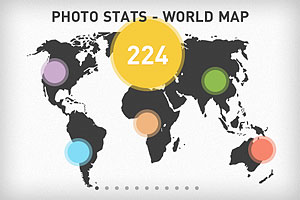
How much do you know about your photo taking practices and how much do you ignore? Can you learn a lesson or two from the hundreds of photos you take? An answer to all these questions is offered by Photo Stats, the infographic creator for iPhone photos, available in the App Store for $0.99/€0.79/£0.69. Photo Stats gathers data from images stored in your device and uses the collected information to generate a summary in the form of clear and minimal eleven-part infographic charts. The charts will tell you everything, from your favorite photo locations to your most productive shooting days.
I have used Photo Stats to have an overview of my personal iPhone photography habits and a handful of relevant aspects appeared in my generated stats.
Four bad habits
Most photos miss metadata – The greatest majority of photos I have stored in my iPhone lack proper metadata. It results I have taken most photos in just a couple of locations. Not that I have been traveling a lot lately, but the list of places where I have taken photos stored in my Camera Roll is definitely longer than that. In some cases I intentionally turn off iPhone’s location services, especially to save battery, but what about the other cases? It’s not a big deal, really, as I know more or less where each photo was taken. Still, it may be a good idea to make sure metadata is intact. At any rate, it’s easier to strip photos of their metadata than adding or restoring it later.
Most photos were taken in the evening – That is, most of my photos were taken between 6PM and 11PM. I know that in theory evening is one of the best times to shoot and that, after all, everybody has a favorite time of the day to take photos. In my case though this result is mostly indication of laziness. It is also indication my lifestyle is a bit “off”. It’s not a surprise, but the reminder is always quite shocking. After all, as they say, it’s the early bird that catches the worm.
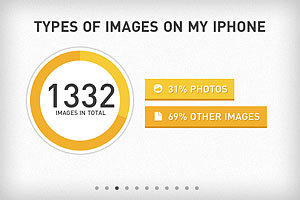
Almost 70% of images are “other” than photos – As I see it, this means that either I keep in my Camera Roll too many work-in-progress copies of my images or that I keep too many extra resources, like textures for instance. More likely, it’s both. Time to sort all these images out and to tidy my Camera Roll up!
A lot of photos were taken using Camera – I can’t even remember using iPhone’s native camera app, at least recently. How did I end up with so many photos taken with it? I don’t know if this should be included in a list of bad habits, but more in general this means that I have a perception of my overall app usage that is not completely accurate.
And one good habit
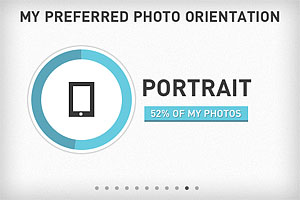
Photos show a good balance of portrait vs landscape orientation – Don’t I choose portrait orientation most of the times? Nope, it seems I am better than I thought at balancing the two. Just a little more than 50% of my photos are portrait-oriented. That’s good!
Conclusion
I am not sure I can brag and post my Photo Stats results everywhere. I am sure though that there are many things that I can do to improve and Photo Stats offered some useful hints by summing up briefly a few of my bad photographing habits — together with a few good habits I can work on further.

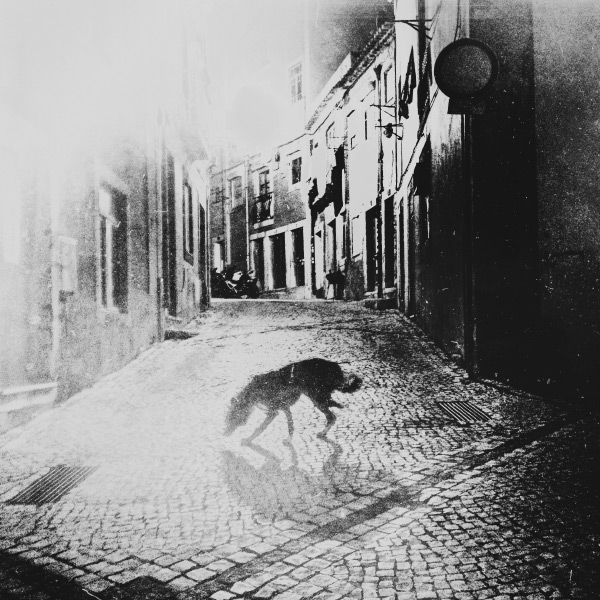





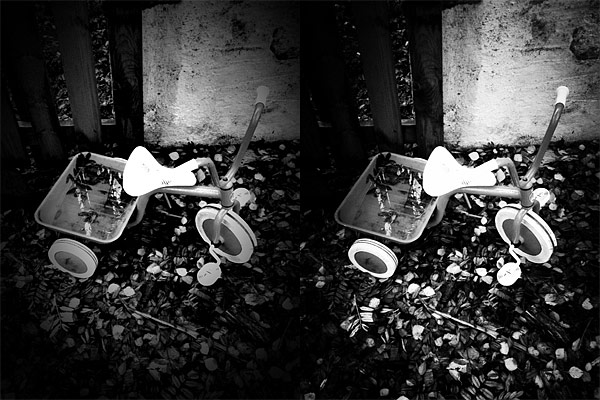


 Photo Stats gathers data from images stored in your device and uses the collected information to generate a summary in the form of clear and minimal eleven-part infographic charts. The charts will tell you everything, from your favorite photo locations to your most productive shooting days.