

Deleting multiple photos from your iPhone does not seem to be exactly straightforward for many users: this is a question we are asked often by iPhone photographers. There are actually at least four methods of deleting multiple photos that are worth mentioning: the first can be done directly from the Camera Roll and is perfect when you need to delete a few dozens of images; the others require your iPhone to be connected to your computer (Windows or Mac).
Method 1: Delete photos from the iPhone Camera Roll
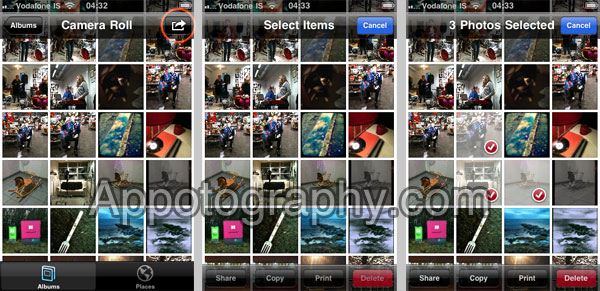
1. Launch your iPhone’s Camera Roll.
2. In the top bar, you should see a curved arrow icon – tap the icon.
3. You can now select as many photos as you want in the Camera Roll.
4. When you have selected all the photos you want to delete, tap the Delete button.
Method 2: Delete photos through Itunes
Sometimes, you have so many photos in your iPhone that even the method above becomes too time-consuming. A simple way to get rid of all the photos is to delete them while your iPhone is connected to iTunes on your PC. When you transfer the photos to your PC, iTunes will ask if you want to keep the photos on your iPhone or if you want to remove them.
1. Connect the iPhone to your computer and launch iTunes
2. Go to Devices, then select your iPhone
3. Click on the Photos tab
4. Uncheck the Synch Photos option and click on Remove Photos
5. Click Apply. WARNING: This will remove all your photos!
Method 3: Windows 7 – Connect your iPhone to your computer, and access the photos directly
Simply put, use your iPhone like an external HDD.
On Windows 7 (should work also on Vista):
1. Connect the iPhone to your computer.
2. Go to My Computer, and you should see the iPhone device icon.
3. Double click on the icon, and you should see your photos directory.
4. You can now delete or do whatever you want with the photos, as if they were on your computer HDD.
Method 4: Using Mac OS X Preview
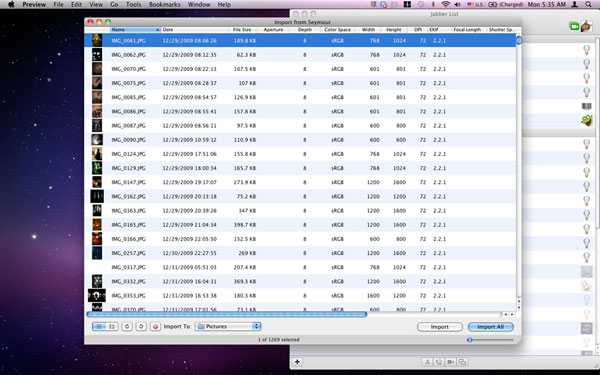
Many Mac users do not know about this, but when you connect your iPhone to your Mac, you can move, delete, and access the photos on your iPhone through Preview. The tool is actually quite powerful, and ignored by some that (reasonably) tend to use only iPhoto to access the photos on their iPhone.
1. Connect the iPhone to your Mac.
2. Open Preview, then click the File menu and select Import From [iPhone Name].
3. An easy to use window will open, where you are free to play with your photos and delete them if you need to.
If you want to delete photos from your iCloud stream, please check our latest article, available here.
If you have other methods to share, please comment!
Also, if this article was helpful, do not forget to follow us on Twitter or on Facebook – it really helps us!


You can also use ImageCapture on the Mac. That’s how I’ve been doing it.
Thanks for your help! easy breezy!
I can’t make it work in Image Capture. What am I missing?
Preview! what a god send you are sir! thanks so much, I never knew you could use that for iphone photo managing! Thanks a million!
Hi,
I didn’t know method #4. My favorite one.
Thanks from France.
Jean-Paul
#4 is sick. Thank you.
yes #4 has pretty much changed my life… fantastic!
Thanks
Yes, this was the best and to me so far unknown method. Thanks so much!
#4 is the best thing ever happen in my life. THANK YOU!!!
#4 is fab. Thank you very much
Jean-Paul, thanks to you for visiting.
Hello,
I used method 3 (I’m using Windows 7), and also tried method 2, and while the iPhone doesn’t have any photos in its photo library, iTunes still says that I have 7 Gb of photos on my phone. Why is this the case? Can anyone help?
Thank you.
hi there, i’m no expert but i think it’s because you’ve still got all your data backed up on your iphone so delete it?
where do you see the photo tab in itunes
Hey Mike,
first, thanks for posting and visiting.
I have seen that happening a few times when using an iPhone with Windows – what I know works in these cases is restarting your iPhone and plugging it to your computer to re-sync it. Annoying, but usually it works. I have also found this Apple Support Discussion which you might find useful, which says the same I am recommending:
https://discussions.apple.com/thread/2720864?start=0&tstart=0
It is an annoying issue, also because a mobile phone is often used while you are away from a computer. I suppose the new iCloud sync feature could be useful in these cases as well.
Hi
I am wanting to delete just a couple of photos from my iphone 4 and have followed #1 instructions only to find I have no delete button at the bottom of my camera roll!!! I have deleted them from my computer, but they remain on my iphone and its starting to frustrate me. As in the illustrations above, I have the option to copy share and print but no delete. Can anybody help me please?
Jess, are you by any chance using a jailbroken iPhone? Many apps for jailbroken iPhones allow disabling the delete button.
If not, which OS and device are you using?
I am having the same problem and I bought my phone from an apple store. Why is the delete option missing completely for photos that are in albums OTHER than camera roll?
When I use method 3, the only photos I can access are those in the “Camera Roll” album, which, for me, is only a tiny portion of my photos. Even then, no “Delete” option shows on my iPhone 4s.
I am more interested in the iPad and not the phone.
Such a convoluted way to delete photos from an App.
How do I upload a whole lot of pictures to Facebook from my iPhone 4S all at one time instead of the tedious one at a time?
You could use (if you have):
1. Top Camera: Import pictures, select them then it will be uploaded to Facebook in Top Camera folder–no custom folder yet it seems. Top Camera is special because it is a really great all-in-one camera/video/photo editor app but with almost no analog effect.
2. PhotoManagerPro: Same as in the case of Top Camera but it has an option to not compress video i.e. using Import instead of Old Import. Folder in Facebook will be named as PhotoManager Photos. PhotoManagerPro is special because it can easily transfer photos to and fro between Mac/PC and iOS.
3. iLoader: A 3rd party just made for uploading photos to Facebook. I think it can create custom folders. There is iLoader 1 and 2 currently in the App Store, better stick to the latest one I guess.
Hello.
I have set up seperate albums within my “photos”. I’ve taken them from my camera roll and copied them into different albums so they are easier to find. Now I want to delete them from the camera roll only but, when I try to do this I am only given the option of deleting them from everywhere and not JUST the camera roll.
Does anyone know how I can do this?
Thank you in advance for your assistance.
Sorry I couldn’t help because I never bothered with albums. Maybe you could use 3rd party apps like PhotoManagerPro to avoid redundant copies in albums.
do you know the answer to this yet? thanks!
Does deleting the photo move it to an area where it can be overwritten (rather than completely remove it?)
There are programs that can retrieve deleted photographs.
Is there any way to remove them completely (by wiping the overwrite area, or something?)
Hm, never thought of that. That sounds more like a Windows thing. iOS is a limited OS, unless you jailbreak. But iOS (and Mac) is also very secure.
Is it possible to delete a picture from the camera roll but keep it in a separate album on the iPod/iPhone?
I don’t think so. If you want to make albums without having redundant photos, I’d suggest use 3rd party album app like PhotoManagerPro.
I have this problem and it’s very irritating me, due i need more space in my iphone for other important things then certain images. what i. did was i put the images onto the phone by syncing them through itunes, but somehow i dont have access to remove photos with method 3. i can only see the images captared by the phone camera. What else can i do?
wow,this hole idea of having to get a third party app to be able to keep your photos separrate an in order is really bad,i was really trying to figure out how come i couldn’t have a different albome and delete the pics from the camera roll,thanks guys for your answer!
Hey! This site is extremely helpful, I am just encountering one silly little problem. I want to delete a photo from only one album on my phone. For instance, I have taken pictures, they have been saved on camera roll and then I selected them and created a new album for just them. Now, I want the photos to be saved in only one album, which is to say, I want them deleted from camera roll whilst being saved in there new file. The only options it gives me are ‘delete from everywhere’ and ‘cancel’.
Any thoughts!?
thanks:
Damn. Sorry, Will read more first next time.
Thanks
I have downloaded pics from my pc via iTunes I have then exported them to individual folders in photo pro but they are still on view in my orginal photo app and I can’t delete them, so buying pro app waste of time as I got to replug my iPhone into iTunes to delete them. totally totally stupid come on apple get a grip I’m so going back to Sony , way more up there and they have apps to use iTunes ……
Hmm, if I understand this correctly, you synced your photos between your PC and your iPhone using iTunes, right? If that so, it’s true that you cannot simply delete the photos in your iPhone. It’s SYNCED, not TRANSFERRED. That’s why it is suggested to use 3rd party apps and not sync at all. Syncing isn’t fun.
I was screwed with the large number of unnecessary pics in my iphone but method 2 worked very well and now i am glad to have only camera roll.
Thank you very much..
See if I took pictures and put them in another album how do I delete them in camera roll but not in the new album ?
That’s impossible. It is suggested to use 3rd party apps for albums and abstain from using iTunes synchronized album. Photo Manager Pro is a good one.
Very simple to do. Thank you so much. Am just getting familiar with my new iphone.
I have the same problem with photos that i did not delete while i was importing. Now I want to delete them. I use an iPhone 3.
Before anybody goes to help, please note that there is NO delete button present because i did not delete on import. Is there a 3rd party App that will do this.
You would think that the iPhone was a cheap phone because it doesn’t come with a simple option to delete even after you decided not to use the delete after import option.
I don’t have a Mac and I don’t want to pay more money to get one and boost Apple’s profit line.
This Sync process to delete is like something from the dark ages. Apple wake up and smell the coffee. Include a simple delete option that remains even after photos are copied across.
Mac is not needed. Hmm, my guess is to remove photos completely using iTunes sync. Then use a 3rd party app to create your album.
The problem is that these methods don’t work for images that you have imported. Any suggestions?
Hi, how do I delete photos from my camera roll with out deleting them from my other albums?
How do I delete photos, not from the Camera app, but from the photo app. You know the app that has an icon with the picture of a sunflower on it?
i haven’t ever figured that one out.
I have two albums on my iphone, the camera roll and another that is simply called photo library and it is a picture of a sunflower like the photo app. When I go to the photo library album there is no option to delete from the phone and when I go to the internal storage for my phone on the laptop this album doesn’t even show up!
How do I delete this album??
HELP PLEASE
Hi Kaitlyn, it might be a lil late, but, I just solved this same problem here, I use windows 7 though, can’t really help with mac. So this is how I did it: create an empty folder, let it empty, remember the name and the location of this folder, plug in iPhone to iTunes, wait till your iPhone show up, click it, go to “photos” , check “sync photos from”, click the arrow and look for the folder you’ve created, click “sync”. Please let me know if this is also work for you. Good luck.
I’ve tried and tried to delete only the pictures on the camera roll. I have saved the pictures I want in an album but everytime I try to delete them from the roll, it states it will also delete them from the album. Why is this?
Preview technique is great! Thanks
I have an iPhone 4s. I have figured out how to delete pics in camera roll. Problem is I still have over 1500 other pics not in the camera roll. Not only is there no delete button (garbage can), but for some reason, there are 3 of every picture. Also, they are not on my computer anywhere and I don’t know how to delete them. Please help me import them to my computer and delete them. Thanks.
thanks, this helped me out alot!
It’t not the camera roll pictures I’m trying to delete off my phone. I’m trying to get the Photo Library and the Albums off my phone. I cannot find how to get them off. I can move them around I just can’t delete them, I can’t even put them on my computer library. I guess I’m just stuck with them.
AAaaaarrrrrrgggggg!!!!!
i am having the same issue… did you happen to figure out how to delete?
I am going to restore my phone which will wipe out all photos and then sync but only with specific albums.
Do you think that will work??
#4 rocks! Thank you Google and thank you You!
Ok. #4 sounds like what I’ve been looking for to weed out my iphone library. But start groaning. How do I open “Preview????” Where is it???
Disclaimer, have only had phone 4 days…
Hello! Preview is into your Mac Applications folder – not into your iPhone.
Hello – when I open my applications folder on the Mac – nothing happens! I’m trying to delete photos using option 4 – but I’m having a tough time getting in to the Preview mode. Can you help? I see it in applications – i click on it and and right click and click open – nothing happens.
David
My iphone 3 has 3 folders in my photos – albums. They are Camera Roll, Photo Library, and Last 12 Months. My iphone was previously synced to my old Mac (which died). I have imported all photos from the Camera Roll on my phone in to iPhoto on my new Mac. I cannot see how to import the photos from the Photo Library that I want to keep, and i’m unable to delete photos from the Photo Library that I don’t want. Any ideas? I have tried method #4, this only imports photos from the Camera Roll. The photos i want to delete are in the Photo Library and Last 12 Months folders but not in the Camera Roll.
I think your best bet is to use an iPhone explorer software like iExplorer. You install it, plug your iPhone, and then you are able to access all directories. Be careful in not messing around, just look for the photos and do not delete any other file.
http://www.macroplant.com/iexplorer/
If somebody else has a better idea not requiring a 3rd party tool…
Yeah! Thanks this worked great and now my iPhone can update ALL apps and my photos are stored safely on my Mac and iCloud!
Many thanks, this is a powerful tool~
Peg
I am trying Method Two, but there is not a “Remove Photos” Option! I followed the method precisely, but again, No “Remove Photos” Option…am I doing something wrong?
June 2012. I have an iPhone 4 and I want to wipe all of the photos from my iPhone, albums, etc. I want to start fresh with zero photos. Why is it impossible to simply select all and just be rid of them. I tried in iTunes (Windows XP), Windows explorer, nothing works.
iTunes copies the photos from my iPhone whenever I sync…..where the hell are they copied to? I’m beginning to understand why so many folks jail break these annoying pieces of crap.
Mark, I use my iPhone 4 on Mac, not Windows, so iTunes might not work exactly the same way on your computer. Here’s how I avoid syncing photos when I connect iTunes and my iPhone. First I select the iPhone device in the left pane of iTunes, then I click the Photos tab in the main pane. I make sure that the “Sync photos from” box is NOT checked. (The drop down menu to the right of that box should indicate where the synced photos to.)
I hope it works the same way on iTunes for Windows. Good luck.
Thanks Ed, I finally figured it out. I will now attempt to transfer some photos back to the iPhone from my PC (just to be sure I got it right). What an adventure. It would have been easier if I just went out and found myself a 15 year old.
Yes Erin I do. Thanks.
Excellent, thanks guys. The Preview method worked perfectly.
thnx! #4 worked for me perfectly.. i needed to delete most of pictures taken last couple of years.. 🙂
when you opened “preview” did you Import first then delete? i have previously imported into iphoto….
do you just open the preview then directly highlight and delete using the red circle with a slash in it?
thank you…
Too good to be true 🙁
Tried to add an import of 4s photos into iPhoto/iMac and said files unrecognizable. Bizarre as they appeared to be regular files to me. Psyched to use your Preview method. Worked until I tried to import via Preview and it came up with this error code: com.apple.ImageCaptureCore error -9912. Been searching for way too long now to find answer. Can’t find the error code anywhere. Any ideas? Was also hoping to manage the 4s photos, ie: delete via Preview too.
Grrrr..
I figured it out. (See last post.)
I had tried to import using Preview. Everything is currently importing smoothly directly through ImageCapture.
Hope this helps someone.
By the way, using Preview &/or Image Capture instead of relying on iPhoto is great info. Thank you Harry.
Debbie, thanks to you for posting here (sorry for not answering sooner) and thanks for taking the time to post the solution!
Harry please help me too! see my above question re: trying to delete the 5,000 plus photos on my iphone 5 that are hogging my memory!
re: preview…once i chose import from drop down do i then directly go on to delete or do i use the import at the bottom of the screen? I’ve hopefully imported them once already thru iphoto.
If method #3 worked I wouldn’t be here.
Works fine for me! Maybe you have some USB port problem?
I don’t think so, but it appears that it I have to connect it to the computer I originally registered the phone on. Even on that one, I don’t seem to be able to delete the folders though?
Preview has worked for me before, but it is not working today. Did Apple make some changes in the latest release?
Never mind. I have to use the delete button near the lower left corner of the window. The Delete key does not work, but that button does.
Method #4. PERFECT! Thank you for posting this guide!!!
Ricky
WoW! Thanks for Method #4! I took it a step further: I created a new folder, moved all the photos there (since I wanted to find my Iphone photos easily to be able to post, print, etc.) and then deleted them by selecting all and using the delete button provided in Preview! Now I can take MORE photos…just what I need At least now I know how to MANAGE them!! Thanks again!
Thank you. Method 4 was extremely helpful. I didn’t know this function existed on the Mac OS!
Method 5 – open iPhoto with the iphone connected. you can download all photos to iPhoto and it gives you the option to delete from iPhone after download. If all photos already been downloaded you get an option to delete all photos from the iphone. Then, in iTunes you can add the photos that you want to keep back when you sync.
where is the preview button for the mac users trying to access their photos. help me please!!!!
Preview is an application. You should find it in the Applications folder; it may also be in the dock (usually found at the bottom of the screen).
This system works for Camera Roll but the Mac wont download any thing that has been make into a folder, it just refuses to accept that they exist. What now?
Hello. I found that one can also delete individual photos in an Album directly on the iphone using the iphoto app for iphone. Seems to work well and does not require that phone get plugged into computer.
THE EASIEST/QUICKEST WAY TO DO THIS.
I’ve tried Preview, and Image Capture, but I dont want all the unnecessary pictures on my computer. If you have updated your phone recently..
1. Go to camera roll
2. click the arrow in the box at the bottom by the shutter button
3. select the pictures you want to delete.
4. hit delete
I deleted about 600 photos this way without even plugging my phone in. It took about 3 minutes.
Not sure why this was so hard for me to figure out! I had been looking for a way to do this on my computer. Thanks for keeping it simple!
Re Method #4, how do I access Preview so I can delete? My phone has a double for every photo and I want to delete one of them for hundreds of photos?
If you are using a Mac, Preview is an application in your Applications folder. It may also be in the Dock, which is usually at the bottom of your screen. You may have to move your cursor to the bottom of the screen to get the Dock to pop up. (It is also possible that the dock could have been moved to the left or right edge of the screen.)
If you are using Windows, you’ll have to try one of the other methods listed above.
I still cant find that preview thing you said. I have Mac how do I search to open preview I have looked everywhere.
As I said above, Preview is an application in your Applications folder. Do you know how to look in your Applications folder? Is is possible that someone deleted Preview from that folder without realizing its usefulness?
It should also be in the Dock, which is usually at the bottom of your screen. You may have to move your cursor to the bottom of the screen to get the Dock to pop up. (It is also possible that the dock could have been moved to the left or right edge of the screen.)
It is worth the effort to find the “Finder” Application…it worked so well. If you don’t see it in your dock or the applications folder do a search…but FYI: on my computer the icon is always on the bottom left of my desktop (may be different for everyone) and it looks like a SQUARE smiley face with dark blue on one 1/2 of the face and light blue on the other half.
Perfect… Thanks. I did it in two minutes…!
Very easy…
Thank you very much. Its easy when ya know how to do it.
Method 3 worked for me with no problem, thank you sooooo much. You have no idea how many things I tried.
I had pics stuck in my ” photos library” file so what i did was create an empty file on my mac desktop and synced that file….and voila everything gone, mind u I had already saved everything but some did not delete for some reason….
Worked the same way with windows 7 too, so I guess this is the only solution for this kind of issue.
please clarify for me, when in Preview and i see the photos theres a box that says IMPORT, if i’ve already imported into iphoto i don’t need to import again… do i ignore that button and just highlight what i want deleted?
No. Importing into Preview is different from importing into iPhoto. Pressing the Import button in Preview allows Preview to act on the photos, including deleting them.
Hope this helps.
so i first open Preview, then choose “Import from iphone”, but then they all appear to be in preview but at the bottom it shows “import selected” or “import all”. Do i need to do one of those in order to delete photos or do i go directly to highlighting the ones to delete…im not explaining this very well. thanks for trying to help me.
After you choose Import from iPhone, you do not need to (and should not) select either “Import selected” or “Import all”. Instead, select the photos you want to delete and click the delete icon in the lower lefthand part of the window. That’s the icon that consists of a red ring with a red slash through it from upper right to lower left. (Using the keyboard’s Delete key did not work for me.)
This worked for me in Prevew 6.0.1. I hope it works as well for you.
Ed K.
Thank you very much for replying and you answered my question perfectly. I’m just learning how to do all of this so I really needed an answer that spelled it out in detail. This is a godsend to me as i’m out of storage space on my phone because i’ve never deleted a photo! Many thanks. dana.
All of my photos from my computer synced on to my phone. I want to keep the photos that are in camera roll not from other albums that got synced onto my phone. When I open my computer i have my phone listed click on that and it’s just the photos from camera roll but i don’t want to delete those im trying to get rid of all the other garbage i don’t need on there. Help me delete all the photos that are in other albums.
I used to use method 1 on my iphone 4 (ios6) and it was fine. However now it says “This photo is used in an album. Do you want to delete it everywhere?” and only gives me the option of “delete everywhere”. This then deletes the photos from my iphoto as well!!!! How do I just delete photos from my phone (to free space!) once I have transferred them to iphoto without losing them there?
Thanks!
#4 is so simple, but I never would have found it on my own. Thank you!!!!!!
Comments on this entry are closed.