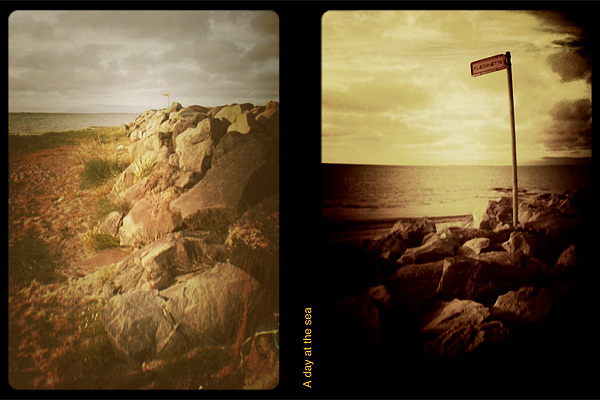
Half-frame cameras, also known as split-frame or single frame, are cameras using an 18x24mm format on regular 35mm film. Exposure orientation on these devices is vertical, whereas it is horizontal on average 35mm cameras. Half-frame cameras allow taking twice the number of exposures that would normally fit onto a roll of film. Each exposure taken with split-frame devices occupies on film half the space than that of devices using the standard format.
The technology used by split-frame cameras was originally developed for being used in movies, thus the definition half-frame — as opposed to standard — is only applied to still cameras.
Not only thanks to the fact they allowed taking double the amount of pictures than standard devices using the same film, but also thanks to their compact and stylish design, half-frame cameras enjoyed a great popularity, especially during the 60’s. While not as popular as before, they’re far from being extinct. Half-frame cameras are still in production up to this day.
HalfCamera brings to the iPhone the fun of authentic split-frame cameras.
Main Features
- Up to 1208 x 800 pixels (3GS);
- 12 effects;
- 12 border styles;
- Viewfinder grid on/off;
- Flash on/off (on supported devices only);
- Switch between rear and front camera (on supported devices only);
- Share on Twitter and Facebook.
Appotography Opinion
With HalfCamera by B1VISUALEFFECTS, it’s possible to create diptychs, applying effects, frames and text. It’s possible to both import photos from your device and use the built-in camera.
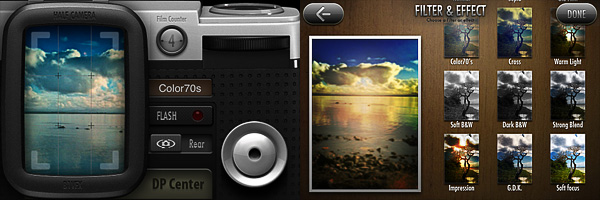
You take each shot separately, choosing a filter among twelve available. The effects, definitely not overdone, cover a variety of styles, from classic black and white to cross process. Shots are stored in the app’s DP Center in batches of twelve, simulating film, which means you can take up to twelve shots in succession before HalfCamera switches to the next batch. Single photos are also saved to your Camera Roll.
At any moment, you can retake any of the shots in a batch. On the other hand, if you choose to apply a filter when taking the photo, you cannot change it later from the DP Center: by choosing a new filter from the Filters & Effects screen, you will have your photo filtered twice and this may not be intuitive at all at first. You can choose any consecutive couple of pictures in the film batch for your diptych creation.
After you pick your two photos, by tapping on the Printing button, you’re introduced to the text editor, which you can use to input text of your choice to the inner border of your diptych. After that, all you have to do is picking a frame among the twelve available — ranging from classic film to grungy borders — and save.
If you decide to load the photos from your device, the process is more or less the same. You load your photo, adjust it to the frame by pinching and zooming, choose a filter, add text if you wish, choose a border and then save or share your image.
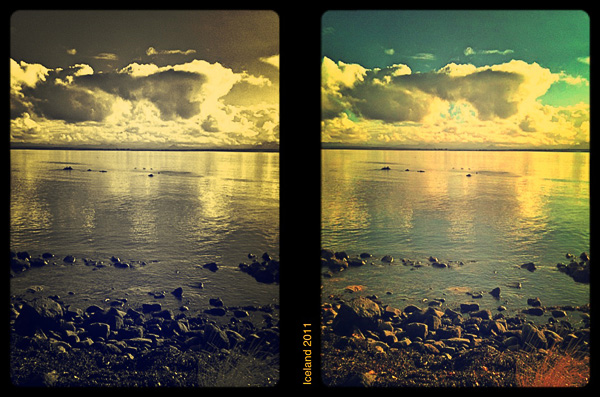
The UI of HalfCamera is very polished and appealing, although understanding how the whole process leading to the final picture works in the very beginning may be perceived as very chaotic. Also, getting used to the notion of working with bundles of shots and in couples may be confusing at first. However, final images are very pretty and this probably is the strongest point of this app: it invites the user to make the most out of it. The idea behind HalfCamera retains some of the unique charm of actual split-frame devices, lending itself to a series of creative uses that is up to the photographer to discover.
Overall
Name: HalfCamera
Developer: B1VISUALEFFECTS
Compatibility: iPhone, iPod Touch, iPad. iOS 4.0 or later.
Price: £0.59||$0.99||€0.79
Vote: 4/5


 HalfCamera 1.3 is now available in the App Store. The latest release of iPhone’s split-frame camera by B1VISUALEFFECTS adds three new filters to HalfCamera’s collection, which now counts 15 effects in all. The newly added filters are Hottest, Bright and Vintage. Hottest is a vivid filter with strong yellow/orange toning; Bright mainly raises overall brightness of images; Vintage has a faded and opaque look, subtler than that of 70’s and Old Film, which were already included in version 1.0. Three additional frames also come with version 1.3.
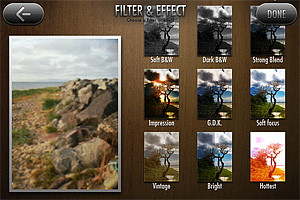 To suggest different moods, try the new filters in combination with any of the other effects: in HalfCamera you can filter photos over and over.