FX Photo Studio For Mac Review

FX Photo Studio is a simple and hassle-free app for photo editing on your Mac. It comes packed with effects and other features to adjust photos you have taken, either with your iPhone/iPod Touch/iPad or with your favorite camera.

Main Features

  • Supports image resolution up to 16 mega-pixels;
  • Supports  different image formats, including JPEG, PNG, BMP, TIFF;
  • 150+ effects;
  • Save custom presets;
  • Adjust exposure, brightness and contrast;
  • Adjust hue and saturation;
  • Undo/redo;
  • Crop and rotate;
  • Send via email or share on Facebook, Twitter, Flickr, Tumblr.

Appotography Opinion

If you are familiar with FX Photo Studio for iPhone or iPad, you know what to expect. MacPhun’s photography apps are among the smoothest, slickest, smartest you will ever find in the App Store. FX Photo Studio for Mac is no exception. It only takes a few minutes and clicks from loading the photo to saving or sharing it. FX Photo Studio will help even total newbies to achieve neat results.
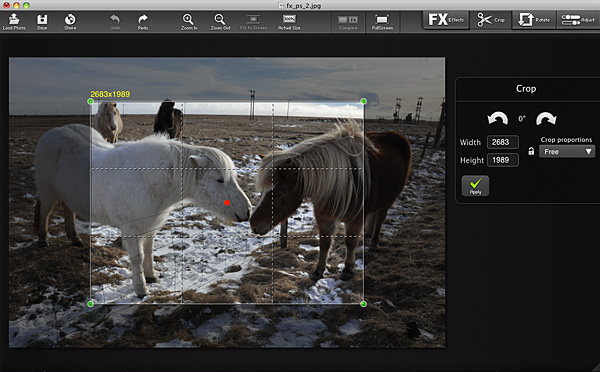
FX Photo Studio by MacPhun for MacFirst, you drag and drop or load a photo into the work area. You can start by adjusting a few settings, like exposure, saturation, brightness, contrast. If you need, you can rotate the image to straighten it using the right tool. You can also crop, freely or choosing one of the standard ratios (1:1, 4:3, 16:9, etc.).
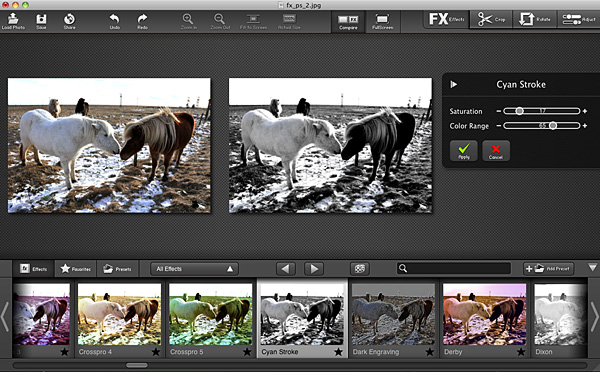
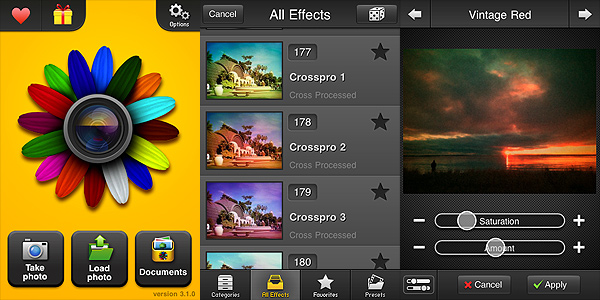
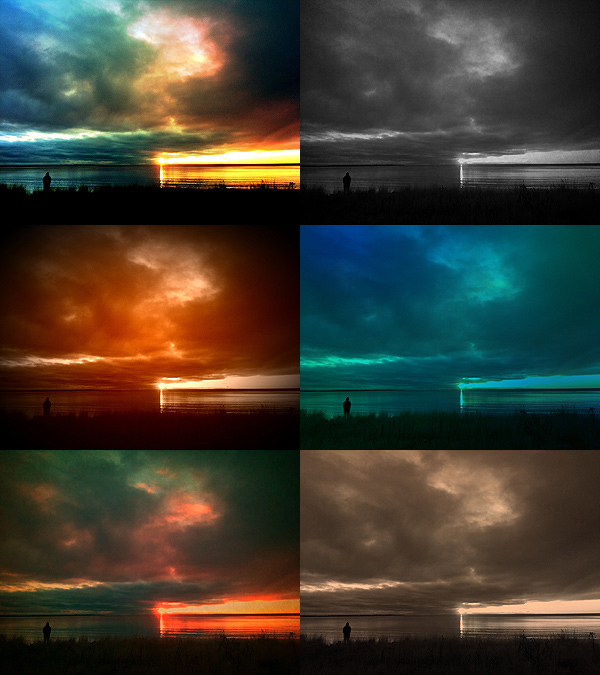
FX Photo Studio by MacPhun for MacYou can apply one of the over 150 ready-to-use filters to your photos. Effects are arranged into thematic categories, like Vintage, Vignette, Blur, Fantasy, and many others. Each category comes with a fair selection of possibilities, in order to satisfy any user, from the beginner with no experience or ideas about editing to the regular post-processing aficionado looking for a quick and well-balanced solution. Each effect can be adjusted with sliders to suit your taste and/or the feel of your photo. By combining the various effects together (you can apply more filters, one after the other), you can obtain personalized styles, which you can also save as presets for applying them over and over.

FX Photo Studio by MacPhun for MacWhen you are done with the processing, you can save your photo, mail it or share it on your favorite social networking site.

FX Photo Studio for Mac is a very focused photo editing application, whose aim is to help anybody to improve the look of their photos with the minimum effort. In comparison, FX Photo Studio is much easier to use than average photo editing software, especially for users with no previous experience: features are basic, but well conceived, the interface is so clean and clutter-free, processing and saving times are extremely fast.

MacPhun’s app is currently on sale! You can get it now for $9.99 (€7.99/£5.99) in the App Store.

The developer of FX Photo Studio kindly provided a promo code for reviewing purposes.

Overall

Name: FX Photo Studio
Developer: MacPhunn LLC.
Compatibility: Mac OS X 10.6 or later.
Price: £5.99||$9.99||€7.99
Vote: 5/5


FX Photo Studio - MacPhun LLC

Silent Film Director Free For 1 Day!

To celebrate the birthday of Marilyn Monroe, one of the most beloved and widely recognized icons in the history of cinema, MacPhun has a very special present for iPhone users:

Silent Film Director will be totally free for one day in the App Store! If you haven’t tried the vintage video making app yet (you can read our review of Silent Film Director by clicking here), this is an occasion not to be missed!

Silent Film Director Free!

You will be able to get Silent Film Director for free only tomorrow, June 1, 2011!

Silent Film Director - MacPhun LLC

FX Photo Studio On Sale!

FX Photo Studio, both the iPhone and iPod Touch and the HD version for iPad, is now on sale: get one of the most popular editing tools available in the App Store at a special price!
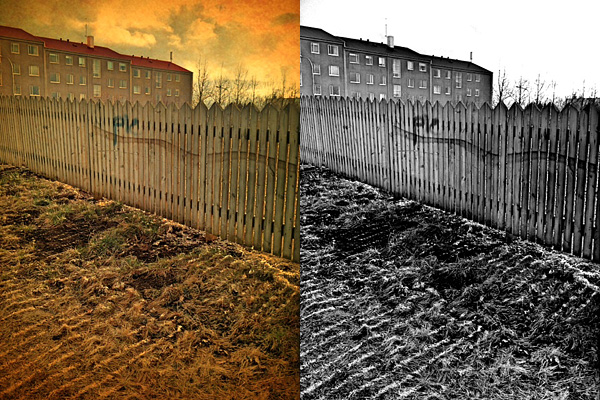
With FX Photo Studio you get: a rich collection of filters; easy-to-use photo editing tools; full built-in support for sharing your photos on Twitter, Flickr, Facebook and Tumblr.

50% off iPhone/iPod Touch version – £0.59||$0.99||€0.79

30% off iPad version – £1.19||$1.99||€1.59

The offer will be valid throughout the weekend, so check it out!

Silent Film Director Review

Once upon a time, MacPhun released a video editing app called Vintage Video Maker, a nice but perhaps a little overlooked video utility to turn videos into old looking footage. This story has an happy ending: Vintage Video Maker was recently upgraded and its name was changed to Silent Film Director. With enhanced features, a newly designed UI and more stability than its predecessor, Silent Film Director is what you need for giving your plain videos a beautiful vintage flavor.

Main Features

  • Up to HD video resolution;
  • Six vintage film styles;
  • Add custom soundtrack;
  • Accelerate or slow down footage;
  • Crop video clips;
  • Add title cards and transitions;
  • Share via email, Facebook, YouTube.

Appotography Opinion

As I said, Silent Film Director allows users  to process their videos in a delightful retro style. MacPhun’s app is more than that though: it also allows basic video editing, which includes cropping, adding transitions, title cards, and custom soundtracks.

Silent Film Director is available in two versions: one called Standard, that is basically what you get with your initial purchase, and the Pro one, which requires an additional in-app purchase (£0.59||$0.99||€0.79).

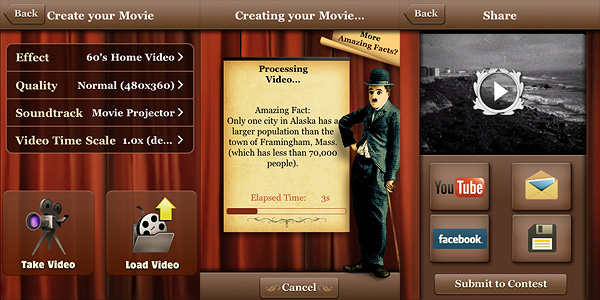
The Standard version mainly allows video post-processing. You can record the video from within the app or load it from the camera roll. You can also import external videos to your device through iTunes and ftp connection.

Silent Film Director App for iPhone by Macphun

Six different styles are available for giving your videos a believable vintage look. Choices range from the dusty and scratchy black and white of 20’s films to the washed-out and overly saturated lo-fi style of 70’s home movies. All the effects are very well-done. Other than applying filters, you can choose a soundtrack from the app’s limited selection, from your iPod or from your computer  — and of course, you can choose to keep the original audio of your video. As a bonus, you can also alter the video’s speed, decreasing or increasing it.

Rendering times are very fast compared to other apps, even on older devices — thumbs up to developers for the amazing improvement from the older Vintage Video Maker app. After you generate your processed video, you can either save it, mail it or share it on Facebook and Youtube.

The Pro version lets the user create more complex projects than Standard mode. It’s in fact possible to add more video clips to a single project and to enrich it with photos, transitions, and titles; by dragging and dropping each element independently and by cropping segments of footage, you have a portable editing studio at your fingertips. When your project is complete, you can proceed to the post-processing stage and then you finally save.

For the quality of the effects, for the features included, for the clear and stylish interface and for the overall experience, Silent Film Director deserves a full score. If you’re into all things vintage, this is one of the apps you must have in your collection.

Overall

Name: Silent Film Director
Developer: MacPhun
Compatibility: iPhone, iPod Touch, iPad. iOS 4.2 or later.
Price: £0.59||$0.99||€0.79
Vote: 5/5

Silent Film Director - MacPhun LLC

FX Photo Studio 3.2

Fx Photo Studio by MacPhun, one of the most popular apps for iPhone photography, is now version 3.2. Together with general performance improvements, with this release you will get also some new extra features.

Here is what’s new in detail:

  • Full compatibility with iOS 4.3;
  • Category Sketches with 6 new filters added;
  • Enhanced effects tuning;
  • Various crashes and bugs fixed;
  • Overall functionality improved.

The new FX Photo Studio filters category, as the names clearly suggests, contains six filters that will turn your photos into hand-drawn-like images. The selection covers a variety of styles, from pencil to pen to charcoal. This, I am sure, is definitely something fans of MacPhun’s app will greatly appreciate.

Check this update out, if you haven’t done so already!

FX Photo Studio - MacPhun LLC

FX Photo Studio Review

Basic features like crop and rotate should at this point be included in most apps, with the only exception of those that strictly try to imitate instant cameras and their mechanics. Unfortunately even cropping and rotating aren’t all that common, so sometimes you end using three different apps instead of one just to make your picture look alright. Which is OK if you’re an iPhone geek or if you have a lot of time to devote to your mobile photography, but it’s definitely not convenient if you just want to make your photos look nicer.

FX Photo Studio is comprehensive and at the same time simple enough to make both the casual iPhone camera user and the geeky type happy. MacPhun’s FX Photo Studio is one of those apps whose aim is to offer the user a wide variety of photo editing possibilities within a single product.

Main Features

  • Full resolution available;
  • 180+ effects, including borders (more available with in-app purchase);
  • Crop and rotate;
  • Gamma correction;
  • Shake to randomize effects;
  • Create and save custom presets;
  • Hide/unhide effects;
  • Undo/redo;
  • In-app hints and trivia;
  • Share via email, Facebook, Flickr, Twitter and Tumblr.

Appotography Opinion

With FX Photo Studio, MacPhun offers a well-conceived and user-friendly multi-purpose utility, with special focus on photographic post-processing effects. The interface of FX Photo Studio is one of the simplest and yet most functional you will be able to find. Despite the assortment of tools and effects, the simplicity of use of this app is impressive. Everything is optimized to allow even the newbie to obtain good results with the minimum effort.

FX Photo Studio by MacPhun for iPhone

To use this FX Photo Studio, you can take a photo within the app or use pictures previously taken. You can adjust basic parameters, like gamma luminosity; you can straighten your photo by rotating and cropping; you can add single or multiple effects. Effects are divided into categories, ranging from vintage to pop, from overlays to borders, etc., and each of them is adjustable to suit your needs. More filters beside those you get with the initial purchase are available in-app (you can get each effect pack separately for $0.99 — €0.79 or £0.59). You can filter your photo over and over and create custom presets which you can save for future use. To make things even simpler while browsing through the effects collection, you can add effects you use more frequently to your favorites and hide those you don’t use at all. FX Photo Studio, unlike other photographic suites as Tiffen’s Photo FX, also has a great choice of sharing options, including email and most popular social networks, to make use of your photos outside your Apple device.

You can have a better idea of how FX Photo Studio affects your photography by looking at these pictures. The same image was edited each time with a different filter:

FX Photo Studio by MacPhun for iPhone

Being not a fan of corny effects in the photo booth style, my complaint about FX Photo studio concerns the inclusion of some effects in the app. Flowery frames or fake water ripples, decorations in the unbearable 80’s style, bubbles and stars, embossing and superimposed ghostly faces cheapen photos rather than embellishing them, at least according to my taste. This is why I have used FX Photo Studio a lot less frequently than other apps in the same league — again, like Photo FX or Camera+. But if you’re into these things, you’ll probably be puzzled reading my criticism. To this I can only reply: to each his own photography!

Enjoy the app!

Overall

Name: FX Photo Studio
Developer: MacPhun
Compatibility: iPhone, iPod Touch. iOS 3.1 or later.
Price: £1.19||$1.99||€1.59
Vote: 4/5

FX Photo Studio - MacPhun LLC