iDarkroom: Déjà Vu

Some developers, conveniently for them, take an easier path than their colleagues: instead of trying to create something that is completely original or new, they simply take this and that from other apps and reshuffle it a bit to make it seem they are releasing something more valuable than it probably is. Since many users  like to try several different options at the same time and other people usually follow the general trend, this approach can sometimes prove very successful, as in the case of iDarkroom, which right now appears to be selling quite well in many App Stores worldwide.

Main Features

  • Full resolution available;
  • 20 color filters;
  • 11 paper textures;
  • 13 light leaks/bokeh;
  • 4 noise effects;
  • 7 borders;
  • Share with email, Twitter, Facebook.

Appotography Opinion

At first glance, iDarkroom contains enough filters and effects to please almost any average user; it is also very easy to use. By choosing among its assortment of effects, that range from colored filters to vignetting and borders, iDarkroom lets you process your photos with minimum effort. The app works both with built-in camera and with camera roll, and you can share via email, Facebook and Twitter. In case you’re short of ideas, you have the random effect generator that will pick effects for you and return different combinations.
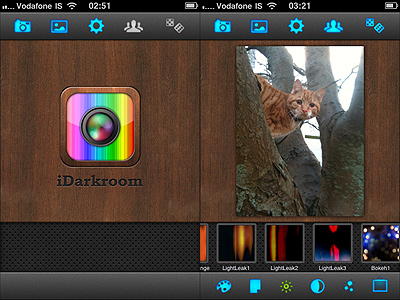
iDarkroom by Maple Studio
Déjà vu?

Comparing Maple Studio’s app to FX Photo Studio or to Picture Show, which are more or less capable of offering the same, it seems evident iDarkroom simply is not on their same level. Especially when compared to Picture Show, iDarkroom bears an uncanny resemblance in the way it works and in the choice of effects.
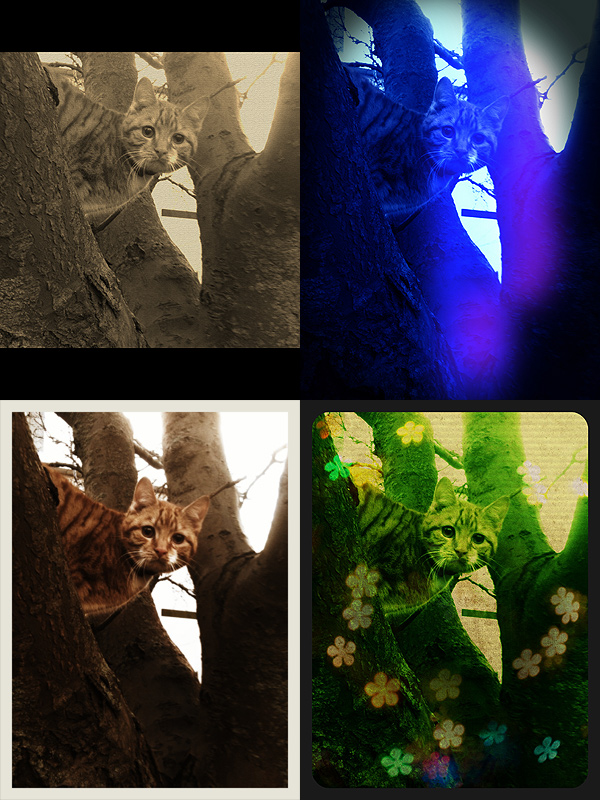
iDarkroom by Maple Studio
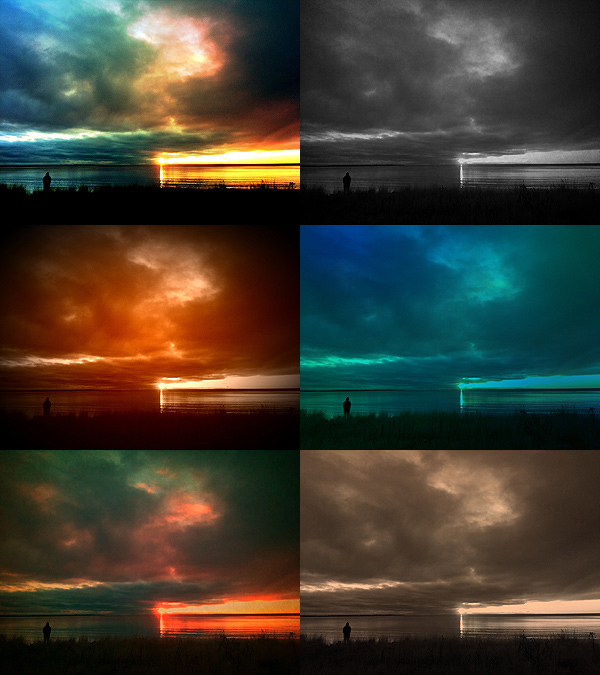
Some randomly generated effects with iDarkroom.

The color filters look remarkable, but other effects, like the textures, the light leaks, the noise or the vignetting, are not always as good-looking. The only department where perhaps iDarkroom does better than Picture Show is the simpler UI, probably mostly because it has less features than its direct rival — but mind, in ease of use it cannot beat FX Photo Studio. In any case, both Picture Show and FX Photo Studio have so much more to offer in terms of quality and quantity. In iDarkroom  you have much less possibility to customize, to adjust filters, to play with each parameter’s values. iDarkroom tries to give you what both FX Photo Studio and Picture Show give you — it even has a randomizer button like Picture Show’s — but processed photos are just not as convincing to me as those I processed with the other two apps I mentioned. To me there is not much more I can do with iDarkroom after I apply the color filters. For example, the bokeh and the textures look so-so and, also considering the flexibility you are given, their number after a few uses feels kind of limited. Definitely, the less effects are involved, the better the results you can obtain with iDarkroom. Again, maybe I’m too picky and what you will see will  appeal to you, but to me iDarkroom by Maple Studio looks like a watered-down and less versatile version of other renown iPhone/iPad photography tools. This doesn’t mean the app is bad; it simply means that there are some better choices available.

All things considered, my suggestion would be: if you want the same features and functionalities and you value your photos enough, get FX Photo Studio or Picture Show.

Overall

Name: iDarkroom
Developer: Maple Studio
Compatibility: iPhone, iPod Touch, iPad. iOS 3.0 or later.
Price: £0.59||$0.99||€0.79
Vote: 3/5

iDarkroom - Maple Studio

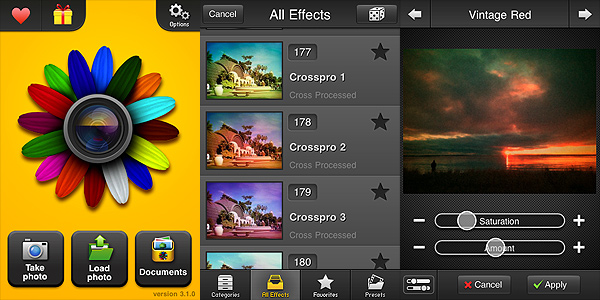
FX Photo Studio Review

Basic features like crop and rotate should at this point be included in most apps, with the only exception of those that strictly try to imitate instant cameras and their mechanics. Unfortunately even cropping and rotating aren’t all that common, so sometimes you end using three different apps instead of one just to make your picture look alright. Which is OK if you’re an iPhone geek or if you have a lot of time to devote to your mobile photography, but it’s definitely not convenient if you just want to make your photos look nicer.

FX Photo Studio is comprehensive and at the same time simple enough to make both the casual iPhone camera user and the geeky type happy. MacPhun’s FX Photo Studio is one of those apps whose aim is to offer the user a wide variety of photo editing possibilities within a single product.

Main Features

  • Full resolution available;
  • 180+ effects, including borders (more available with in-app purchase);
  • Crop and rotate;
  • Gamma correction;
  • Shake to randomize effects;
  • Create and save custom presets;
  • Hide/unhide effects;
  • Undo/redo;
  • In-app hints and trivia;
  • Share via email, Facebook, Flickr, Twitter and Tumblr.

Appotography Opinion

With FX Photo Studio, MacPhun offers a well-conceived and user-friendly multi-purpose utility, with special focus on photographic post-processing effects. The interface of FX Photo Studio is one of the simplest and yet most functional you will be able to find. Despite the assortment of tools and effects, the simplicity of use of this app is impressive. Everything is optimized to allow even the newbie to obtain good results with the minimum effort.

FX Photo Studio by MacPhun for iPhone

To use this FX Photo Studio, you can take a photo within the app or use pictures previously taken. You can adjust basic parameters, like gamma luminosity; you can straighten your photo by rotating and cropping; you can add single or multiple effects. Effects are divided into categories, ranging from vintage to pop, from overlays to borders, etc., and each of them is adjustable to suit your needs. More filters beside those you get with the initial purchase are available in-app (you can get each effect pack separately for $0.99 — €0.79 or £0.59). You can filter your photo over and over and create custom presets which you can save for future use. To make things even simpler while browsing through the effects collection, you can add effects you use more frequently to your favorites and hide those you don’t use at all. FX Photo Studio, unlike other photographic suites as Tiffen’s Photo FX, also has a great choice of sharing options, including email and most popular social networks, to make use of your photos outside your Apple device.

You can have a better idea of how FX Photo Studio affects your photography by looking at these pictures. The same image was edited each time with a different filter:

FX Photo Studio by MacPhun for iPhone

Being not a fan of corny effects in the photo booth style, my complaint about FX Photo studio concerns the inclusion of some effects in the app. Flowery frames or fake water ripples, decorations in the unbearable 80’s style, bubbles and stars, embossing and superimposed ghostly faces cheapen photos rather than embellishing them, at least according to my taste. This is why I have used FX Photo Studio a lot less frequently than other apps in the same league — again, like Photo FX or Camera+. But if you’re into these things, you’ll probably be puzzled reading my criticism. To this I can only reply: to each his own photography!

Enjoy the app!

Overall

Name: FX Photo Studio
Developer: MacPhun
Compatibility: iPhone, iPod Touch. iOS 3.1 or later.
Price: £1.19||$1.99||€1.59
Vote: 4/5

FX Photo Studio - MacPhun LLC

1001 Awesome Filters: Not So Awesome

When browsing through the App Store, one is inevitably drawn to some apps that seem to boast about their greatness with self-referential exaggerations and more than bombastic descriptions. However, very often apps that need to rely on these tricks as means of attraction are apps that are not worth your time — and money. Why is that? Maybe because if you truly have good material you don’t need to show off — results will definitely speak for themselves?

Main Features

  • Up to 640×480 pixels (3GS);
  • Filter on/off;
  • Flash on/off (on supported devices);
  • 140+ colored filters;
  • Seven series of filtering masks;
  • Four levels of intensity for each filter;
  • Integrated photo viewer.

Appotography Opinion

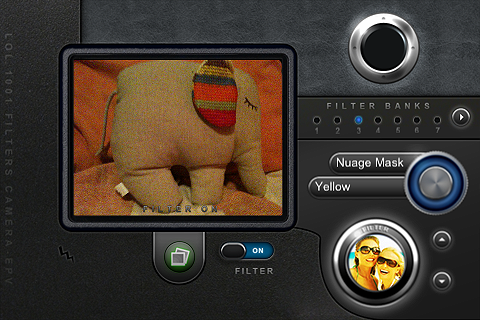
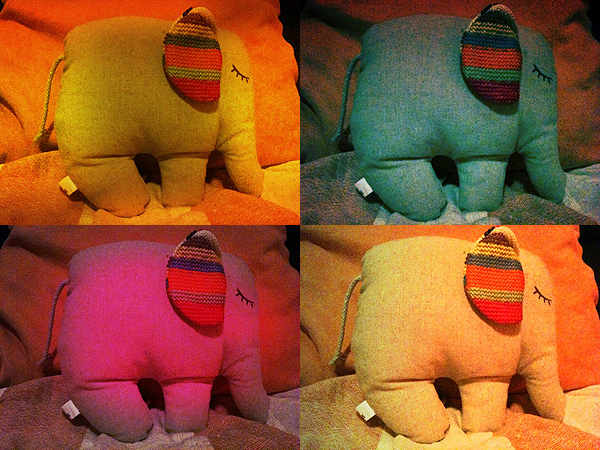
Simply put, this 1001 Awesome Filters is another app you should forget about. It doesn’t matter how many filters the developers say you have at your disposal, when none of these is even remotely good. The filters in this app are quite cheap-looking, especially the masks, and they don’t blend organically with most photos; more than improving your photo, you  will risk to spoil it utterly without having a second chance. Using 1001 Awesome Filters Digital Camera is quite confusing, especially at first: navigating through the filters is clunky and time-consuming. In general, the interface of 1001 Awesome Filters is not intuitive and buttons are not handy at all, first of all because of their size, and secondly for their poor responsiveness. The preview is not accurate enough to have a precise idea of the final outcome, and you have to use a filter several times in order to know more or less how your image will be affected. Even if you get the hang of this app, you cannot do much with the presets you are given anyway — you can only choose to change their intensity level after your photo is taken. Most filters resemble one another anyway, so there isn’t much variety to begin with. In the current version, you can only process images taken with the built-in camera, not those you have in your camera roll. This also means the photo viewer is quite useless a feature.

1001 Awesome Filters Digital Camera iPhone

It’s very easy, when you have not a clue about what high quality photographic effects are, to develop a product and sell it adding adjectives as “awesome”, etc. or suggestive numbers to its name to impress buyers. Accept the fact this approach won’t fool everybody, especially when there are so many other apps that are truly deserving available on the market. LOL Software seems to be more interested in developing heaps of apps of  any existing genre than focusing on less products and develop them more carefully. Too bad. If if it’s true this method can work for some categories of applications, it’s also true it doesn’t work very well with photographic apps, because to develop them not only you have to be very careful in creating a well-balanced and functional product, but you also have to have a good discerning eye.

1001 Awesome Filters Digital Camera iPhone

An update was announced some time ago, so we hope that some of these issues will be solved and that we will be able to reconsider our current opinion.

Overall

Name: 1001 Awesome Filters – Digital Camera
Developer: LOL Software
Compatibility: iPhone, iPod Touch. iOS 3.0 or later.
Price: £0.59||$0.99||€0.79
Vote: 1/5

1001 Awesome Filters - Digital Camera - LoL Software

Photo fx: a Digital Filters Suite Always in Your Pocket

Tiffen has years of experience as a manufacturer in the photography field. Founded in 1945 by Sol Tiffen, the company has provided photographers and professionals in the motion pictures and tv broadcasting with equipment and accessories.

After bringing its expertise to world of digital photography in the latest years, Tiffen also contributed to the needs of iPhone photographers, supplying them a few image-editing apps to cover a wide range of possibilities and requirements. Photo fx is one of their latest efforts.

Main Features

  • Full resolution available;
  • 76 filters arranged in 8 categories;
  • 878 presets to choose from;
  • Add filters selectively by mask painting;
  • Crop, rotate, straighten;
  • Shake to randomize filter and presets;
  • Search through filters and effects;
  • Export setup via email (compatible with Tiffen Dfx Digital Filter Suite);
  • Integrated help.

Appotography Opinion

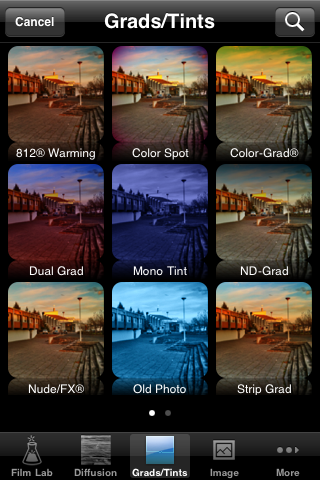
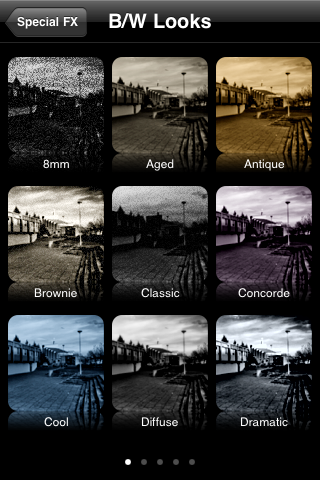
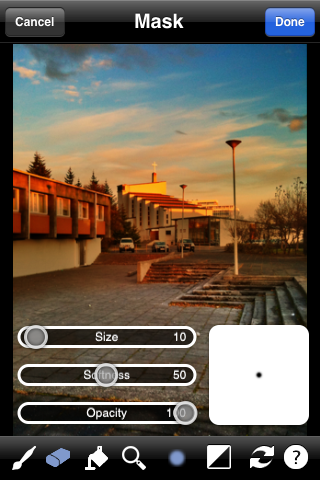
Among the photo-editing filter suites for iPhone, Photo fx is probably one of the best and most comprehensive. The amount of possibilities this app offers in terms of image-editing is comparable with Tiffen’s desktop suite: making use of filters masking and adjusting the various parameters, the user has lot of freedom in terms of customization; cropping and rotating tools are also very useful additions, and I find myself using these all the times, even when I do not want to use the other filters at all.

Photo fx iPhone

Photo fx iPhone

Photo fx iPhone

Photo fx iPhone

You can either upload a previously taken photo or use the built-in camera. The interface is very user-friendly, giving you a preview of each filter and preset. The variety of photographic filters alone is worth it, but in any case everything is very flexible, widening the range of results you can obtain even more. From color to black and white, from textures to gradients and tints, Photo fx truly offers a lot of choice, whether you have to make slight adjustments to your photos or if you have to work on them more thoroughly. You can add multiple effects without saving, each time with having an accurate preview of how each change is going to affect your image. With brush and eraser you can apply the filter only where you need it and in the right amount.

Here are a few versions of the same photo edited using different presets in Tiffen Photo fx:

The only truly lacking aspect of Photo fx concerns the sharing. Being this not a desktop application, having a few more sharing options wouldn’t hurt.
Photo fx is one of those apps that for a reason or another you’ll end using a lot for multiple purposes, so it’s definitely a must-have, especially if you use your camera a lot.

Overall

Name: Photo fx
Developer: Tiffen
Compatibility: iPhone, iPod Touch. iOS 4.1 or later.
Price: £1.79||$2.99||€2.39
Vote: 5/5

Photo fx - The Tiffen Company