
I will never stop asking this question: is quantity equal to quality? In some cases, isn’t quantity just a way to conceal the fact quality is too difficult to achieve? Your opinion may differ from mine, of course, but you can’t deny that not all the time more is better, especially when this more is only apparent. In the case of photography, creative photography in special way, having freedom to adjust your standards to your means without limitations is much better than having somebody presenting you with a pre-packaged variety of choices.
100 Cameras in 1 claims to offer you the easiest tool to make your pictures unique on your Apple device. Is it really so?
Main Features
- Up to 1536 x 1536 pixels (3GS), 1936 x 1936 pixels (4);
- 100 different textures to choose from;
- Integration with GameCenter;
- Share via email, Facebook, Twitter, Flickr.
Appotography Opinion
Despite what the previews and demo videos affirm, this is not even remotely the fastest photography app available and it doesn’t even come close to accomplishing greatness and uniqueness. In fact, compared to other photography apps, 100 Cameras in 1 is definitely more than sketchy: not only its performance doesn’t stand out in any way, but also as far as photographic outcomes are concerned, the overall quality of this app remains on a very poor level.
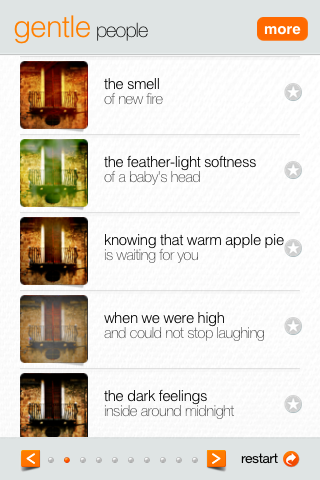
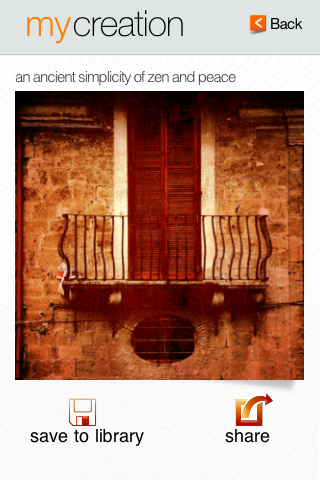
You can use pictures stored in your library or take photos with the built-in camera. After that, you’ll be asked to adjust your photo to the square format required by this app. You can move and enlarge/shrink your photo a bit before proceeding to add your filter of choice.
It’s true that you have 100 different textures you can apply to your photos, but most of them aren’t of great quality: in fact, they are quite ugly and they don’t merge organically and convincingly with any picture. Do we need one hundred presets when you cannot even play around with them to adjust basic parameters to suit your photos? Unless the preset is well-conceived enough to stand on its own, which is not the case with 100 Cameras in 1, you do need a little freedom, otherwise the effect will always look like a separate layer with rudimentary textural elements applied over the photo, no matter how many of these textures you will try hoping to find one that will do. This brings into discussion also the supposed app’s immediateness: sure, it’s easy to reach the point where you have to pick your texture of choice, but it’s not a great point in favor considering you’ll get frustrated in the process of finding among all those textures one that won’t actually ruin your photo instead of enhancing it.
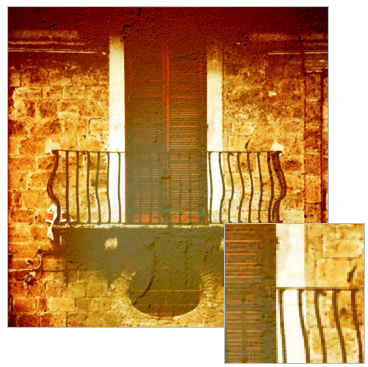 The above image was saved at 600×600 pixels. The square isn’t a magnified detail, it is how the picture looks at its actual resolution. As you can see, the saved images result in very noticeable low quality. At first, I tried playing around with different resolutions, trying the maximum allowed and then going down to the minimum, but it changed nothing. Even at the lowest resolution, the results are not even remotely acceptable. This is undeniably a huge issue that could alone be a reason to stay away from this app at all costs. If it’s not an issue, then tell me what it is, because you’re not supposed to have to resort to superpowers to get an acceptably looking photo at the chosen resolution…
I wouldn’t suggest you to download this app even if it were free, let alone purchasing it for any price. There are gazillions of apps that will help you achieving similar results and in a much better and organic way. All in all, as it is now, this app is useless.
Blending layers is not just a matter or fooling people by sticking a texture over a photo, and I assume even the developer of the app knows it, as he clearly shows with his own works on his website. It seems the developer took more time trying to make the interface look minimally slick and in inventing fancy names for each texture than in actually creating the textures themselves and in making the app usable. It’s all good on the surface, but for decent iPhone photography this isn’t a recommendable approach. This proves that being a reasonably skilled graphic artist doesn’t imply you’re also a good app developer. And honestly, this app looks more than anything else like a convenient way for its creator to advertise his other activities.
Overall
Name: 100 Cameras in 1
Developer: Stuck In Customs
Compatibility: iPhone, iPod Touch, iPad. iOS 3.0 or later.
Price: £1.19||$1.99||€1.59
Vote: 1/5
