
AnalogColor for iPhone is right now 50% off in the App Store. You can download pentacom’s app for the price of $.99 for just a few days — the full price is $1.99.
Tag: vintage camera
ScratchCam 1.3 Update
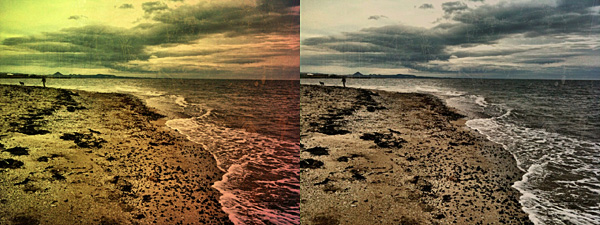
 The new release of ScratchCam for iPhone will shortly be available in the App Store. ScratchCam adds a grungy, aged and distressed look to any photo. If you want to know more, you will find an in-depth review of the app by clicking here.
Although version 1.3 will not change the way ScratchCam works overall, it will add an essential feature to the app. In fact, with the new release, it will be possible to save favorite styles. Up to version 1.2, ScratchCam relied exclusively on effect randomization. The new feature will make it easier to make a list of preferred styles, to allow quicker selection of the right look at the right moment. Frequent users in special way will appreciate this addition, for it will definitely give them more control over their final results. Favorited styles will be accessible and manageable from the main work area.
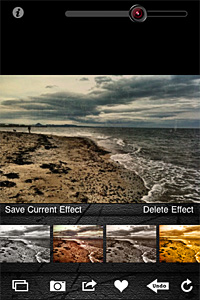 In version 1.3, sharing via email was also added and enhancements to the included effects were made.
The new release clearly shows that ScratchCam’s developer is very responsive to sensible feedback: he actually listened to what his users deemed important to make adjustments and improve the overall usability of ScratchCam.
Last but not least, the Lite version of ScratchCam is also coming to the App Store. ScratchCam Lite will be a fully functional release, including all the features of the paid version, with the only exception of high resolution saving and a limit to the number of styles users can add to their favorites. If you want to try before purchasing, go ahead and get the Lite version.
NOTE: The developer of ScratchCam kindly provided us with preview code for this ScratchCam update.
RetroCamera Review
Does anybody remember RetroCamera? Perhaps you don’t, but I do. RetroCamera for iPhone was released a long time ago; although this app looked quite unique at the time of its initial release, it had serious flaws — first of all concerning the output resolution — and thus it soon sank into oblivion.
At long last, it seems RetroCamera’s banishment came to an end. The developer finally released the long-awaited version 2.0, bringing back from limbo an app that since its first days had good potential, but couldn’t pull it off with version 1.0.
Main Features
- Full resolution available;
- 165+ filters;
- 145+ textures;
- 60+frames;
- 15+ noise effects;
- Adjust brightness and contrast;
- Adjust hue, value and saturation;
- Add digital bokeh;
- Move, resize and rotate;
- Undo/redo;
- Send via email or share on Facebook, Twitter, Flickr, Steply;
- Forward to supported apps (Dropbox, Camera+, Magic Hour, etc.).
Appotography Opinion
RetroCamera, as you can easily guess, is an app to add an aged, old-fashioned, evocative flair to your photos.
You can both import images from your device or use the built-in camera. As soon as you have your photo loaded into the working space, you can either choose to apply one of the ready-to-use templates or create your effect by combining together several elements, like film simulation, noise, textures and frames or by adjusting different parameters.
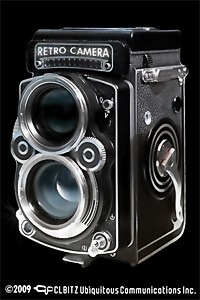
The templates that come with the app cover a variety of styles, ranging from instant and lo-fi to outdated photography. You can use them when you simply want a quick one-tap edit. Otherwise, for more control on the final look of your photo, you can go for a more thorough processing.
The film simulation includes a series of filters reproducing the looks of authentic film, from Polaroid to Daguerreotype, passing through Lomo and much more. Given the richness of the collection, films are conveniently arranged into categories (type of filter, brand, etc.); moreover, it’s possible to browse through each category by name and color. The film simulation works a lot like in Film Lab by the same developer, but filters are not exactly the same, so don’t expect a clone.
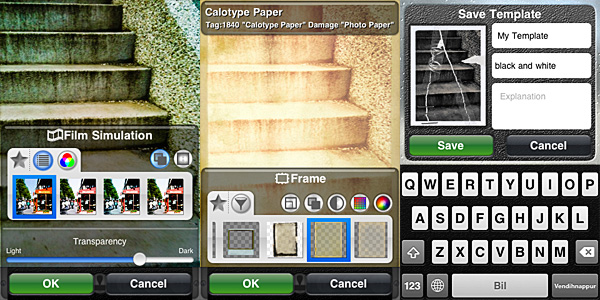 Other than film simulation, you can add textures, noise and frames. By applying them, you can imitate light leaks, scratched or damaged film, vignetting. You can also use the bokeh feature to digitally recreate depth of field or tiltshift effects or simply to add blur. Other than that, you can rotate and resize, set desired brightness, contrast, saturation, color and so on.
For each element, you can define affected areas and transparency level. You can save your personal combinations as new templates to be used more than once. Not only that: you can filter your image over as many times as you wish. If you make mistakes, you can undo.
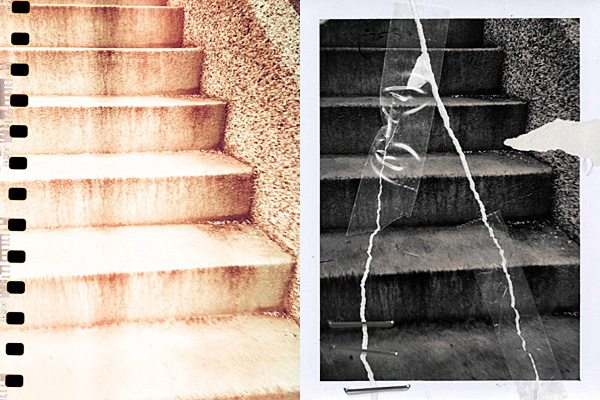
When saving or sharing, you can decide the image’s orientation. Apart from saving to Camera Roll, you can choose to send photos to online services like Facebook, Flickr and Twitter or, if you prefer, you can forward to other supported apps to keep on working on them.
RetroCamera’s filters are quite well done, though some frames and textures are somewhat overdone or not as flexible — and usable — as the others. The choice is however so vast that they don’t represent a great issue. You can create lists of favorites both for individual elements and for templates for easier browsing. Worth mentioning, the fact the workflow in RetroCamera is a bit less streamlined than that of similar apps and this can lessen your experience as a user. Furthermore, at higher resolutions, processing can take some time.
On the whole, RetroCamera offers plenty of possibilities to photo editing enthusiasts. Especially if you are into old-fashioned looking photography, this app will definitely keep you busy for a while.
Overall
Name: RetroCamera
Developer: CLBITZ Ubiquitous Communications Inc.
Compatibility: iPhone, iPod Touch, iPad. iOS 4.1 or later.
Price: £0.59||$0.99||€0.79
Vote: 4/5

ScratchCam Review
ScratchCam is a little iPhone app programmed to turn your average photos into worn-out, damaged looking images in no time. Differently from many apps in the same genre and with the same purpose — look very promising at first, but failing horribly in terms of mere photographic value and quality –, ScratchCam looks kind of unassuming to the distracted eye, but it does its job well.
Main Features
- Full resolution available;
- Adjust filter opacity;
- Share on Facebook and Flickr.
Appotography Opinion
It’s very easy to get the hang of ScratchCam in just a few seconds. The interface is as simple as it can get and the app’s features are also very basic and focused on getting the job done with as little effort as it is possible. Both if you load photos from your device and if you use the built-in camera, all you’re supposed to do is tapping on the refresh icon till you obtain a combination you deem appealing. You can adjust the opacity of the effect applied with a slider placed on top of the working area. If you inadvertently tap on the refresh button, you can undo your last change. You can then share to Flickr and Facebook or save to your album.
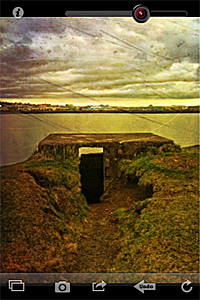
Like with other photography apps heavily relying on randomly generated effects, the good of ScratchCam resides in the surprise factor, which is something that in part retains the charm of toy cameras; the trade-off, however, is that you cannot freely choose individual filters to apply to your photos. Although the random generation works in other apps whose effects are actually not so different the one from the other (like Plastic Bullet), in the case of apps like ScratchCam it may displease users looking for the right look at the right moment.
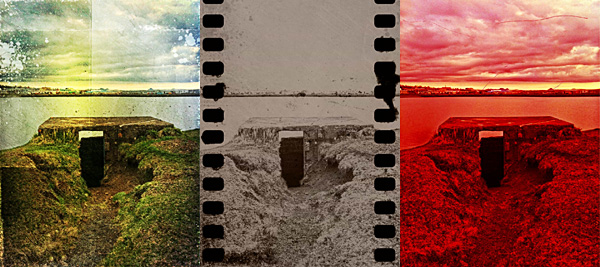
The filters, though not that many, do their work properly: unlike many other grunge/vintage cameras available in the App Store, ScratchCam’s effects blend convincingly with photos to give them an aged and distressed look. The quality of the textures holds extremely well also at full resolution. The black and white and sepia effects, reminiscent of old daguerreotypes, are especially impressive. ScratchCam, not only as a standalone tool but also if used in combination with other apps, may become a valid accessory in your iPhone photography collection.
Overall
Name: ScratchCam
Developer: Luna’s Edge
Compatibility: iPhone, iPod Touch , iPad. iOS 4.0 or later.
Price: £1.19||$1.99||€1.59
Vote: 4/5
Pocketbooth Review
With Pocketbooth, once again modern technology found a way to bring back a popular phenomenon from the past. Photo booths, even if in a totally new form, are enjoying right now a moment of revival and are contributing in establishing new photography trends.
If I have to be totally honest: I’ve always hated photo booths. Every time I had to use one to take photos for ID or other documents, I felt like hyperventilating and fainting. I’ve always found photo booth shots of myself in special way very embarrassing and ugly. Mainly because I am not in the least photogenic and when I know I am being photographed I unconsciously switch to awkward face mode. It’s nice though that this is an idiosyncrasy and not a sentiment shared by a wider number of people. Otherwise developers of apps like Pocketbooth, which we are going to talk about in this review, would be very sad indeed.
Pocketbooth imitates 1950’s-era Auto-Photo Model 11 photo booths. Easy recognizable for its rounded ends design, Model 11 was initially developed in the late 50’s for government and military use. Differently from other similar machines manufactured in the same period, Auto-Photo Model 11 allowed development of more photo strips at a time — it could handle up to seven strips! It was operated by a second person that pressed an external button while the subject was inside.
Main Features
- Up to 489×2608 pixels (4 poses) or 652×1956 pixels (3 poses);
- 4 color effects (color, b&w, antique, sepia);
- 2 types of paper (glossy, matte);
- Black or white border;
- Set time interval between shots;
- AirPrint compatible;
- Share on Twitter, Facebook, or send via email.
Appotography Opinion
Pocketbooth allows the user to take a series of shots in the photo booth fashion and to save, print or share them. On enabled devices, both flash and front camera can be used, while on other devices, it’s still possible to use rear camera only. As with original photo booths, taking photos doesn’t require much effort, especially if you are able to make use of the front camera. Before shooting, it’s possible adjust various settings: color and paper effects, number of poses (you can choose among 3 or 4), color of border, interval between shots. Unlike other apps, you cannot choose to manually take each shot separately. This makes perfect sense, as it is part of the analog photo booth simulation to grant a certain degree of spontaneity in the subject.
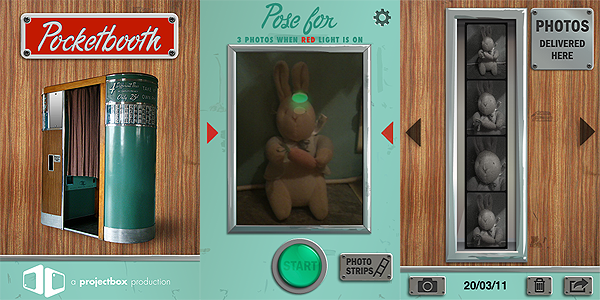
From the viewfinder, you have a preview. The light indicator will be red during the shooting session and green at other times, so that you always know when you have to put on your clever face and when you can just relax and take it easy. After you have your strip of photos, which is stored in the app’s gallery, you can save, print or share it as you prefer.
 Although I must admit I have never used a Model 11 photo booth, the effects delivered by Pocketbooth look to me quite authentic and none of them is overdone; the output quality appears good as well, also for printing purposes. The UI, well-balanced and stylishly designed, works flawlessly: getting the job done is very easy even if you are using the rear camera instead of the front one.
Pocketbooth by Project Box will be able to bring instants of amusement to those intrigued by analog photo booths. Of course there’s no need for me to say — but I will say it in any case — that you can just ignore the original app’s purpose and employ Pocketbooth as any other action camera to take a series of shots in a given time interval. With a little creativity, Pocketbooth lends itself to many unforeseen uses. It’s up to you to find them out.
Overall
Name: Pocketbooth
Developer: Project Box
Compatibility: iPhone, iPod Touch, iPad 2. iOS 4.0 or later.
Price: £0.59||$0.99||€0.79
Vote: 4/5
Lumière: Vintage Photo Processing In Real Time
With Lumière, a newly released photography app whose aim is to recreate the magic of the most diverse toycams on Apple portable devices, nebulus design pay a tribute to two of the initiators of cinematography.
You have probably heard at some point of Auguste and Louis Lumière, French brothers celebrated by most as pioneers and fathers of cinema. There still is a lot of debate concerning the status of Lumière brothers as actual fathers of cinematography.
In 1895 the Lumière Bros, who had inherited a photographic business from their father Antoine, patented the cinématographe, a film camera and a projector all rolled into one, cleverly making use of a series of inventions which included Edison’s Kinetoscope and Reynaud’s film perforations. The name of their creation itself was a reprise from Bouly’s cinèmatographe.
Whoever rightly deserves to be considered the actual inventor of cinematography, it is certain though that the public screening of footage shot with Lumière’s cinematograph on December 28, 1895 at the Grand Café in Paris represents one of the single greatest and most memorable moments in the history of this art form.
However, the question of fatherhood of cinema is much more complex than this and it would at least take a whole post on its own to discuss it in more detail.
Main Features
- Up to 1440 x 960 pixels;
- Real-time processing;
- 9 filters;
- 9 borders;
- In-app instructions;
- Share via email, Facebook, Twitter, Tumblr.
Appotography Opinion
Don’t get fooled by the name of this app: Lumière takes photos, not videos. Since it works in real time, you cannot use it with photos previously taken and stored in the camera roll. You point the camera to your subject, you slide your finger on the screen to scroll among color filters (horizontally) and borders (vertically) and, in case you have no preference or you want to go for an unexpected effect, by shaking the device you trigger the randomizing feature. When you find a combination that suits your taste, you press the shutter button. From the gallery, you can save the photo or share it.
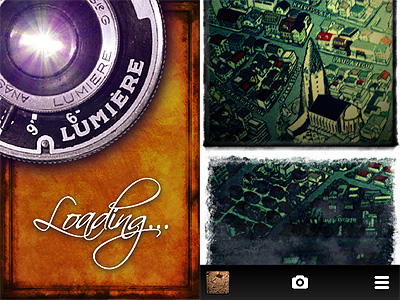
The real-time feature for handling the photo processing is more gimmicky than actually useful. If this were a video recording app — as I thought at the beginning, given the evocative name “Lumière” — real-time processing would make sense, but since the app only takes photos, it’s nothing more than a choice motivated by style. Scrolling among the effects can be cute at first, but it’s definitely not the best option if you want quickness and handiness. Retrieving the right filter/border combination for instance can be a pain in certain circumstances. The choices are kind of limited though, so it’s still possible to manage.
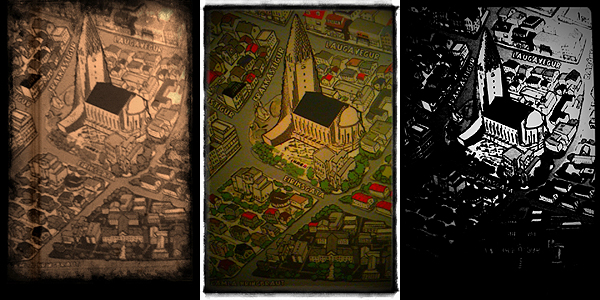
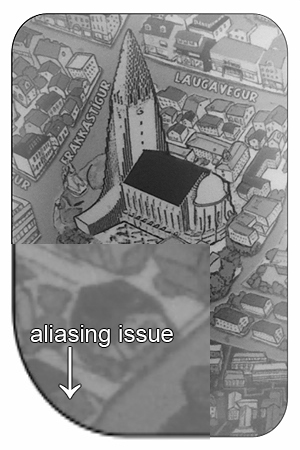
The filters, including Chromatic Distortion, 70’s, Super Saturated, Black and White, etc., are able to deliver a believable retro feel typical of lo-fi toy cameras. However, the final resolution of the saved images, with its 1440 x 960 pixels, is nothing great, especially if you value your photos enough to want to make use of them a little more productively than as mere disposable images. Also, some borders at the highest available resolution look shabby and present aliasing issues — on 3GS at least.
Overall, I’d say Lumière needs to be improved. Updates on maximum resolution and quality of some elements will definitely help bringing the app on another level thus making it fully usable also outside iPhone/iPod Touch/iPad limitations. Still, Lumière is a curious little app that, most of all thanks to its fancy real-time feature, will especially please those who enjoy something slightly out of the ordinary in photographic processing.
Overall
Name: Lumière
Developer: nebulus design
Compatibility: iPhone 3GS & 4, iPod Touch 4th, iPad 2. iOS 4.2 or later.
Price: £1.19||$1.99||€1.59
Vote: 3/5
iSupr8: Second Round With Perfect Score!
We pretty much explained in our previous review all the great aspects about iSupr8 and how our rating had been mainly influenced by deficiencies in the app’s framing accuracy. With the latest updates we verified that the aforementioned issue has been fixed by MEA Mobile, developer of iSupr8. Also, more interesting features were added.
Main Features
- Tru8™Processing;
- Unlimited HD record time;
- Re-develop videos;
- 3 levels of filter intensity (low, medium, high);
- Record 360p / 480p / 720p
- Large Viewscreen mode;
- Import videos from camera roll;
- Spotlight enabled for iPhone 4;
- Share still Frames on Snapr;
- Share via email and Facebook.
Appotography Opinion
Here we are, for iSupr8 part 2. As I said, we liked the app in its original form, but it had issues that made it difficult to fully enjoy it. This is why I am more than happy to have the chance to re-review the updated and improved version.
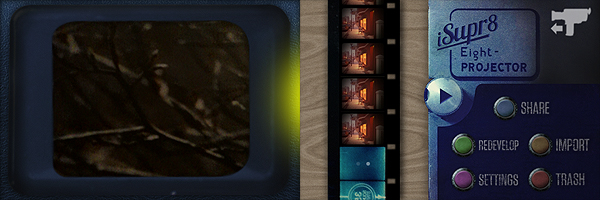
iSupr8’s UI, which I liked, thankfully has not undergone drastic changes; it has been improved to go along with the new options now offered by the app. The large viewer, for instance, permits better and more accurate control over footage recording. You can bring it on by double tapping on the regular viewer and you can conceal it by double tapping on it again at any time. Another of the newly introduced features allows users to process videos stored in their camera roll, instead of only being able to process material recorded from within the app. As a result, iSupr8 is now fully iPad/iPad 2 compatible. And this is not all: you can conveniently process the same video again and again, so every time you can make changes to parameters and settings. In fact, more than a processing option was included with the updates. You can adjust the intensity of the applied filter, from low to high. This will please both those who prefer a heavily dated look for their videos and also those who just want the vintage flavor without much scratching and dust applied. Among the other features not included in the first release — the one we reviewed — you will find the possibility to share stills from your videos on Snapr, a web service for posting geo-tagged images.
Developers of iSupr8 encourage users to send suggestions and feedback to make their app even better. Appotography praises MEA Mobile for being attentive to users’ requests and needs and for promptly improving their product.
iSupr8 was already remarkable for the quality of its processing and for the authenticity of its 8 mm simulation. All that we liked in the first release is still intact, and all that we were unsure of was readily corrected. As of now, iSupr8 is our favorite 8 mm simulation app and one of the video processing apps we like more. Well done!
Overall
Name: iSupr8
Developer: MEA Mobile
Compatibility: iPhone (3GS, 4), iPod Touch. iOS 4.1 or later.
Price: £1.19||$1.99||€1.59
Vote: 5/5
iSupr8: Super 8 Makes a Comeback
History time: Super 8 was released by Kodak in 1965 as an upgrade from the previous 8 mm format. Differently from the previous format, its perforations were smaller thus allowing a larger area to be exposed. It also allocated space enough for magnetic sound recording.
Born as an improvement from basic 8 mm home movies, Super 8 acquired a legendary status, also thanks to achievements of indie film-makers that resorted to making use of it as a means to keep production costs lower. It’s not a surprise then that more than a few experimental film-makers continue to use this format extensively and that even Hollywood’s J.J. Abrams is going to pay his tribute to it with his upcoming Super 8.
Together with many other developers, New Zealand-based MEA Mobile jumped on the revival wagon, releasing iSupr8, that according to them, is an app “designed by vintage film enthusiasts” as an “effort to revive and increase awareness of a commercially dying format to a new generation”. For this app, MEA Mobile developed Tru8™, a post-processing algorithm capable to grade each pixel separately according to exposure, adding at the same time other effects like film flickering, projector framing and other realistic elements. All in the name of the most accurate authenticity of looks possible.
Main Features
- Record in 360p, 480p or 720p (on supported devices only);
- Tru8™ processing;
- LED enabled (on supported devices only);
- Share via email and Facebook.
Appotography Opinion
Note: A more recent review of iSupr8 is available here.
iSupr8 doesn’t work in real-time and doesn’t process videos previously taken. You take your video on the spot and once you recorded it, it is stored in your rolls gallery. From there you can either decide to process it or to trash it. Processing times are perfectly average for this kind of apps. Memory usage is also quite in the norm, meaning this app won’t cause much troubles, overloading your device beyond its capabilities and crashing continuously. The interface is clean and stylish, making the use of the app an enjoyable and rewarding experience from this point of view.
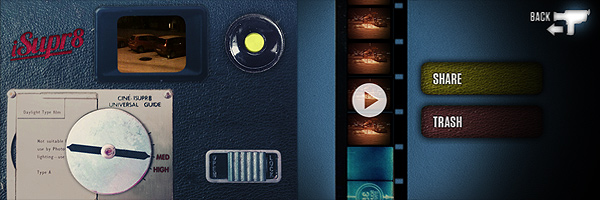
There is only one filter you can choose from, so if you expect a filter collection this app is not for you. The emulation of original Super 8 is very good though, especially in the fact the developers wisely decided to take another path from that already chosen by their colleagues: they didn’t overdo it, adding all kinds of visual mumbo jumbo, with too much dirt and scratches and extreme overly saturated or desaturated tones. As far as the final outcome is concerned, iSupr8 holds very well.
This video was shot in some of the worst possible conditions, at night and with snowy weather. Keeping in mind these considerations, the results aren’t half bad.
Despite all my previous comments, I don’t feel like giving a higher rating to iSupr8. There is a very serious issue I find with this app and it concerns the viewfinder: accurately framing your subject is absolutely frustrating and sometimes it requires a lot of testing and retakes, unless of course you’re careless enough to not mind about what will be in your final video. Some other apps in the Photography category used to have, or have still, this same issue. Just to mention a famous example, Hipstamatic developers too at first had released their app with this same problem — but partially corrected it adding a “precision framing” alongside the “classic” and imprecise one. Original Super 8 cameras did have some issues with framing, and as a matter of fact many users complained about viewfinder’s lack of accuracy. Each camera had different troublesome framing, some being a little off vertically and some other horizontally. iSupr8 is a bit of both and getting your video right is not the most intuitive task, in spite of the app’s overall simplicity.
Emulating the feel of the original Super 8 is one thing; reproducing also issues and deficiencies of old cameras is another.
Overall
Name: iSupr8
Developer: MEA Mobile
Compatibility: iPhone (3GS, 4), iPod Touch. iOS 4.1 or later.
Price: £1.19||$1.99||€1.59
Vote: 3/5
Retro Camera Plus: Another Hipstamatic Wannabe… But Quite Good
How many clones of Hipstamatic are there now? I lost count. They pop up like mushrooms, but none among them is really up to their source of inspiration. The problem is more than a developer thinks it doesn’t take much to successfully imitate Hipstamatic. Imitating is not the path to choose if you want to make a truly good impression, but of course it saves lots of time and you might be able to fool more than a few users.
Retro Camera Plus — not to be confused with RetroCamera — is another of these countless Hipstamatic’s little sisters. We must admit the idea, although it is quite worn out, still has some fascination.
Main Features
- Up to a resolution of 1200 x 1387 pixels;
- Five cameras for a total of nine different effects (filters and borders);
- Share via email, Twitter and Facebook.
Appotography Opinion
With Retro Camera Plus you have access to five different presets simulating five different old-school cameras. Four of these cameras let you choose among color and black and white (actually just a greyscale version of the color filter). You cannot use photos from your camera roll, as with other hipstamatic-ish apps; you are supposed to choose the filter you want to apply and shoot right away. The effects achieved are pretty good, but none really stands out.
Here’s a preview of how the different filters affect images.


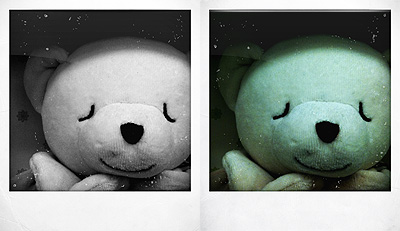


There are quite a few problems if you try to take more shots one after the other or if you open the prints gallery while the image is still being processed. The app crashed more than a few times during our testing with the latest OS . The browsing among images stored in the app’s gallery is also not as fluid and functional as it should be. Fixing these problems, adding a few features, like for example the possibility for a double exposure with the Pinhole Camera, and refining a bit the b&w filters, would definitely bring the app on another level.
The app is free, so you might as well try it if you are curious.
Overall
Name: Retro Camera Plus
Developer: Urbian, Inc.
Compatibility: iPhone, iPod Touch. iOS 4.1 or later.
Price: free!
Vote: 3/5
Infinicam: Time To Randomize Your Camera!
We know about Nevercenter thanks to their CameraBag app. We are now presented with a new photo app whose potential goes far beyond that of CameraBag. However, Infinicam is not an enhanced version of CameraBag. Like its predecessor, it features filters imitating analog cameras and films, but the way the filters are generated is totally different.
Main Features
- Full resolution available;
- 18 film-style borders;
- Wide range of photographic filters;
- Possibility to save preferred the automatically generated styles;
- Cropping tool;
- Camera history;
- iOS retina-display support;
- Possibility to share styles with friends.
Appotography Opinion
As the name implies, Infinicam offers the user an endless series of combinations to edit photos, previously taken or on the spot. Tapping on the “Press for new camera” button, a new style is instantly generated through complex algorithms. Each style is identified with a seven digits code which can be saved for further use or manually entered when needed. The filters are neat and some of them truly deliver the feel of shots by analog cameras. Endless effects, I said: is it really true? Well, the variety of automatically generated effects is impressive, but most of the styles look very similar. Also, we are not great fans of borders with credits and apps names stamped all over them, as they make the edited photos more like something obtained using a free app. From a paid app, this is not very “stylish”.
Here are some examples of what you can achieve:
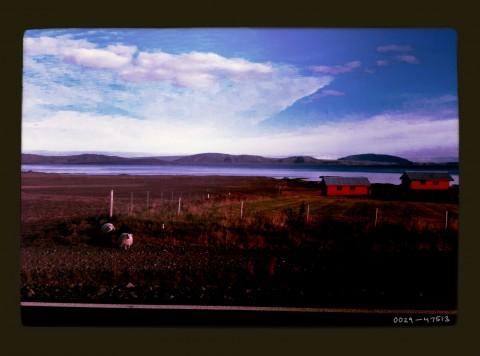
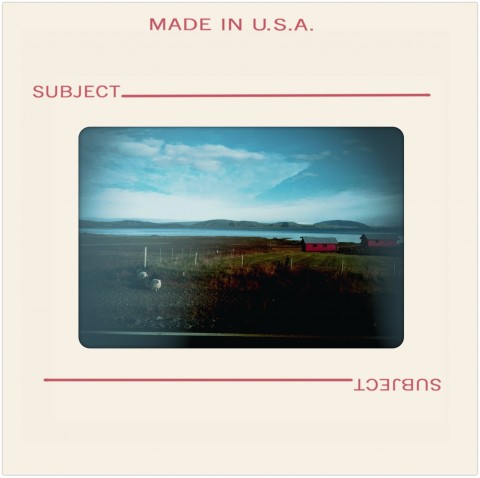
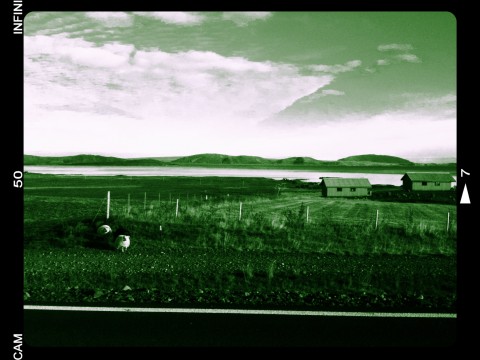
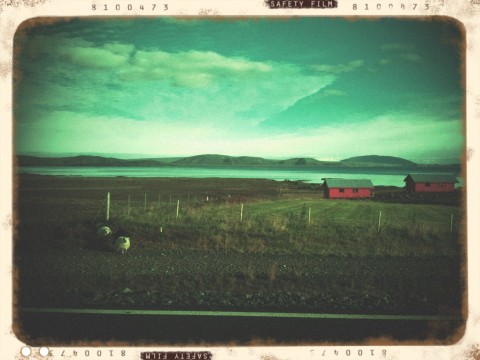
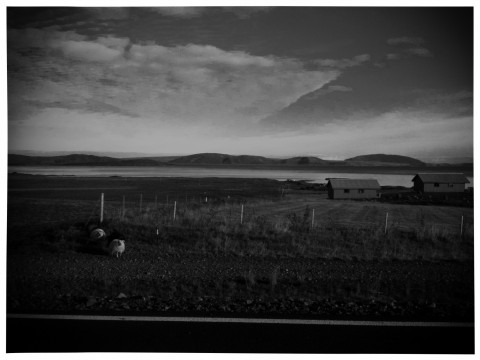
Unless you create a huge library of previously used and faved filters – or acquire them in exchanges with other users or through download – you won’t have great freedom of choice and customization. For those who are more focused in obtaining extremely predictable results, Infinicam is definitely not the right choice. Infinicam will mainly please perhaps those who have already tried many other apps and are looking for something different, or those who are fans of the unexpected results that can be obtained through apps allowing a great degree of randomization.
Overall
Name: Infinicam
Developer: Nevercenter Ltd. Co.
Compatibility: iPhone, iPod Touch, iPad. iOS 2.0 or later.
Price: £1.19||$1.99||€1.59
Vote: 4/5