Photoshop Express by Adobe got an update yesterday. For those who were already using this app before, there aren’t substantial differences in the new version. For the others, this could be a good starting point to spend a few words about it.
Where do you start writing about anything with the Photoshop label on it without making comparisons with THE Photoshop? It’s almost impossible. There is a risk that I will end writing something totally superfluous. Does it even make sense to review Photoshop Express? I guess not. But as there shouldn’t be a precise reason to talk about an app instead of another, bear with me, for even if it’s pointless in this case I’ll make an exception.
Main Features
- Crop, flip and rotate;
- Adjust exposure, tint, saturation, contrast;
- Soft focus, sketch and sharpen;
- Seven effects;
- Eight borders;
- Share on Facebook, TwitPic or Photoshop.com (requires Photoshop.com account).
Appotography Opinion
PS Express will probably displease those that associate the name Photoshop with a very sophisticated tool of graphics editing. The Express version for iPhone, iPod Touch and iPad has little in common with the full-fledged software by Adobe.
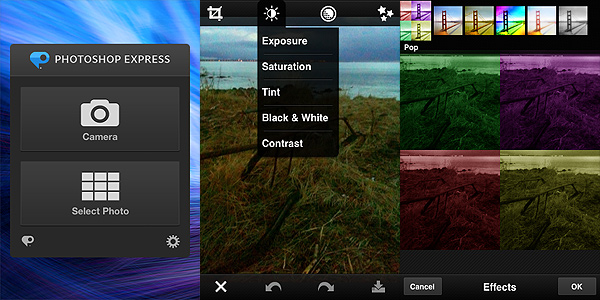
You can use the camera or photos in your camera roll. You can immediately upload or you can choose to edit the pictures, by cropping, rotating or fixing their orientation, by altering color properties, by applying filters, effects and frames. However, there is actually very little you can do with Photoshop Express, apart from very basic adjustments to your photo.
The effects, for instance, are few, very generic and not customizable. The frames are also not that varied and most have that conventional comic border look that not anybody will find appealing. You can adjust parameters like exposure, tint and contrast by swiping your finger on the screen, but personally I don’t find the app’s way of handling the whole process very user-friendly overall. For example, if you want to apply one of the filters, you have to imagine a fullscreen slider; if you raise your finger from the screen’s surface, the app will remember the value of the filter applied in relation to the position your finger reached on the screen; if you want to make a slight adjustment without starting over, you have to reposition your finger more or less as it was before. Even for quick adjustments, this is not the most user-friendly approach, in my opinion. But again, even if there are other apps doing the same in a more satisfactory way, many will object that differently from them Photoshop Express is free thus one shouldn’t really complain.
The bottom line is: it’s true it’s Photoshop and it’s free, but from the photo editing colossus we honestly could have expected something more. If you want the closest thing to the actual Photoshop on the iPhone, this is not the right choice for you. Maybe in combination with other apps or for very basic and quick editing, Photoshop Express still has some use.
Overall
Name: Photoshop Express
Developer: Adobe Systems
Compatibility: iPhone, iPod Touch, iPad. iOS 4.2 or later.
Price: free!
Vote: 3/5


 Adobe’s Photoshop Express was updated to version 2.0. Some interesting new features, including in-app purchases, were added with this last update. Here is what’s new: