
REXiG HDR Camera Review

Using the HDR technique is the best option in many situations where lighting conditions are particularly problematic. However, getting the necessary exposures to be used in HDR composites can be hard in some specific instances, for example when you don’t have a tripod or other stable surfaces to support your camera or when you are trying to photograph moving subjects. In such instances, it has become quite common to create fake HDR images (using one exposure only) with the help of specialized software.

REXiG HDR Camera recreates HDR-like effects on the iPhone: a resource in cases where lighting is not satisfactory and regular HDR is not achievable.

Main Features

  • Full resolution available;
  • 23 presets;
  • Adjustable brightness, contrast and saturation;
  • Adjustable color balance;
  • Noise reduction.

Appotography Opinion

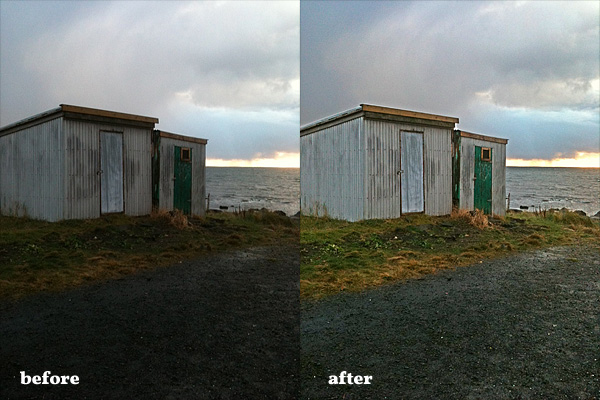
All you need to create your HDR-like image in REXiG HDR Camera is loading a single photo to the work area. REXiG HDR Camera doesn’t need two shots like real HDR because the app simply tries to restore useful information from either dark or bright areas — or both — of your photo.
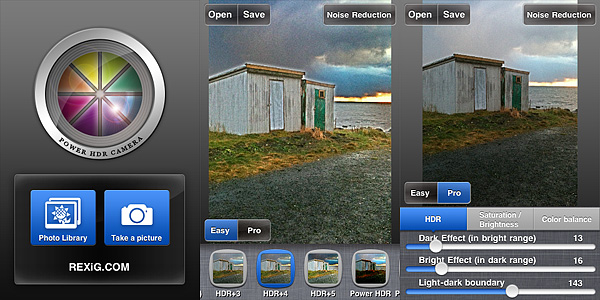
REXiG HDR Camera iPhoneFor a quick enhancement of badly exposed photos, the Easy mode offers 23 presets which can be applied to images with a single tap. Presets can be found in the bottom part of the screen, and by swiping with the finger you can scroll and choose among them. For a more thorough processing and for more control, you can switch to Pro mode. Pro mode lets you adjust individual settings which affect the overall look of the image, like bright and dark intensity, saturation and contrast, and color balancing.
REXiG HDR Camera iPhone
Before and after REXiG HDR Camera processing.

Since recovering information from dark areas can significantly increase digital noise, REXiG HDR Camera also offers a noise reduction option. Noise reduction processing however can take some time and its effectiveness greatly varies depending on the photo you want to process.

Somebody cleverly said the best HDR is the one you cannot spot. For this reason, most photographers use HDR only when they are after a well exposed and natural looking photo and they have no other means to achieve it. While REXiG HDR Camera doesn’t actually generate true HDR, it tries to imitate the looks of the heaviest and most bombastic HDR processing: most presets are extremely overdone; without proper tweaking, REXiG HDR Camera’s final results look very artificial and thus not always desirable. Notwithstanding, REXiG HDR Camera is one of the most convincing HDR replacements available on iPhone and it will definitely come in handy now and then.

REXiG HDR Camera is free in the App Store until August 18, 2011.

Overall

Name: REXiG HDR Camera
Developer: REXiG.com
Compatibility: iPhone, iPod Touch, iPad. iOS 4.0 or later.
Price: £0.69||$0.99||€0.79
Vote: 4/5

REXiG HDR Camera - REXiG.COM

HDR Artist Review

HDR Artist initially confused me with its icon: however I tried, I honestly couldn’t place such an icon in relation to HDR photography — moreover, it looked vaguely familiar, but I have not figured this out yet. I was even more baffled after downloading Union Well Limited’s app for iPhone from the App Store: hadn’t I seen it before?

Main Features

  • Up to 1200×900 pixels resolution;
  • 12 effects;
  • Send via email or share on Facebook and Flickr.

Appotography Opinion

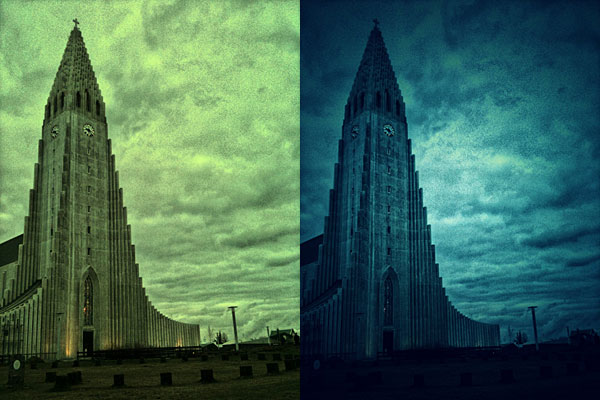
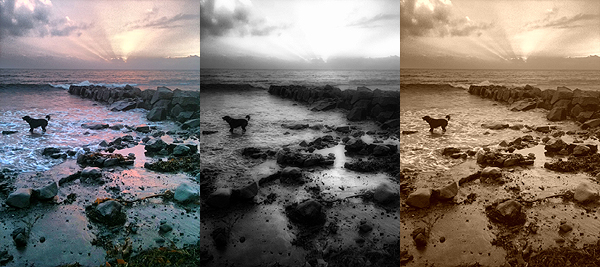
For processing photos in HDR Artist for iPhone, you can either use the built-in camera or photos stored in your device. You have a set of effects to apply HDR-like look to your images, but there are also effects that have nothing to do with HDR looks, like Halftone. In general, the effects work fairly decently, but they’re quite generic and their names seem to have been picked without any definite notion in mind. 70’s simply turns images to sepia, SoEmo to electric blue, Toy adds a cyan tone, just to give you an idea. There is a “Next” button on top of the effects page that for some reason doesn’t appear to be active and another browsable page of effects is nowhere to be found.

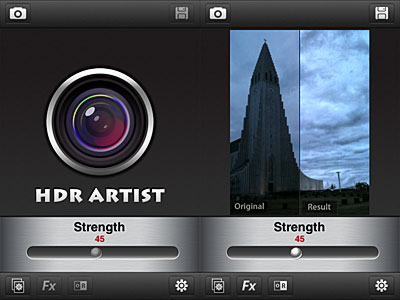
HDR Artist for iPhoneWith a slider, you can adjust each effect’s intensity and enable original vs result view for comparison. When you are satisfied, you can save, send with email or share on Facebook and Flickr.
HDR Artist for iPhone
HDR Artist effects applied to the same photo.

Overall, the app feels like an assemblage of elements thrown in at random. Most importantly, HDR Artist’s uncanny resemblance to the first versions of Dynamic Light is so conspicuous it’s impossible to ignore it. It certainly is too evident to be a mere coincidence. I have no idea what went on behind the scenes, but sure enough developers of HDR Artist used Dynamic Light a little too heavily as their inspiration and, to say the least, didn’t put much imagination and originality into their own creation.

If you want a well conceived HDR imitation on your iPhone, then get Mediachance’s Dynamic Light, which now includes also more features, effects and extras that HDR Artist lacks.

Overall

Name: HDR Artist
Developer: Union Well Limited
Compatibility: iPhone, iPod Touch, iPad. iOS 4.0 or later.
Price: £1.19||$1.99||€1.59
Vote: 2/5

HDR Artist - Union Well Limited

Dynamic Light: When The Best HDR Is Fake

Who said the best HDR is the real one? That’s a rhetorical question some digital photographers who tend to opt for an all-done-in-post-processing approach often like to pose. The question itself may sound blasphemous to purists of HDR photography, but reflecting on it, in some cases the best HDR can indeed be the fake one. This is for different reasons: when you don’t have a tripod or other means of support, taking bracketed photos can be a problem; also, some HDR pictures present issues like halation, which can be a pain to remove. And this is just to mention two of the most common problems connected to HDR photography.

After years of expertise in multimedia development, Canadian Mediachance now brings to Apple portable devices their proprietary DPHDR (Dynamic Photo HDR) processing. The result is Dynamic Light, an optimized tool for generating HDR-like effect on iPhone, iPod Touch and iPad that will  make things easier for many fans of the HDR style.

Main Features

  • Full resolution available;
  • 12 filters;
  • Adjustable radius, surface smoothness and color boost;
  • Retina display support.

Appotography Opinion

Dynamic Light works both with built-in camera and with photos stored in your camera roll. What the app does, basically, is to simulate HDR using a single image instead of using several exposures as in real HDR.

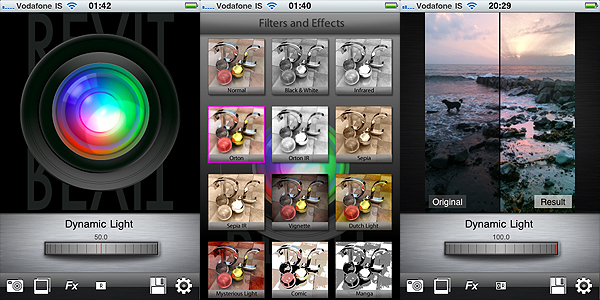
The Dynamic Light proprietary filter is chosen by default as soon as you start the app, but you have eleven more filters available to choose from. Among the most interesting ones, you will find Orton and Orton Infrared, another filter based on a very popular effect among digital photographers, which consists in processing the photo in order to create a unique mix of areas characterized by sharp detail and others with extreme out of focus. All you have to do once you choose the filter is to adjusts its intensity using the on-screen wheel. From low to high values, depending on the filter, outcomes can change a lot. In the app’s settings you can also adjust individual parameters — Radius, Surface Smoothness and Color Boost — to determine how filters will affect your images.

Dynamic Light by Mediachance for iPhone

Obtaining decent looking fake HDR using a single exposure is not as easy as one might think. To achieve it, many apps simply apply heavy sharpening and over-saturation that brings out unrealistic hues. In these cases the results are usually abominable. Dynamic Light succeeds in actually improving the look of the initial photo, enriching it with details that were lost in darkness and emphasizing the original colors without making them look strident and cheap. Some of the additional effects besides the default are also very well-done, like the aforementioned Orton and the Sepia, also in their Infrared variations. The only filters I cannot bring myself to like and use are Comic and Manga — but I have yet to see an all-around great comic filter.

Dynamic Light by Mediachance for iPhone

For better results, developers suggest to use Dynamic Light HDR on outdoors and landscape photos with rich textures, unless you’re looking for very particular results. I must say that I have tried the app also with photos that definitely couldn’t be considered ideal, and I was pleased.

Dynamic Light is much easier to handle than real HDR and results you can obtain are terrific. For its quality and at the given price, Mediachance’s is an app I feel like recommending without hesitation.

Overall

Name: Dynamic Light
Developer: Mediachance
Compatibility: iPhone, iPod Touch, iPad. iOS 4.0 or later.
Price: £0.59||$0.99||€0.79
Vote: 4/5

Dynamic Light - Mediachance