
There are no official quality standards and guidelines when it comes to Polaroid — and more in general instant — photography: some photographers apply to it the same rules that they are comfortable with and use in other genre of photography; some others completely change their style according to the medium they are using and prefer to consider instant photography as a world of its own, where general rules are not applicable. This is one of the reasons in Polaroids anything seems to be acceptable, even things that often wouldn’t be well-received in full-fledged photography. Many instant photographers for example are very much in love with the cheap look of Polaroids, and even those who converted to more up-to-date formats try to replicate it digitally. A cheap digital photograph isn’t like a cheap analog one, and if it’s true that in the case of Polaroids anything is acceptable, it’s also true that in the case of digitally imitations perhaps it is not.
Main Features
- Full resolution available;
- Zoom, pan and rotate;
- Nine instant film types (+nine more with in-app purchase);
- Four instant frames (+four more with in-app purchase);
- Undo button;
- Share via email and Facebook.
Appotography Opinion
FotoRoid is another of these apps that try to simulate the Polaroid effect on the iPhone. Differently from a few other apps in the same group, you don’t have any simulation of the developing process, so if this means for some people part of the magic will be lost, for others it will conveniently mean quicker results. You can use pictures from your camera roll or use the built-in camera. Using the camera, the app crashes easily. Saving can also cause the app to crash.
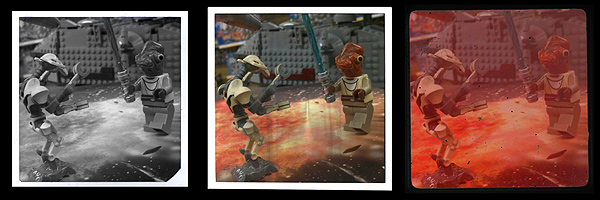
Several films and frames are available, ranging from expired to black and white to overly saturated, etc. Some filters are OK, but the quality on average is quite poor. More than a few filters in FotoRoid just look ugly on almost any photo you will come up with, and just in very rare cases they will give you decent results. Some may argue this is what makes Polaroids what they are, but considering we are talking about digital photos instead of genuine Polaroids, on this point I beg to differ. When you have to adapt your photography to the app, it means the app has serious issues. To adjust the photo to the frame, you can use your fingers to pan, zoom and rotate. These features, although very useful, don’t work very smoothly in FotoRoid and getting exactly what you want can at times become frustrating. A feature to save the original photo is also not available for the present moment, but in the case of this app it would be useful to have it. Not to forget, an annoying black border is added around the frame to each saved picture.
FotoRoid is free, but to better enjoy the app you have to purchase film and frame upgrades in order to broaden your possibilities — in-app purchases unlock either frames or films, or they disable ads. The problem is: are these upgrades worth it, in terms of quality and also of what they allow the user to achieve? To be totally honest, I don’t think they are.
Overall
Name: FotoRoid
Developer: Gen Kiyooka
Compatibility: iPhone, iPod Touch, iPad. iOS 4.0 or later.
Price: free!
Vote: 2/5
