Back to school sale: PhotoForge2 is 70% off in the App Store. GhostBird Software’s photo editing app is now available at the special price of $0.99 (€0.79/£0.69).
PhotoForge2 is universal and fully compatible both with iPhone and iPad. Some of the features that make PhotoForge2 one of the most advanced applications on iDevices yet: import and edit RAW files, use masks and layers, fine-tune images with curves, channel mixer, shadows and highlights; make use of crop and rotate tools; add special effects, like blur, vignette, frames and textures, manage metadata and finally share your photos on Twitter, Flickr, Facebook, DropBox FTP and more.
The current offer is valid for a limited time only.
PhotoForge2 2.1.1 is out. Here are the details on the latest release of the universal photo editor by GhostBird Software.
Auto-resizing – When images that are too big are loaded into the app, auto-resizing is activated. This prevents memory issues that can lead to the app crashing when it’s not possible to handle images in their original size. While loading large images does not represent a huge problem for iPhone 4 and iPad 2 users, for 3G/3Gs and iPad users it can cause serious malfunctioning. Auto-resizing is only activated in the case images too big to handle are loaded into the app. It’s possible to edit maximum image loading size from in-app settings (PhotoForge logo -> Settings -> Load Settings).
Better performance – Reduction of memory usage with textures, vignette, frames and Pop! Cam operations. This should prevent crashes when large images are being processed.
RAW support improved – Fixed issue that caused images in RAW format to load only in a low resolution preview in some instances. Metadata for RAW is also improved.
Set default IPTC info to photos – This addresses the issue of entering the same information several times for the same photo.
View EXIF metadata from each photo info screen.
Mailing list signup – It’s now possible to sign up for receiving updates, tutorials, contests, and other news from in-app settings (Photoforge logo -> Sign up for newsletter).
Uploader now always displays default titles and descriptions.
Other fixes – Hangs with uploading to Dropbox and with Pop!Cam in-app purchase dialogue (with in-app purchases disabled) are now fixed.
PhotoForge2 is still available at the special price of $1.99/£1.49/€1.59 in the App Store.
Photoforge2 2.1 is finally in the App Store. GhostBird Software’s photo editing application is now universal, fully compatible with iPad and iPad 2. The iPad compatibility is not the only interesting aspect in the latest release of PhotoForge2. Several enhancements were made, especially to performance and interface. Tools like masking and rotate are now more user friendly than before and users are given more freedom when saving their photos.
Here is what’s new in PhotoForge2 2.1:
Improved mask painting: now faster even on larger images;
Added Composition mode: see layers below while mask painting to easily apply selective filters and effects to photos;
Redesigned ropping handles: for more control during cropping process;
Replaced rotation gesture with 1° rotation buttons;
Improved size of the handles in the Levels editor for easier control;
Save photos to documents directory: for easily sending images back to computer;
Save images in JPEG, PNG and TIFF (upload of PNG and TIFF only to supported locations);
Added compression control of JPEG quality;
Added more editable IPTC fields added;
Added address field for GPS location information;
Added ability to manually remove GPS info on the map screen from images;
Added selective control to remove meta data from images when uploading;
Adjustments, Effects, Tools and Uploader now save last location: the last used item will be the first in user’s list;
Added link to online tutorials in the main menu;
Fixed Facebook uploader crash;
Various bug fixes and improvements.
PhotoForge2 is currently on sale at $1.99 (€1.59/£1.19), which is 60% off the original App Store price.
PhotoForge2 will be available to purchase for a limited time at the special price of $0.99 (€0.79/£0.59), which is roughly 66% off the regular App Store price.
PhotoForge2 is one of the most comprehensive and advanced photo editing apps available in the App Store and definitely one worth having for iPhone/iPad photographers, thanks to the many tools for full control over post processing, like RAW import, curves, levels, white balance and exposure adjustment, layers support, masking features, a rich collection of effects and several, in addition to an extensive collection of sharing options.
The special offer will be valid until the release of iPad’s native support.
Version 2.0.2 of GhostBird Software’s PhotoForge2is now in the App Store for all iDevices. This long-awaited release contains some new tools and considerable improvements, including a fix for the infamous 2.0.1 bug that caused previous projects not to load properly after the update.
In detail, here is what comes with version 2.0.2 of PhotoForge2:
Added Rotate editor;
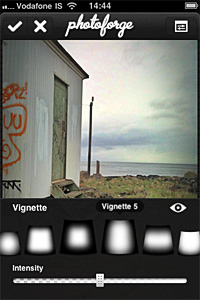
Added Vignette editor: 8 adjustable vignette styles available in FX menu;
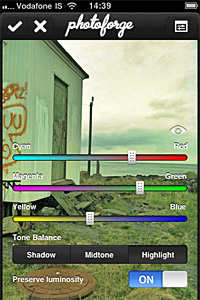
Added Color Balance editor: adjust color balance for midtones, highlights and shadows separately;
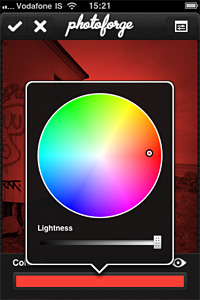
Added Colorize editor: apply tints to your photos;
Added Device to Device image transfer: transfer photos between devices easily;
Added invert layer mask feature, useful to quickly switch between masking and for more refined results;
Improved Shadows & Highlights adjustment for better results;
Improved performance of crop and layer transform tools;
Fixed bug that prevented projects to load properly in previous update;
Fixed but that caused graphical corruption when repeatedly cropping huge images;
Fixed bug in iOS 4.2.1 that made app not responsive when wifi is unavailable;
Graphics improvements and fixes;
Minor bug fixes.
PhotoForge2 - The Vignette EditorPhotoForge2 - Colorize EditorPhotoForge2 - The Color Balance Editor
PhotoForge2 was released a few hours ago. Version 2.0.1 comes with many fixes and improvements, both to features and interface. Here ‘s what’s new in detail:
Enabling location services to load photos no longer required;
Remove metadata when sharing photos online;
Disable GPS tagging when using the built in camera;
Set editor background opacity when editing;
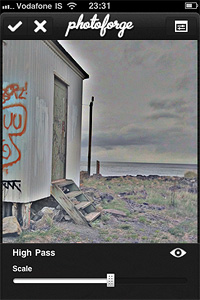
High Pass filter added;
Configurable polar filter edge blending and zoom added;
Camera connection kit RAW support added;
Auto-approve images uploaded to Facebook;
Disabled location service when cancelling the image picker;
Metadata disappearing when emailing photo fixed ( it can now be configured from settings);
Camera roll is now always at the top of the list in the image picker;
Facebook login problem on devices without multi tasking fixed;
Minor interface fixes;
Speed of gaussian blur filter increased;
Various optimizations and speed enhancements.
The High Pass filter.Transparent editor backgrounds.
There were reports of a bug preventing users to load their previous projects correctly after updating to PhotoForge2 2.0.1 (the bug doesn’t affect new projects). Developers stated they couldn’t test the app for this specific issue, but they are currently working on it and a new version will be available soon.
PhotoForge2 is a universal app that comes as an upgrade to the previous PhotoForge editing and painting application for iPhone and iPod Touch. PhotoForge was already a very comprehensive app, allowing sophisticated photo editing before other apps also added similar tools. For instance, working with curves was a rarity at first, therefore PhotoForge was regarded by many users as the ideal replacement of famous desktop editing software on iPhone.
The new PhotoForge2 contains most of the elements that were already included in its predecessor, adding at the same time much more.
Main Features
Full resolution available;
Crop and resize;
25 adjustable filters (more available with in-app purchase);
Send via email or share with Twitter, Flickr, Facebook, Drop Box, Picasa, Tumblr, FTP.
Appotography Opinion
In PhotoForge2, you can start a project either with a shot taken with the built-in camera or with any image from your iDevice. All your projects are stored in the project list and you can go back to any of them at any moment. Projects you are working on are automatically saved.
You can edit your photos using Adjustments, FX, Tools and Layers. The visual history feature will let you undo unnecessary edits. While editing, you can zoom and pan as it pleases you by finger-pinching on the photo or you can examine the photo at its full resolution by double tapping.
Adjustments includes a series of instruments that affect your photo at its core: Curves, Channel Mixer, Levels, Brightness/Contrast, Exposure, White Balance, Noise Reduction, Sharpen, etc. These are the tools you will be using the most if you’re used to work with full-fledged photo editing software.
Tools let you resize your photos, crop them (different aspect ratio and free cropping are both available), and add frames and textures. You have more than ten textures and eight borders that come with your initial purchase, but you can expand your collection by purchasing the Pop! Cam expansion.
Pop! Cam is available through the FX section (the in-app purchase is $1.99). As the name clearly states, FX contains a collection of various ready-to-use effects, much simpler to handle than editing using Adjustments. With a simple tap, you can turn your photo into black and white, add a 3D effect, add blur to the image, and so on. Pop! Cam contains additional effects (film simulation, different lenses, etc.), other than more borders and textures. It also contains a randomizer function, for randomly applying styles to your pictures. Before you buy, you are allowed to see Pop! Cam in action and try all its features.
Layers permits fully functional enhancement of your photos using layers: you can import multiple photos from your device, add masks, change blending modes, and more. Layer support is definitely one of the most interesting features in PhotoForge2 and one of the things that, alone, is worth the app’s purchase.
Among the aspects I find more interesting is that once your photo has effects added to it, you can filter it over. This means, for example, that if you add a border to your photo at first and the border doesn’t quite mix with the feel of the filtered image, you can re-filter both as a flattened image and have them blend beautifully. In other apps either you cannot filter over a border because it always remains on a separate layer — unless you save and re-open the image — or, if you can, you get a so-so looking image.
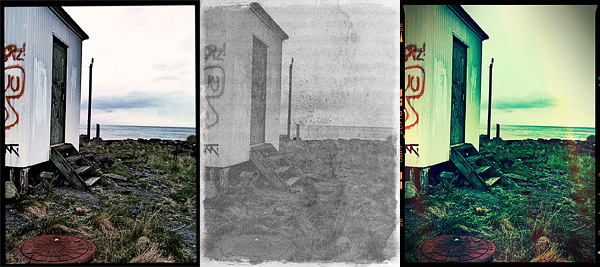
Different results obtained with PhotoForge 2 on iPhone.
Rendering times in PhotoForge2 are perhaps not that great on older iPhone models. Even to simply adjust brightness and contrast takes more than it does with other apps, where rendering is immediate.
What struck me as an atypical choice, to say the least, is the total absence of camera features. Editing a photo can be OK in most cases, but starting your work with a better image helps, too. PhotoForge2 is not exclusively a post-processing app: as a matter of fact, it allows taking photos; yet, developers did not spend time improving the built-in camera. The former PhotoForge was the same, but it definitely was a less complete application. Anyway, this is just a consideration and it won’t affect the general opinion I have of PhotoForge2, in case you’re wondering.
If you are looking for the closest thing to a complete editing photo app currently available for your iDevice, PhotoForge2 is a must-have: the number of features is impressive, making it a very comprehensive app, especially for iPhone — there are just a few others options, especially on iPad/iPad 2. It must be said though that the price of PhotoForge2, in-app expansions excluded, will be a turnoff for more than a few users, I am sure.
PhotoForge2 is on sale: you can get it now at the special price of $2.99.
On May 19, 2011 — which means in just a few more days — PhotoForge2 will hit the App Store.
PhotoForge2 is described as an upgrade from the previous photography app PhotoForge. PhotoForge2 will be a universal app, available only to iDevices running iOS 4.2 or later. Developers affirm that the new PhotoForge2 is not a mere upgrade from PhotoForge. The app was thoroughly re-designed and renovated. Since, due to App Store regulations, no actual upgrade for previous PhotoForge users is possible, in the first 24 hours the app will be on sale at $0.99 (€0.79/£0.59). After that, it will still be possible to purchase it at the special price of $2.99 for the rest of the month of May.
GhostBird Software released a video preview: enjoy this sneak peek!



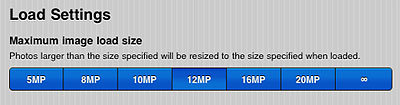 It’s possible to edit maximum image loading size from in-app settings (PhotoForge logo -> Settings -> Load Settings).


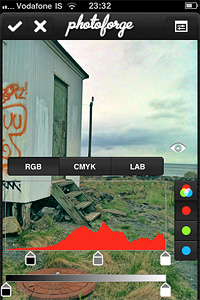
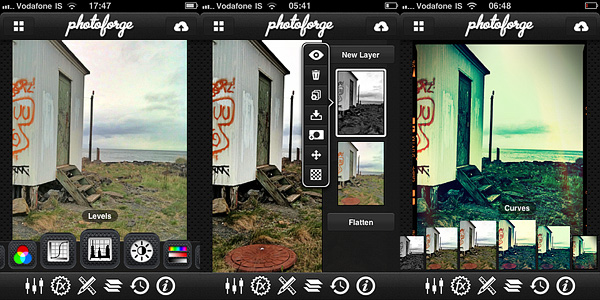 Adjustments includes a series of instruments that affect your photo at its core: Curves, Channel Mixer, Levels, Brightness/Contrast, Exposure, White Balance, Noise Reduction, Sharpen, etc. These are the tools you will be using the most if you’re used to work with full-fledged photo editing software.