For the rest of the weekend, and for the weekend only, Halftone will be free in the App Store. If you like the idea of spicing up your images and you are into the comics style, then this is the right occasion to try Juicy Bits’ app — if you haven’t done so already!
Halftone turns your photos into single panel comics: set the right halftone style, choose one among the available templates and add dialogue and stickers. Halftone comes with several extra items, such as paper textures, colored stamps, caption and speech bubble styles, which you can change and fit to your photos.
Halftone is a universal app and fully compatible with iPhone, iPod Touch and iPad.
Halftone 1.6.3 is now available in the App Store. With this update, Halftone improves its overall stability. Developers at Juicy Bits took user feedback seriously enough to fulfill a few requests to enhance performance and usability of their iPhone/iPad comic panel creator.
New in version 1.6.3 of Halftone is the ‘Image Cropping‘ option, which can be switched on and off from Halftone’s settings. Cropping enables applying a square format to images loaded into the work area. Not only this gives users more creative possibilities, it also allows interaction with other apps which solely rely on square format, like Instagram.
Note that ‘Image Cropping’ must be activated from the device’s settings, not from in-app settings.
Also new in this release is the larger speech balloon’s tail area. Grabbing the tail of balloons was one of the several issues that caused some difficulty to Halftone users when creating their comic panels. Expanded touch area for balloons‘ tail allows better handling and placement of speech balloons in Halftone.
Lithogram emulates the looks of halftone lithography on iPhone. Kuviz’s app takes its name from the lithography technique, in which a drawing is delineated with wax or other water repellent substance on a smooth surface, like that of a stone (in ancient Greek, the word lithos means stone) or of a metal plate. After proper treatment, ink spread on the surface will only adhere to the water repellent substance, which forms the positive part of the image. By pressing the inked surface on paper sheets, a series of prints can be obtained. Lithography was for a long time one of the most widely used printing techniques.
Main Features
Up to 1280×960 (photo), 426×320 (video) pixels resolution;
Video recording available;
6 paper textures;
6 halftone styles;
Send via email.
Appotography Opinion
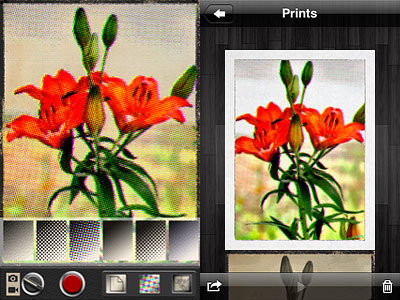
Lithogram allows both photo and video taking. The app uses a a real-time preview to let users see how effects and textures affect what the camera is capturing. It’s also possible to load photos from the Camera Roll, by tapping on the small picture icon appearing at the top of the screen. Saved photos and videos are stored in the Prints gallery. From there, you can delete, save to Camera Roll or email photos and videos.
There are in total 6 paper textures and 6 halftone styles to choose from. Halftone, which includes both color and monochrome effects, applies different patterns (dots, diamonds, crosshatch and lines) to still images and videos. Papers not only add texture and, in a few instances, a border, but also color presets for giving different tints to monochrome effects.
The effects, however not many, are nicely done, especially if you look at the edited photos at their actual resolution. No significant detail is lost. The effects work best on images with good contrast and predominant subjects, like close-up shots.
Different combinations of textures and halftones.
There is a problem when sending images created with Lithogram via email directly from within the app: the files are not read as images but as videos. It’s not a big deal, honestly, as you can ignore the fact the computer tries to open them using Quick Time by default. Still, it might be confusing. If you save to Camera Roll and email the images from there, nothing weird happens.
The greatest problem with Lithogram is the saving resolution. The maximum allowed for still images is 1280×960 pixels, while for videos it’s a very disappointing 426×320 pixels. Photos loaded from your device are saved at the same resolution of those taken with Lithogram’s built-in camera, so beware. This is partly justified by the real-time feature. However, we know that other apps like Lumière use the real-time quite successfully even with high resolution saving. Given this is version 1.0 of Kuviz’s app, I am confident improvements will be made with future updates.
Lithogram is currently on sale and downloadable at the special price of $0.99 (€0.79/£0.69)!
In the occasion of the the celebrations for the 4th of July, a selection of MacPhun’s photo apps is currently available for free, for a limited time. This special offer is valid for Silent Film Director, Cartoonatic, Doodle Cam and Art Camera and it will be running until July the 4th.
FX Photo Studio and FX Photo Studio HD are also on sale, both at the special price of $0.99 for a few days: a good occasion to check them out!
Other offers valid through the 4th of July: Halftone ($0.99 -50%) and PocketBooth HD ($0.99 -80%)
At users request, Halftone is now a universal app! Thanks to the release of version 1.6, you will be able to fully enjoy your single-panel comics creator also on iPad!
Version 1.6 of Halftone contains a few extras:
Six more paper styles!
Three more stamps!
Other changes include ability to turn off the intro screen and other various bug fixes.
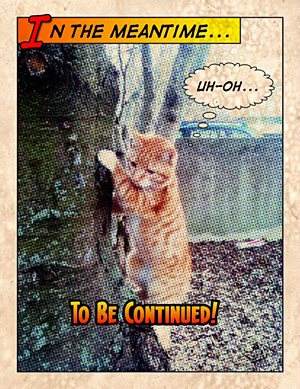
It would be nice once in a while to have characters in your photos talk like in comic strips, or if you could easily add captions to display date and time in a groovy style. Process your photos with Halftone by Juicy Bits to make them look as if they were single-panel comics.
Halftone is a graphic technique that uses the optical illusion produced by a series of dots varying in density, color and size, to suggest infinite range of tones. Halftone app for iPhone simulates effects produced by the halftone technique on your photos.
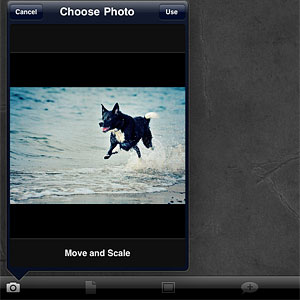
After launching Halftone, you decide to take a photo with the built-in camera or you load one from your iDevice. To process your image, you have a series of options. You can add a stressed, aged feel with paper textures. Then you can pick a layout among those available, to add one or more captions. Captions can be custom or you can simply let the app add date and credits. The next thing you can do is adding speech balloons, choosing one of the available styles (classic, square and round borders, thought, scream) and stickers. Both balloons and stickers can be customized a little: it’s possible to enlarge or shrink and to rotate them by finger pinching.
Controls are not as smooth and responsive as with other apps and personally I was frustrated at some point, because if you you are not careful you might end up having to deal with multiple useless stickers instead of just one, when all you wanted to do was rotating the first slightly.
When you are done, you can send the image via email, print it, share on Twitter and Facebook, or you can simply save it to your Camera Roll.
The effects, if applied wisely to photos that lend themselves to be turned into comics, can result in a few hours of amusement. Nevertheless, the overall lack of flexibility and variety remains a problem: you have partly customizable stickers, fonts, textures and more, but results are not diverse enough to grant Halftone great longevity. Although I am fully aware that talking about longevity when it’s about something that an iPhone user can get for $0.99 perhaps doesn’t make much sense.


 Halftone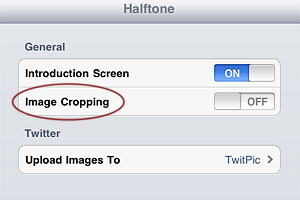
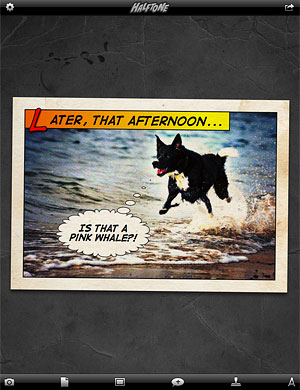 Also new in this release is the larger speech balloon’s tail area. Grabbing the tail of balloons was one of the several issues that caused some difficulty to Halftone users when creating their comic panels. Expanded touch area for balloons‘ tail allows better handling and placement of speech balloons in Halftone.
 There are in total 6 paper textures and 6 halftone styles to choose from. Halftone, which includes both color and monochrome effects, applies different patterns (dots, diamonds, crosshatch and lines) to still images and videos. Papers not only add texture and, in a few instances, a border, but also color presets for giving different tints to monochrome effects.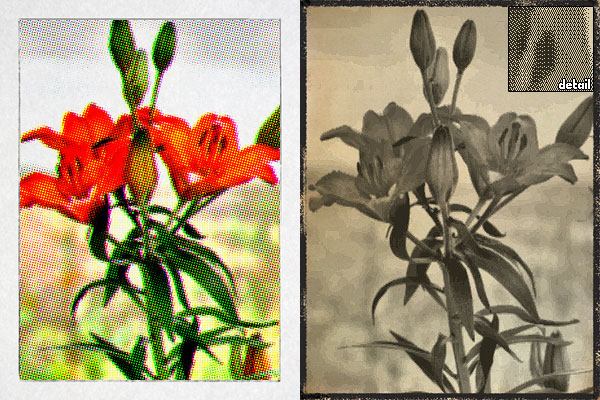

 Other changes include ability to turn off the intro screen and other various bug fixes.
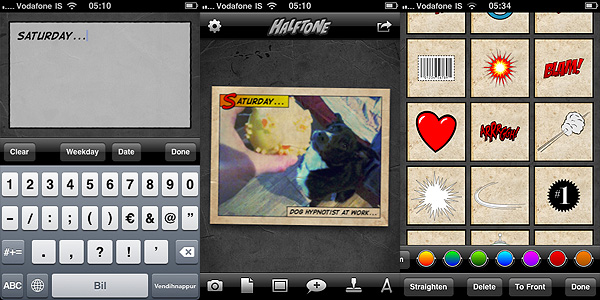 Controls are not as smooth and responsive as with other apps and personally I was frustrated at some point, because if you you are not careful you might end up having to deal with multiple useless stickers instead of just one, when all you wanted to do was rotating the first slightly.
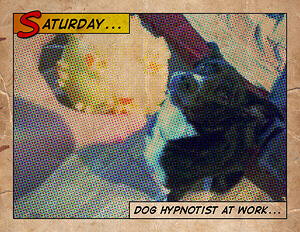 The effects, if applied wisely to photos that lend themselves to be turned into comics, can result in a few hours of amusement. Nevertheless, the overall lack of flexibility and variety remains a problem: you have partly customizable stickers, fonts, textures and more, but results are not diverse enough to grant Halftone great longevity. Although I am fully aware that talking about longevity when it’s about something that an iPhone user can get for $0.99 perhaps doesn’t make much sense.