Hipstamatic 220 presents: Family Album – Share Your Adventures in Hipstaland.
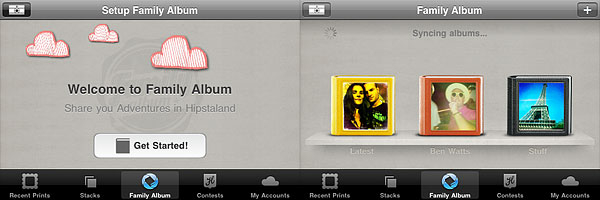
Now you can create your own personalized albums and share them with friends and other Hipstamatic users. As soon as your prints are developed, you can select the “Send to Family Album” option to share them via this new feature.
There are three types of available albums that you can choose from:
- Shared Album‘s purpose is making it easier to share and have instant access to Hipstaprints of your friends and contacts. For example, you can create more shared albums to share content with different people.
- In Photo Album you can collect Hipstaprints you like: they can be your own, your friends’ and other Hipstamatic users’ as well.
- Magic Album can contain all sort of content, relating to people, things and places.
For each album type, you can set a name, add tags and specify other details, like a defined period of time and shooting location, so that you can keep track of everything and have your shared prints or prints you like neatly organized.
Through the main Family Album screen, you can browse all your shared prints, together with featured albums and latest uploads. Albums you create can be deleted at any time, while prints you have shared are not deleted with albums.
Lastly, you can now upload your prints to Twitter, Facebook and Tumblr at the same time.


 The new addition to Hipstamatic’s lens collection was done in collaboration with photographer