Instagram Backpedals on New TOS

InstagramInstagram has just published an article on their official blog to answer the concerns of users and press about their new TOS – and possibly to stop the movement of people that have been running away from their platform in the past 24 hours. Parts of the TOS will be reworded to be more clear and others will be removed entirely from the TOS. In particular,

The language we proposed also raised question about whether your photos can be part of an advertisement. We do not have plans for anything like this and because of that we’re going to remove the language that raised the question.

Continue reading “Instagram Backpedals on New TOS”

Goodbye Instagram!

InstagramNo, Instagram is far from shutting down, but many loyal users have been deleting their accounts in the course of the last hours — or are planning to, in the course of the next days. The Instagram community is in tumult over the newly released Terms Of Services that will become effective starting January 16, 2013.

What are the new Terms about?

It seems we are talking a lot about Instagram these days, but this time it will not be exactly a jolly little discussion about add-ons and improvements. The controversial points in the the new Terms are #1 an #2 of the “Proprietary Rights in Content on Instagram” section. They read as follows: Continue reading “Goodbye Instagram!”

Instagram’s Willow Tried & Tested

InstagramI am one of these Instagram users that was terribly shocked by changes made to the app’s original filters after the 2.0 makeover. Even though I could see the app was overall improved and I liked the new features, as a poster I was affected by the changes. The fact is for a while most of my Instagram photos were processed using the now forgotten filter Gotham. Yes, Gotham… While I really liked Gotham, I didn’t really appreciate the other in-app black and white effect, Inkwell, even if I used it as well — just not as often. Anyway, after said improvements, I almost completely stopped using Instagram to process photos to turn them into monochrome, because Inkwell was just a characterless joke.

Well, it turns out Instagram tried to make up for its embarrasing lack of monochrome by adding Willow. The app was updated a couple of days ago, so by now many of you probably know how to complement their photos using this new effect better than I do.

Instagram Willow Continue reading “Instagram’s Willow Tried & Tested”

Instagram 3.0 Presents Maps

InstagramThe release of Instagram 3.0.0 introduces the new photo map feature. Every user can now share pictures based on their location by enabling the feature at the moment of posting them. Previously taken photos can be selected and added to the map as well and others can browse them accordingly. Previously Instagram users were allowed to add a location to their photos, but there was no proper visualization of all the geolocated photos according to the given location. Now photos are arranged on the map and they can be accessed and browsed easily from the user profile. All photos added to each user’s map can be individually removed from it at any time. Users switching to the new map feature are advised against adding to it photos whose location they don’t wish to be exposed. Continue reading “Instagram 3.0 Presents Maps”

Instagram + OpenPhoto

If you had previously requested an invite through their web page, you already know that the folks at OpenPhoto launched the Instagram image importer. Thanks to this new feature, you do not have to worry anymore about not being able to preserve your Instagram photos. The OpenPhoto importer uses your service of choice (Dropbox or Amazon S3) to store your precious images. You can thus fully enjoy them as you prefer, also outside Instagram. Note that OpenPhoto has also similar features for photos that users shared on other networks, such as Flickr, Facebook and Picasa.

OpenPhoto for Instagram
Continue reading “Instagram + OpenPhoto”

Revamped Instagram 2.0 Hits the App Store

Instagram 2.0Numbers speak clearly: over 9 million people worldwide are using Instagram to take, process and share their photos. These figures are mind-boggling and they speak better than anything else about the actual popularity of this app. The success of Instagram is explicable with the fact the Burbn’s app succeeded in attracting both photo enthusiast and, at the same time, people that had never considered having fun with a camera before. Instagram was, and still is, a common ground for users with very different expectations and requirements.

I got Instagram on day one of its release: when was it? Last October, I think? It feels ages ago since I snapped the first in-app picture and applied the first filter (I think my very first try was the Lomo-fi) and, although I am far from being a regular user (you will find me as @psychopu there), I always enjoyed checking out every update conjured by the developers at Burbn. Yes, even when there were reasons for complaining.

I never denied there was something in Instagram’s way of dealing with my photography needs that left me a little disappointed. Namely the issue with Instagram’s output resolution. However good the filters (you gotta love the timeless and subdued Earlybird, just to name one), that problem always lurked at the back of my mind when using the app to take photos.

Instagram 2.0.0 was released earlier today and the new version adds a lot to what Instagram already offered. Improvements include: new filters, new editing tools and, most importantly, new save resolution. Here are all the details.

  • Full resolution save – One of the problems that prevented users from truly enjoying the app was the final resolution of saved photos. Now Instagram delivers  filtered photos in high resolution to the device Camera Roll.
  • Instant live effects – Both filters and tilt-shift can be seen in real time before applying them. As I was testing this new feature today on my iPhone, Instagram live view seemed to work smoothly and I could not find any problem with it.
  • New filters – Four new filters are an addition that Instagram fans will appreciate greatly. The new filters are Valencia, Amaro, Rise and Hudson. I am adding a preview for all these new effects — definitely better than writing a useless description.
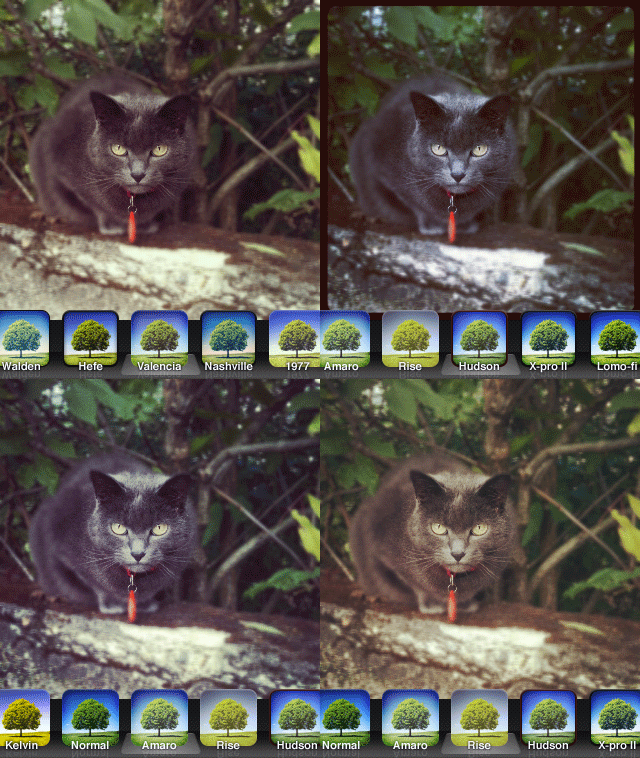
    Instagram 2.0 new filtersOn a perhaps irrelevant note, some of the older filters appear to have undergone significant changes in the new version of Instagram as well.
  • Turn off borders – Borders and effects can be applied separately, as it’s finally possible to disable borders in photos when a filter is chosen.
  • Rotate – A rotate tool has been added. Users can now rotate photos by 90 degrees after taking them.
  • New icon – Instagram 2.0.0 has a new icon — nothing dramatically different from the previous; just a little sleeker, as you can see above.
  • Other enhancements – Improved viewing feed support; faster feed load times.

Given the improvements in version 2.0, I feel like reviewing our previous score for Instagram. With the added extras, but most of all with the long-awaited high resolution, the app now deserves a full score.

Overall

Name: Instagram
Developer: Burbn, Inc.
Compatibility: iPhone, iPod Touch, iPad. iOS 4.2.1 or later.
Price: free!
Vote: 5/5


Instagram - Burbn, Inc.

Instagram 1.8.5 Update

Instagram for iPhoneInstagram 1.8.5 hit the App Store a few hours ago. New features are awaiting fans of the popular photo sharing app by Burbn in this latest release, so check them out.

What’s new in Instagram 1.8.5?

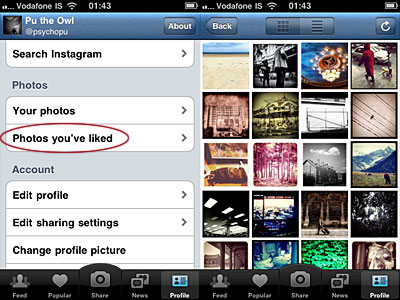
Instagram users now have a summary of photos they have liked, which is accessible from the profile menu panel. Before, faved photos were almost useless to whomever had liked them. Now browsing your liked photos is very easy.

Instagram for iPhone
Browse photos you have liked in Instagram.

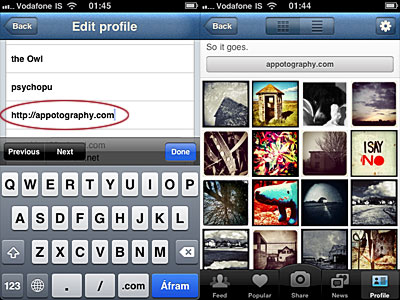
In version 1.8.5 is also possible to add a link to a personal website. To do so, simply input the link in the newly added profile field. A button will appear just above your photos thumbnails in your personal profile. By tapping on it, Safari will be launched and visitors will be redirected to your site.

Instagram for iPhone
Add custom website link to Instagram profile.

The last addition of the latest release is the hashtags auto-completion, which makes tagging Instagram entries much smoother.

5+ Free Ways To Enjoy Instagram Out Of Your iPhone

That Instagram is one of the biggest phenomenons in social networking that exploded in the last months isn’t great news. Evidence of the popularity of Burbn’s photo sharing app is the increasing number of third party services based on Instagram.

Yes, Instagram is undoubtedly connected to the iPhone, but this doesn’t mean you shouldn’t have the pleasure to make use of it also in other forms and on other platforms. Here’s a list — or rather, a selection — of services that will let you have fun with Instagram for free on your computer, iPad, and so on.

With Your Browser

  • Statigram

    Statigram
    Statigram
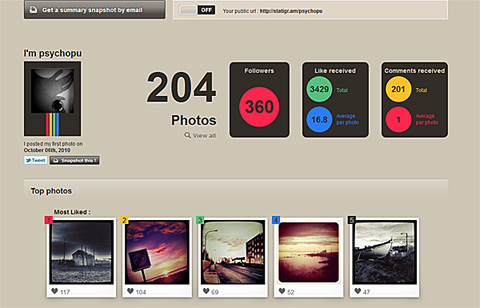
  • Statigram gives you access to all sorts of interesting stats and information about your Instagram account: from your most popular photos to your most used filters, from how you interact with your contacts to many other aspects concerning your activity.

  • Inkstagram
    Inkstagram
    Inkstagram

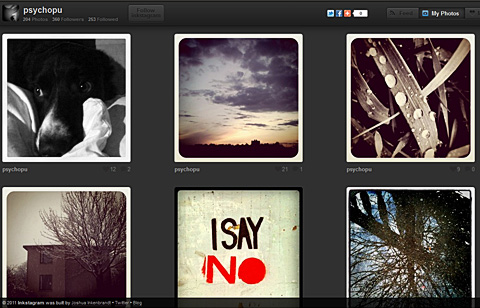
    Inkstagram is a web interface for Instagram. Connecting your Instagram account to Inkstagram, you will be able to browse photos in the popular category, from your contacts, manage your likes, comments on posts by other members and so on.

… And On Your iPad

  • Flipboard
    Flipboard
    Flipboard

    Flipboard was not specifically designed for Instagram but it does feature Instagram integration. Flipboard will let you browse in a visually appealing magazine-style manner content from Instagram, Facebook, Twitter, Flickr and much more, all at the same time.

… And Yet More.

  • Wallgram
    Wallgram
    Wallgram

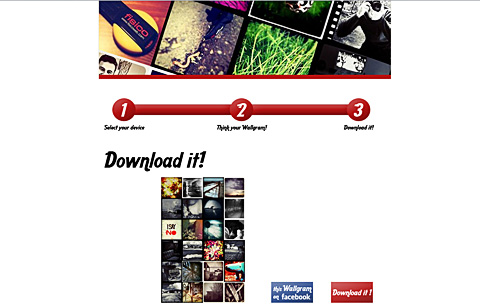
    With Wallgram you can generate and download wallpapers for your iPhone and iPad — computer and poster options coming soon — using either your recent Instagram photos or recent photos from your feed. You can also choose recent popular entries.

  • InstaBam
    Instabam
    Instabam

    Instabam lets you find Instagram public photos based on your location. You can define a distance radius for photos to be indexed. Instabam is also available on iPhone.

  • Instagram Meetups
    Instagram Meetups
    Instagram Meetups

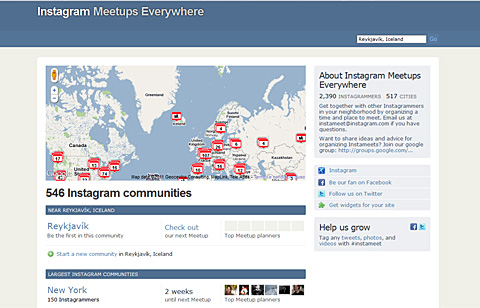
    For the most social types out there. Join local Instagram communities, organize and take part in meetups around your area.

What are your favorites? Let us know!

Instagram Updated to 1.8

Instagram 1.8 was released in the App Store a few hours ago. This latest version of the free photo sharing and micro-blogging app by Burbn presents some interesting improvements that will make your experience with Instagram smoother.

Here is what’s new:

  • Added double-tap on photos to ‘Like’ them;
  • Added username auto-completion feature;
  • Newly introduced interactive comment screen;
  • Improvements to reliability and speed.
Instagram
Double-tap on photos to 'Like' them.

Enhancements in this version mainly involve the social side of the app and will especially improve the interaction among users.

Updates: Instagram, PhotoToolbox & More

Instagram 1.7 is out. Here are all the changes and improvements in the latest release:

  • Grid View for Profile Pages;
  • Optional Bio field in personal profiles;
  • Manage which push notifications from Edit Profile screen;
  • Import profile picture from Facebook and Twitter;
  • Improved stability on iOS 4.1;
  • Improved speed on older phones;
  • Various bug fixes.
Instagram for iPhone
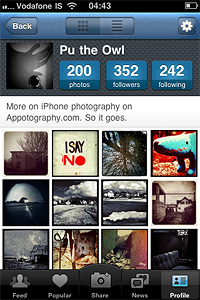
Grid view in Instagram profiles.

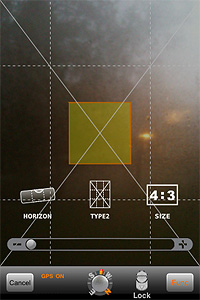
With version 2.6.2, PhotoToolbox adds a bunch of new functionalities to the built-in camera for easier shooting.

The newly added features are:

  • 6x digital zoom;
  • Horizontal indicator on/off;
  • Three grid lines overlay;
  • Flash on/off;
  • Switch front/rear camera.
PhotoToolbox for iPhone
New shooting tools in PhotoToolbox.

Other recent updates: Gorillacam (v. 1.2.2), XProcess (v. 1.1.2).