Qbro 3.3 by Jellybus is now available in the App Store. The latest release, in more detail:
Added auto-saving of original photos to Camera Roll;
Added 3 new filter packs;
Optimization for iPhone3G;
Added support for uploading to RenRen.com;
Improved SNS sharing.
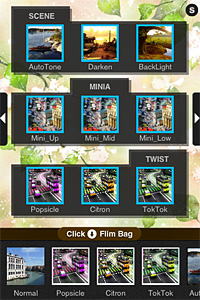
The filter packs added in version 3.3 contain each three filters, for a total of nine new filters for your iPhone photography.
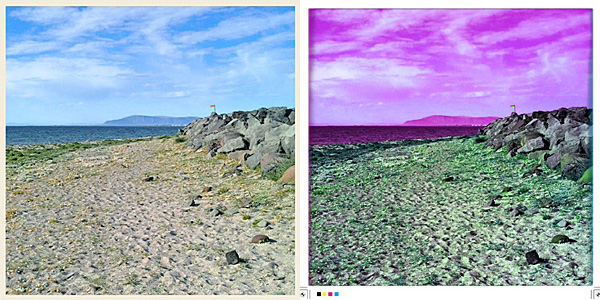
Scene Pack (filters included: AutoTone, Darken, Backlight) simply adjusts exposure; MiniA pack (filters included: Mini Up, Mini Mid, Mini Low) simulates tiltishift effects for creating miniature photos; Twist pack (filters included: Popsicle, Citron, TokTok) applies extreme color shifts to images.
BackLight and TokTok filters.
Unfortunately, the overall value of qbro hasn’t changed since our previous review. Developers seem to prefer to add new features and gimmicks, rather than taking care of actual issues of their app.
Apps whose fame is not sign of actual value? qbro app for iPhone by JellyBus is definitely one of them. Especially in South Korea, this app appears to be very popular. However, I have tested the app and I was very disappointed. Both for ease of use and in the image quality department, qbro failed to convince me that its popularity is actually deserved. I’m going to explain why in detail.
Main Features
Full resolution available;
Big shutter button on/off;
Timer;
Grid on/off;
Front camera reverse on/off;
Square format;
50+ filters (+12 available with in-app purchase);
25 borders;
Hall of Fame;
Send via email or share on Twitter, Facebook, Flickr, Tumblr, Cyworld, me2day.
Appotography Opinion
qbro allows users to take photos with built-in camera or to edit previously taken pictures. The camera has a few tools to help taking better shots, like a big shutter button, reference grid and timer.
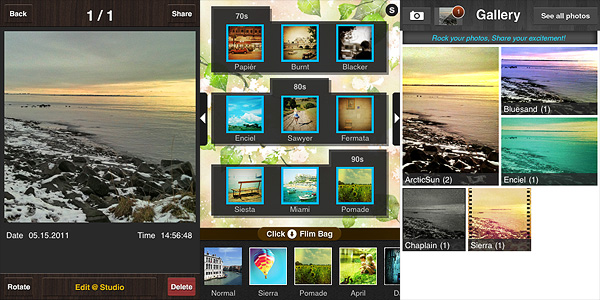
To process the image, there are about fifty filters coming with the initial purchase, but it’s possible to add a dozen more (each pack is $0.99 and contains three filters). It’s possible to select filters from the bottom scrolling menu bar. By tapping on the Film Bag button, you access the whole filter library. You can drag filters to add or remove them from the bottom bar, thus creating a selection of your favorite filters which you can access instantly. Tapping on the top slider icon, you enable the filter intensity adjustment and you also have access to the borders library. Tapping on your image will show you the original at all times for comparison. After you are done adding your effect of choice, you can save the image to qbro’s gallery or you can share it. From the gallery, you can access saved images and edit them again. Photos are arranged in stacks according to filters used, but you can also browse them individually.
Commands and interface in qbro are somewhat confusing for the beginner. Some examples: in the Camera Film Bag you have a preview of combined filters and borders as if they were presets ready to be used, but when you add filters to the bottom bar, borders are not included with them: you have to add borders separately. If by mistake you add a border and you want to get rid of it, the process is not simple. The original language of the app is Korean: some messages do not appear to be translated. Although this is not a great issue, it’s still annoying.
The developer lists in the app description page some features as “unique”, but they’re actually not. I’m not sure what the developer considers as meaning of the term Unique, but according to the English dictionary:
Unique
adjective
1. existing as the only one or as the sole example; single; solitary in type or characteristics.
2. having no like or equal; unparalleled; incomparable.
3. limited in occurrence to a given class, situation, or area.
4. limited to a single outcome or result; without alternative possibilities.
5. not typical; unusual.
As I see it, none of these can fit the developer’s notion of unique. In fact, seeing edited photos in real time is a pretty common feature in many photography apps and so is selecting and equipping only your favorite filters for easier use. The same goes for many other features labeled as such in qbro. The only unusual feature I have seen in this app — but correct me if I am wrong: some other apps may have it as well — is the front camera reverse, which may be original but it is also kinda pointless, in my opinion. Promoting an app with such nonsensical pretension of uniqueness is quite irritating.
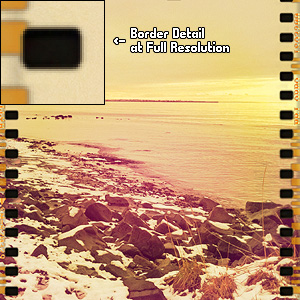
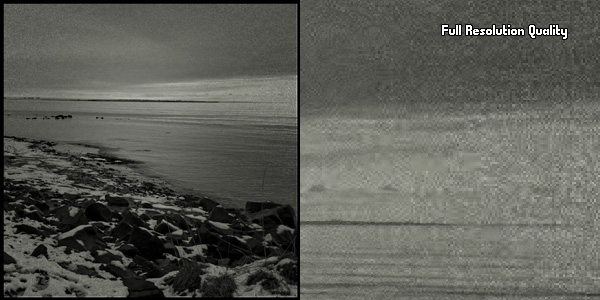
Blurry borders clearly visible at higher resolutions.
Last but not least: the output quality of the images. The filters can actually utterly ruin your original photos: especially at higher resolution the quality is dreadful for some effects and borders. At smaller resolutions the quality still holds, somehow, but issues are definitely noticeable on larger images. For this same reason, the additional filters are not worth purchasing.
Serious quality issues on large images.
I wouldn’t recommend to get this app in its current version. Hopefully improvements to image quality will be made with upcoming releases.
Overall
Name: qbro
Developer: JellyBus Inc.
Compatibility: iPhone, iPod Touch (4th), iPad 2. iOS 4.1 or later.
Price: £0.59||$0.99||€0.79
Vote: 1/5