
Top Camera is a do-it-all camera app that can both take photos and record videos and allows sharing and, to a degree, editing. In occasion of its recent launch, Top Camera is currently on sale for 0.99/€0.79/£0.69 in the App Store.
I have tested this photo application thoroughly and, although I recognize there are good ideas in it, I found it has too many issues to be a truly useful replacement for iPhone’s native camera app.
Main Features
- Full resolution available;
- Video recording;
- Self-timer;
- Stabilizer;
- Grid on/off;
- Virtual horizon on/off;
- 5x digital zoom;
- Focus and exposure setting;
- White balance lock;
- 4 capturing modes;
- Crop and rotate;
- 36 effects;
- 18 borders;
- Adjust contrast, brightness, saturation;
- In-app guide;
- Send photos via email and share on Facebook, Twitter, Flickr and Dropbox.
Appotography Opinion
To help the user in the task of taking photos and videos, Top Camera comes with individually adjustable focus and exposure, virtual horizon and four capturing modes: Normal, HDR, Burst and Slow Shutter. The Normal mode just takes photos normally; in HDR mode, both auto and manual, the app takes three shots and merges them to create a high dynamic range image; Slow Shutter also merges more shots together to simulate long exposure effects; the Burst mode takes several shots in sequence while pressing the shutter button just once. To improve the performance of each of these modes in difficult conditions, the user can enable a self-timer and a stabilizing feature.
 All videos and photos taken in-app are automatically stored in the app’s Main Folder. From here they can be viewed, saved, shared, edited (with the exception of videos) and moved to other folders. Users can create and title new folders, importing and moving photos and videos freely among them. The folders feature is one of the best elements in Top Camera, as it permits to keep photos and videos neatly arranged.
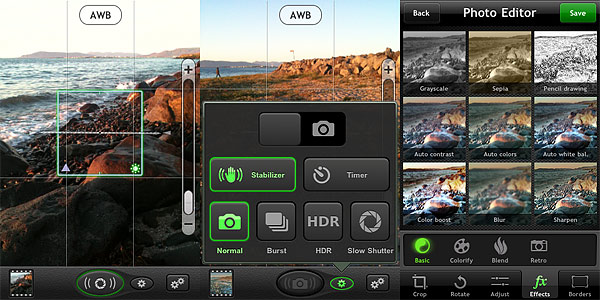 The Photo Editor offers crop, rotate, adjust brightness, contrast, saturation and improve definition tools. It also includes effects and borders. Effects — 36 in all — range from sepia to lomo-like filters. Borders come in two different styles, basic and vignette. Most adjustments and effects can be applied simply using sliders to regulate their intensity. Reverting to the original image is always possible.
Top Camera comes with many features and options and, in this regard, it would represent and interesting choice in the App Store’s photography section. However, Top Camera’s workflow feels somewhat clunky, the output quality of images is poor and some of the features of this camera lack refinement and thus are not comparable with equivalent features of other apps. Just to make some examples: the HDR feature, since it lacks any tweaking possibility after the shots are taken, is not always fully usable and it tends to produce severe halo artifacts; the edit mode counts several adjustments, effects and borders, but most are quite mediocre and not varied enough — if anything, it looks like they’re just there to give users additional content. Another problem I have encountered using Top Camera is the app sometimes disables the auto-lock feature of the iPhone, which obviously causes it to drain more battery than necessary. Finally, the in-app guide is not very comprehensive and helpful.
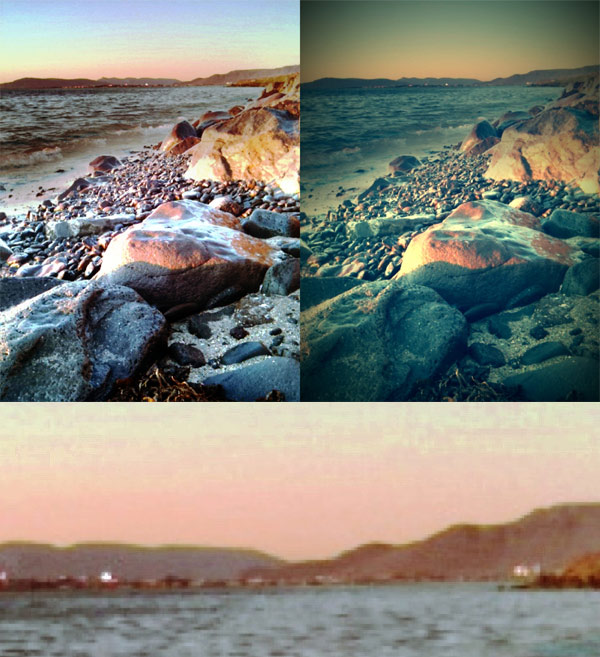
On average, Top Camera will perhaps satisfy a few of those users looking for a general replacement for the native camera app with some extras that other multi-purpose camera lack. However, for its many issues and especially given the overall quality of images produced with Top Camera, I don’t feel like recommending it.
Overall
Name: Top Camera
Developer: Lucky Clan
Compatibility: iPhone, iPod Touch 4th, iPad 2. iOS 3.1 or later.
Price: £1.99||$2.99||€2.39
Vote: 2/5
