Pinhole HD is now version 1.1. Apart from several bug fixes, new features come with the latest release of the successor of Pinhole Camera for iPhone. Here is what’s new in more detail.
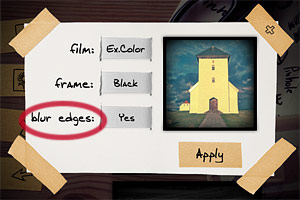
New edges effect – The all new blur edges effect was added. Blur edges apply slight blur around the borders of your image, for a more believable analog pinhole look. To make space to the new effect, lens distortion is not available anymore. The blurring option can be enabled by default from the device settings.
Revamped color effects – Saturation in color film effects was changed in version 1.1. Film effects available however are still Color and Expired Color, as in the original release.
Autosave – An autosave to library option was added, allowing to save images automatically to the Camera Roll. Autosave can be enabled from the device settings.
Double exposure preview – It’s now possible to have a live preview of the double exposure effect directly in the app’s viewfinder before taking both photos.
Tap buttons – Before, it was only possible to swipe over buttons to change resolution, enable double exposure and change effects. Now you can either tap or swipe for achieving the same.
New info screen – Tapping on the icon marked with the letter “i”, you access the app information.
Save settings when app starts/ends – Pinhole HD now remembers all the previous settings when you close and open the app again. You don’t have to start over and change settings every time, unless you want to.
Are you looking for more information on this app? Our review of Pinhole HD is here.
Before the HD came, there once was a sweet little iPhone app called Pinhole Camera. Pinhole Camera brought the feeling of original pinholes, with their attractive lo-fi look, to Apple devices. In spite of the good idea and even if the app in general looked very nice and polished, there were some serious resolution limitations in Pinhole Camera that prevented many users from enjoying it as they wished. Pinhole HD is a new and improved version of Pinhole Camera: the pinhole camera app for iPhone now offers bigger output resoulution and more features.
Main Features
Full resolution available;
Square format;
Double exposure on/off;
Three different films (color, expired color, b&w);
3 frame styles;
Set lens distortion;
Share the photos via Facebook or email.
Appotography Opinion
Pinhole HD works almost exactly like Pinhole Camera; the only difference is that you have more options and a higher resolution available. The UI is also the same: if you are used to the previous Pinhole app, you won’t have any problem using the HD version. Pinhole HD features three types of film: color, expired color and black and white. From the Film menu, you can choose your desired effect before taking pictures. You can turn on and off the double exposure with a swiping motion of your finger over the slide button located on the top right of the main screen. Using the button on top left of the screen, resolution (small, medium and high) can be set in the same way. If you decide to take a double exposure, you are requested to tap twice on the shutter button. You do not have time limitations, but you cannot change film from the first exposure to the next. Development takes place in background, so you can keep on shooting while your photos are being processed. All the photos you take are saved to the Gallery, from which in any moment you can decide to make basic adjustments, like changing film type and frame, enabling lens distortion (low or high, to simulate a wide angle effect) and balancing blending in double exposures. Default values for these parameters can be changed from iPhone’s Settings. Once you are satisfied with your image, you can save it to Camera Roll, send it to Facebook or share it with your email contacts. In the new HD version, it’s possible to select more photos at once to delete, share or save them with a single tap. Differently from Pinhole Camera, Pinhole HD lets you process photos stored in the Camera Roll, not only those taken with the built-in camera.
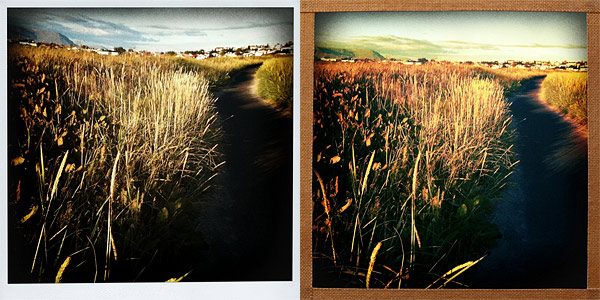
Color, white frame, low distortion (left); expired color, tape frame, no distortion (right).
Processing times in Pinhole HD are slower compared to average. Also, please note that when you close Pinhole HD, your settings are always reset. For example, if you pick the higher resolution available and then exit the app, the next time you will open it, the resolution will be set again to a default medium. To avoid surprises, be sure to check your settings every time you open the app.
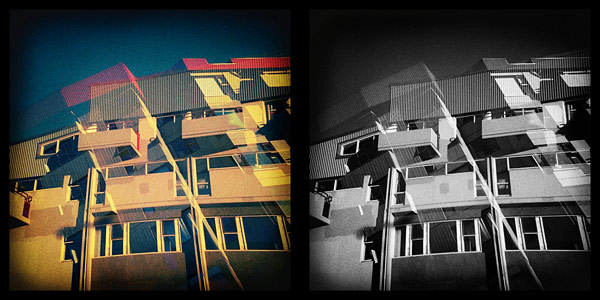
Double exposure in expired color and b&w.
Pinhole HD is a more solid and better-rounded edition of the former Pinhole Camera app for iPhone. Effects are as good as in the previous version; the idea behind the app, original but straightforward, is still refreshingly pleasing. All in all, Pinhole HD is very easy and fun to use.
Overall
Name: Pinhole HD
Developer: Martin Kosdy
Compatibility: iPhone, iPod Touch (4th), iPad 2. iOS 4.1 or later.
Price: £0.59||$0.99||€0.79
Vote: 4/5


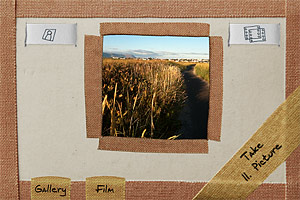 Pinhole HD features three types of film: color, expired color and black and white. From the Film menu, you can choose your desired effect before taking pictures. You can turn on and off the double exposure with a swiping motion of your finger over the slide button located on the top right of the main screen. Using the button on top left of the screen, resolution (small, medium and high) can be set in the same way. If you decide to take a double exposure, you are requested to tap twice on the shutter button. You do not have time limitations, but you cannot change film from the first exposure to the next. Development takes place in background, so you can keep on shooting while your photos are being processed.
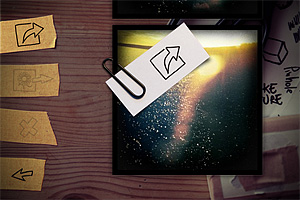 All the photos you take are saved to the Gallery, from which in any moment you can decide to make basic adjustments, like changing film type and frame, enabling lens distortion (low or high, to simulate a wide angle effect) and balancing blending in double exposures. Default values for these parameters can be changed from iPhone’s Settings. Once you are satisfied with your image, you can save it to Camera Roll, send it to Facebook or share it with your email contacts. In the new HD version, it’s possible to select more photos at once to delete, share or save them with a single tap. Differently from Pinhole Camera, Pinhole HD lets you process photos stored in the Camera Roll, not only those taken with the built-in camera.