Starting today and for the whole weekend, King Camera will be on sale in the App Store. Saycheezzz’s do-it-all photo application for iPhone will be available at the special price of $0.99/€0.79/£0.69 (50% off the regular price tag).
King Camera is a multi-purpose app coming with top-notch camera and post processing features, giving the user an overall balanced, comprehensive and easy to use tool for taking and editing photos on the iPhone. If you want to know more, you can read our full review for version 1.0 here. The launch of version 2.0 is approaching and developers revealed it will bring major changes to some of the core features of King Camera, plus new effects and other upgrades. In the meantime, there is more than enough within the current release to have fun with your photos: King Camera’s recent updates greatly improved both the app’s speed and general performance.
The current offer will be valid throughout the weekend.
King Camera 1.02 is out! The latest release of Saycheezzz.com’s app is not only about the new fancy icon. Here are all the changes and improvements in version 1.02:
Optimized thumbnail generation in Photodesk: now 2.5x faster;
Optimized cache system for Quickmatik thumbnails: now up to 20x faster;
Improved access speed to Photodesk when it contains over 10 pages of photos;
Added 90 degree Rotate Tool to Crop/Rotate;
New app icon;
Fixed bug that made photos disappear in Photodesk after app update;
Restored photos that disappeared with update from 1.0 to 1.01;
Fixed metadata and geolocation not showing properly in Photo Info with photos imported photos from Camera Roll.
What does it all mean? Simply that King Camera is faster and smoother than before, both when shooting and when editing. If the previous update (1.01) mostly took care of improving the speed of camera features, the latest release enhances the app’s performance in post-process modes.
On a final note, developers informed their users that a reported bug concerning the White Balance and Exposure lock when recording video is iOS 4.3 related and that Apple seems to have fixed it in iOS 5.
King Camera will be available at the special launch price of $0.99 until the end of June!
King Camera 1.01 is officially in the App Store. With this update, the multi-purpose camera presents enhancements and optimization of various features, including speed in taking photos and frame design. Moreover, the latest update fixes a few reported bugs, so keep on offering your precious feedback to developers to help them to improve King Camera even more.
In detail, here is what you will find in King Camera 1.01.
The revised Faded Memories theme.
Optimized photo shutter speed: now 200% faster;
Optimized app size under 20MB: King Camera can now be downloaded over 3G network;
Optimized video saving speed;
Removed warning message when geolocalization is turned off;
Fixed zoom bug when switching from Stills to Video mode;
Added the 12fps option to TimeLapse/Stop-Motion video recording;
Removed the app’s logo from frame designs featuring it.
More is coming with the next update, so check back for further news! And remember that King Camera is still available for purchase at the special launch price of $0.99!
Recently launched in the App Store, King Camera (for iPhone, iPod Touch, and iPad) promises to become your perfect photo companion. I don’t know if I would speak about perfection, but sure enough, with its impressive array of tools, King Camera doesn’t look like your average newcomer.
Main Features
Full resolution available;
Switch between rear and front camera;
Set focus and exposure separately;
Zoom in/out;
Grid on/off;
Flash on/off;
Big shutter button;
Sound trigger;
Self-timer;
Burst mode;
Anti-shake;
Time lapse;
Video recording;
White balance and exposure lock;
Adjustable contrast, brightness, shadows and highlights;
Adjustable tints and saturation;
Undo/redo;
Crop, flip and rotate;
Adjustable vignetting;
Add simple and styled borders;
45 presets;
15+ textures;
Save custom presets;
EXIF data access;
Extensive video tutorial;
Send via email or share to Facebook, Twitter, Flickr, Dropbox.
Appotography Opinion
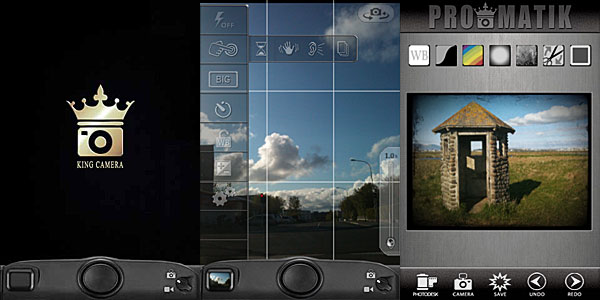
In King Camera, the built-in camera offers a wide range of instruments to help you take photos in the easiest way possible: from individually adjustable focus and exposure to the big shutter button, from stabilizing tools to burst mode, from flash options to white balance and exposure locks. For creating time lapse or stop motion animations, you can enable a dedicated feature.
Once the photo is taken, it is stored directly into the Photo Desk area, the app’s gallery where all photos are neatly organized in stacks and thus easily browsable. You can also load photos from your device. Other than photo taking, King Camera also allows video recording. However, videos taken cannot be edited and processed within the app; unlike photos, they are directly sent to your Camera Roll.
Effects can be applied to photos either in QuickMatik or ProMatik modes. Both modes can be accessed after your photo is stored in the Photo Desk. Photos can be re-edited over and over, but you can always retrieve the original from the Photo Desk. This way, you can keep multiple versions of the same photo and keep on working on the original.
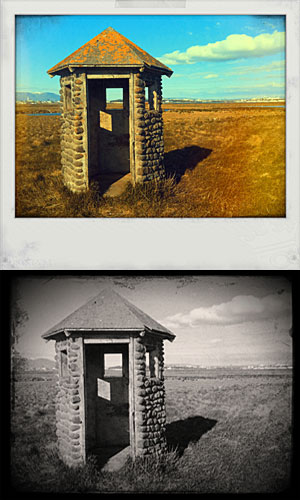
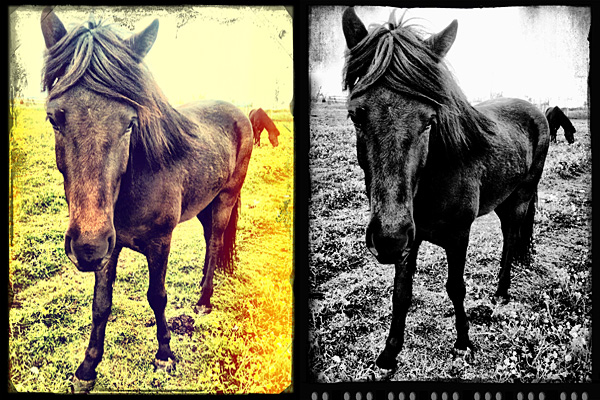
As the name clearly suggests, QuickMatik allows quick — and easy — processing. QuickMatik is basically a collection of preset styles you can use right away without having to tweak. All the included presets are arranged in categories — Color, Monochrome, Grunge and Themes. Style intensity can be adjusted to suit your photo. You can add your own styles by using the ProMatik editing mode.
Styles created using King Camera.
In ProMatik mode, you have more control on individual aspects of post processing. You can adjust several parameters to affect the final look of your image, like brightness and contrast, shadows and highlights, tint and saturation, and more. By playing with sliders, you can fine tune everything as your photo requires. Finally, you can choose to add a border, either in a plain color of your choice or picking one among the available designs. If you particularly like a style you have created and want to use it further, you can save it as a preset. When you are done, your photo is saved to the Photo Desk.
Rather than with Camera+ like it was stated elsewhere, a comparison that inevitably came to mind while testing King Camera is with Camera Genius, another multi-purpose camera featuring very similar tools. However similar these two apps may seem at first, King Camera brings the experience a step further, especially concerning the post processing and photo organizing stages. Rendering and saving times are also very reasonable and the UI, in spite of the many options, remains very accessible.
If you’re looking for a valid replacement to the native iPhone app and also a very comprehensive processing utility, King Camera is a new excellent choice.
In occasion of the app’s launch, King Camera is available at a special price of $0.99 in the App Store for a limited time.
Overall
Name: King Camera
Developer: Saycheezzz.com
Compatibility: iPhone, iPod Touch, iPad. iOS 4.2 or later.
Price: £1.79||$2.99||€2.39
Vote: 5/5

 The launch of version 2.0 is approaching and developers revealed it will bring major changes to some of the core features of King Camera, plus new effects and other upgrades. In the meantime, there is more than enough within the current release to have fun with your photos: King Camera’s recent updates greatly improved both the app’s speed and general performance.

 On a final note, developers informed their users that a reported bug concerning the White Balance and Exposure lock when recording video is iOS 4.3 related and that Apple seems to have fixed it in iOS 5.

 Once the photo is taken, it is stored directly into the Photo Desk area, the app’s gallery where all photos are neatly organized in stacks and thus easily browsable. You can also load photos from your device. Other than photo taking, King Camera also allows video recording. However, videos taken cannot be edited and processed within the app; unlike photos, they are directly sent to your Camera Roll.