Fusioncam Review

Fusioncam is a new app by Stepcase, developers of Actioncam, Phototreats, Darkroom Pro and Labelbox. Fusioncam is Stepcase’s answer on iPhone to classic toy cameras and thus it represents an expansion of their lineup.

Main Features

  • Full resolution available;
  • Square format;
  • Multiple exposure on/off;
  • Flash on/off;
  • Three filters available;
  • Share on Facebook, Twitter, Tumblr, Sina Weibo, Posterous & Flickr (requires Steply account).

Appotography Opinion

Fusioncam by Stepcase for iPhone doesn’t allow loading previously taken photos: you can only use the built-in camera. You can select one among the three available filters — cross process, black and white and a lomoish red. To take a normal photo with filter applied, you simply tap on the shutter button. All photos are stored in the app’s gallery and are browsable as a continuous film roll. From the gallery, you can save or share your creations on several social networks via the Steply community — which means you need to register an account to use the sharing options.
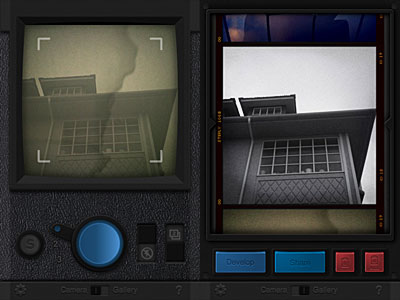
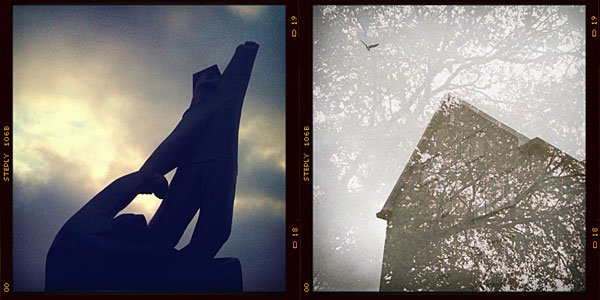
Fusioncam for iPhone by StepcaseTo activate the multi-exposure feature, you pull the switch and take another shot which will be superimposed over the previous photo. Multiple exposure in Fusioncam works only with the last photo taken, not with any photo in your gallery. The idea, I assume, is to make this feature work as closely as possible to multiple exposures obtained using roll of film without winding. This limitation, which I am sure many will find a drawback, can however be a catalyst to rethinking the whole process of  taking photos with an iDevice. By using the multi-exposure feature, you can combine different filters together and create unique effects.
Fusioncam for iPhone by Stepcase
Single exposure and multi-exposure in Fusioncam.

The interface of Fusioncam is not very smooth and commands are not highly responsive. Rendering times are not the best I have experienced either. The filters included are all right, but not memorable or particularly original. What irks me most though is the annoying border which you cannot disable. It would be OK in theory, since Fusioncam’s purpose is to emulate the cheap and uncustomizable toy cam feel; in this case though, merely for aesthetic reasons, the border is a turnoff for me.

In general, given available features and overall functionality, also in relation to the price tag and competition, Fusioncam remains on average levels and it is not among the most satisfying iPhone toy cameras available in the App Store. Nevertheless some of ideas behind Stepcase’s app are quite interesting and worth exploring.

Overall

Name: Fusioncam
Developer: Stepcase
Compatibility: iPhone, iPod Touch , iPad. iOS 4.0 or later.
Price: £1.19||$1.99||€1.59
Vote: 3/5

Fusioncam - Stepcase

Labelbox: Fun & Free Photo Labelling, But Flawed

Attaching text to your photos should be one of the simplest features, but have you actually tried doing it? Very few apps let you do something as easy as this  and most of them are not that groovy. How frustrating is it?

Good news is Labelbox by Stepcase finally allows you to take get this feature for free. The bad news is there are still improvements to be made in order to fully enjoy this app.

Main Features

  • Up to 960 x 720 pixels (3GS);
  • 9 free styles (4 more available with in-app purchase);
  • Upload to Steply or share via Facebook, Twitter, Tumblr, Sina Weibo, e-mail.

Appotography Opinion

Labelbox enables users to apply labels on their pictures in a fun and easy way. You have nine styles to begin with that come with the initial download, but you can purchase a few more by in-app purchase for $0.99 or €0.79. The app’s styles include fancy and multicolored stripy designs or more neutral and all-purpose labelling tapes.

Stepcase Labelbox for iPhone

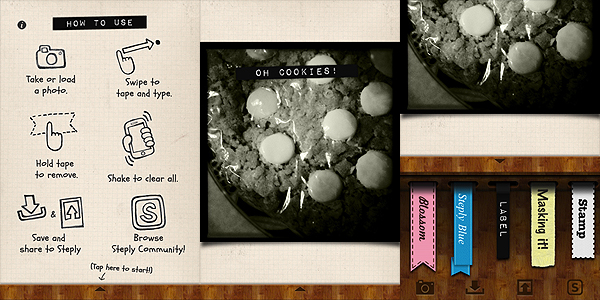
After you take or open your photo, all you have to do is swiping your finger over it in any direction and orientation. The blank label in your style of choice will appear immediately and you’ll be able to input your text by using the default keyboard. If you make mistakes or if you want to start over, you simply shake the device and the previous changes will be reset. When you are done, you can save, send your picture to your friends using email, or share it by connecting to one of the supported networks – Facebook, Twitter, Tumblr, Sina Weibo. If you have a Steply account, you can upload it to their community.

Labelbox is a cute little tool that goes along with some of the latest lo-fi photo trends, which include fakearoids and, more in general, instant photography revival. Labelbox is a cool power-up for your iPhone photography and since it is free, you have nothing to lose.

Stepcase Labelbox for iPhone

A couple of complaints one could have concern the final resolution of the photos, a mere 960 x 720 pixels on 3GS on which I have tested it — definitely not much — and the quality of the label applied – an annoying aliasing is clearly noticeable especially on some of the styles. If you plan to use the photos on iPhone/iPod Touch screen only, these issues will hardly affect you; however, if you plan on using the images more extensively, you’ll think about it twice. We hope future updates will at least solve the aliasing problem.

Overall

Name: Labelbox
Developer: Stepcase
Compatibility: iPhone, iPod Touch, iPad. iOS 4.0 or later.
Price: free!
Vote: 2/5

Labelbox - Stepcase

Darkroom Pro: Get Rid of Motion Blur

There are times when using your iPhone camera becomes a pain: situations of low light are some of these. Although the iPhone 4 represents an improvement, it still has serious issues when it comes to motion blur that can make your potentially best shots truly impossible to use even after serious attempts at salvaging them with photo editing. The truth is the iPhone’s camera isn’t especially designed to take pictures in extreme conditions, and low light can be very detrimental even for full-fledged cameras without a tripod or the right lens. But all these considerations don’t really matter when you want to take a picture at night time and you cannot manage to keep the hand holding your iPhone still: what to do then?

Darkroom Pro by Stepcase is an app that helps you with taking pictures that could be subjected to motion blur, thanks to a handful of useful features as stabilizer, self-timer and fullscreen shutter button.

Main Features

  • Full resolution available;
  • Steady mode;
  • Self-timer mode;
  • Fullscreen shutter button mode;
  • Grid on/off;
  • Autosave on/off;
  • Share via email or upload to Steply.

Appotography Opinion

Darkroom Pro contains a series of tools which can be of use when you absolutely want to end with a decent-looking picture even if the iPhone native camera shows clear signs it’s not likely to achieve that. The timer and full screen button for example are useful if you want to take a self-portrait; the stabilizer will come in handy in situations of poor lighting.

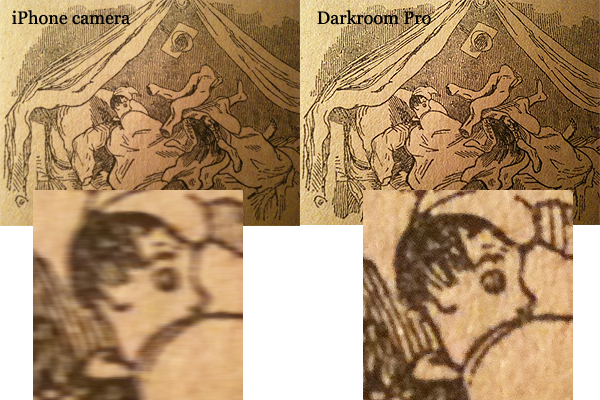
Here is an example of a picture with very clear detail in evidence. Both panels show a detail of the same subject at full resolution in the same light conditions (book page under dim table light): the first one is taken with iPhone native camera, the second with Darkroom Pro for the iPhone. As you can see, in the second there’s significantly less blur.

Darkroom Pro iPhone

Darkroom Pro is very good to achieve better results in difficult conditions, but it’s obvious you have to help it. This means you shall try in any case to keep the iPhone as still as possible, otherwise the app will be unable to perform properly its duty. However, when taking pictures in the dark, expect noise to increase proportionally.

A free version of the app is available in the App Store as well. Although the free version has only very basic features —  steady mode only –, it will help you have an idea, so I suggest to check it out.

Of course, it goes without saying that you shouldn’t expect miracles from this or from any similar app: there are cases in which iPhone limitations can’t be overcome in any way and whatever app you use, taking a good shot is impossible. A sensible user should be able to recognize the limitations and make use of the available tools without expecting to rely on hocuspocus.

Overall

Name: Darkroom Pro
Developer: Stepcase
Compatibility: iPhone. iOS 3.1 or later.
Price: £0.59||$0.99||€0.79
Vote: 4/5

Darkroom Pro - Stepcase