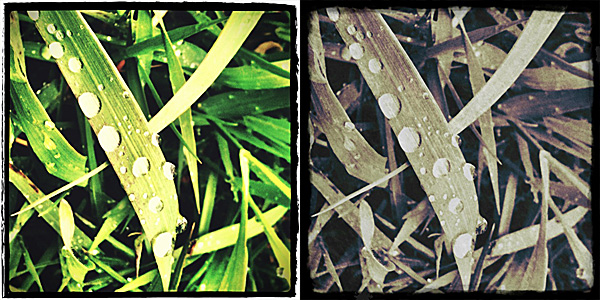
Magic Hour 1.1: Update Review

Magic Hour by KiwipleOne of the most amazing photography apps recently released to the App Store gets an amazing update.

With Magic Hour 1.1, Kiwiple brings to their iPhone photo app the awaited full resolution. But this is not all: much more comes with the new release.

Let’s see what’s new in detail.

  • Added high resolution photo saving option: finally you can save photos taken or processed in Magic Hour at their full resolution
  • Enabled photo taking in Quiet Mode (works only with standard 640×640 pixels resolution): take photo discreetly without turning off your device volume;
  • Added custom crop view: more freedom in cropping your photos;
  • Added sharing to Instagram, Facebook Pages, Posterous;
  • Added upload to Evernote, Mover Lite, Camera+ and more (on enabled devices only);
  • Added AirPrint support;
  • “Always see guides” on/off: keep in-app guide enabled for reference or disable it;
  • Added curves guildelines;
  • Other various improvements.
Magic Hour by Kiwiple
Magic Hour offers a wide range of highly customizable filters.

In our previous review of Magic Hour (you will find our full review of version 1.0 by clicking here) we clearly stated how much we enjoyed this app’s versatility, especially regarding filter creation and sharing in the Filter Market. To sum it up, this was the verdict after the previous evaluation:

Magic Hour combines the features of a camera and those of a simple but effective filter making utility.

And also:

Magic Hour makes taking and editing photos fun and accessible for all photo enthusiasts, including newbies.

And finally:

Give us higher resolution and we will give you a full score.

Kiwiple granted our wish in version 1.1. This is why we are more than happy to keep our promise: Magic Hour now deserves a full score!

PS: Magic Hour is on sale! You can get it for a limited time at $0.99, -50% the regular price!

Name: Magic Hour
Developer: Kiwiple
Compatibility: iPhone (3GS, 4), iPod Touch (4th), iPad 2. iOS 4.0 or later.
Price: £1.19||$1.99||€1.59
Vote: 5/5

Magic Hour - Camera & Unlimited Filter - Kiwiple

Fusioncam Review

Fusioncam is a new app by Stepcase, developers of Actioncam, Phototreats, Darkroom Pro and Labelbox. Fusioncam is Stepcase’s answer on iPhone to classic toy cameras and thus it represents an expansion of their lineup.

Main Features

  • Full resolution available;
  • Square format;
  • Multiple exposure on/off;
  • Flash on/off;
  • Three filters available;
  • Share on Facebook, Twitter, Tumblr, Sina Weibo, Posterous & Flickr (requires Steply account).

Appotography Opinion

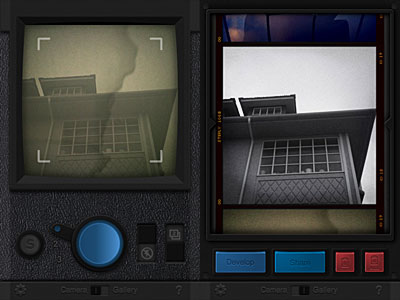
Fusioncam by Stepcase for iPhone doesn’t allow loading previously taken photos: you can only use the built-in camera. You can select one among the three available filters — cross process, black and white and a lomoish red. To take a normal photo with filter applied, you simply tap on the shutter button. All photos are stored in the app’s gallery and are browsable as a continuous film roll. From the gallery, you can save or share your creations on several social networks via the Steply community — which means you need to register an account to use the sharing options.

Fusioncam for iPhone by StepcaseTo activate the multi-exposure feature, you pull the switch and take another shot which will be superimposed over the previous photo. Multiple exposure in Fusioncam works only with the last photo taken, not with any photo in your gallery. The idea, I assume, is to make this feature work as closely as possible to multiple exposures obtained using roll of film without winding. This limitation, which I am sure many will find a drawback, can however be a catalyst to rethinking the whole process of  taking photos with an iDevice. By using the multi-exposure feature, you can combine different filters together and create unique effects.
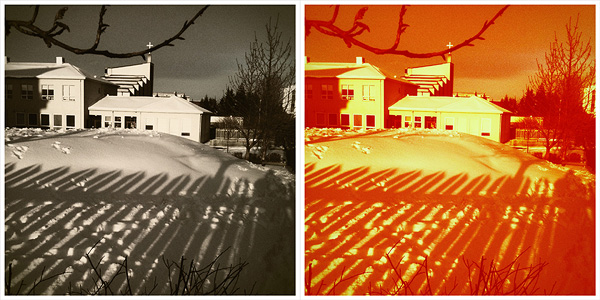
Fusioncam for iPhone by Stepcase
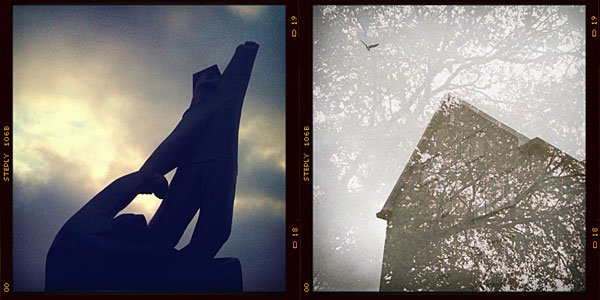
Single exposure and multi-exposure in Fusioncam.

The interface of Fusioncam is not very smooth and commands are not highly responsive. Rendering times are not the best I have experienced either. The filters included are all right, but not memorable or particularly original. What irks me most though is the annoying border which you cannot disable. It would be OK in theory, since Fusioncam’s purpose is to emulate the cheap and uncustomizable toy cam feel; in this case though, merely for aesthetic reasons, the border is a turnoff for me.

In general, given available features and overall functionality, also in relation to the price tag and competition, Fusioncam remains on average levels and it is not among the most satisfying iPhone toy cameras available in the App Store. Nevertheless some of ideas behind Stepcase’s app are quite interesting and worth exploring.

Overall

Name: Fusioncam
Developer: Stepcase
Compatibility: iPhone, iPod Touch , iPad. iOS 4.0 or later.
Price: £1.19||$1.99||€1.59
Vote: 3/5

Fusioncam - Stepcase

Cameramatic 1.2: It Keeps on Getting Better and Better!

With the update to version 1.2.0, Cameramatic — one of our favorite apps — added some neat extras that will undoubtedly please its fans. I finally got around to testing the updated version. First of all, two Standard filters were added together with two B&W filters and a Standard border.

Cameramatic for iPhone

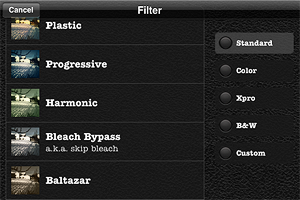
Also, now you have a thumbnail preview of all the available effects. You had a preview of the borders before, but you had to recognize the filters by name and description. Given the richness of Cameramatic’s filter collection, this new feature  is particularly useful.

Cameramatic for iPhone
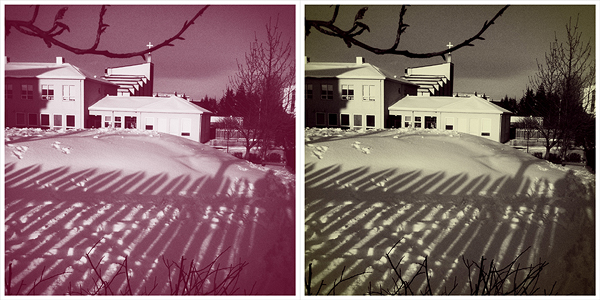
New Standard filters Baltazar & Firebird with White 005 border
Cameramatic for iPhone
New B&W filters Berrychrome & Retrochrome with White 005 border

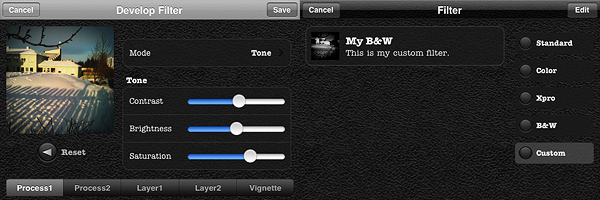
However, the most interesting new feature in Cameramatic is the custom filter development tool, which is really fantastic and gives you a lot of space for creating highly customized effects. As the name clearly states, this new feature allows you to create your own filters and save them.

You can either start by editing one of the presets or develop your filter from scratch. You have access to 2 separate levels of processing and to 2 additional layers for adding further effects; you can also set vignetting color and intensity separately. You can enable each level of processing individually, depending on your personal requirements. Among parameters, you will be able to set blending mode, brightness and contrast, adjust color channels and alpha opacity. Through the preview, you can make corrections knowing how they will affect your photos. When you are done, you save the desired filter, choose a name and a description for it. You can access your filter at any moment together with the others under the “Custom” category. Thanks to the filter development feature, you can use your newly created filters over and over again to add a unique touch to your photography.

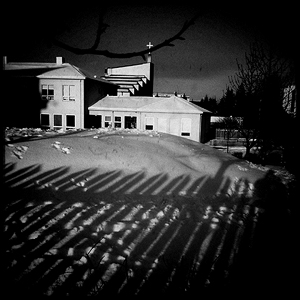
My custom filter.

I have already rated Cameramatic 5 out of 5 in my previous review, so it would be pointless to add a new rating. But rating considerations aside, I truly believe Cameramatic has made tremendous improvements from its first release. From a relatively undistinguished start, it has now become one of the most impressive photography apps you will be able to find in the App Store.  Not only the developer was very responsive to users’ feedback, but he also seriously took into account the most useful suggestions in order to actually make the app better and better.

If you haven’t done so yet, go get Cameramatic now! And have fun with it!

ClassicSAMP: Some Action To Your Photography

Bringing action to your photography sometimes is not the easiest task. Shooting multiple exposures and showing them in sequence is one of the tricks that allows static images to convey the feeling of motion to the viewer. Differently from animation, which is at its core founded on the same principles, this kind of photography still conveys the original idea of stillness which is proper of photographs.

ClassicSAMP by misskiwi will help you in bringing action to your iPhone photos by providing you with a neat collection of effects and colored filters in the toycam style, a stylish and easy interface and just the right amount of customizability for an app of its kind.

Main Features

  • Full resolution available (but check review for in-depth resolution description);
  • 6 camera effects;
  • 14 film simulations;
  • Set shooting speed;
  • Share via email and Facebook.

Appotography Opinion

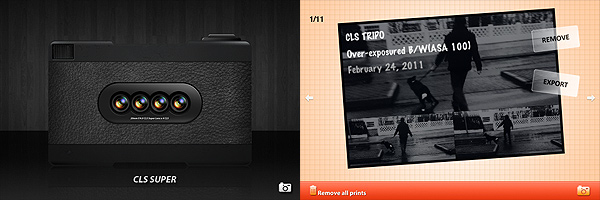
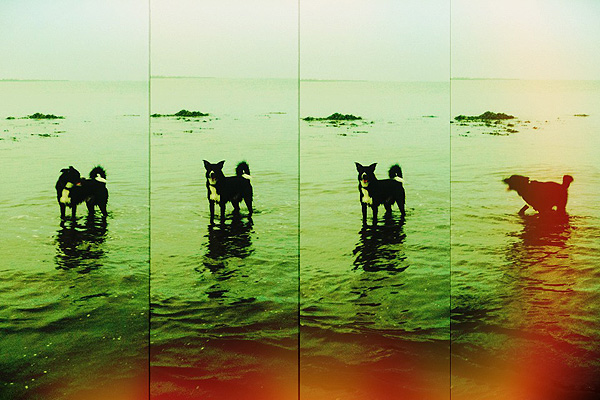
ClassicSAMP is an app that brings together the features of a multi-shot with those of misskiwi’s ClassicTOY camera. The app offers a rich variety of options in the assortment both of formats and filters. You have six different cameras — from two to nine shots — and many films covering a range of possibilities which include classic and high contrast black and white, sepia, overly saturated and lomo-like colors, overexposed, etc. Randomly generated light leaks are a cool extra to reinforce the toycam feel of this app.

ClassicSAMP by misswiki for iPhone

The films and some of the cameras featured in this app are also included in ClassicTOY, so if you have ClassicTOY already and you are not especially into multi-shots, you won’t gain much from getting ClassicSAMP as well.

After choosing your camera and film, you can also adjust the shooting speed. If you want more freedom in composing your photo without being forced to follow the timer’s limitations, you can decide to select the manual mode, which allows you to press the shutter button for each separate shot.

ClassicSAMP by misswiki for iPhone

From what I could see, the app doesn’t have any major issue, and in fact it is quite fun and pleasing to use, but I found the way resolution is handled a little confusing. You can choose to save your photos at small, medium or high resolution, but formats differ slightly depending on the effect applied. I tested the app on 3GS: with both the CLS TRIPO and with the CLS POP effects I found the resolution of processed photos to be once saved unusual, to say the least. While applying all the other effects on 3GS gives you images at 960×640, 1200×800 and 2048×1366 pixels, the aforementioned effects save respectively at 960×642, 1200×801 (TRIPO) and 1200×798 (POP), 2048×1368 (TRIPO) and 2049×1368 (POP). The fact the difference is one or two pixels only made me think maybe it wasn’t intentional. This issue is perhaps not too interesting in practice, but I still found it to be quite… unexpected. Thus I thought about sharing my experience.

ClassicSAMP works quite well for multi-shot photography purposes. The effects are nicely done, processing times are very reasonable and, although being familiar with other apps by the same developer probably made things easier for me to understand right away, the UI of this app is quite intuitive even to a newbie.

Even if personally I am not very passionate about multi-shot cams, I think ClassicSAMP is an app that will please fans of the genre and those who are willing to take advantage of this kind of photography for their creative projects.

Overall

Name: ClassicSAMP
Developer: misskiwi
Compatibility: iPhone, iPod Touch. iOS 4.1 or later.
Price: £1.19||$1.99||€1.59
Vote: 4/5

ClassicSAMP - misskiwi

Cameramatic: One Of The Best Toy Cameras On The iPhone

When at first I tried Cameramatic by youthhr, I didn’t pay enough attention to it. Maybe because toy cameras on the iPhone were popping up like mushrooms and it was hard at first sight to distinguish the one from the other. Also, the first release of this app had some bugs that prevented me to fully enjoy it. Thus I had forgotten about Cameramatic till the release of the last update. After that, I started paying more attention to this app and I realized Cameramatic has a lot  interesting qualities about it.

Main Features

  • Up to 1530×1530 pixels (3GS) or 1930×1930 pixels (4) resolution;
  • 30+ filters (more available with in-app purchase);
  • 25+ frames;
  • Light leaks, vignetting and grain on/off;
  • Access EXIF and geotagging data;
  • Share via email, Facebook, Twitter and Flickr.

Appotography Opinion

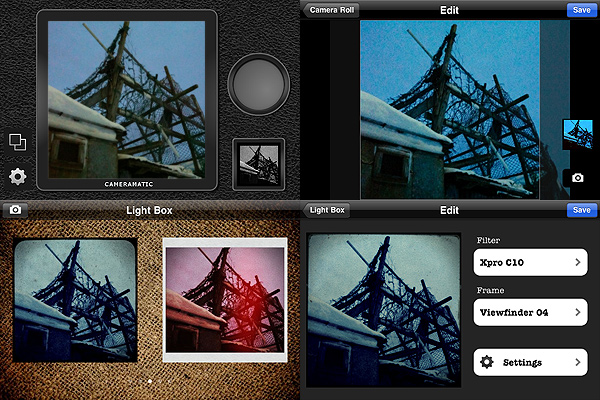
Cameramatic lets you both access your photo library or take photos from within the app. Photos you take are directly saved in a square format, while with previously taken photos you can adjust the cropping before the photo is processed. Saved images are stored into the app’s light box. From Cameramatic’s light box you can access each image’s data, change settings and share using email, Facebook, Twitter or Flickr. You can enable automatic saving to export directly to the camera roll as soon as your photo is processed, if you prefer.

Cameramatic by youthhr for iPhone

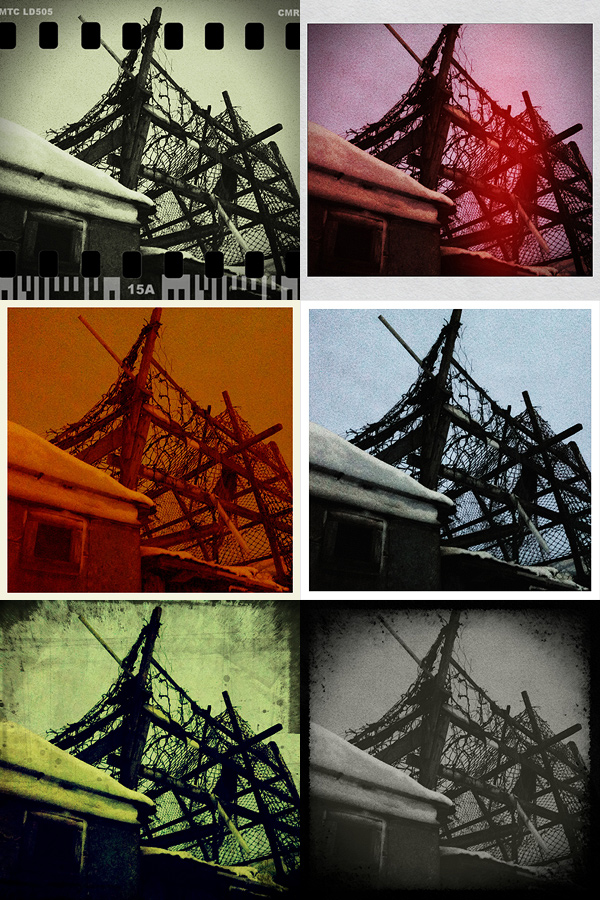
The filters you get with Cameramatic are all reminiscent of vintage lo-fi cameras and among them you will find cross processing and monochrome films, TTV frames, grungy textures, and so on. Each effect is carefully designed to convey the feel of original toy cameras.

Here is a preview of some combinations obtained with Cameramatic for iPhone:

Cameramatic by youthhr for iPhone

The filters are really good and the combinations you can obtain are many. To vary your results each time, you can enable vignetting, film grain (only for black and white filters) and light leaks — an element that, in my opinion, still needs some improvement to look more authentic. Purchasing the additional packs (each for $0.99/€0.79) will widen even more your possibilities. It’s true you cannot make too many adjustments to the photos or adapt single parameters, like each filter’s intensity, but the results are anyway believable and varied enough not only to justify the purchase, but also to be satisfied with it.

Another thing I like about this app is the fact it gives you access to EXIF data and geographical tagging information. It would be very convenient if all developers included this feature into their apps, so people would be able to avoid the hassle of relying on external services just to make sure their images are the right size or to know other useful information.

The only serious issue I have with Cameramatic is the lack of preview or some other reference for individual filters: my memory perhaps isn’t excellent, so I cannot remember every time which filter is which just from the name. For frames you have a preview and some filters are easy to guess, but with others it is more complicated. The problem is partly solved by the fact until your photo is stored in your light box, you can edit it and make changes to any of its parameters. Still, choosing among filters without visual reference can sometimes be annoying, especially if you decide to save directly to camera roll.

Among the number of toycam simulation apps, Cameramatic is one of the best and one I definitely feel like recommending, especially if you’re into the lo-fi analog look.

Overall

Name: Cameramatic
Developer: youthhr
Compatibility: iPhone, iPod Touch. iOS 4.0 or later.
Price: £1.19||$1.99||€1.59
Vote: 5/5

Cameramatic - youthhr

Plastic Bullet: Turn Your Photos Into Dreamy Images

What a lot of users love about toy cameras resides in the unforseen quality of the results one can accomplish with them. Some people love the unexpected, what is impossible to reproduce just with mastery of the technique. All the fancy leaks and crazy color shifts, the blurry and somewhat cheap looks: those are some of the effects toy cameras are so good at achieving and iPhone users love to be able to reproduce these days with the various applications the App Store has to offer.

Plastic Bullet by Red Giant Software promises to bring the unexpected variety of toy cameras to your Apple device. Does it live up to the promise?

Main Features

  • Full resolution available;
  • Great assortment of final effects;
  • Possibility to share the photos on Facebook and Flickr.

Appotography Opinion

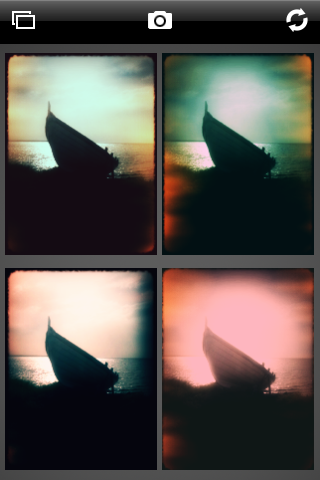
With Plastic Bullet you can either take a photo with the built-in camera or load a previously taken photo from the camera roll. Making it work is very simple and doesn’t require any effort to get used to. You are presented with four thumbnails representing four random final results: if you like any of them you choose and save it; if you don’t you press the refresh button until you have something that pleases you. The easiness and immediacy of use are two of the strongest points of this app and something that has to be taken into account. The results, although actually not greatly different the one from the other in most cases, grant enough choice to the user .

Plastic Bullet iPhone

These are examples of what you can achieve using Plastic Bullet to edit your photos:

Plastic Bullet iPhone

Plastic Bullet iPhone

Plastic Bullet iPhone

Plastic Bullet iPhone

Plastic Bullet is a very nice addition to the family of toy cameras available in the App Store. With just a couple of taps you can truly turn your photos into something different and pleasing to the eye.

Overall

Name: Plastic Bullet
Developer: Red Giant
Compatibility: iPhone, iPod Touch, iPad. iOS 3.0 or later.
Price: £1.19||$1.99||€1.59
Vote: 4/5

Plastic Bullet Camera - Red Giant Software

PictureShow: Lotsa Fun For iPhone Photograpers!

There are so many toy camera apps around that it has become a really tough job for developers to come up with anything still able to draw iPhone users’ attention. Some toy cameras in the App Store are nothing more than mere replicas of more popular apps, just with an interface slightly different.

PictureShow has features that despite obvious similarities with other apps still make a difference in the crowded panorama of toy cameras apps. Let’s take a closer look to see why.

Main Features

  • Full resolution available;
  • 28 photo styles (HolgaGraphy, LomoGraphy, Noir, Retro, Instant, PopArt, etc.);
  • Rich collection of frames, noise textures and light effects;
  • Vignetting on/off;
  • Color correction;
  • Brightness and contrast adjustment;
  • Built-in editor to add text to the photos;
  • Autosaving on/off;
  • Possibility to share the photos via Flickr, Twitter, Facebook, Blogger and email.

Appotography Opinion

We had, and are having, so much fun with PictureShow. Graf’s app made us feel the refreshing novelty of our first period of iPhone photographing, when exploration of various techniques offered constantly new amusement. Despite its reproduction of filters that are abundantly used in other apps, Picture Show grants originally designed results, successfully combining a clean interface with a variety of possibilities. In fact, you have quite a few choices in the filters department, and mixing the effects to obtain unexpected outcomes sometimes is really endearing. It’s possible to scroll among effects and examine the various results and in case of mistakes it’s possible to reset and start over. The only thing I don’t like in PictureShow – and in other apps as well – is having borders with the app’s name stamped over them, which gives a bit the feeling of using a free app.

Here are versions of the same photos obtained with the randomizer button, which offers a nice additional touch and might really come in handy in moments of shortage of ideas.

Picture Show iPhone

Picture Show iPhone

Picture Show iPhone

Picture Show iPhone

Picture Show iPhone

Picture Show iPhone

PictureShow works both with photos taken on the spot and and with those stored in the camera roll.

Overall

Name: PictureShow
Developer: Graf
Compatibility: iPhone, iPod Touch, iPad. iOS 3.1 or later.
Price: £0.59||$0.99||€0.79
Vote: 5/5

PictureShow - graf