Instant110 Review

Instant110 is evidence enough that there are still nice surprises in store for fans of instant photography on iPhone. Although there are already many apps promising to deliver the same results, the latest photography app by Cameramatic’s developer is a polished product that, at the same time, offers very basic functionalities, a clear interface and great ease of use.

Main Features

  • Full resolution available;
  • 8 lens effects;
  • 5 borders;
  • 3 chemical effects;
  • Square format;
  • Send to other apps;
  • Access to EXIF data;
  • Random effect option;
  • Send to email or share on Twitter, Facebook, Flickr and Tumblr.

Continue reading “Instant110 Review”

Cameramatic Updated to 1.3.0

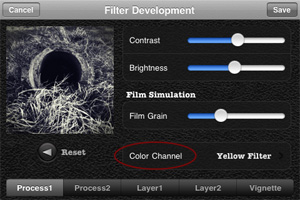
Cameramatic 1.3.0 is out. The latest version of youthhr’s toy camera for iPhone introduces a new essential feature, Color Channel, for better handling black and white photo conversion. With color channel, it’s possible to select one among the available colored filters, red, green, blue, orange, yellow, plus two other options, normal gray (a default equal weight for all color channels) and maximum channels. The same feature was recently added also to Monochromia, the monochrome sibling of Cameramatic.

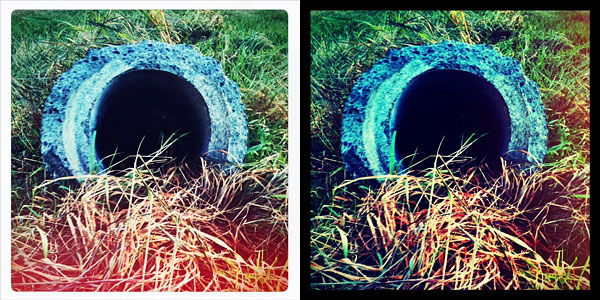
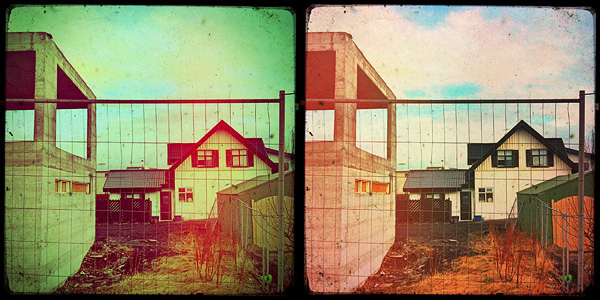
Cameramatic for iPhoneIn Cameramatic 1.3.0 you will also find two new filters, Slide and Cross Processing 2. Slide is an addition to Cameramatic’s Standard filter collection, while Cross Processing 2 is included in the XPro selection.

Cameramatic by youthhr for iPhone
The new filters: Slide (left) and Cross Processing 2 (right).

Monochromia 1.5: Update Review

Monochromia 1.5 is now available in the App Store. I reviewed Monochromia last month, explaining that, while I regarded this app as one of the best in its genre on iPhone, I truly felt that the impossibility to work properly with color channel settings was something that prevented users from fully taking advantage of youthhr’s monochrome converter.

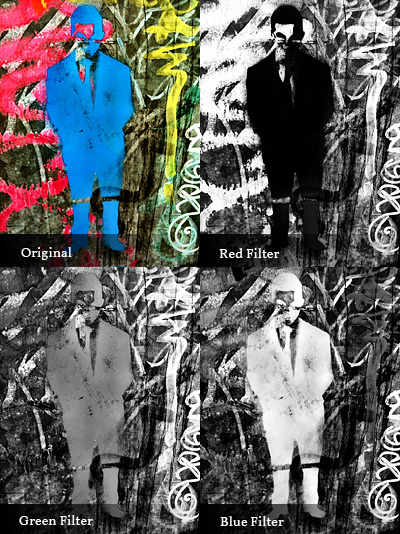
The developer listened to users or, in any case, he demonstrated to agree that color channels are not a secondary aspect for better looking black and white photos. There is more to black and white than simply desaturating, and not all photos can be successfully turned into monochrome just by giving equal weight to all colors. Sometimes, to make important elements in a monochrome photo stand out or in order not to lose precious detail, it’s necessary to filter colors. In traditional black and white photography, for giving visual preeminence to specific elements of the image, special filters can be applied in front of the lens of the camera. Blocking certain colors instead of others (for example, the red filter blocks all colors but red, the blue filter blocks all but blue, etc.), filters allow to obtain a richer tonal range. The same effects can be accomplished in digital photography with post processing.

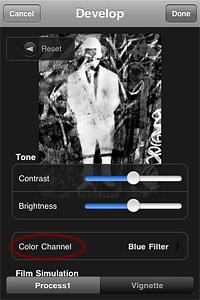
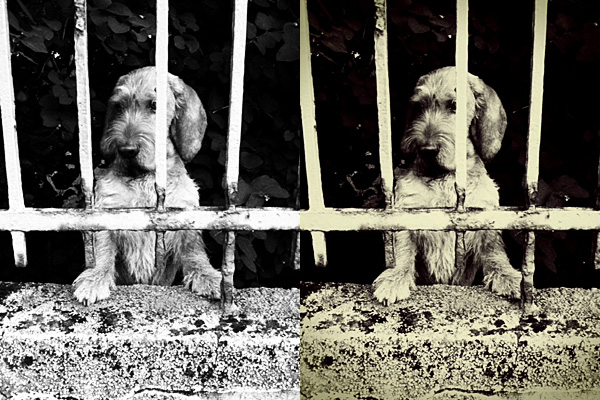
Monochromia for iPhoneMonochromia 1.5 finally offers a color channel feature, for greater flexibility and better conversion from color to black and white. The possibility to apply filters for individual color channels makes a huge difference. From Monochromia’s developing area, you can now access the color channel settings. Other than red, green, blue, yellow, and orange filters, it’s possible to select normal grayscale and maximum channels.

Monochromia for iPhone
Different results for different filters.

Given Monochromia’s new features, I decided to review my previous rating accordingly, giving the app a full score.

Overall

Name: Monochromia
Developer: youthhr
Compatibility: iPhone, iPod Touch, iPad. iOS 4.1 or later.
Price: £1.19||$1.99||€1.59
Vote: 5/5

Monochromia - Black & White Photography - youthhr

Monochromia Review

From the same developer of Cameramatic,  Monochromia is an app focused on recreating photographic black and white effects on the iPhone.

Main Features

  • Full resolution available;
  • 15+ presets;
  • Adjust brightness and contrast;
  • Adjust vignette;
  • Add grain;
  • Send with email or share on Facebook and Twitter.

Appotography Opinion

Monochromia allows both taking pictures with the built-in camera and processing photos already stored in your device. Differently than in Cameramatic, you can choose to disable the square format restriction and therefore you can edit and save your photos in their original shape and size.

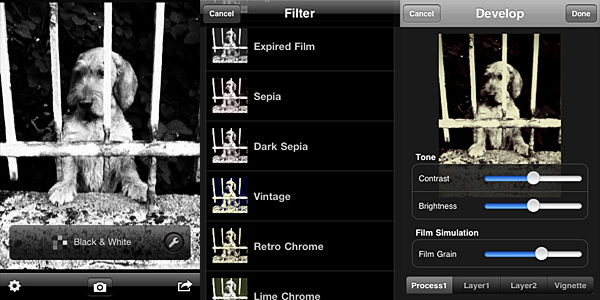
Monochromia by youthhr for iPhoneOnce you load the photo into the working area, you can open the presets menu and choose one of the ready-to-use filters that come with the app. The selection is good enough, covering a range of possibilities between basic black and white to high contrast monochrome, passing through old photo effects like sepia and silver tone. The available presets, however, don’t cover everything. It’s here that the Develop feature comes in handy.

It’s possible to access the Develop area by tapping on the monkey wrench icon. Develop in Monochromia is very similar to Filter Development in Cameramatic: by playing with parameters, you can create your own monochrome filter. You can set brightness and contrast, add a tint and determine vignetting, opacity and width. When the editing is complete, you can save, email or share on Facebook and Twitter.

Monochromia by youthhr for iPhone
Black & White and Retro Chrome presets.

The lack of a channel mixer is probably the hardest thing to digest in Monochromia. Not that many other monochrome converters in the App Store have it, to be honest. However, a lot of other photo editing apps have recently started adding this and other sophisticated tools, making users question the actual usefulness of the average monochrome converter available in the App Store. Given the similarities with Cameramatic, Monochromia feels like a themed light version of its toy cam sibling. Not so “light” though: the price tag is exactly the same as Cameramatic. In theory, Cameramatic is less specialized, yet it’s by far more flexible, if you except the square format restriction: because of additional features, mainly, and because it is basically capable of doing the exact same things that Monochromia does.

Given these considerations, Cameramatic users will thus regard Monochromia as a clone only limited to monochrome photography of the better-known iPhone toy camera by the same developer. These users will not find any special use for Monochromia. Still, youthhr’s monochrome app is able to convert photos to black and white quickly and it allows fair customization. Achievable effects are definitely above the average black and white. Monochromia is perhaps not a must-have. Still, especially to non-Cameramatic users, it can be worth a try.

Overall

Name: Monochromia
Developer: youthhr
Compatibility: iPhone, iPod Touch , iPad. iOS 4.1 or later.
Price: £1.19||$1.99||€1.59
Vote: 4/5

Monochromia - Black & White Photography - youthhr

Cameramatic 1.2.4 Update

Cameramatic version 1.2.4 is available in the App Store. The latest release features new filters and frames and a few other extras. Let’s see them in more detail.

  • 4 new filters
    • Expired Film (Standard)
    • Dirty (Standard)
    • Infrated Red (Color)
    • Green D Street (Color)
  • 1 new frame
    • White 06 (Standard)
  • “Apply only to the selected image” option added: you don’t need to create new filters to apply them to photos anymore.
  • Support for yfrog added.

And here is a preview of all the newly added frame and filters.

Cameramatic for iPhone by youthhr
Cameramatic 1.2.4 - 2 standard + 2 color filters + 1 standard frame.

Cameramatic 1.2.1: Light Leaks Feature Gets A Makeover

Cameramatic is now version 1.2.1. A major update was released not long ago, but yet again Cameramatic gives its users new enhanced features.

So, what’s new in version 1.2.1? Let’s take a look:

  • Light leak management: select light leak style manually;
  • Restore purchases;
  • Various bugs fixed.

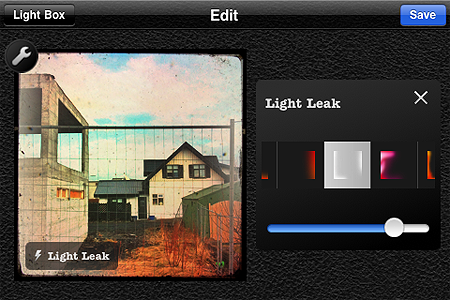
I am pleased to see the light leaks feature was finally renovated. Light leaks were perhaps the only element I didn’t enjoy much in the previous versions of Cameramatic, because the light leaking applied was totally random before, so you couldn’t really make use of it properly.

Several light leak styles to suit your customized effects combinations.

With this update not only the quality of the light leaking effects look greatly improved, but it is also possible to choose among different styles and adjust their intensity. The result is far more convincing than before!

You can now also easily restore your purchases in the case they are lost when you delete the app and install it again.

Cameramatic - youthhr

Cameramatic 1.2: It Keeps on Getting Better and Better!

With the update to version 1.2.0, Cameramatic — one of our favorite apps — added some neat extras that will undoubtedly please its fans. I finally got around to testing the updated version. First of all, two Standard filters were added together with two B&W filters and a Standard border.

Cameramatic for iPhone

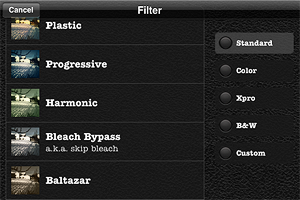
Also, now you have a thumbnail preview of all the available effects. You had a preview of the borders before, but you had to recognize the filters by name and description. Given the richness of Cameramatic’s filter collection, this new feature  is particularly useful.

Cameramatic for iPhone
New Standard filters Baltazar & Firebird with White 005 border
Cameramatic for iPhone
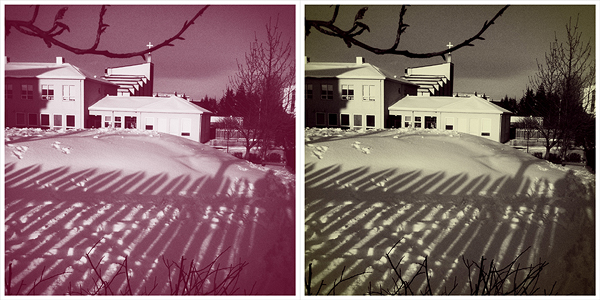
New B&W filters Berrychrome & Retrochrome with White 005 border

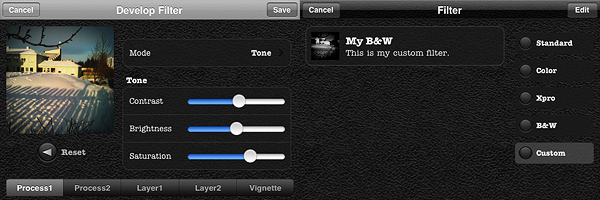
However, the most interesting new feature in Cameramatic is the custom filter development tool, which is really fantastic and gives you a lot of space for creating highly customized effects. As the name clearly states, this new feature allows you to create your own filters and save them.

You can either start by editing one of the presets or develop your filter from scratch. You have access to 2 separate levels of processing and to 2 additional layers for adding further effects; you can also set vignetting color and intensity separately. You can enable each level of processing individually, depending on your personal requirements. Among parameters, you will be able to set blending mode, brightness and contrast, adjust color channels and alpha opacity. Through the preview, you can make corrections knowing how they will affect your photos. When you are done, you save the desired filter, choose a name and a description for it. You can access your filter at any moment together with the others under the “Custom” category. Thanks to the filter development feature, you can use your newly created filters over and over again to add a unique touch to your photography.

My custom filter.

I have already rated Cameramatic 5 out of 5 in my previous review, so it would be pointless to add a new rating. But rating considerations aside, I truly believe Cameramatic has made tremendous improvements from its first release. From a relatively undistinguished start, it has now become one of the most impressive photography apps you will be able to find in the App Store.  Not only the developer was very responsive to users’ feedback, but he also seriously took into account the most useful suggestions in order to actually make the app better and better.

If you haven’t done so yet, go get Cameramatic now! And have fun with it!

Cameramatic Updated to 1.2

Cameramatic version 1.2 brings some new features to the popular toycam app by youthhr for iPhone, iPod Touch and iPad. Now available new filters, frames and filters customization. Here is what’s new in the latest release in detail:

  • 4 new filters: Baltazar (standard), Firebird (standard), Berrychrome (black & white), Retrochrome (black & white);
  • 1 new frame: White 05 (thin square);
  • Filter Development: develop your own custom filters.

Cameramatic: One Of The Best Toy Cameras On The iPhone

When at first I tried Cameramatic by youthhr, I didn’t pay enough attention to it. Maybe because toy cameras on the iPhone were popping up like mushrooms and it was hard at first sight to distinguish the one from the other. Also, the first release of this app had some bugs that prevented me to fully enjoy it. Thus I had forgotten about Cameramatic till the release of the last update. After that, I started paying more attention to this app and I realized Cameramatic has a lot  interesting qualities about it.

Main Features

  • Up to 1530×1530 pixels (3GS) or 1930×1930 pixels (4) resolution;
  • 30+ filters (more available with in-app purchase);
  • 25+ frames;
  • Light leaks, vignetting and grain on/off;
  • Access EXIF and geotagging data;
  • Share via email, Facebook, Twitter and Flickr.

Appotography Opinion

Cameramatic lets you both access your photo library or take photos from within the app. Photos you take are directly saved in a square format, while with previously taken photos you can adjust the cropping before the photo is processed. Saved images are stored into the app’s light box. From Cameramatic’s light box you can access each image’s data, change settings and share using email, Facebook, Twitter or Flickr. You can enable automatic saving to export directly to the camera roll as soon as your photo is processed, if you prefer.
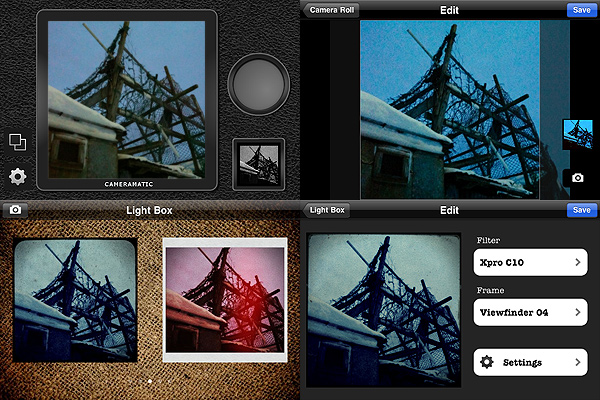
Cameramatic by youthhr for iPhone

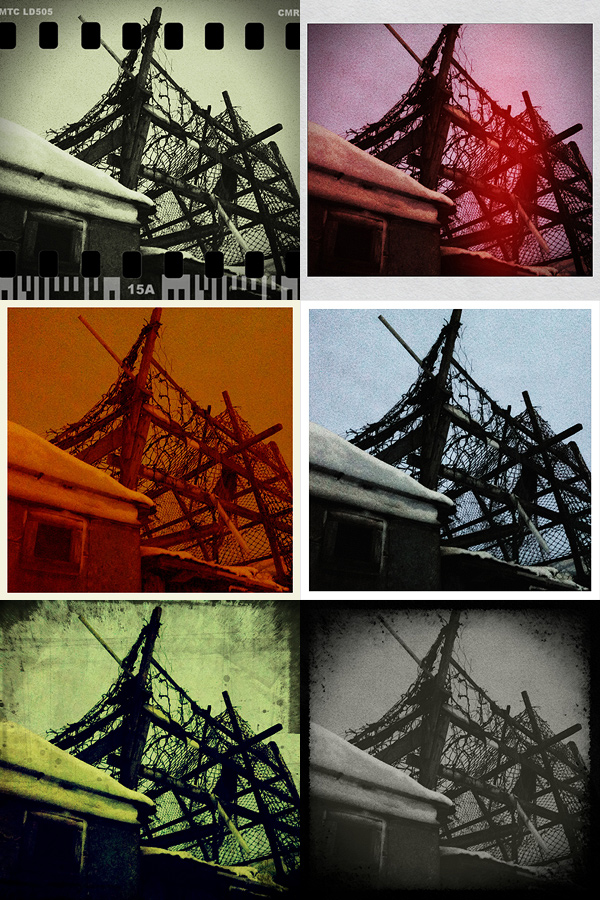
The filters you get with Cameramatic are all reminiscent of vintage lo-fi cameras and among them you will find cross processing and monochrome films, TTV frames, grungy textures, and so on. Each effect is carefully designed to convey the feel of original toy cameras.

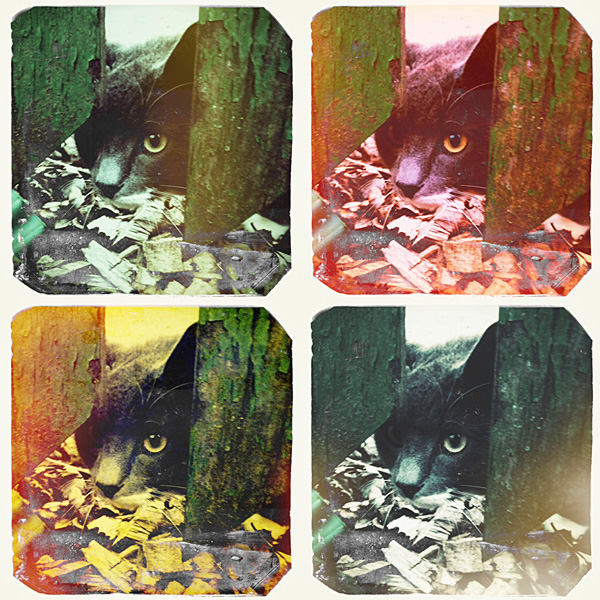
Here is a preview of some combinations obtained with Cameramatic for iPhone:
Cameramatic by youthhr for iPhone

The filters are really good and the combinations you can obtain are many. To vary your results each time, you can enable vignetting, film grain (only for black and white filters) and light leaks — an element that, in my opinion, still needs some improvement to look more authentic. Purchasing the additional packs (each for $0.99/€0.79) will widen even more your possibilities. It’s true you cannot make too many adjustments to the photos or adapt single parameters, like each filter’s intensity, but the results are anyway believable and varied enough not only to justify the purchase, but also to be satisfied with it.

Another thing I like about this app is the fact it gives you access to EXIF data and geographical tagging information. It would be very convenient if all developers included this feature into their apps, so people would be able to avoid the hassle of relying on external services just to make sure their images are the right size or to know other useful information.

The only serious issue I have with Cameramatic is the lack of preview or some other reference for individual filters: my memory perhaps isn’t excellent, so I cannot remember every time which filter is which just from the name. For frames you have a preview and some filters are easy to guess, but with others it is more complicated. The problem is partly solved by the fact until your photo is stored in your light box, you can edit it and make changes to any of its parameters. Still, choosing among filters without visual reference can sometimes be annoying, especially if you decide to save directly to camera roll.

Among the number of toycam simulation apps, Cameramatic is one of the best and one I definitely feel like recommending, especially if you’re into the lo-fi analog look.

Overall

Name: Cameramatic
Developer: youthhr
Compatibility: iPhone, iPod Touch. iOS 4.0 or later.
Price: £1.19||$1.99||€1.59
Vote: 5/5


Cameramatic - youthhr

XProcess: Simulate Cross Processing with Your iPhone

Cross processing is a practice that consists in developing a photographic film using a chemical solution intended for another type of film. The procedure, which legend says was discovered by mistake, has become a deliberate method to obtain peculiar effects and it’s very popular especially among lo-fi or amateur photographers.

Cross processing is very often simulated with image editing software in digital photos. Although digital simulation lacks the captivating unpredictability of the analog technique, many choose to apply this kind of effects to digital photos simply because the recognizable cross processing unnaturally saturated hues and the intensely bright tones immediately grant any photo a little of the analog feel.

Main Features

  • Full resolution available;
  • Adjustable colors;
  • Adjustable vignette and saturation;
  • Shake for random effect;
  • Move and scale;
  • Share via email, Twitter and Facebook.

Appotography Opinion

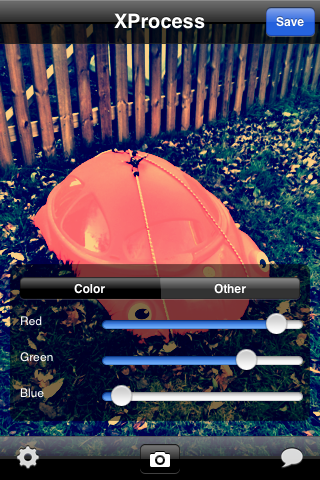
XProcess is a very basic app which simply allows the user to alter any image’s colors very easily and, most of all, quickly. It’s possible to adjust color through red, green and blue channel sliders, add vignetting and crop the image. For a taste of unpredictability, you can shake the iPhone to get random parameters and outcomes.

XProcess iPhone

The results are not outstandingly varied, but they are at any rate good enough to enjoy the app. The problem is that many other apps are more or less capable of the same, but they also have a lot of additional features or extras that are not included in XProcess. Moreover, a little more flexibility regarding the cropping and resizing feature would be helpful: as it is now, there isn’t much you can do with it.

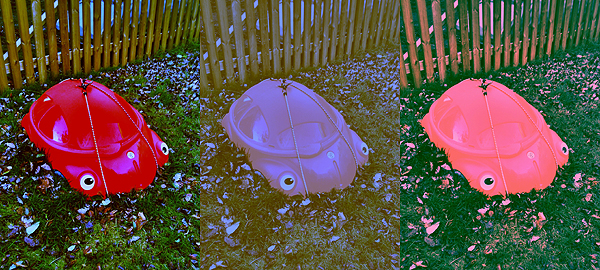
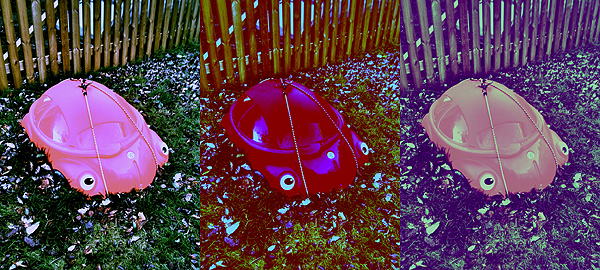
Here’s a few samples of what you can do with XProcess:

XProcess iPhone

XProcess iPhone

XProcess works with built-in camera and camera roll.

Overall

Name: XProcess
Developer: youthhr
Compatibility: iPhone, iPod Touch. iOS 4.0 or later.
Price: £0.59||$0.99||€0.79
Vote: 3/5

XProcess - youthhr