MPro is another camera app focused on delivering black and white images. In the past getting black and white photographs as you wanted them right off the bat with the iPhone was so much more complicated and sometimes even tedious, as you had to switch multiple times among apps just to make slight adjustments. Honestly, monochrome cameras for the iPhone have gotten so much better over time and choice is so much richer than it used to be.
Hueless 1.6 comes with a new feature: the preset management. Presets can be quite handy in more than a few instances and using them you don’t have to start your image processing from scratch all the times. Several popular apps rely on them heavily, but not as many let you create your own. Instead of giving you a bunch of instant effects, Hueless lets you save your own presets, both for interface and for image adjustments.
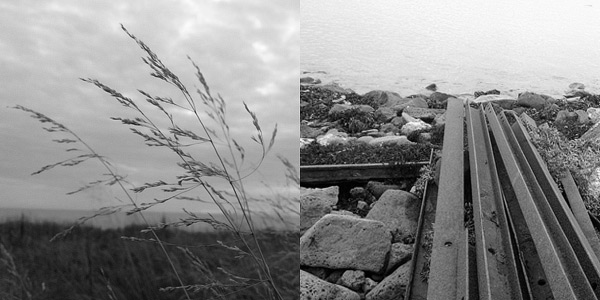
Hueless is a monochrome camera app that has been waiting quietly in one of my several iPhone photo folders for a long time. Recently I finally started using it on a regular basis for taking black and white pictures and I actually found it so enthralling and enjoyable that it has become one of my all-time faves.
More than one user requested, after the publication of our recent review of Dramatic Black & White, a comparison between JixiPix’s app and Red Giant’s Noir Photo. Dramatic Black & White and Noir Photo are essentially similar apps: both try to convey beautiful monochrome effects that are suggestive and extremely pleasing to the eye.
More than one user requested, after the publication of our recent review of Dramatic Black & White, a comparison between JixiPix’s app and Red Giant’s Noir Photo. Dramatic Black & White and Noir Photo are essentially similar apps: both try to convey beautiful monochrome effects that are suggestive and extremely pleasing to the eye.
Note: we are only taking into account the iPhone version of Dramatic Black & White and Noir Photo.
UI
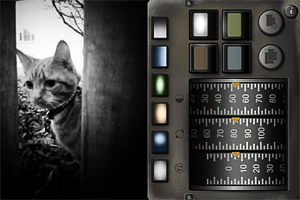
Both apps are well-designed and well-rounded products. Both feature similar ellipse tools for relighting by vignette placement on images. Personally, I am more inclined to like the sleek and focused interface of Noir Photo, with the numbered dial controls instead of the sliders. Even so, Dramatic Black & White’s interface works well and it’s very easy to get the hang of.
Processing Speed
Noir Photo does much better than Dramatic Black & White with processing times. With its simple and to-the-point three-dials system, Noir Photo is capable of delivering great effects in seconds. Rendering and saving also work amazingly smoothly. Red Giant’s expertise clearly gives them a huge advantage in this case. It’s nothing new, as JixiPix’s apps are renown for their sluggish processing times. Like other JixiPix’s apps, Dramatic Black & White is much slower than average apps when it comes to saving processed photos, in spite of all the recent enhancements.
Longevity
None among these two apps will make you regret your purchase and both allow the saving of custom presets for use at a later date. It must be said though that Dramatic Black & White, with its more thorough effects editor, does better than Noir Photo, as it allows more freedom in selecting different effects and has a wider selection of adjustments which counts, among other things, Infrared and HDR-like ready-to-use presets. Most importantly, JixiPix’s monochrome app comes with an RGB channel filter editor, which is a fundamental element for proper control over effective black and white conversion.
Quality
Again, Dramatic Black & White, especially thanks to a few additional tools like the RGB channel editor, has something more to offer. Still, both apps are capable of delivering fantastic black and white and monochrome effects. Thanks to the accessible controls, relighting photos with the help of the ellipse tool can be easily done in both apps. The two apps offer full resolution saving. After observation, I can say that in terms of mere quality, these two apps are equivalent.
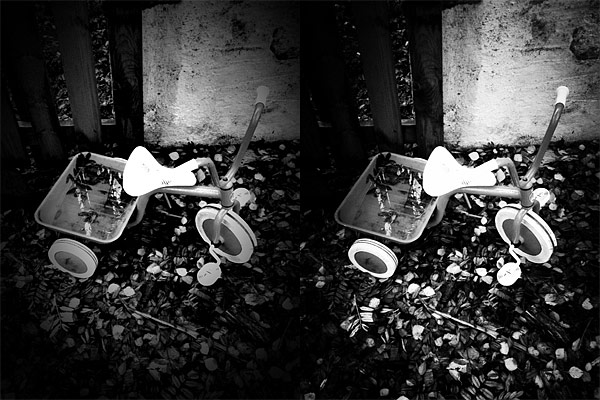
Similar effects obtained with presets from Dramatic Black & White (left) and Noir Photo (right).
Sharing
Noir Photo’s sharing options are basically non-existent. Dramatic Black & White is not the most sharing-friendly app out there, but it comes with at least the send to email and share to Facebook features, plus it supports AirPrint.
Price
With a price tag of $1.99, Dramatic Black & White is a little cheaper in the App Store and, overall, it comes with more features than its opponent. Which in very simple words means that you will get more for less money. Of course, money’s value depends a lot on your priorities. If you are looking for an app to do its work fast and you do not care for the extra features, then the $2.99 for Noir Photo are definitely well spent.
Conclusion
While Dramatic Black & White offers more in terms of variety and customization, Noir Photo is definitely the winner when it comes to quick processing. Anyhow, Noir Photo and Dramatic Black & White are top apps in their category, delivering great quality photographic monochrome effects for a reasonable price. Both apps offer their users long-lived effects — meaning you won’t get tired of the beautiful monochrome of these apps, even after applying the same effects many times — that are enough to justify the purchase.
With Dramatic Black & White, JixiPix Software wanted to give their users something beyond the usual — and sometimes flat — iPhone black and white. The app can in fact produce beautiful and rich monochrome effects with a lot of space for customization.
With Dramatic Black & White, JixiPix Software wanted to give their users something beyond the usual — and sometimes flat — iPhone black and white. The app can in fact produce beautiful and rich monochrome effects with a lot of space for customization.
Main Features
Full resolution available;
35+ presets;
RGB filters;
Adjust tone, contrast and vignette;
Sharpen/soften;
Grain strength;
Randomize effects;
In-app guide;
AirPrint support;
Send photos via email or share on Facebook.
Appotography Opinion
Dramatic Black & White gives you a wide choice of ready-to-use effects for applying monochromatic processing to photos both imported from the Camera Roll or taken in-app. The UI and the workflow are basically identical to those of other JixiPix apps, such as VintageScene and Grungetastic. The main difference of course resides in the actual effects, which are in this case aimed at converting your photos to black and white or other monochrome.
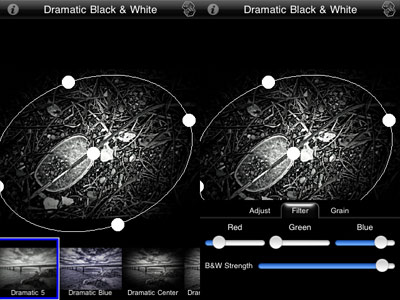
Presets are divided into three categories: Black and White, Infrared Photo and Dramatic Black and White. Each category counts several presets, neatly arranged and fully editable. Black and White includes more classic black and white effects, Infrared Photo, as the name clearly states, infrared filters, and Dramatic Black and White highly contrasted effects of suggestive visual impact. Once you find a preset that suits your photo, you can save, share, print or proceed to further processing. JixiPix’s app offers tone adjustment — for the creation of sepia and other monochrome effects –, sharpness, contrast and brightness sliders. The app also comes with a handy spotlight editing tool. Moving and resizing the ellipse over the image, you can shrink, enlarge and find the right placement for your vignette, thus achieving more or less dramatic lighting. The RGB filter editor will help you in fine-tuning the black and white, blocking off specific color channels, in order to perfectly complement the original image. Dramatic Black & White will let you save your custom presets, so that you can use them more than once and you can also use the app’s randomizing button to generate unexpected effects.
Dramatic Black & White comes with a more than adequate collection of presets which can be fully customized for even more variety. The quality of the effects is excellent and the possibility to save custom presets, as in other apps by JixiPix, means greater flexibility than that offered by most iPhone apps devoted to monochrome. The only black and white app that I can think of that truly allows the same level of customization is Monochromia — which is, in fact, one of my personal favorites for black and white on iPhone. The only thing that could definitely be improved is the rendering times, which are, in spite of updates, still on the slow side.
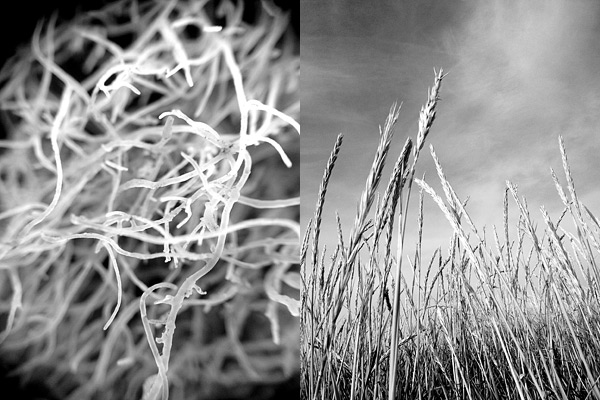
Different presets applied in Dramatic Black & White.
JixiPix proves once again what they are capable of. Dramatic Black & White is a great tool for iPhone photographers with a special interest in monochrome photography, as it easily provides great functionality in a solid and well-rounded package.
Dramatic Black & White for iPhone is currently on sale for $0.99/€0.79/£0.69 in the App Store.
Overall
Name: Dramatic Black & White
Developer: JixiPix Software
Compatibility: iPhone, iPod Touch, iPad. iOS 4.2 or later.
Price: £1.49||$1.99||€1.59
Vote: 5/5
Red Giant’s Noir Photo 1.1 is out. Noir Photo is a simple and effective application working on all iDevices for conveying a mood through photos. Dramatic effects can be achieved just by playing with basic settings, like brightness, contrast and vignette. You can read our full review of Noir Photo here.
The most notable feature added in version 1.1 is the fullscreen editing. By tapping on the uppermost right corner of the tool panel (on the dotted corner), it’s now possible to enlarge the work area. This is especially useful when better control on finer detail is required, as it allows more accurate placement of the ellipse affecting the vignette’s adjustment.
Other enhancements in Noir Photo 1.1 include: higher editing resolution and preservation of photo metadata, so that original information is not lost upon saving.
Simply B&W does exactly what its name states: it turns photos into black and white. Given the overabundance of black and white converters in the App Store, Simply B&W can easily go unnoticed. As a matter of fact, although I am mostly devoted to black and white photography, I had overlooked this app myself. However, as far as the value of Simply B&W is concerned, I am quite sure iPhone black and white hardcore enthusiasts will enjoy this app quite a bit.
Main Features
Full resolution available;
Black or white border on/off;
Color filters;
Adjust brightness and contrast;
Send via email.
Appotography Opinion
Simply B&W is very essential in its features and straightforward in its workflow. You load your a photo from your iPhone and the photo is instantly converted into average black and white. All you have to do to is setting brightness and contrast values and applying colored filters to your photo, in order to make the important elements stand out.
Colored filters are what mostly affect the look of your black and white photo, since the way the final image will look like depends primarily on color channel settings. By applying a color filter, you pass the color which the filter is named after and block all the others. Filters available in Simply B&W are red, green, blue, yellow and orange, which is, basically, all you need in photography to produce good looking black and white.
Other than that, from the main page, you can go to the app’s settings and enable or disable the border feature (enables/disables a plain black or white border, not adjustable).
Black border with no filter (left), blue filter + high contrast (right)
What I like about Simply B&W is its minimal approach. You spend a few seconds adjusting just the crucial settings and forget about all the rest. Simply B&W produces high quality, classy black and white. Caring more about editing than about actually taking photos can be detrimental. More than anything else, Simply B&W is a reminder that a good photo is the starting point to any decent looking post-processing.
The developer of Simply B&W kindly provided a promo code for reviewing purposes.
Overall
Name: Simply B&W
Developer: Mr. B. Ware
Compatibility: iPhone, iPod Touch, iPad. iOS 4.0 or later.
Price: £0.59||$0.99||€0.79
Vote: 4/5
Monochromia 1.5 is now available in the App Store. I reviewed Monochromia last month, explaining that, while I regarded this app as one of the best in its genre on iPhone, I truly felt that the impossibility to work properly with color channel settings was something that prevented users from fully taking advantage of youthhr’s monochrome converter.
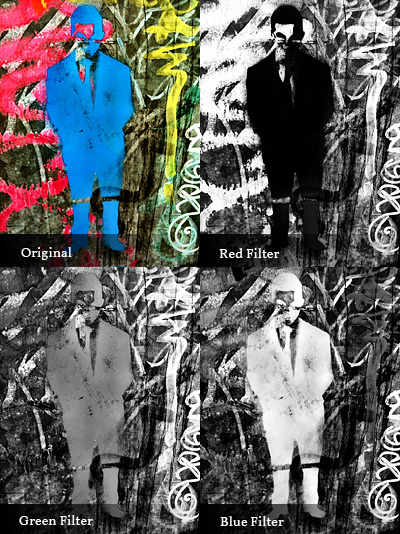
The developer listened to users or, in any case, he demonstrated to agree that color channels are not a secondary aspect for better looking black and white photos. There is more to black and white than simply desaturating, and not all photos can be successfully turned into monochrome just by giving equal weight to all colors. Sometimes, to make important elements in a monochrome photo stand out or in order not to lose precious detail, it’s necessary to filter colors. In traditional black and white photography, for giving visual preeminence to specific elements of the image, special filters can be applied in front of the lens of the camera. Blocking certain colors instead of others (for example, the red filter blocks all colors but red, the blue filter blocks all but blue, etc.), filters allow to obtain a richer tonal range. The same effects can be accomplished in digital photography with post processing.
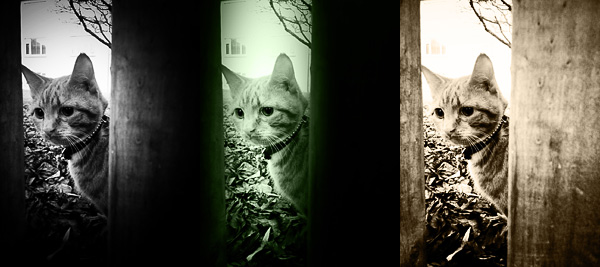
Monochromia 1.5 finally offers a color channel feature, for greater flexibility and better conversion from color to black and white. The possibility to apply filters for individual color channels makes a huge difference. From Monochromia’s developing area, you can now access the color channel settings. Other than red, green, blue, yellow, and orange filters, it’s possible to select normal grayscale and maximum channels.
Different results for different filters.
Given Monochromia’s new features, I decided to review my previous rating accordingly, giving the app a full score.
Film noir is a denomination associated with crime films from the 40’s and 50’s. Although the term is commonly identified with Hollywood’s production, examples of film noir can be found before and after the aforementioned two decades and outside Hollywood. As a matter of fact, many of the most renown film noir directors were émigrés, especially from Austria, Germany and Eastern Europe, who arrived in America in the late 20’s and 30’s as a consequence of the political turmoil preceding World War II. You have probably heard of Josef von Sternberg, Fritz Lang, Michael Curtiz, Otto Preminger, Billy Wilder and, of course, Alfred Hitchcock. These are just a few of the most representative names that come to mind speaking of film noir.
Categorization of film noir is nothing but a vague notion and in some cases, cinema critics and historians have contrasting opinions. Even if we accept the point of view of those that consider film noir a genre on its own, there is no such thing as common ground when it comes to style and motifs. However, most examples of film noir are characterized by well-defined stylistic traits, first of all the extreme use of low-key lighting and the highly eloquent use of black and white.
Red Giant‘s Noir Photo takes inspiration both for its name and for its idea from film noir’s highly stylized looks. There are those taking snapshots just for fun and those wanting their photos to convey a feeling or tell a story. Noir Photo will delight the latter group.
Main Features
Full resolution available;
Six presets;
Adjustable contrast and exposure;
Adjustable vignetting;
Save custom presets;
In-app guide.
Appotography Opinion
Given the expertise of Red Giant, it’s not a surprise the UI of Noir Photo works so smoothly and everything is so simple and user-friendly. The app presents a very straightforward approach to photo editing: in a single screen, you have access to all the necessary features. A concise in-app guide is included for reference.
You upload a photo from your device. As a starting point, you have six presets ready for use. If you prefer, you can make your own presets by setting each parameter according to your personal need. The app not only allows quick conversion of pictures into rich black and white monochrome, but also easy relighting, which is particularly important for granting photos a highly stylized, expressive effect.
The three dials representing three different parameters, with values ranging from 0 to 100, are at the core of Noir magic: Contrast, Inner and Outer Exposure. Each of these settings will influence your picture’s lighting. By playing with their values, you can have your photo look like average black and white or extremely contrasted and highly dramatic.
Vignetting is another crucial element in Noir Photo. Vignetting changes when you adjust Inner and Outer Exposure values, but it’s by pinching to enlarge and contract it or by moving it around that you actually affect the photo. The four available color tints are the final touch to widen the possible combinations and the effects you can achieve. The preview lets you know in every moment how your photo will look like.
It’s undeniable that Noir Photo’s developer’s expertise shows in the app’s incredible sleekness and in its well-balanced consistency. The interface not only is conceived to allow immediate use, but, as I said before, it actually works very smoothly. What one could object is the fact options are not many, especially for the app’s price tag. Some more freedom in choosing tints or in arranging more light sources, for instance, would increase the app’s value.
Overall
Name: Noir Photo
Developer: Red Giant
Compatibility: iPhone, iPod Touch, iPad. iOS 4.0 or later.
Price: £1.79||$2.99||€2.39
Vote: 4/5

 Hueless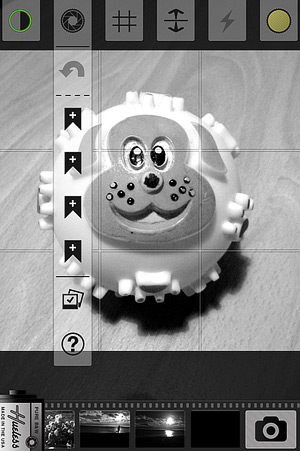


 JixiPix’s app offers tone adjustment — for the creation of sepia and other monochrome effects –, sharpness, contrast and brightness sliders. The app also comes with a handy spotlight editing tool. Moving and resizing the ellipse over the image, you can shrink, enlarge and find the right placement for your vignette, thus achieving more or less dramatic lighting. The RGB filter editor will help you in fine-tuning the black and white, blocking off specific color channels, in order to perfectly complement the original image. Dramatic Black & White will let you save your custom presets, so that you can use them more than once and you can also use the app’s randomizing button to generate unexpected effects.
 Dramatic Black & White comes with a more than adequate collection of presets which can be fully customized for even more variety. The quality of the effects is excellent and the possibility to save custom presets, as in other apps by JixiPix, means greater flexibility than that offered by most iPhone apps devoted to monochrome. The only black and white app that I can think of that truly allows the same level of customization is Monochromia — which is, in fact, one of my personal favorites for black and white on iPhone. The only thing that could definitely be improved is the rendering times, which are, in spite of updates, still on the slow side.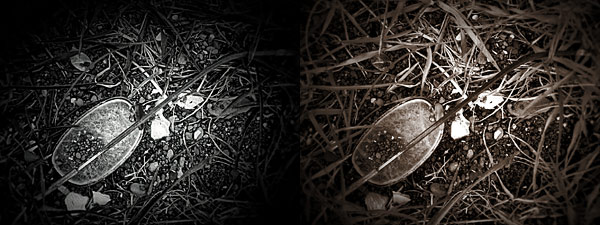


 The most notable feature added in version 1.1 is the fullscreen editing. By tapping on the uppermost right corner of the tool panel (on the dotted corner), it’s now possible to enlarge the work area. This is especially useful when better control on finer detail is required, as it allows more accurate placement of the ellipse affecting the vignette’s adjustment.
 Other enhancements in Noir Photo 1.1 include: higher editing resolution and preservation of photo metadata, so that original information is not lost upon saving.
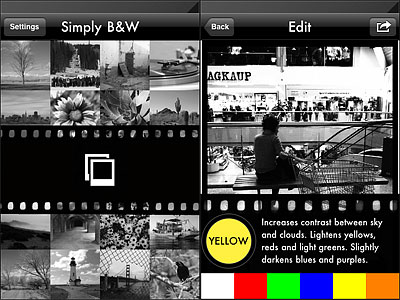 Colored filters are what mostly affect the look of your black and white photo, since the way the final image will look like depends primarily on color channel settings. By applying a color filter, you pass the color which the filter is named after and block all the others. Filters available in Simply B&W are red, green, blue, yellow and orange, which is, basically, all you need in photography to produce good looking black and white.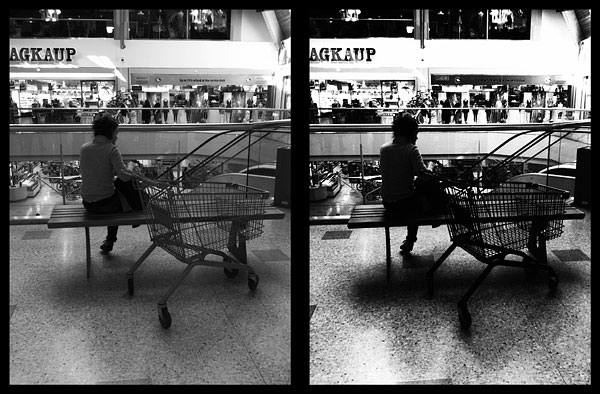
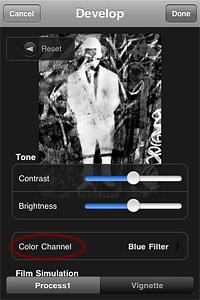 Monochromia 1.5 finally offers a color channel feature, for greater flexibility and better conversion from color to black and white. The possibility to apply filters for individual color channels makes a huge difference. From Monochromia’s developing area, you can now access the color channel settings. Other than red, green, blue, yellow, and orange filters, it’s possible to select normal grayscale and maximum channels.