SuperPopCam Review

SuperPopCam by Art & Mobile — creators, among other things, of TiltShift Generatorcombines the charm of toy cams with real-time processing on the iPhone.

Main Features

  • Real-time effect up to 640 x 480 (3GS), 960 x 720 (4) pixels;
  • Full resolution on saved images available;
  • Grid on/off;
  • 9 filters;
  • Adjustable vignetting and border;
  • Send via email or share on Twitter and Facebook.

Appotography Opinion

SuperPopCam is mainly about real-time processing, but not only. Differently from other apps making use of the real-time factor, SuperPopCam allows to alter also previously taken shots.

The real-time feature enables a preview of how each effect is going to affect the scene you are going to shoot. By finger-swiping, you switch from one filter to the other.  You don’t get a preview for vignetting and borders; however, if you enable the grid from the in-app settings, an outline will show where the border will be in the final image. This way you will be able to frame the picture correctly. In SuperPopCam there are five levels of intensity for vignetting, from none to heavy. The included white borders come in two versions: regular and gritty. Each border is available in thin and thick version. It’s also possible to enable the 1:1 format to take square photos.

SuperPopCam works very smoothly, I have not encountered any issue while using it. The UI is also very clear and functional, like other Art & Mobile’s photo apps.
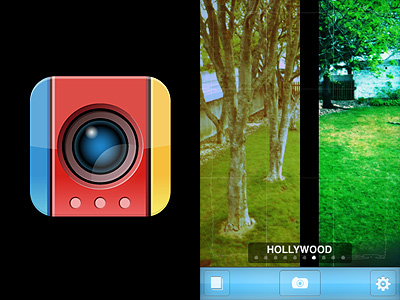
SuperPopCam - Swipe to Effect by Art & Mobile for iPhone

Although features are not many, the effects in Super PopCam are quite remarkable. Especially for users who don’t like intense processing and would rather rely on a subtle analog toycamera lomo-ish feel, SuperPopCam offers a decent replacement to more complex apps. Like in Cross Process, the filters are just an embellishment and they do not conceal with overdone post-processing the final images. The difference with Banana Camera’s app is, of course, the real time preview, a feature that in any case doesn’t add anything to the overall photographic value of SuperPopCam. At least, that’s how I see it.

SuperPopCam - Swipe to Effect by Art & Mobile for iPhone
Hollywood and CrossProcess effects with thin border on.

The most annoying aspect in SuperpopCam is the huge difference between output resolution of photos taken from within the app and that of previously taken shots, both processed using the app’s filters. In the first case, the resolution is very small, even on iPhone 4, which definitely lowers the app’s value. On the other hand, processing photos previously taken with other apps, which includes those taken with iPhone’s native camera app, doesn’t affect their resolution at all. For example, loading a 2048 pixels image for post-processing into SuperPopCam will not result in a scaled down image after saving. This makes me wonder about the actual usefulness of the real-time feature, a handicap rather than an addition.

Overall

Name: SuperPopCam
Developer: Art & Mobile
Compatibility: iPhone, iPod Touch, iPad. iOS 4.0 or later.
Price: £1.19||$1.99||€1.59
Vote: 3/5


SuperPopCam - Swipe to Effect - Art & Mobile

Cross Process: Some More Cross Processing to Embellish Your Photos Without Overdoing It

We gave you a brief overview on cross processing in another occasion, explaining how digitally cross processed photos have acquired in recent times great popularity especially among a certain type of photographers. Cross processing on the iPhone — and iPod Touch and iPad, too — is just another way, like appying retro filters, to spice up your photos.

Main Features

  • Full resolution available;
  • Five effects (red, blue, green, basic, extreme);
  • Border on/off;
  • Share via email and Facebook.

Appotography Opinion

Cross Process is an app whose results are subtler than those obtained with other apps. Subtler, meaning non-invasive but also, sometimes, not that noticeable. The filters can be applied both on photos coming from your camera roll and on photos taken on the spot with the built-in camera. You can choose in the application’s settings which effects you want to enable among the green, blue, red and extreme. You can also add a border, if you like. All these parameters must be adjusted before, as you are not given any chances to modify them once you are actually using the app on your photos. The effect is chosen at random among those you enable, but you can save an original of your photo so you can try again if you are not satisfied with the final outcome.

Cross Process iPhone

Cross Process iPhone

Cross Process mixes the feel of instant camera with some of the unpredictability of cross processing without overdoing it. Developers affirm they studied real cross processing to make the effects look as believable as possible. However, as I said before, sometimes the effects are not that evident compared to the original image.

Cross Process, similarly to ShakeItPhoto from the same developer, is an app that with great ease of use will quickly allow users to enhance their snapshots.

Overall

Name: Cross Process
Developer: Banana Camera Co.
Compatibility: iPhone, iPod Touch, iPad. iOS 3.1.3 or later.
Price: £0.59||$0.99||€0.79
Vote: 3/5

Cross Process - Banana Camera Co.

XProcess: Simulate Cross Processing with Your iPhone

Cross processing is a practice that consists in developing a photographic film using a chemical solution intended for another type of film. The procedure, which legend says was discovered by mistake, has become a deliberate method to obtain peculiar effects and it’s very popular especially among lo-fi or amateur photographers.

Cross processing is very often simulated with image editing software in digital photos. Although digital simulation lacks the captivating unpredictability of the analog technique, many choose to apply this kind of effects to digital photos simply because the recognizable cross processing unnaturally saturated hues and the intensely bright tones immediately grant any photo a little of the analog feel.

Main Features

  • Full resolution available;
  • Adjustable colors;
  • Adjustable vignette and saturation;
  • Shake for random effect;
  • Move and scale;
  • Share via email, Twitter and Facebook.

Appotography Opinion

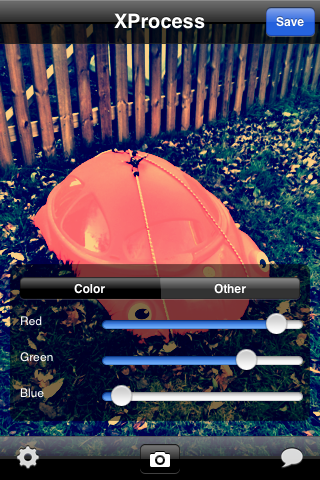
XProcess is a very basic app which simply allows the user to alter any image’s colors very easily and, most of all, quickly. It’s possible to adjust color through red, green and blue channel sliders, add vignetting and crop the image. For a taste of unpredictability, you can shake the iPhone to get random parameters and outcomes.

XProcess iPhone

The results are not outstandingly varied, but they are at any rate good enough to enjoy the app. The problem is that many other apps are more or less capable of the same, but they also have a lot of additional features or extras that are not included in XProcess. Moreover, a little more flexibility regarding the cropping and resizing feature would be helpful: as it is now, there isn’t much you can do with it.

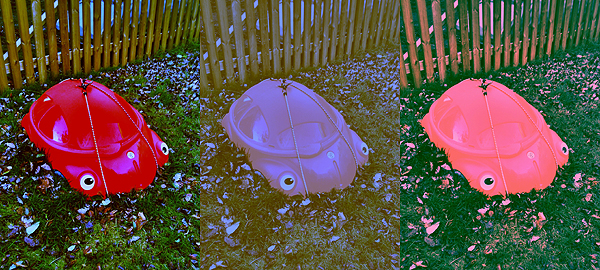
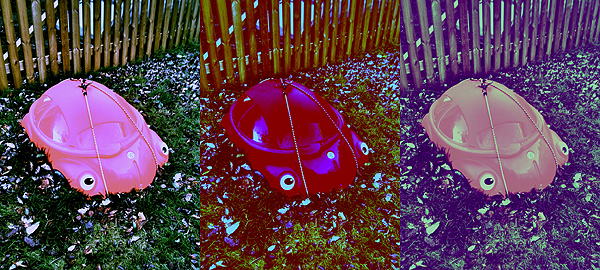
Here’s a few samples of what you can do with XProcess:

XProcess iPhone

XProcess iPhone

XProcess works with built-in camera and camera roll.

Overall

Name: XProcess
Developer: youthhr
Compatibility: iPhone, iPod Touch. iOS 4.0 or later.
Price: £0.59||$0.99||€0.79
Vote: 3/5

XProcess - youthhr