
Another interesting Black Friday offer for you to enjoy: Simply B&W will be free for the whole day tomorrow (November 25, 2011) in the App Store. The offer will be valid for one day only — after Friday the app will go back to its regular App Store price ($0.99/€0.79/£0.69).
Tag: monochrome converter

Monophix Updated to 3.1
I have been hoping for this update. Monophix 3.1 is out and with it comes the long-awaited color filter feature.
Monophix is one of the most valuable tools in the App Store for easy conversion from color to black and white. In our previous review, although we recognized the worth and the potential of the app, we also explained how the final score reflected the absence of a color filtering feature. Color filtering is an essential aspect in color to monochrome conversion. To avoid mediocre results, every photographer has to take into account color filtering. In traditional photography different results are obtained by blocking certain colors by using various photographic filters. In digital photography, the same can be easily achieved in photo editing.
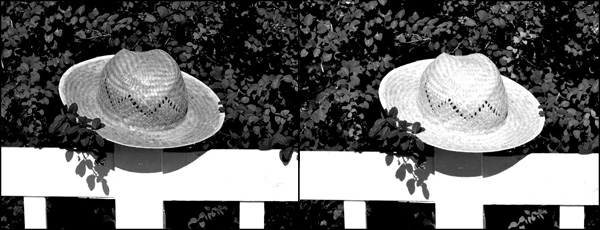
In Monophix 3.1 you have now filters for red, green, blue, cyan, yellow and magenta. The average weight black and white is also still available. This allows better control over final results, depending on the photo and on the effect you want to achieve.
In Monophix 3.1 major improvements to the vignette feature were also made. Vignette is now more manageable, thanks to the intensity slider which was added in this version. For users who experienced this issue in previous releases, the developer informs that the vignette preview glitch was also fixed: with a slider it’s now possible to correct vignette preview distortion.
Thanks to these and other minor enhancements, we feel like reviewing the previous score of Monophix, which now gets 5 out of 5.
Note: version 3.1 contains a glitch affecting the app’s opening screen. Since we have verified the issue does not concern the app’s functioning, our final score is not influenced by it. Anyhow, the developer lets Monophix users know that with the upcoming update to 3.1.1 the problem will be solved.
Overall
Name: Monophix
Developer: UIC Phoenxsoftware
Compatibility: iPhone. iOS 3.1 or later.
Price: £0.69||$0.99||€0.79
Vote: 5/5

Monochromia Review
From the same developer of Cameramatic, Monochromia is an app focused on recreating photographic black and white effects on the iPhone.
Main Features
- Full resolution available;
- 15+ presets;
- Adjust brightness and contrast;
- Adjust vignette;
- Add grain;
- Send with email or share on Facebook and Twitter.
Appotography Opinion
Monochromia allows both taking pictures with the built-in camera and processing photos already stored in your device. Differently than in Cameramatic, you can choose to disable the square format restriction and therefore you can edit and save your photos in their original shape and size.
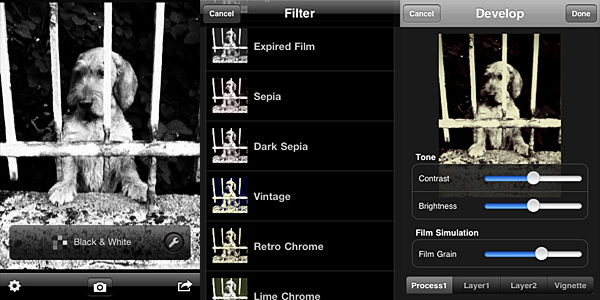 Once you load the photo into the working area, you can open the presets menu and choose one of the ready-to-use filters that come with the app. The selection is good enough, covering a range of possibilities between basic black and white to high contrast monochrome, passing through old photo effects like sepia and silver tone. The available presets, however, don’t cover everything. It’s here that the Develop feature comes in handy.
It’s possible to access the Develop area by tapping on the monkey wrench icon. Develop in Monochromia is very similar to Filter Development in Cameramatic: by playing with parameters, you can create your own monochrome filter. You can set brightness and contrast, add a tint and determine vignetting, opacity and width. When the editing is complete, you can save, email or share on Facebook and Twitter.
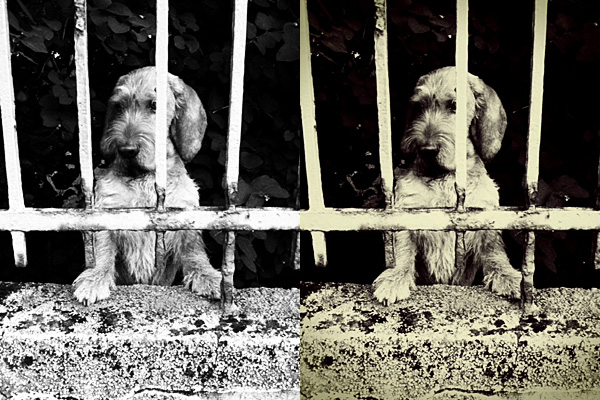
The lack of a channel mixer is probably the hardest thing to digest in Monochromia. Not that many other monochrome converters in the App Store have it, to be honest. However, a lot of other photo editing apps have recently started adding this and other sophisticated tools, making users question the actual usefulness of the average monochrome converter available in the App Store. Given the similarities with Cameramatic, Monochromia feels like a themed light version of its toy cam sibling. Not so “light” though: the price tag is exactly the same as Cameramatic. In theory, Cameramatic is less specialized, yet it’s by far more flexible, if you except the square format restriction: because of additional features, mainly, and because it is basically capable of doing the exact same things that Monochromia does.
Given these considerations, Cameramatic users will thus regard Monochromia as a clone only limited to monochrome photography of the better-known iPhone toy camera by the same developer. These users will not find any special use for Monochromia. Still, youthhr’s monochrome app is able to convert photos to black and white quickly and it allows fair customization. Achievable effects are definitely above the average black and white. Monochromia is perhaps not a must-have. Still, especially to non-Cameramatic users, it can be worth a try.
Overall
Name: Monochromia
Developer: youthhr
Compatibility: iPhone, iPod Touch , iPad. iOS 4.1 or later.
Price: £1.19||$1.99||€1.59
Vote: 4/5
MonoPhix Review
For most people, monochrome is just negation of color and thus a black and white picture is a mere desaturated version of something that in the original contained colors. For photographers specialized in monochrome though the question is not that simple. Black and white photography is first of all a matter of thinking in monochrome, carefully pondering before clicking the shutter button if monochrome is going to work or not with a certain subject. Not every photo that looks good in color looks also good in black and white and vice versa. Monochrome is a branch of photography that in the most accomplished instances follows rules that are slightly different than those of color photography.
Currently in its third version, with revamped appearance and improved features, MonoPhix ranks among the best monochrome conversion apps for the iPhone, iPod Touch and iPad.
Main Features
- Full resolution available;
- Adjust light/dark level and exposure;
- Set alpha opacity and posterization effects;
- 2 types of vignetting on/off;
- Grain generator;
- Set tint (bw, sepia, antique, custom);
- 2 types of film simulation;
- Retina display support.
Appotography Opinion
To use MonoPhix, all you have to do is to load a photo into the app. You are presented with several options to give you great control over your final outcome. By playing with sliders and switches you can handle several different aspects of the editing process. You can go for a vintage look, by adding intense noise (grain), vignetting and tint, or you can simply simulate slight desaturation making use of the monochrome alpha setting, which basically blends the monochrome version of the image with the original colored one. The interface works flawlessly and setting each parameter is very easy.
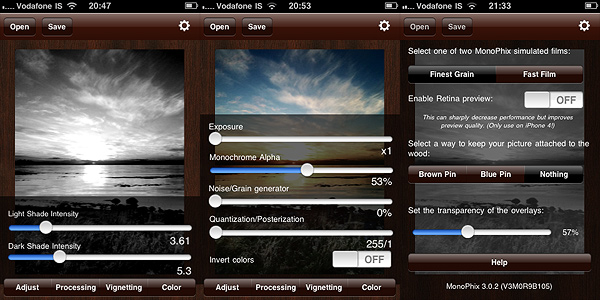
The black and white effects delivered by MonoPhix are rich and captivating. In photos where greatest importance must be given to contrast enhancement, MonoPhix truly gives its best and most convincing results.
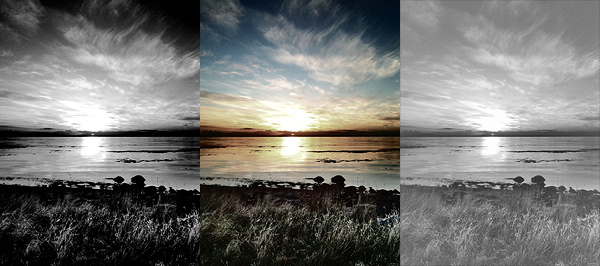
What would be useful to have as an addition to an app as focused as MonoPhix on converting color to monochrome is an option for color sensitivity adjustment. MonoPhix already does its job pretty well. However, being able to work not only with parameters as exposure and light/dark balance is something photographers devoted to monochrome I am sure would appreciate. Unfortunately, not many apps to this moment offer this feature, but for more accurate control over black and white photography color sensitivity is fundamental.
Both for the quality of processing and for its user-friendly interface, MonoPhix 3 remains one of the best apps in its genre and a must have for users eager to make the most of their black and white photography.
Overall
Name: Monophix
Developer: UIC Phoenxsoftware
Compatibility: iPhone. iOS 3.0 or later.
Price: £0.59||$0.99||€0.79
Vote: 4/5