Cameramatic 1.4.0

Cameramatic iPhoneCameramatic 1.4.0 is now available in the App Store. The latest version introduces new filters and frames to its already rich collection.

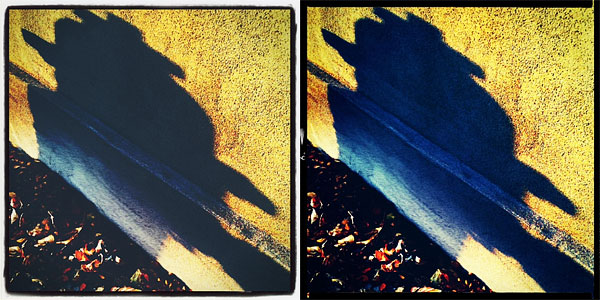
The new filters, Instant and Deep, are both added to the Standard collection of Cameramatic. Their overall looks are not significantly different, but while Instant is bright and vivid, Deep has a slightly faded character. Several new frames (9 new items in total: White 07, White 08, Ivory 02, Sloppy, Film 01, Film 02, Film 03, Film 04, Hassy 02) are also part of this update. They are added to Film and Standard frame collections.

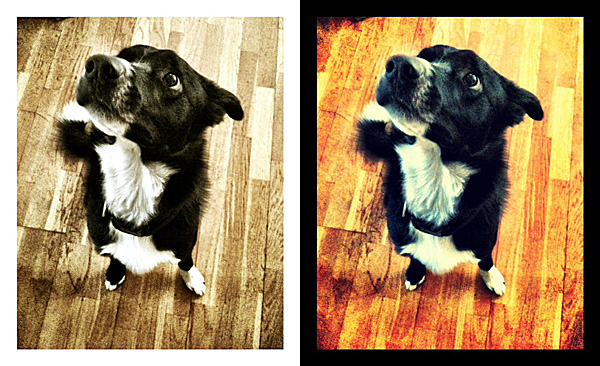
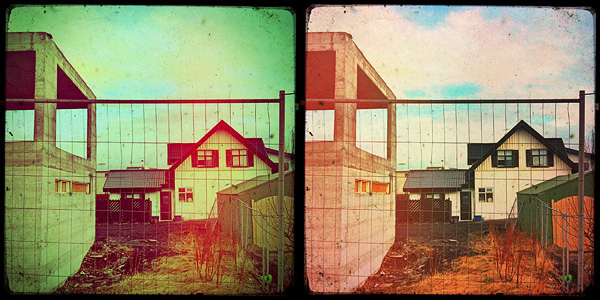
Here is a preview of the filters in combination with two of the new borders.

Cameramatic 1.4.0 iPhone
Deep + Sloppy border (left), Instant + Film 04 (right)


iPhone Photography Tutorials #3 – Create A Little Post-Apocalyptic Scenery

The film industry, and Hollywood in particular, have filled our imagination for years using post-apocalyptic visions of submerged cities in ruins and all that jazz. To achieve the effect in a sumptuous Hollywood-style would take too much money, I am afraid. Anyhow, with little effort and simple means, you too can recreate on the iPhone your own little post-doomsday scenery.

This effect works great on bold architectural details, like the top of bell towers, skyscrapers or other buildings, but it can be applied successfully to a number of other objects, so feel free to experiment.

Apps I used: WaterMyPhoto, Cameramatic, Infinicam.

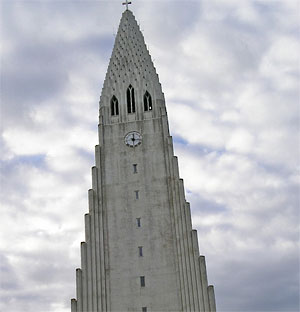
  1. I choose an average photo of the Hallgrímskirkja, a local church with an impressive and unique bell tower. The photo is slightly tilted. I load the photo into WaterMyPhoto (->Photo Album). For quickness’ sake I choose this app, mainly because it’s so simple to use and you don’t have to make other adjustments apart from selecting the area of the image you want reflected. Unfortunately, the app only saves at very small resolution (a less than satisfactory 390×502 pixels). The app is free, but it displays ads. If you care to remove them, you can purchase the in-app remove ads feature for $0.99. I adjust the photo, making sure I am keeping the cross on top of the tower into the frame (I like that detail) and tap on the Crop button to confirm. After the app generates the water reflection, all I have to do is saving (->Done Editing->Save Photo).
    Choosing the Photo
    Choosing the photo.

    Applying Water Reflection
    Applying the water reflection effect.
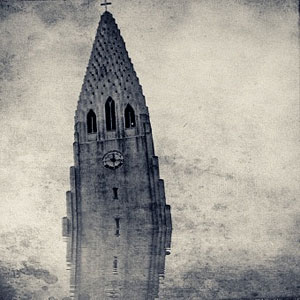
  2. I open the image in Cameramatic. I adjust the image to the square cropping tool and from the Light Box, I tap on the monkey wrench button to access the edit area. From filters, I select a monochrome filter. In this case I picked Retrochrome (Filter->B&W->Retrochrome), but anything balanced, not too contrasted or faded, would have worked. Then I apply a frame (Frame->Texture->Grunge Paper 03). I save to Light Box and then to Camera Roll by tapping on the “+” sign.

    Add Texture
    Turning into monochrome and adding texture.
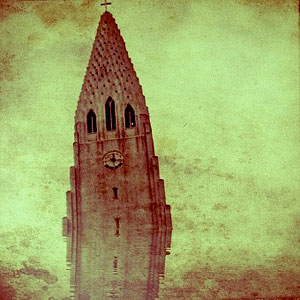
  3. I open the photo in Infinicam because I know it has some lovely hazy effect. Autochrome, which is one of the presets that come with the app, is my personal choice. Since I like the hazy look, which makes the texture and reflection look subtler, but I don’t think the reddish hue fits the mood I am trying to convey, I apply another filter: this time it’s one of my own presets (whose code is DJX-63A0), which turns the image into a more appropriate sepia. All I have left to do is saving.
    Applying Autochrome
    Applying haze with Autochrome.

    Turning Into Sepia
    Turning the photo into sepia.

This is what I did in this very specific case. There are many other ways to achieve the same overall result. For example, you could choose other tools to apply your favorite textures and borders, to fix exposure or to tilt your subject further, for a more dramatic effect. You could go either for an uncropped image or for a different format than square, which I used here. It all depends on what makes you more comfortable or what pleases your eye.

Cameramatic Updated to 1.3.0

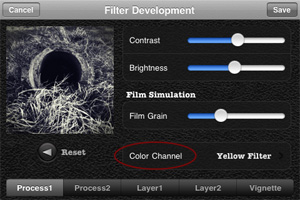
Cameramatic 1.3.0 is out. The latest version of youthhr’s toy camera for iPhone introduces a new essential feature, Color Channel, for better handling black and white photo conversion. With color channel, it’s possible to select one among the available colored filters, red, green, blue, orange, yellow, plus two other options, normal gray (a default equal weight for all color channels) and maximum channels. The same feature was recently added also to Monochromia, the monochrome sibling of Cameramatic.

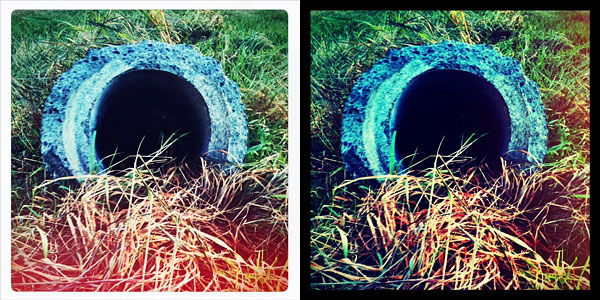
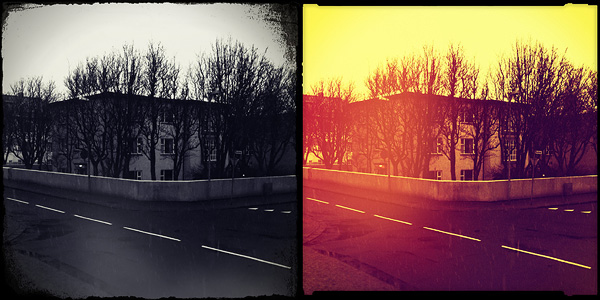
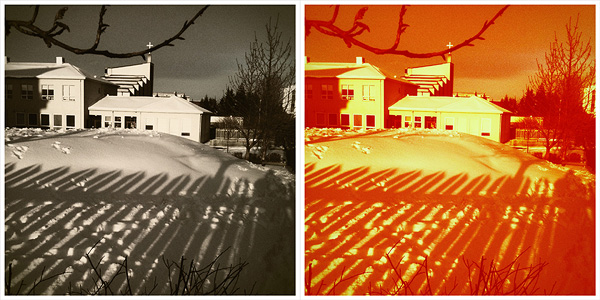
Cameramatic for iPhoneIn Cameramatic 1.3.0 you will also find two new filters, Slide and Cross Processing 2. Slide is an addition to Cameramatic’s Standard filter collection, while Cross Processing 2 is included in the XPro selection.

Cameramatic by youthhr for iPhone
The new filters: Slide (left) and Cross Processing 2 (right).

Lumière 1.3 & Other Updates

A brief entry for a few iPhone updates now available in the App Store.

Lumière 1.3

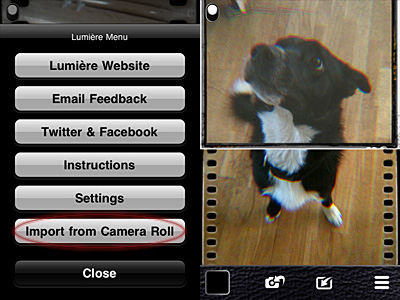
Importing photos from Camera Roll is allowed. You can now use Lumière and its vintage effects on photos you have previously taken with your iPhone.

Lumière 1.3
Lumière 1.3 - Import from Camera Roll
Lumière 1.3
Lumière 1.3 - Apply effects to imported photos.

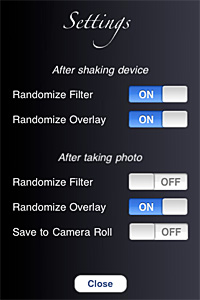
You can also enhance your experience with the new settings. From the Settings screen, you can now decide whether you want to make use of Lumière randomizing features or not. Not only this: you can actually decide which elements and in which instances you want random generation to occur.

Lumière 1.3
Lumière 1.3 - Settings

Last but not least, flash support on iPhone 4 is now enabled.

Camera+ 2.2.1

Some improvements for the new release of Camera+:

  • Enabled sharing via SMS;
  • Fixed Facebook login bug when sharing;
  • Improved launch time.

Camera+

Cameramatic 1.2.5

Minor update also for youthhr’s toy camera, now version 1.2.5:

  • Increased Light Box storage capacity from the previous 24 to 36;
  • Fixed bug that made the app crash after taking photos.

Cameramatic 1.2.4 Update

Cameramatic version 1.2.4 is available in the App Store. The latest release features new filters and frames and a few other extras. Let’s see them in more detail.

  • 4 new filters
    • Expired Film (Standard)
    • Dirty (Standard)
    • Infrated Red (Color)
    • Green D Street (Color)
  • 1 new frame
    • White 06 (Standard)
  • “Apply only to the selected image” option added: you don’t need to create new filters to apply them to photos anymore.
  • Support for yfrog added.

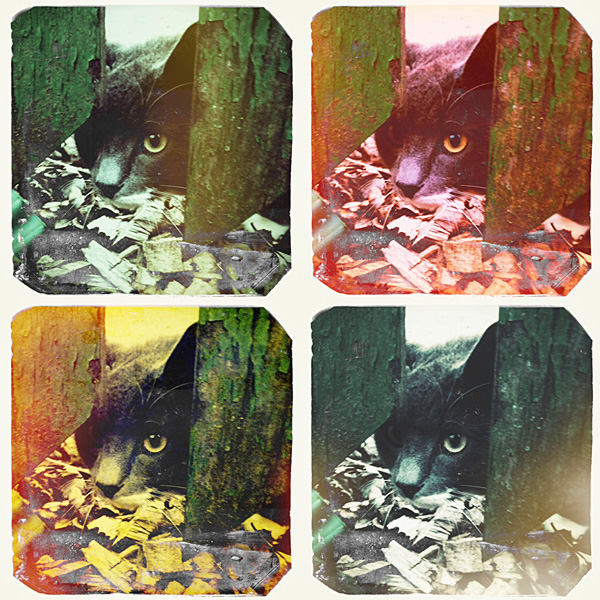
And here is a preview of all the newly added frame and filters.

Cameramatic for iPhone by youthhr
Cameramatic 1.2.4 - 2 standard + 2 color filters + 1 standard frame.

Cameramatic 1.2.3 And Other Updates

Cameramatic version 1.2.3 introduces a bunch of new filters and frames for your photos  and some other interesting features.

Here’s what’s new in detail:

  • Added 3 new filters: Retro Pop (Standard), Silverchrome (B&W), Limechrome (B&W);
  • B&W Smoky is now B&W Expired Film;
  • Added 2 new frames: Black 05, Rough 01;
  • Added 2 new light leak styles;
  • Enabled front-facing camera (on supported devices only);
  • Removed photo album button from camera interface — import photos from within Light Box;
  • Fixed minor bugs.
Cameramatic app by youthhr for iPhone.
New combinations? Yes, please.

Other noteworthy updates: iCamera HDR (2.1), PictureShow (3.1.1)

Cameramatic 1.2.1: Light Leaks Feature Gets A Makeover

Cameramatic is now version 1.2.1. A major update was released not long ago, but yet again Cameramatic gives its users new enhanced features.

So, what’s new in version 1.2.1? Let’s take a look:

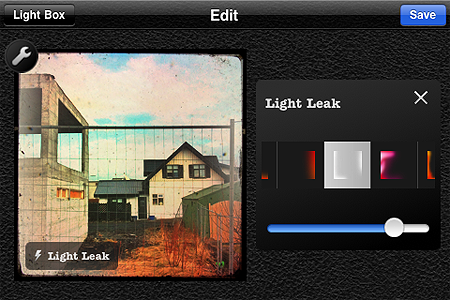
  • Light leak management: select light leak style manually;
  • Restore purchases;
  • Various bugs fixed.

I am pleased to see the light leaks feature was finally renovated. Light leaks were perhaps the only element I didn’t enjoy much in the previous versions of Cameramatic, because the light leaking applied was totally random before, so you couldn’t really make use of it properly.

Several light leak styles to suit your customized effects combinations.

With this update not only the quality of the light leaking effects look greatly improved, but it is also possible to choose among different styles and adjust their intensity. The result is far more convincing than before!

You can now also easily restore your purchases in the case they are lost when you delete the app and install it again.

Cameramatic - youthhr

Cameramatic 1.2: It Keeps on Getting Better and Better!

With the update to version 1.2.0, Cameramatic — one of our favorite apps — added some neat extras that will undoubtedly please its fans. I finally got around to testing the updated version. First of all, two Standard filters were added together with two B&W filters and a Standard border.

Cameramatic for iPhone

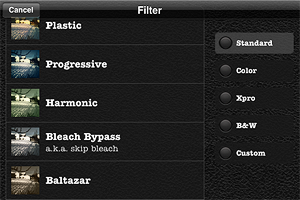
Also, now you have a thumbnail preview of all the available effects. You had a preview of the borders before, but you had to recognize the filters by name and description. Given the richness of Cameramatic’s filter collection, this new feature  is particularly useful.

Cameramatic for iPhone
New Standard filters Baltazar & Firebird with White 005 border
Cameramatic for iPhone
New B&W filters Berrychrome & Retrochrome with White 005 border

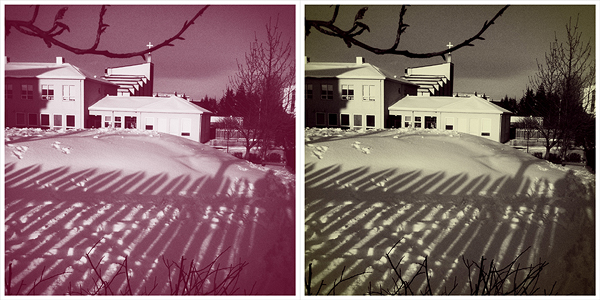
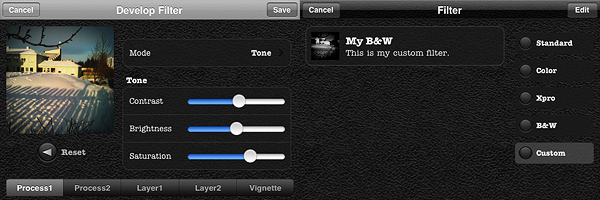
However, the most interesting new feature in Cameramatic is the custom filter development tool, which is really fantastic and gives you a lot of space for creating highly customized effects. As the name clearly states, this new feature allows you to create your own filters and save them.

You can either start by editing one of the presets or develop your filter from scratch. You have access to 2 separate levels of processing and to 2 additional layers for adding further effects; you can also set vignetting color and intensity separately. You can enable each level of processing individually, depending on your personal requirements. Among parameters, you will be able to set blending mode, brightness and contrast, adjust color channels and alpha opacity. Through the preview, you can make corrections knowing how they will affect your photos. When you are done, you save the desired filter, choose a name and a description for it. You can access your filter at any moment together with the others under the “Custom” category. Thanks to the filter development feature, you can use your newly created filters over and over again to add a unique touch to your photography.

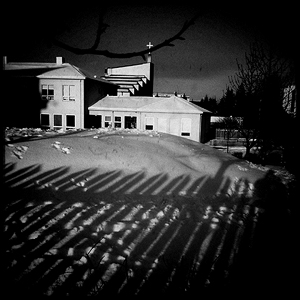
My custom filter.

I have already rated Cameramatic 5 out of 5 in my previous review, so it would be pointless to add a new rating. But rating considerations aside, I truly believe Cameramatic has made tremendous improvements from its first release. From a relatively undistinguished start, it has now become one of the most impressive photography apps you will be able to find in the App Store.  Not only the developer was very responsive to users’ feedback, but he also seriously took into account the most useful suggestions in order to actually make the app better and better.

If you haven’t done so yet, go get Cameramatic now! And have fun with it!

Cameramatic Updated to 1.2

Cameramatic version 1.2 brings some new features to the popular toycam app by youthhr for iPhone, iPod Touch and iPad. Now available new filters, frames and filters customization. Here is what’s new in the latest release in detail:

  • 4 new filters: Baltazar (standard), Firebird (standard), Berrychrome (black & white), Retrochrome (black & white);
  • 1 new frame: White 05 (thin square);
  • Filter Development: develop your own custom filters.

Cameramatic: One Of The Best Toy Cameras On The iPhone

When at first I tried Cameramatic by youthhr, I didn’t pay enough attention to it. Maybe because toy cameras on the iPhone were popping up like mushrooms and it was hard at first sight to distinguish the one from the other. Also, the first release of this app had some bugs that prevented me to fully enjoy it. Thus I had forgotten about Cameramatic till the release of the last update. After that, I started paying more attention to this app and I realized Cameramatic has a lot  interesting qualities about it.

Main Features

  • Up to 1530×1530 pixels (3GS) or 1930×1930 pixels (4) resolution;
  • 30+ filters (more available with in-app purchase);
  • 25+ frames;
  • Light leaks, vignetting and grain on/off;
  • Access EXIF and geotagging data;
  • Share via email, Facebook, Twitter and Flickr.

Appotography Opinion

Cameramatic lets you both access your photo library or take photos from within the app. Photos you take are directly saved in a square format, while with previously taken photos you can adjust the cropping before the photo is processed. Saved images are stored into the app’s light box. From Cameramatic’s light box you can access each image’s data, change settings and share using email, Facebook, Twitter or Flickr. You can enable automatic saving to export directly to the camera roll as soon as your photo is processed, if you prefer.
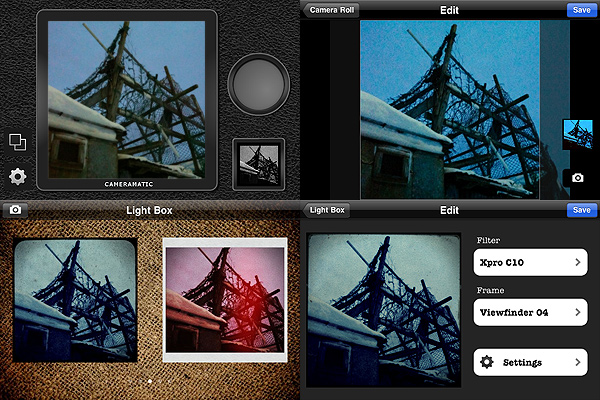
Cameramatic by youthhr for iPhone

The filters you get with Cameramatic are all reminiscent of vintage lo-fi cameras and among them you will find cross processing and monochrome films, TTV frames, grungy textures, and so on. Each effect is carefully designed to convey the feel of original toy cameras.

Here is a preview of some combinations obtained with Cameramatic for iPhone:
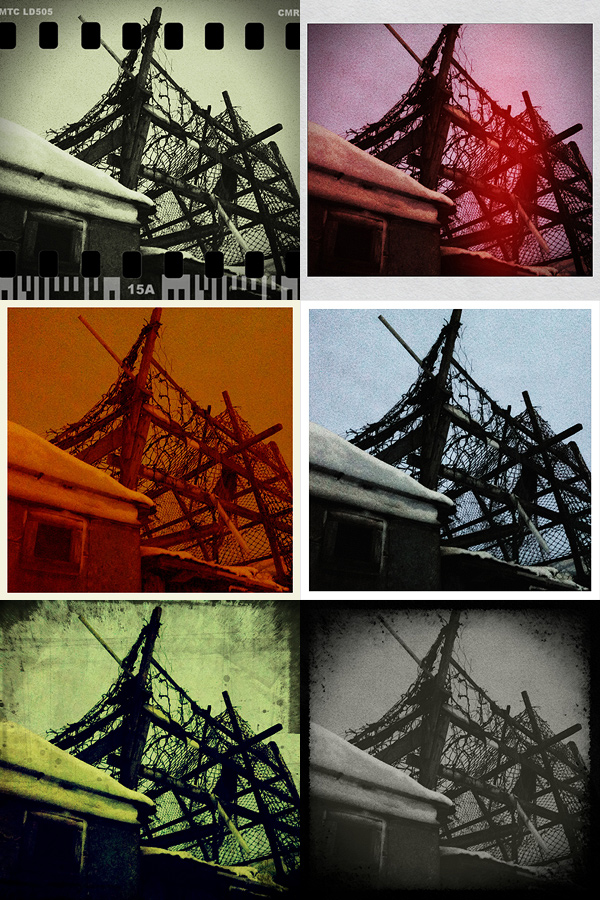
Cameramatic by youthhr for iPhone

The filters are really good and the combinations you can obtain are many. To vary your results each time, you can enable vignetting, film grain (only for black and white filters) and light leaks — an element that, in my opinion, still needs some improvement to look more authentic. Purchasing the additional packs (each for $0.99/€0.79) will widen even more your possibilities. It’s true you cannot make too many adjustments to the photos or adapt single parameters, like each filter’s intensity, but the results are anyway believable and varied enough not only to justify the purchase, but also to be satisfied with it.

Another thing I like about this app is the fact it gives you access to EXIF data and geographical tagging information. It would be very convenient if all developers included this feature into their apps, so people would be able to avoid the hassle of relying on external services just to make sure their images are the right size or to know other useful information.

The only serious issue I have with Cameramatic is the lack of preview or some other reference for individual filters: my memory perhaps isn’t excellent, so I cannot remember every time which filter is which just from the name. For frames you have a preview and some filters are easy to guess, but with others it is more complicated. The problem is partly solved by the fact until your photo is stored in your light box, you can edit it and make changes to any of its parameters. Still, choosing among filters without visual reference can sometimes be annoying, especially if you decide to save directly to camera roll.

Among the number of toycam simulation apps, Cameramatic is one of the best and one I definitely feel like recommending, especially if you’re into the lo-fi analog look.

Overall

Name: Cameramatic
Developer: youthhr
Compatibility: iPhone, iPod Touch. iOS 4.0 or later.
Price: £1.19||$1.99||€1.59
Vote: 5/5


Cameramatic - youthhr