Magic Hour 1.3 is now available in the App Store. The new version of Kiwiple’s photo editing and filter creator application for iPhone introduces new features for more fun and possibilities.
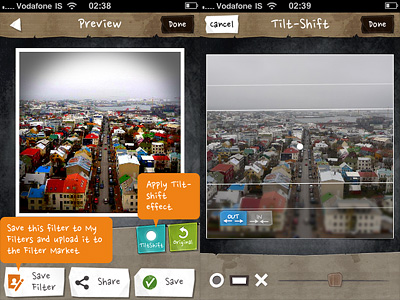
The biggest addition in this release is the brand new TiltShift effect, for turning photos into fake miniature images.
Tilt shift simulation can be applied to photos edited in Magic Hour after adjusting other settings, just before saving. This means, you will not find the tilt shift option among Magic Hour’s presets or in the Filter Market, but you will be able to add it after the rest of you editing is done. There are two blur modes that you can choose from: radial and linear. Other than that, you can decide if the blur must be applied inwards or outwards. A slider allows easy resizing of the effect. In combination with other filters and/or with vignetting added, Magic Hour’s tilt shift effect looks pretty neat.
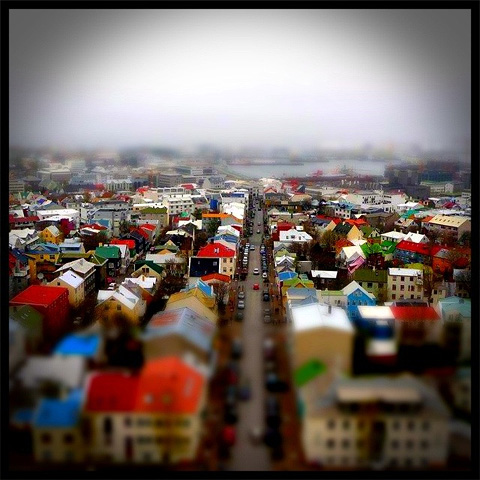
Colorful Reykjavik! Apply a fake miniature effect to your photos in Magic Hour.
Other changes in version 1.3 include a digital zoom feature for the camera mode and a fix for Facebook and Posterous sharing bug.
One of the most amazing photography apps recently released to the App Store gets an amazing update.
With Magic Hour 1.1, Kiwiple brings to their iPhone photo app the awaited full resolution. But this is not all: much more comes with the new release.
Let’s see what’s new in detail.
Added high resolution photo saving option: finally you can save photos taken or processed in Magic Hour at their full resolution
Enabled photo taking in Quiet Mode (works only with standard 640×640 pixels resolution): take photo discreetly without turning off your device volume;
Added custom crop view: more freedom in cropping your photos;
Added sharing to Instagram, Facebook Pages, Posterous;
Added upload to Evernote, Mover Lite, Camera+ and more (on enabled devices only);
Added AirPrint support;
“Always see guides” on/off: keep in-app guide enabled for reference or disable it;
Added curves guildelines;
Other various improvements.
Magic Hour offers a wide range of highly customizable filters.
In our previous review of Magic Hour (you will find our full review of version 1.0 by clicking here) we clearly stated how much we enjoyed this app’s versatility, especially regarding filter creation and sharing in the Filter Market. To sum it up, this was the verdict after the previous evaluation:
Magic Hour combines the features of a camera and those of a simple but effective filter making utility.
And also:
Magic Hour makes taking and editing photos fun and accessible for all photo enthusiasts, including newbies.
And finally:
Give us higher resolution and we will give you a full score.
Kiwiple granted our wish in version 1.1. This is why we are more than happy to keep our promise: Magic Hour now deserves a full score!
PS: Magic Hour is on sale! You can get it for a limited time at $0.99, -50% the regular price!
Magic hour, better known in photography as golden hour, is a term used by cinematographers to describe the first and last hour of sunlight of the day. The magic resides in the fact during these hours the quality of light is warm and diffuse and shadows are longer but less harsh, thus producing the best photographic effects. The term is used loosely to indicate a precise hour, so it would be more correct to consider it as a variable period of time in which the light acquires its special quality. In fact, changing seasons and latitudes, the golden hour can extend its magical properties to up to several hours daily. In places like Iceland, for instance, it’s possible to experience some of the longest and most extraordinary golden hours possible.
Magic Hour is now also a photo app by Kiwiple: take photos, create and add custom effects, share them with the world.
Main Features
Up to 640 x 640 pixels resolution;
Full screen shutter button;
Exposure control;
Square format;
40+ filter presets;
Adjust curves, saturation, brightness, contrast;
8 vignetting styles;
20+ textures;
12 frames;
Save and share custom filters;
Share via Dropbox and on Facebook, Twitter, Flickr, Tumblr, Foursquare, Cyworld, me2day.
Appotography Opinion
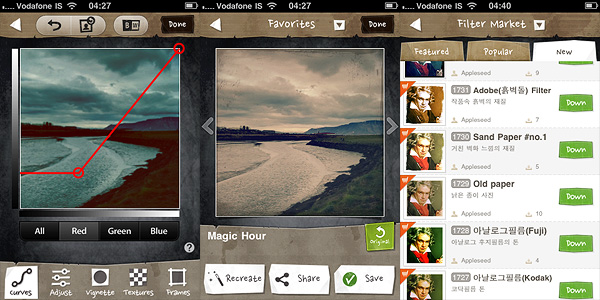
Magic Hour combines the features of a camera and those of a simple but effective filter making utility. You can take your photos and edit them right away using one of the presets coming with the app. If you’re a little more adventurous, you can create your own filter by playing with various settings as brightness, contrast, curves and by adding vignetting, textures and borders. After your filter creation is complete, you can add name and description to it and share it on the Filter Market.
The Filter Market is definitely the most interesting feature in Magic Hour. You can browse through filters created by other users and download them for free to expand your collection. Filter exchange is something many other apps could offer — but as a matter of fact, they don’t or, if they do, the process to acquire new effects is extremely convoluted or, at any rate, not very user friendly. Magic Hour makes filter sharing incredibly easy and fun.
The rich presets collection would probably be enough to justify the purchase, but the developer added the possibility to create customized filters by retouching curves, saturation, brightness and contrast and by adding vignetting, textures and frames; if these were not enough, there is the Filter Market to spice things up. Magic Hour makes taking and editing photos fun and accessible for all photo enthusiasts, including newbies.
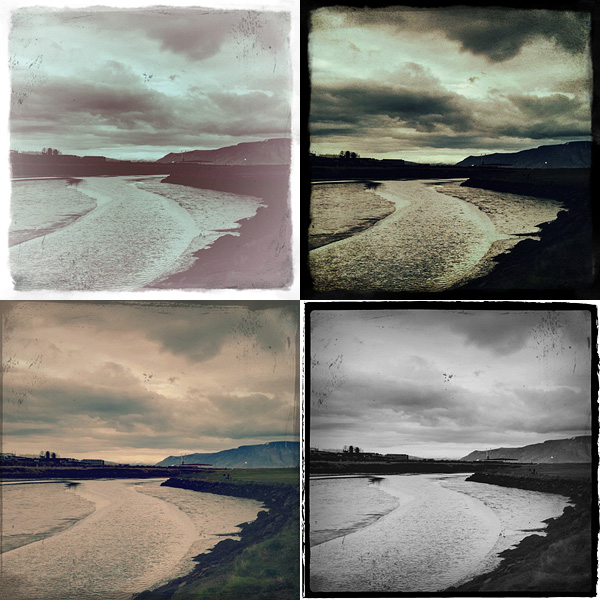
Examples of presets applied to the same photo in Magic Hour for iPhone.
The only serious problem with Magic Hour is the output resolution: too small with its mere 640×640 pixels. I was seriously disappointed when I saw the final resolution of the saved images. Unlike other users, I am not bothered by apps using exclusively the square format and the resolution issue is the only drawback to a better rating. Give us higher resolution and we will give you a full score.

 One of the most amazing photography apps recently released to the App Store gets an amazing update.