
The new PicFrame 6 is now available in the App Store with a few surprises: interface improvements and new editing features.
Tag: ActiveDevelopment
PicFX Now Free!
PicFx for iPhone is currently free for download in the App Store. ActiveDevelopment’s app was previously $1.99/€1.59/£1.49. The offer is valid for a limited time only, so check it out. PicFx features several photographic styles that can be applied to photos, from black and white and sepia to other vintage and colored filters.
 PicFx for iPhone is currently free for download in the App Store. ActiveDevelopment’s app was previously $1.99/€1.59/£1.49. The offer is valid for a limited time only, so check it out.
 PicFx features several photographic styles that can be applied to photos, from black and white and sepia to other vintage and colored filters. Other than photo styles, PicFx includes a fair collection of items for easy and quick image enhancement, like textures overlays and frames. For obtaining different combinations, images can be filtered over as many times as you wish.
PicFx is a nice power-up for your photography, especially now that it comes for free.
Thanks a lot to ILAR for the news tip.

PicTools Review
PicTools is a new photo editing app by ActiveDevelopment, creator of PicFx and PicFrame. Thanks to a well-chosen selection of instruments and to a balanced interface, PicTools has some of the potential of full-fledged photo editors, without being as demanding.
Main Features
- Full resolution available;
- Crop, flip and rotate;
- Curves editor;
- Randomize effects;
- Layer blending;
- 12 overlay styles;
- 20+ effects;
- 10+ borders;
- Undo;
- Share on Facebook.
Appotography Opinion
PicTools includes a small collection of photo editing instruments for getting the most out of your photos in no time. The interface of ActiveDevelopment’s app is basic and intuitive: you load your photo to the work area and all the tools at your disposal are neatly arranged at the bottom of your screen. By tapping on each icon, you access the various menus. You can crop and rotate your image and apply as many effects as you see fit, over and over.
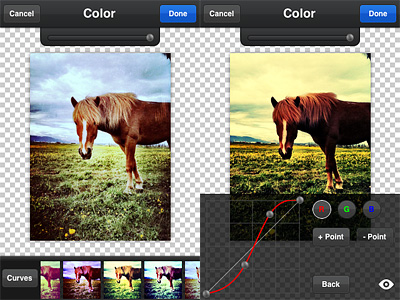 Overlays enables layer blending (12 modes available in all). A selection of presets can help you to get started or to get things done quickly, but you can also load images from your own device, like textures for example, and blend them all. Effects consists of several presets arranged into categories, Antique and Color. If you want more freedom, instead of picking a preset, you can play with the curves editor and build your own colored filters from scratch. PicTools also offers a randomize feature: as its name suggest, Quick uses a random combination of effects and overlays for a speedier editing. For both Overlays and Effects — and also for the Quick feature, that combines the two — you can set opacity, for a subtler or more intense result. By adding a border, which you can filter over as well for a more consistent look, you can add a final touch before saving. Among the other things, it’s possible to save photos in a square format with a black or white background: Instagram users will undoubtedly know how to take advantage of this option.
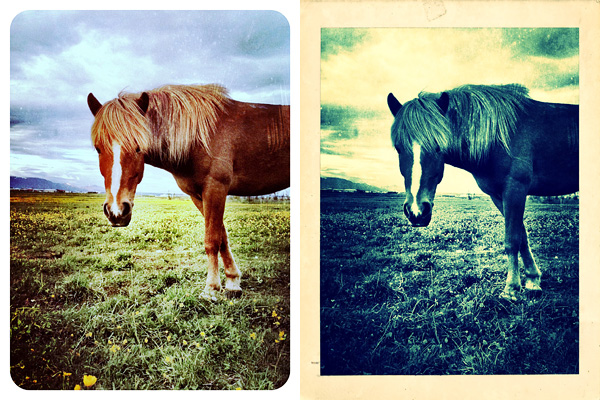
I will be honest: I’m liking PicTools a lot. Not only it gives you enough to enhance your photos in a cinch, but it is also very simple and user-friendly and it allows great results, without going through all the trouble of tweaking with massive iPhone photo editors. Presets are extremely well-done and they can give you even nicer results if you combine them together with your own settings. PicTools will become a regular guest in my iPhone camera bag.
PicTools is currently on sale. It is now available in the App Store at the special launch price of $0.99.
Overall
Name: PicTools
Developer: ActiveDevelopment
Compatibility: iPhone, iPod Touch, iPad. iOS 4.0 or later.
Price: £0.59||$0.99||€0.79
Vote: 5/5
Picfx On Sale!
 Picfx is currently on sale. ActiveDevelopment’s app is 50% off its regular App Store price.
With Picfx, you can add several effects to your photos, choosing among a collection of textures, light leaks, borders and more. Picfx comes with 36 effects (including textures and borders) and 13 colored filters (from black and white to vintage) which you can apply over and over to your photos to create your own unique styles.
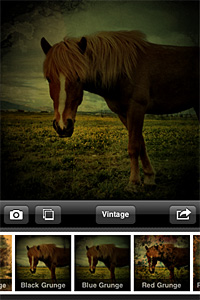
Picfx, which exclusively relies on the square format, can particularly be a special treat to users willing to give their photos an old style look. In combination with other apps, some interesting results can be achieved.
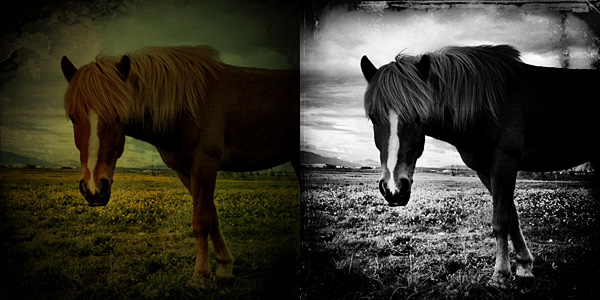
You can now purchase Picfx at the special price of $0.99 (€0.79/£0.59).
PicFrame Review
PicFrame for iPhone allows mixing together your photos for creating funny and original montages. Compared to Diptic, its better known rival, PicFrame lacks some flexibility in photo management and editing (no built-in camera, no control over the look of your photos), but it makes up for it with a few additional border features.
Main Features
- Full resolution available;
- 4 image formats (1:1, 3:2, 4:3, 3:4);
- 16 templates;
- 12 border patterns;
- Set border color;
- Set corner angle;
- Move, resize, mirror and rotate;
- Send via email or share on Facebook, Twitter, Flickr, Tumblr.
Appotography Opinion
In PicFrame, you start your creation by picking a format for your final image and select one among the many frame templates, ranging from single to four panels.
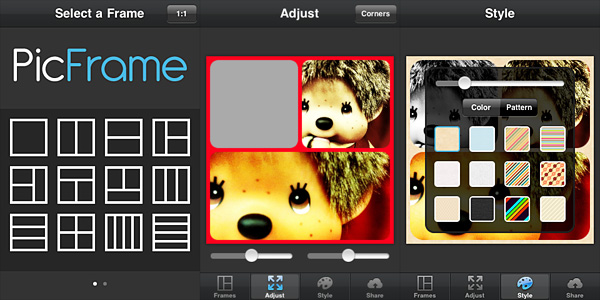 To add photos to the frame panels, you simply tap on the desired panel and choose one of the photos from your device. You can adjust the photos individually to fit better by moving them around (sliders are also provided to expand and contract each panel’s area), by pinching to enlarge and shrink them, by tapping and holding to activate mirror and rotate functions.
The border of each frame is customizable: not only you can determine its thickness, make its corners more rounded and apply a plain color to it by adjusting color sliders, you can also pick one of the available patterns that come with the app, including geometric, stripy and textured designs.

ActiveDevelopment’s app is not the first, nor it will be the last of its kind. Nevertheless, PicFrame is an easy and fun way to achieve fancy visual mishmash on your iPhone. The app manages to keep everything clean and simple, so that even less than experienced users will enjoy creating images with it.

The only complaint I have about PicFrame concerns the tap and hold feature to activate rotation and mirroring: while trying to adjust the photos inside the frame, especially in instances where you need a lot of precision, it takes nothing to exercise the required pressure to prompt the rotate and mirror buttons, even when they’re not needed. It’s not a big issue, of course, but still it can get in the way.
Edit: the developer promptly pointed out that from iPhone Settings there is an option to switch from tap and hold to double tap to activate the mirror and rotate functions. My bad, I hadn’t seen it. So yes, tap and hold is the default, but you can switch to double tap mode and this definitely solves the aforementioned problem.
Overall
Name: PicFrame
Developer: ActiveDevelopment
Compatibility: iPhone, iPod Touch, iPad. iOS 3.2.2 or later.
Price: £0.59||$0.99||€0.79
Vote: 4/5
Picfx Review
Picfx by ActiveDevelopment is another of these apps that will appeal iPhone photographers who like to use several apps at the same time to process a single photo. What Picfx does is mainly adding grungy textures to your original pictures, to give them a dirty and decayed look. Which means: if you’re not interested in the grungy style, Picfx is definitely not for you.
Main Features
- Up to 1366×1366 pixels (3GS);
- Square format;
- 27 textures;
- 13 filters;
- Share via email, Facebook, Twitter and Tumblr.
Appotography Opinion
Picfx is a recent addition to the App Store. ActiveDevelopment’s app allows to process photos both loaded from the camera roll and taken from within the app, using the built-in camera feature. Once there is a photo to process, all the user has to do is choosing among the available filters and among the textures, adjusting the opacity of each one of them to suit the image. Adding several levels of filtering is possible without saving. Sharing options include Facebook, Twitter and Tumblr.
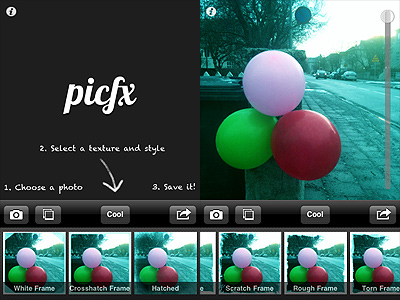
Filters, varying from oversaturation to black and white, affect not only the original image but also the texture that is applied on it. Most of the textures included in the app’s selection are conceived to add stains, scratches and corrosion to the photos.
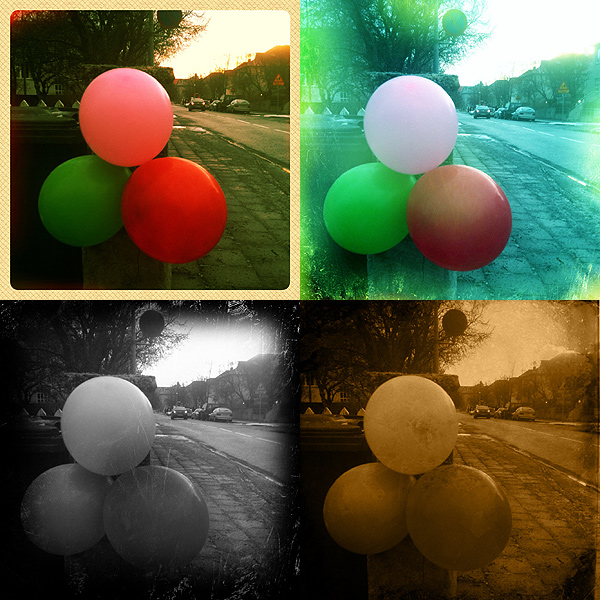
Picfx only allows basic processing. The filters to enhance tones and saturation are fairly well done, although most of them will only slightly affect the photos; the textures — also including a few smudged and old style frames — are not varied and versatile enough to grant endless use; customization of each texture only consists in adjusting its opacity. Some of the textures require patience to look convincing on pictures with no previous processing. In favor of Picfx I have to say you can filter over and over again, and multiple filtering in succession definitely expands possibilities.
As a stand-alone app, I doubt Picfx can stand out in any way, especially given its current very limited features. In combo with other apps, Picfx can still be an acceptable enhancement to your collection.
Overall
Name: Picfx
Developer: ActiveDevelopment
Compatibility: iPhone, iPod Touch, iPad. iOS 3.2.2 or later.
Price: £1.19||$1.99||€1.59
Vote: 3/5