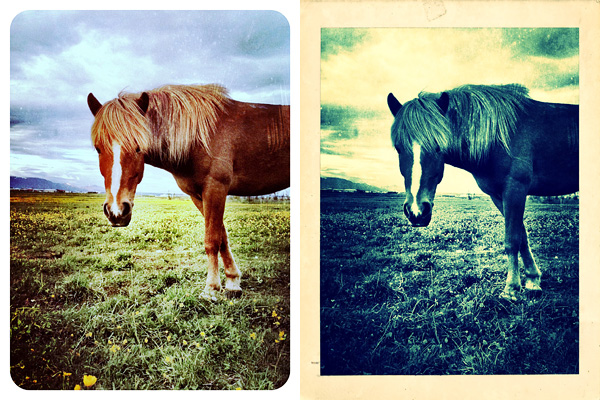
Simply B&W 1.1 is out. The latest release of MR. B. Ware’s monochrome converter for iPhone comes with enhanced interface and new useful features.
It’s now possible to apply two different vignetting styles, black and white. Vignette intensity is easily adjustable with a slider. Another new feature is grain simulation, to imitate effects obtained with different types of film. Version 1.1 also adds EXIF data preservation for devices running iOS 4.1 or later.
Other noteworthy updates include:
PicTools 1.1: new effects, overlays and borders with names for easier reference, added border opacity control, save up to 5 RGB curves settings;
Hipstamatic 221: added the requested delete from Family Album feature;
Appysnap 1.1: added leaderboard and Snap tab, improved upload stability;
PicTools is a new photo editing app by ActiveDevelopment, creator of PicFx and PicFrame. Thanks to a well-chosen selection of instruments and to a balanced interface, PicTools has some of the potential of full-fledged photo editors, without being as demanding.
Main Features
Full resolution available;
Crop, flip and rotate;
Curves editor;
Randomize effects;
Layer blending;
12 overlay styles;
20+ effects;
10+ borders;
Undo;
Share on Facebook.
Appotography Opinion
PicTools includes a small collection of photo editing instruments for getting the most out of your photos in no time. The interface of ActiveDevelopment’s app is basic and intuitive: you load your photo to the work area and all the tools at your disposal are neatly arranged at the bottom of your screen. By tapping on each icon, you access the various menus. You can crop and rotate your image and apply as many effects as you see fit, over and over.
Overlays enables layer blending (12 modes available in all). A selection of presets can help you to get started or to get things done quickly, but you can also load images from your own device, like textures for example, and blend them all. Effects consists of several presets arranged into categories, Antique and Color. If you want more freedom, instead of picking a preset, you can play with the curves editor and build your own colored filters from scratch. PicTools also offers a randomize feature: as its name suggest, Quick uses a random combination of effects and overlays for a speedier editing. For both Overlays and Effects — and also for the Quick feature, that combines the two — you can set opacity, for a subtler or more intense result. By adding a border, which you can filter over as well for a more consistent look, you can add a final touch before saving. Among the other things, it’s possible to save photos in a square format with a black or white background: Instagram users will undoubtedly know how to take advantage of this option.
Mix presets with your own settings in PicTools.
I will be honest: I’m liking PicTools a lot. Not only it gives you enough to enhance your photos in a cinch, but it is also very simple and user-friendly and it allows great results, without going through all the trouble of tweaking with massive iPhone photo editors. Presets are extremely well-done and they can give you even nicer results if you combine them together with your own settings. PicTools will become a regular guest in my iPhone camera bag.
PicTools is currently on sale. It is now available in the App Store at the special launch price of $0.99.

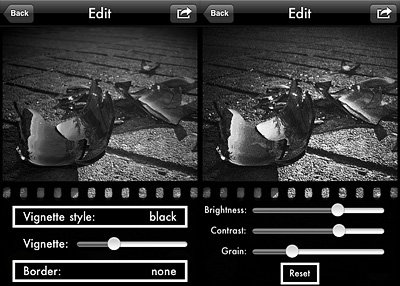 Version 1.1 also adds EXIF data preservation for devices running iOS 4.1 or later.
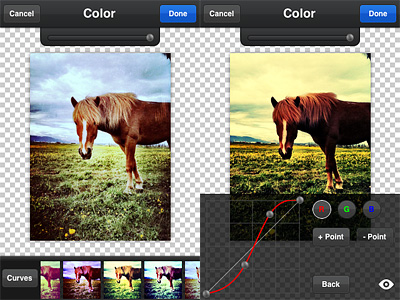 Overlays enables layer blending (12 modes available in all). A selection of presets can help you to get started or to get things done quickly, but you can also load images from your own device, like textures for example, and blend them all. Effects consists of several presets arranged into categories, Antique and Color. If you want more freedom, instead of picking a preset, you can play with the curves editor and build your own colored filters from scratch. PicTools also offers a randomize feature: as its name suggest, Quick uses a random combination of effects and overlays for a speedier editing. For both Overlays and Effects — and also for the Quick feature, that combines the two — you can set opacity, for a subtler or more intense result. By adding a border, which you can filter over as well for a more consistent look, you can add a final touch before saving. Among the other things, it’s possible to save photos in a square format with a black or white background: Instagram users will undoubtedly know how to take advantage of this option.