iPhone Photography Tutorials #1 – Easy Dramatic Black and White In The Film Noir Style

I’ve been asked how I achieve a dramatic black and white look on photos taken with the iPhone. I have more than a way to do it, but today I am sharing one among the processes I follow.

Sometimes you take a photo, especially of some architectural detail or building, and it looks all right at the moment of shooting; then you take a look at your photo moments later and you realize it’s sort of forgettable. The light isn’t as great as you remembered it and the final picture has too much noise; perhaps the colors aren’t stunning either. Something tells you though that you still have some use for that shot, a detail perhaps, the shadow casting, a suggestive angle, and so on. How to improve this kind of photos, adding to them a dramatic twist in the style of old school film noir?

Apps needed: Film Lab, DXP.

1. Choose your average building photo, the one that didn’t turn out as you would have liked but that for some reason you still think has some potential. The photo can be taken simply with iPhone’s native camera, but you can use also shots taken with HDR apps or fake HDR apps, like Dynamic Light;

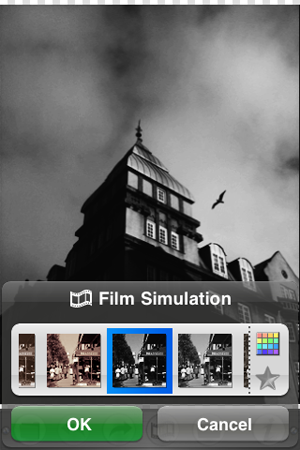
2. Open Film Lab. Choose Film Simulation -> Vintage -> Daguerreotype – High Contrast -> OK. This filter not only will turn the photo in a black and white with character, but will also enhance contrasts, bringing out the grain of iPhone shots taken in so-so lighting conditions. Adding the grain digitally usually doesn’t look very natural, so I always try to avoid it;
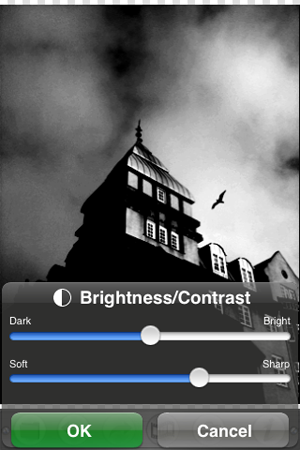
3. Still in Film Lab, go to Tool Box -> Brightness/Contrast. Increase contrast even more, so that dark areas look almost pitch black but light areas are still quite evident. Press OK and save when you are done;
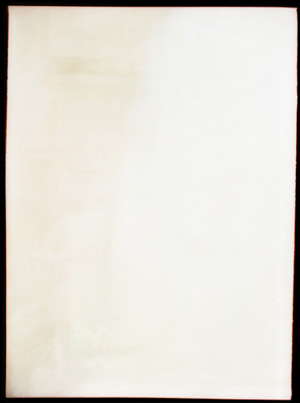
4. Browse the Internet for some vintage looking black — or at any rate very dark — frame on white background, something that will give a flair to your photo without making it look extremely dirty or scratched. There are many textures you can use for free and/or in the Creative Commons on sites like Deviantart or Flickr — but there are many others besides these two. When you find something that suits your taste, save it. It doesn’t have to be a black and white frame, you can desaturate later;
5. Open DXP -> Load from Album. Choose your edited black and white image. Load From Album again and choose your frame. Make sure that in the Settings “fit to first image size” is selected, otherwise DXP will crop the image in the case the second picture is of a different size than the first. Tap on DXP Effect -> Multiply. Move the slider knob to 100%, towards the end of the slider;
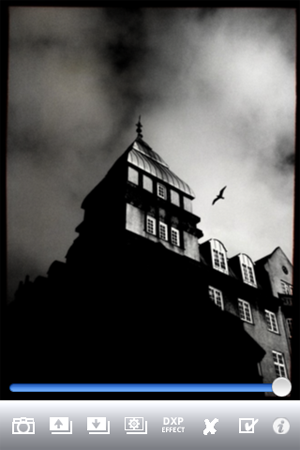
6. In the case you are working with a colored frame, tap on Effects -> B&W. This will turn your final image to B&W and will also merge both layers. Save to Album.
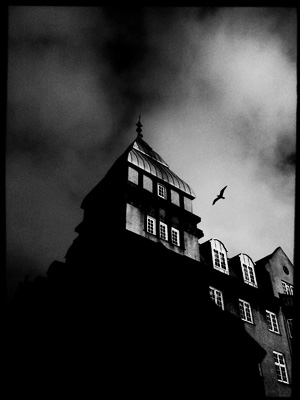
7. If after merging the photo with the frame you want to further adjust contrast and brightness, you can go back to Film Lab and repeat step 3 till you like the final result.

That’s it! Pretty easy, uh?
DXP: Mix and Blend Your Pictures

Dear addicts of photo editing, I know it’s hard for you sometimes to do all the things you’d like to on your Apple devices. A full-fledged computer with a proper software is what you are most comfortable with, but transferring photos to edit them properly is not something you can be bothered to do all the times. Among other fancy effects, many apps come with ready-made textures that make up for your unsatisfied editing cravings. However, being able to use your own personal textures is all another story, right? Also, being able to mix pictures is not an easy thing to do on iPhone/iPod Touch.

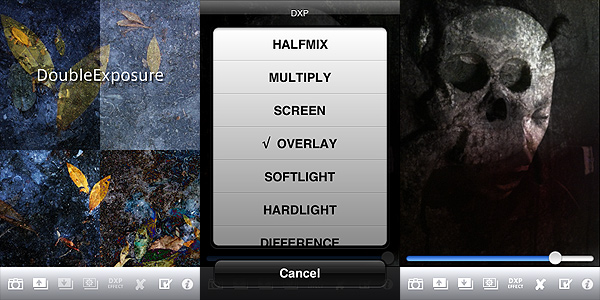
DXP stands for “double exposure”. Tandem Systems’ app goes beyond the simple double exposure suggested by its name. With its range of blending modes and other options, it will provide you with some very interesting features that to this day most apps are not able to offer. Blending pictures effectively could almost be considered a branch of photography on its own. In fact, choosing the right blending mode can sometimes change the final look of your pictures. DXP will help you achieve the right effects.

Main Features

  • Full resolution available;
  • Take photos in different formats (4:3, 3:2, 1:1);
  • Grid on/off;
  • Flip and rotate;
  • 18 blending modes (multiply, overlay, screen, hardlight, saturation, etc.).

Appotography Opinion

Basic but adequate features for effective picture blending are included in DXP. You can work either with shots taken with the built-in camera, with photos you have in your roll or with both at the same time. The blending modes’ intensity can be adjusted to generate different effects to suit your needs; you can desaturate or turn your pictures to sepia hues; you can make other adjustments, like choosing to adapt the superimposed images to fit the first layer or having the app crop them; you have a “push to/pop from stack” feature that will make it simpler to work with layers without having to handle them all at the same time.

DXP by tandem Systems for iPhone

DXP by tandem Systems for iPhone
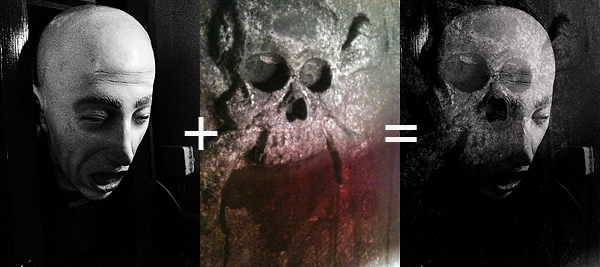
Example of fancy things you can do with DXP

DXP brings iPhone photography to another level, giving the user that doesn’t feel satisfied with pre-packed effects more freedom, opening new possibilities of expression.

There are a few changes which would improve the usability of DXP: the possibility to not have the layers merge as soon as you choose to turn them into black and white or sepia; more flexibility in the “push to/pop from stack”, in order to process a larger number of layers without risking to mess everything up; a wider choice of masking features; more customizable image rotation and layer cropping; at least an email sharing option. Also, I reckon up to a few updates ago an undo feature was available in DXP. I’m not sure why right now it isn’t available anymore. It was quite handy, because it allowed to make corrections without having to start over.

At the moment, for blending images properly, DXP is the best app available in the App Store. This app also comes in a lite version that you can try for free, so check it out!

Overall

Name: DXP
Developer: Tandem Systems
Compatibility: iPhone, iPod Touch, iPad. iOS 3.1.3 or later.
Price: £1.19||$1.99||€1.59
Vote: 4/5

DXP - Tandem Systems