
LensFlare is free in the App Store right now. BrainFeverMedia’s photo editing app’s full price is $0.99.
Tag: LensFlare
LensFlare And Alien Sky Updated
LensFlare Review
Are you one of those people trying to avoid lens flare at all costs in your photos and blaming unexpected light scattering caused by your lens all the times? Or are you instead one of those people welcoming all the fancy rings, glares and starburst-like effects and deliberately using them to add that special something to your images? If you are part of the second group, then you will like LensFlare.
LensFlare is a no-frills photographic tool for enhancement of photos and other graphic elements. BrainFeverMedia’s iPhone app makes it incredibly easy to drastically change images by adding and manipulating light effects.
Main Features
- Up to 3072×3072 pixels resolution (iPhone 4);
- 45 effects;
- Adjust flare brightness;
- Lens dust on/off;
- In-app guide.
Appotography Opinion
Even if the way LensFlare works is simple and to the point, the app comes with a clear and detailed manual to guide you through your post-processing. Once a photo — either taken in-app or imported from Camera Roll — is loaded into the work area, you can pick one of the several light effects among those in LensFlare collection.
 By tapping and dragging, you place the flare in the right position; by pinching with two fingers, you shrink or enlarge the flare; with two fingers, it is also possible to rotate the flare to the right angle. You can save your image right away to your device or, if you prefer, using the “Render image” option, you can add to it as many flares as you like. In order to use flares generated in LensFlare in external photo editors, you can choose the “Save flare only” option and thus export the flare on a plain black background. The lens dust feature to achieve a more realistic and natural look can be enabled and disabled from the same flares panel.
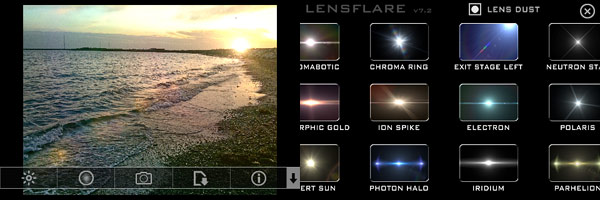
The choice of flare types is very rich and it includes cinematic, natural light and SRL flares, plus several other effects. All effects coming with LensFlare are high quality and their brightness can be adjusted with a slider.

LensFlare allows immediate and easy modification of photos through the addition of striking photographic effects. Used as a tool for finishing touches, this app will undoubtedly bring value to your iPhone camera bag.
The HD version of LensFlare for iPad is also available in the App Store.
Overall
Name: LensFlare
Developer: BrainFeverMedia
Compatibility: iPhone, iPod Touch, iPad. iOS 4.0 or later.
Price: £0.69||$0.99||€0.79
Vote: 4/5

5 Useful iPhone Tools For Quick Enhancements Pt.1
Sometimes it takes just a few touches to turn a good shot into a stunning picture. Other times you just need to add a final detail or to make sure your photo has a certain standard size, ratio, and so on. This is intended as a selection of remarkably easy-to-use iPhone and iPad photography apps, both paid and free, that can help you fine-tune your photos in no time.
- Pixlr-o-Matic
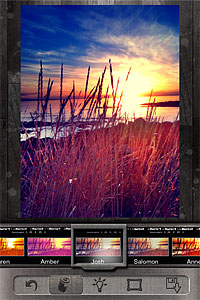 Change the look of your photos with a single tap. Pixlr-o-Matic offers a collection of 25 photographic effects, 30 light overlays and 31 frames, for many combinations. Pixlr-o-Matic is also a web app. Try it for free here.
 Developer: Autodesk Inc.
Works on: iPhone, iPod touch, and iPad. iOS 4.0 or later.
Price: free! - LensFlare
 Light can make a difference in photo enhancement. LensFlare comes with 42 professional looking flares, which can be placed in images loaded from Camera Roll or in photos taken with the built-in camera feature. Flares range from SRL camera lens to cinematic effects. Scale and rotate flares to adjust them to photos, create images of great visual impact with just a few touches.
 Developer: BrainFeverMedia
Works on: iPhone, iPod touch, and iPad. iOS 3.2 or later.
Price: $0.99/€0.79/£0.69 - Phonto
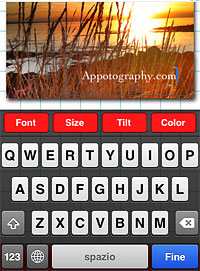 Add captions to photos with Phonto. More than 100 font styles are available. Phonto lets you customize your text by changing font face, size and color. Change opacity, tilt and add backgrounds for different effects. Use Phonto to add watermarks or to send personalized messages. Phonto is Instagram-friendly: it saves photos in a square format and lets you post directly to your favorite photo sharing app.
 Developer: youthhr
Works on: iPhone, iPod touch, and iPad. iOS 4.1 or later.
Price: free! - Squaready
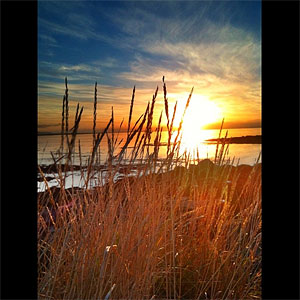
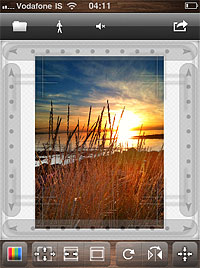 Squaready is a great companion for regulars of the 1:1 aspect ratio. Instagram users will find it easier to adapt both their landscape and portrait oriented photos to the square format. Flip and rotate, shrink and enlarge, add a colored background and send to other photography apps (Instagram, Magic Hour, Camera+, Cameramatic, and more).
 Developer: FANG Inc.
Works on: iPhone, iPod touch, and iPad. iOS 4.0 or later.
Price: free! - Image Blender
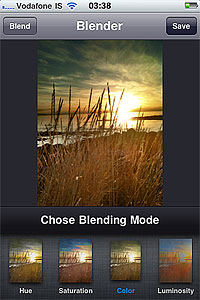 Merge two photos together to create unique images. Create unique effects and spice up photos by adding textures. Choose among 18 blending modes and adjust the opacity of each image for the desired result. Image Blender is as easy as layer blending can get.
 Developer: Johan Andersson
Works on: iPhone, iPod touch, and iPad. iOS 4.0 or later.
Price: $1.99/€1.59/£1.49