iSupr8 2.0 Released

iSupr8 2.0 for iPhoneiSupr8 2.0 is out. New features and a few extras are part of the latest major update for this iPhone and iPad video maker which simulates the look of the old Super 8 format (our full review can be found here). Let’s see what’s new in version 2.0 in detail.

First of all, iSupr8 now offers more editing options. There are four new film simulations that you can purchase (each for $0.99/€0.79/£0.69) + an extra film coming for free with version 2.0:

  • Prime-X B&W – Low contrast black and white with subtle sepia tint, for a suggestive and timeless look.
  • PenneMaker B&W – High contrast black and white inspired by the rough and extreme documentary style of the 60’s.
  • VibraChrome 40 – Warm color effect with red hue in shadows, especially suited for sunny days.
  • SuprCrome 40 – Slightly desaturated color effect with a touch of magenta.
  • Levi’s Film Workshop (free) – Color effect with a bold indigo hue for emphasizing blues.
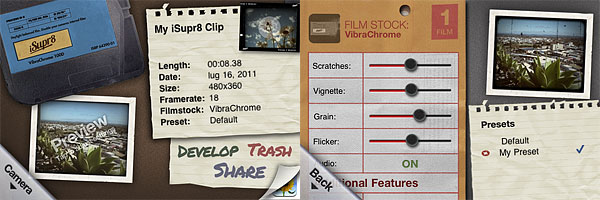
iSupr8 iPhoneEvery effect has adjustable settings which are accessible by tapping on the ‘preview’ thumbnail in the app’s development area. You can set vignette, noise, flicker and scratch strength, disable/enable audio, film burn and frame. Your customized settings can be saved as presets.

Among other new features, a revamped design, a selection of FPS rates (12, 18, 24) and improved sharing and community integration (make sure though you have read the Terms of Service and you agree with them before you share via iSupr8 community).
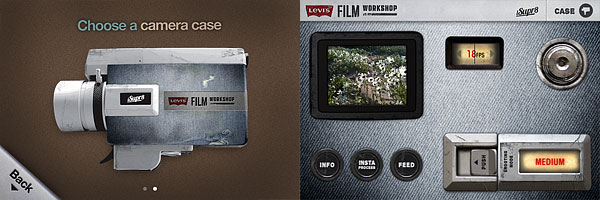
iSupr8 iPhoneIt’s also possible to choose a camera case among the ones available. Currently there are two choices, the standard black case and the special Levi’s themed edition case.

Last but not least, as mentioned above, iSupr8 is currently free in the App Store for a limited time, thanks to Levi’s Film Workshop sponsorship.
Top Free Apps For Your Photography Needs Pt.2

The second part in our free photography apps series of specials — the first part is here. After all, who said you have to pay to enjoy your photography on iPhone, iPod Touch and iPad? Sometimes taking and processing photos is fun also because it’s free.

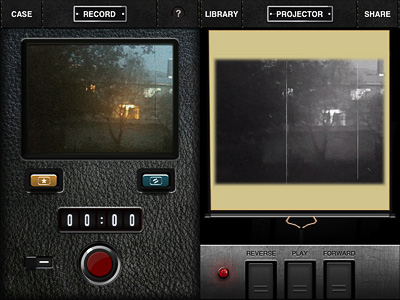
Super 8

To celebrate the upcoming J.J. Abrams’s movie, Super 8, Paramount conveniently released a video processing app and  gave it away for free.

Pros: Several filters and options to take and process videos, sleek interface, in-app manual.
Cons: Not very appealing if you don’t like being forced to watch promotional material.

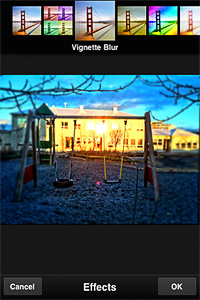
Photoshop Express

Adobe Photoshop is currently one of the most popular — if not THE most popular — photo editing and retouching tool in the world. Adobe brought its long expertise to mobile platforms with their Photoshop Express, top free downloaded photography app in many countries.

Pros: A little of everything, from shooting to fine tuning to adding borders and effects to sharing.
Cons: Not much flexibility for some of the features included. From Adobe, one would expect something more.

Tiny Planet Photos

See your average photos in a new light by turning them into stereographic images. Or, to say it in a simpler way, turn your photos into cute little planets. That’s what Tiny Planet Photos does.

Pros: Nice effects. If used with the right images and/or in combination with other apps, it can offer very interesting effects and truly creative, astonishing results.
Cons: Limited possibilities as a stand-alone app.

Flickr

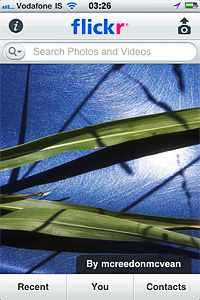
The official app to the most famous photo management and sharing service out there.

Pros: Share your photos easily, get in touch with your contacts, explore other people’s photos.
Cons: Not as manageable as the web application; some photo apps already offer basic Flickr photo sharing.

Gorillacam

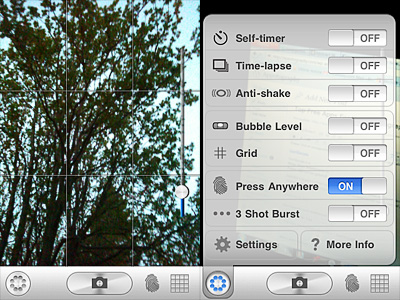
From the makers of Gorillapod. Gorillacam is a great app for those willing to take photos in the most straightforward manner. Within the same app, make use of a collection of digital tools that are often available only by using more apps at the same time.

Pros: Many helpful tools to easily take better photos: timer, anti-shake, grid, full-screen shutter button, burst mode, etc.
Cons: Developers announced they will not be releasing further updates.

And this was part 2 of our special. Hopefully, it helped some of you to discover a few new apps. If you have personal favorites that you would like to bring to our attention, feel free to comment here.

Camer8: A Classic Super 8 Camera On Your iPhone

Super 8, introduced in 1965 by Kodak as a format accessible to everybody for its low costs and ease of use, is right now experiencing a huge revival: not only in its actual analog form, but also through its many digital imitations.

With Camer8 (formerly Super 8), Booom! intended to bring to iPhone, iPod Touch and iPad the authentic feel of old Super 8 home movies.

Main Features

  • Show video up to HD resolution;
  • Two filters with three intensity levels for each (light, medium, heavy);
  • Recording limit on/off;
  • 12 or 18 FPS.

Appotography Opinion

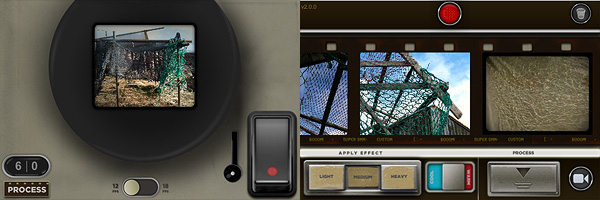
Camer8 lets you process videos taken from within the app — not external videos. Before recording your video, you have to choose among 12 or 18 FPS (Frames Per Second, the number of still frames displayed per second). You can set either of those as a default from your device settings. In general, given the phenomenon of persistence of vision in relation to human mind, the briefer the interval between still images, the smoother the perceived movement. Original Super 8 worked at 18 FPS; the most widely used standard for film is 24 FPS, although today there are many other popular formats (25, 30, etc.).

Camer8 app for iPhone by Booom

To record a video, you either keep the trigger button pressed or you tap on the latch, which will keep the trigger pressed in your stead. In both cases, a large viewfinder is brought up and you have a clear view of what you’re actually recording. You have a default time limit of sixty seconds per recording session, which is a lot better than the previous twenty-second limit of the first releases of Camer8; if it weren’t enough, this can be disabled or changed from Settings. Enabling recording time restrictions can be seen as a way to bring back the limitations of the original medium, although Super 8 allowed a much longer continuous filming time (a little more than three minutes per reel).

The recorded material is sent right away to the Camer8 Process Lab, a gallery where all unprocessed videos are stored. The filters add a colored layer of a warm golden color or of a cobalt blue over the clips, other than some dirt, scratches and dark framing. The intensity of the filters varies a little depending on whether you choose light, medium or heavy processing. Overall, the filters are quite good. You can filter the same video clip over and over, choosing warm or cold effect and different intensity every time. Rendering times are perfectly in the norm; to make things easier you can add to the processing queue several items at once — in this case, be careful because the app may crash if too many items are added. Processed videos are saved directly to your Camera Roll.

Compared to other video processing apps in the same league, Camer8 lacks some useful features, especially in the sharing department and, from my experience,  it’s also crash-prone. The effects, however good, are not as eye-catching as the ones of this app’s direct competitor, iSupr8. Still, Camer8 is a fairly decent app and a valuable addition to your collection, especially after the last update which fixed some of its major issues.

Overall

Name: Camer8
Developer: Booom!
Compatibility: iPhone 3GS-4, iPod Touch, iPad 2. iOS 4.1 or later.
Price: £0.59||$0.99||€0.79
Vote: 4/5

Camer8 - Bits of Cat Software