
Starting tomorrow and for the following three days, all MEA Mobile iOS apps will be free for downloading in the App store. Several photo and video apps are included in this special offer.
Tag: MEA Mobile
Camera XE Quick Preview & Launch Offer
MEA Mobile‘s newest photo app, Camera XE is out. To celebrate the launch, the app is free for one week in the App Store.
Currently, Camera XE is also offering another promotion in collaboration with Walgreens: by entering the coupon code CAMERAXE13 when using the app to order prints, you get 25% off your purchase.
iSupr8 Extra Films Overview
One of the most important changes introduced in version 2.0 of  iSupr8 is the possibility to purchase more films to process video clips. Together with the original Tru 8, iSupr8 now features a selection of effects ranging from black and white to a variety of color film stocks. All films are customizable: users can choose default settings or they can create and save their own custom presets by altering basic parameters for each effect.
After the update to 2.0.2, iSupr8 now offers 7 film types (+ Tru 8 and Levi’s® Film Workshop, available for free with the app’s download):
- VibraChrome 100D: slightly faded color film with warm, radiant tones.
- SuprChrome 40: desaturated colors with a slight magenta cast.
- PenneMaker B&W Reversal Film: bold high contrast black and white in the style of the 60’s.
- Prime-X B&W Reversal Film: black and white with a faded look and a subtle sepia tint.
- ThermaChrome: vibrant colors with an emphasis on blue shadows and warm midtones.
- AltroVerdi 100: ultra-vivid colors and strong green hues, especially noticeable in darker areas.
- WestmanRosa 64T: bright red shadows contrasting with cool midtones.
Here is a preview of all the extra films that are available as in-app purchases in iSupr8.
Thermachrome, AltroVerdi and WestmanRosa were added with the last update (2.0.2), while the other films were already in version 2.0. Effects are not bundled together: each of the available items can be purchased individually for $0.99/€0.79/£0.69.
iSupr8 is still free in the App Store, thanks to the sponsorship of Levi’s Film Workshop.
iSupr8 2.0 Released
 iSupr8 2.0 is out. New features and a few extras are part of the latest major update for this iPhone and iPad video maker which simulates the look of the old Super 8 format (our full review can be found here). Let’s see what’s new in version 2.0 in detail.
First of all, iSupr8 now offers more editing options. There are four new film simulations that you can purchase (each for $0.99/€0.79/£0.69) + an extra film coming for free with version 2.0:
- Prime-X B&W – Low contrast black and white with subtle sepia tint, for a suggestive and timeless look.
- PenneMaker B&W – High contrast black and white inspired by the rough and extreme documentary style of the 60’s.
- VibraChrome 40 – Warm color effect with red hue in shadows, especially suited for sunny days.
- SuprCrome 40 – Slightly desaturated color effect with a touch of magenta.
- Levi’s Film Workshop (free) – Color effect with a bold indigo hue for emphasizing blues.
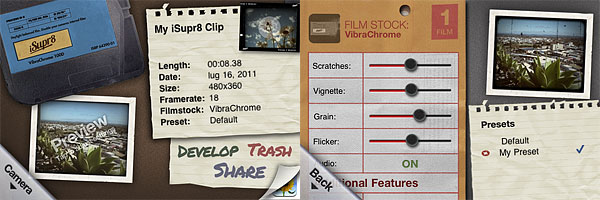 Every effect has adjustable settings which are accessible by tapping on the ‘preview’ thumbnail in the app’s development area. You can set vignette, noise, flicker and scratch strength, disable/enable audio, film burn and frame. Your customized settings can be saved as presets.
Among other new features, a revamped design, a selection of FPS rates (12, 18, 24) and improved sharing and community integration (make sure though you have read the Terms of Service and you agree with them before you share via iSupr8 community).
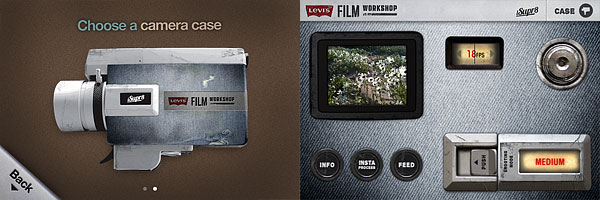 It’s also possible to choose a camera case among the ones available. Currently there are two choices, the standard black case and the special Levi’s themed edition case.
Last but not least, as mentioned above, iSupr8 is currently free in the App Store for a limited time, thanks to Levi’s Film Workshop sponsorship.
iSupr8 and iCamera HDR Updates
iSupr8 and iCamera HDR were updated respectively to version 1.4 and version 2.0.
What’s new in iSupr8:

- iPad2 Support;
- AirPlay support;
- Browse and share videos on iSupr8 community;
- Enabled location service off on video uploading;
- Corrected GeoTagging for Northern hemisphere;
- Improvement on video metadata;
- General performance improvements.
What’s new in iCamera HDR:

- Substantial improvements to the tone mapping algorith, for producing significantly better images;
- Minor bug fixes.
iSupr8 Is Now 1.3
Version 1.3 of iSupr8, the popular 8mm simulation app for Apple device, has just hit App Store’s shelves. What’s new in this latest release?

- iSupr8 community launched;
- New Tru8 processing engine;
- Proper video metadata saved;
- Sharing of geo-tagged video powered by Snapr;
- Video uploading with location services off now enabled;
- Various improvements and bug fixes.

Dynamic Light and iSupr8 Updates
Two apps that we recently reviewed were updated in the past hours. We are talking about Dynamic Light and iSupr8. The updates are nothing big, but developers of both apps announced important improvements and changes are on their way.
 Dynamic Light‘s newest release is 1.1.
The update was meant to improve memory handling by caching large images. Version 1.1 also temporarily replaces the filter Dutch Light with Ultra Contrast, an overdone HDR effect. Mediachance made clear Dutch Light will be back in a later update, together with a whole new set of photo filters.
 iSupr8 was also updated to version 1.2.2.
The new release fixes crash issues that mainly affected iPhone 3GS users. A major update to the popular Super 8 video app was announced by MEA Mobile and is coming soon.
iSupr8: Second Round With Perfect Score!
We pretty much explained in our previous review all the great aspects about iSupr8 and how our rating had been mainly influenced by deficiencies in the app’s framing accuracy. With the latest updates we verified that the aforementioned issue has been fixed by MEA Mobile, developer of iSupr8. Also, more interesting features were added.
Main Features
- Tru8™Processing;
- Unlimited HD record time;
- Re-develop videos;
- 3 levels of filter intensity (low, medium, high);
- Record 360p / 480p / 720p
- Large Viewscreen mode;
- Import videos from camera roll;
- Spotlight enabled for iPhone 4;
- Share still Frames on Snapr;
- Share via email and Facebook.
Appotography Opinion
Here we are, for iSupr8 part 2. As I said, we liked the app in its original form, but it had issues that made it difficult to fully enjoy it. This is why I am more than happy to have the chance to re-review the updated and improved version.
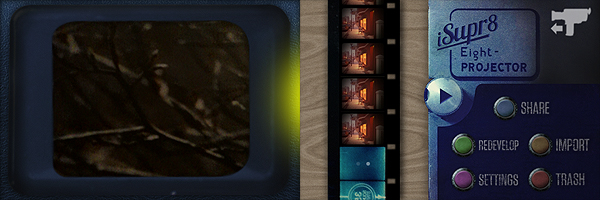
iSupr8’s UI, which I liked, thankfully has not undergone drastic changes; it has been improved to go along with the new options now offered by the app. The large viewer, for instance, permits better and more accurate control over footage recording. You can bring it on by double tapping on the regular viewer and you can conceal it by double tapping on it again at any time. Another of the newly introduced features allows users to process videos stored in their camera roll, instead of only being able to process material recorded from within the app. As a result, iSupr8 is now fully iPad/iPad 2 compatible. And this is not all: you can conveniently process the same video again and again, so every time you can make changes to parameters and settings. In fact, more than a processing option was included with the updates. You can adjust the intensity of the applied filter, from low to high. This will please both those who prefer a heavily dated look for their videos and also those who just want the vintage flavor without much scratching and dust applied. Among the other features not included in the first release — the one we reviewed — you will find the possibility to share stills from your videos on Snapr, a web service for posting geo-tagged images.
Developers of iSupr8 encourage users to send suggestions and feedback to make their app even better. Appotography praises MEA Mobile for being attentive to users’ requests and needs and for promptly improving their product.
iSupr8 was already remarkable for the quality of its processing and for the authenticity of its 8 mm simulation. All that we liked in the first release is still intact, and all that we were unsure of was readily corrected. As of now, iSupr8 is our favorite 8 mm simulation app and one of the video processing apps we like more. Well done!
Overall
Name: iSupr8
Developer: MEA Mobile
Compatibility: iPhone (3GS, 4), iPod Touch. iOS 4.1 or later.
Price: £1.19||$1.99||€1.59
Vote: 5/5
iSupr8 Updated to 1.2
iSupr8 got an update a few hours ago. I didn’t try the new version yet; here is what’s you will find in version 1.2:
- Video import;
- Large viewfinder;
- Three levels to the filter’s intensity;
- Share full resolution still frames of your films on Snapr community;
- Reduced render times for 3GS;
- Compression options for sharing.
iSupr8: Super 8 Makes a Comeback
History time: Super 8 was released by Kodak in 1965 as an upgrade from the previous 8 mm format. Differently from the previous format, its perforations were smaller thus allowing a larger area to be exposed. It also allocated space enough for magnetic sound recording.
Born as an improvement from basic 8 mm home movies, Super 8 acquired a legendary status, also thanks to achievements of indie film-makers that resorted to making use of it as a means to keep production costs lower. It’s not a surprise then that more than a few experimental film-makers continue to use this format extensively and that even Hollywood’s J.J. Abrams is going to pay his tribute to it with his upcoming Super 8.
Together with many other developers, New Zealand-based MEA Mobile jumped on the revival wagon, releasing iSupr8, that according to them, is an app “designed by vintage film enthusiasts” as an “effort to revive and increase awareness of a commercially dying format to a new generation”. For this app, MEA Mobile developed Tru8™, a post-processing algorithm capable to grade each pixel separately according to exposure, adding at the same time other effects like film flickering, projector framing and other realistic elements. All in the name of the most accurate authenticity of looks possible.
Main Features
- Record in 360p, 480p or 720p (on supported devices only);
- Tru8™ processing;
- LED enabled (on supported devices only);
- Share via email and Facebook.
Appotography Opinion
Note: A more recent review of iSupr8 is available here.
iSupr8 doesn’t work in real-time and doesn’t process videos previously taken. You take your video on the spot and once you recorded it, it is stored in your rolls gallery. From there you can either decide to process it or to trash it. Processing times are perfectly average for this kind of apps. Memory usage is also quite in the norm, meaning this app won’t cause much troubles, overloading your device beyond its capabilities and crashing continuously. The interface is clean and stylish, making the use of the app an enjoyable and rewarding experience from this point of view.
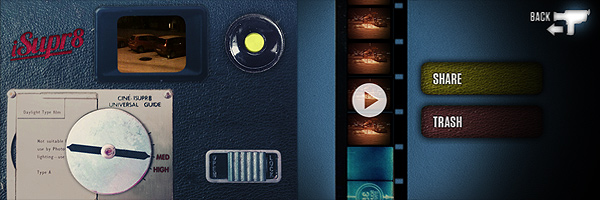
There is only one filter you can choose from, so if you expect a filter collection this app is not for you. The emulation of original Super 8 is very good though, especially in the fact the developers wisely decided to take another path from that already chosen by their colleagues: they didn’t overdo it, adding all kinds of visual mumbo jumbo, with too much dirt and scratches and extreme overly saturated or desaturated tones. As far as the final outcome is concerned, iSupr8 holds very well.
This video was shot in some of the worst possible conditions, at night and with snowy weather. Keeping in mind these considerations, the results aren’t half bad.
Despite all my previous comments, I don’t feel like giving a higher rating to iSupr8. There is a very serious issue I find with this app and it concerns the viewfinder: accurately framing your subject is absolutely frustrating and sometimes it requires a lot of testing and retakes, unless of course you’re careless enough to not mind about what will be in your final video. Some other apps in the Photography category used to have, or have still, this same issue. Just to mention a famous example, Hipstamatic developers too at first had released their app with this same problem — but partially corrected it adding a “precision framing” alongside the “classic” and imprecise one. Original Super 8 cameras did have some issues with framing, and as a matter of fact many users complained about viewfinder’s lack of accuracy. Each camera had different troublesome framing, some being a little off vertically and some other horizontally. iSupr8 is a bit of both and getting your video right is not the most intuitive task, in spite of the app’s overall simplicity.
Emulating the feel of the original Super 8 is one thing; reproducing also issues and deficiencies of old cameras is another.
Overall
Name: iSupr8
Developer: MEA Mobile
Compatibility: iPhone (3GS, 4), iPod Touch. iOS 4.1 or later.
Price: £1.19||$1.99||€1.59
Vote: 3/5