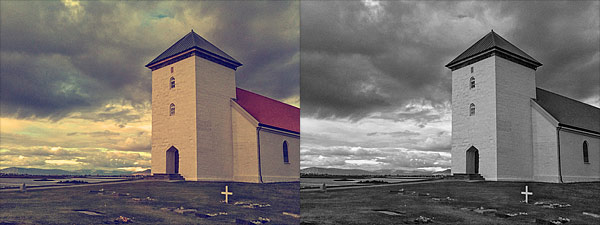
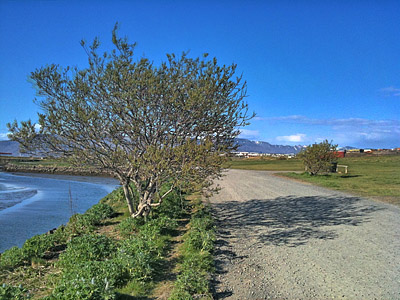
The folks at Everimaging have brought to iOS devices their expertise in HDR photo editing. iCamera HDR may be a fairly recent addition to the App Store, but it’s definitely an app you shouldn’t overlook.
Following the great popularity of HDR photography, processing apps focused on this set of techniques are being frequently released on all iOS platforms. Not all of them are actual HDR processing software, and even when they are, some are not up to expectations.
For completeness, I must add the very first thing that made a strong impression on me before I had even tried iCamera HDR, was reading its App Store’s description. In the app’s page, developers state that other HDR apps “are all fake HDRs”. I’m not sure how they could come up with such a statement because, as far as I know, most HDR apps in the App Store use actual bracketing to process and produce their HDR composites, exactly just like iCamera HDR; this means that as a matter of fact they’re not fakes. On the other hand, apps like Dynamic Light, which we reviewed recently, produce fake HDR simply because they don’t process multiple shots with different exposure settings: they just alter one single shot to create HDR-like photographic effects. There is nothing wrong with it of course, but that is not HDR. However, as I said already, not all HDR apps work in this manner. iCamera HDR developers make it sound like they are the ultimate purists of HDR on the iPhone, which is sort of annoying and also not very accurate. Despite this attitude, which was a huge turnoff at the beginning, I tried iCamera HDR. And I was pleased by the results.
Main Features
- Full resolution available;
- Stabilizer;
- Continuous LED flashlight (on supported devices only);
- Save originals on/off;
- Automatic, Manual and Single (fake HDR) modes;
- Single photo HDR (fake HDR);
- Three different tone mapping engines;
- Adjustable brightness, contrast, saturation, shadows/highlights, b/w point, white balance, blur/sharpening;
- Lens correction;
- 27 photo effects;
- Flip and rotate;
- Share via email, Facebook and Flickr.
Appotography Opinion
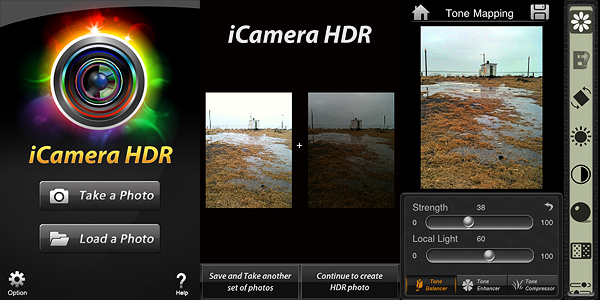
With iCamera HDR, you can either use previously taken shots or the built-in camera. In both cases, you have the possibility to go for a proper HDR or for a fake HDR (single image processing). If you take the photos with the built-in camera, you can select among Automatic mode, in which the software determines on its own the lighting conditions, or Manual, which allows you to move around the square cursors to indicate light and dark areas of your image. In absence of tripod or other stable surfaces, the Stabilizer feature, with its three levels of intensity, can help you in taking sharper photos, resulting in more accurate HDR composites. You can take more sets of photos which you can save before getting to the post-processing stage; if you want, you can edit them when it suits you instead of doing it right away. This is particularly useful if you are not sure about some of the shots you have taken and you choose to take more for better results.
After you pick the images you want to work with, you have an extensive assortment of adjustable settings and tools to make the final outcome as good as it is possible. From the three available tone mapping engines — allowing you to try different solutions to get the most out of your shots by enhancing details and tones — to an array of other instruments which include white balancing, contrast and brightness adjusting, lens correcting and many more, you have at your disposal an exhaustive post-processing lab, especially tailored for HDR photography. Before saving, you can also apply one of the many photo effects included in the app to your image — colored filters, mainly.
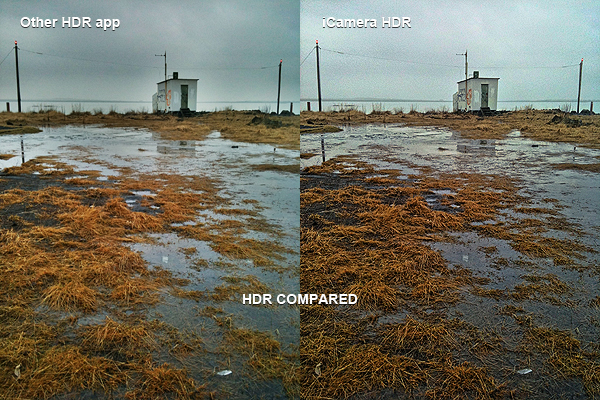
iCamera HDR is a very sophisticated software that, unlike other more basic HDR apps, gives the user access to a very rich and advanced set of photographic tools for fully controlling the HDR process from the moment of shooting up to its finalization. The results obtained with iCamera HDR are excellent, also thanks to the fact the degree of flexibility and control you are given is impressive, especially for an iPhone application. The app by Everimaging is able to reduce issues that others, however good and effective, cannot correct. One of these issues is halation — that annoying bright spreading area on a photographic image, very frequently found in HDR images that make only use of two exposures instead of more, that is sometimes very hard to get rid of even for professional photographers. Comparing results obtained using the same bracketed photos — both if taken with the built-in camera and with a third party app like Bracket Mode — in some instances I noticed significant differences.
Of course, on the other hand, using iCamera HDR is more time-consuming and it requires more effort than average iPhone HDR apps: the UI is clean and using the sliders to make adjustments is quite easy, but parameters are many, maybe too many for a newbie or for anybody just wanting to get the job done in a click or two. More settings mean more flexibility, but also more time to use them at their full potential. Let’s not forget speed and straightforwardness are still important aspects in iPhone photography, especially in the eyes of more casual users. On the long run, more control over your photography is definitely rewarding, but if you’re not so dedicated, then iCamera HDR is probably not the right choice.
The developers seem to be updating their product very frequently, which is always a point in favor, at least as I see it. The app is iPhone 3GS/4 and iPod Touch 4 only for now, but it was said iPad version is also in the making, so stay tuned for more to come.
Overall
Name: iCamera HDR
Developer: Everimaging
Compatibility: iPhone 3GS & 4, iPod Touch 4th. iOS 4.0 or later.
Price: £1.19||$1.99||€1.59
Vote: 5/5


 Images thus edited can be processed further by adding to them several photographic filters. All effects available are arranged into four categories: Classic, Lomo, Neon and Monochrome. The grouping of effects to fit them in the various categories seems however a little arbitrary and I still cannot fathom why some of those effects appear twice and why in the Monochrome section there are color filters as well. Countless filter combinations can be applied to photos. As a final touch, before saving, sending with email or sharing on Facebook and Flickr, it’s possible to apply a borders. Borders are mostly black and white items in a variety of styles.
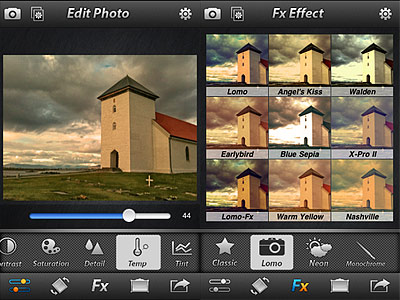 Photo Effect Studio is an OK app with a few nice effects, but it definitely looks too much like something we have already seen many times. And with many I really mean many. Some of the filters bear an uncanny resemblance — same names too — to those of other best-selling apps, like Instagram and Camera+.