ToonPAINT: Neat-Looking Sketches From Your Photos

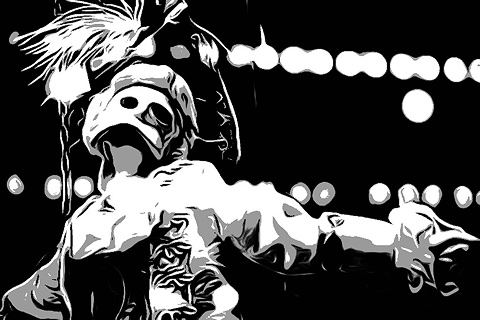
ToonPAINT by Toon-Fx was conceived as a tool to allow even people who don’t have a knack for drawing to come up with nice looking stylized pictures. Using image processing algorithms, ToonPAINT creates for you an easy to customize sketch.

As with all apps in the same league though, you have to make sure from the start you understand the difference between actual drawing and processing an image to make it look as if it was drawn. Usually, results are much better if you know how this kind of apps work and how and when they can come in handy.

Main Features

  • Up to 850×565 pixels resolution (3GS);
  • Zoom and pan;
  • Restore from previous session;
  • Undo/redo;
  • Basic and advanced settings;
  • Integrated guide;
  • Share via email, Facebook, Twitter.

Appotography Opinion

ToonPAINT is very simple to use and straightforward; yet, you have some reasonable control over your image. The effect is similar to what you would be able to achieve with a tracing tool in a vector editing software. ToonPAINT doesn’t actually turn images into vectors though; it only imitates the vector tracing style.

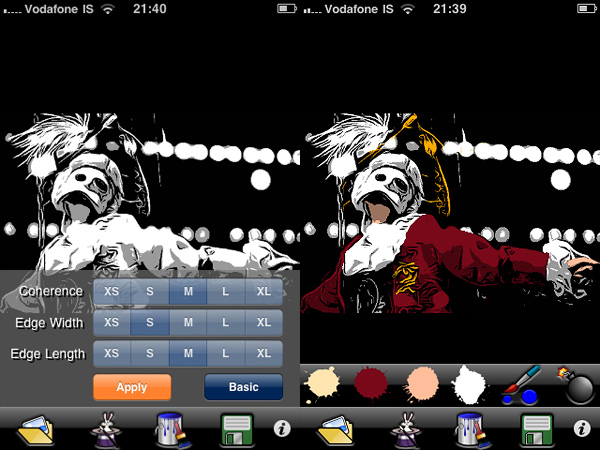
You start either with a picture you have previously taken or you take a snapshot with the built-in camera. With sliders you can adjust parameters — edges accuracy, amount of black/grey, etc. — but if you want even more control, you can switch to advanced settings and have at your disposal some more flexibility. After you apply the toon filter and your picture of choice is turned into a sketch-like image, you can proceed to apply color, if you wish. With a brush and a no-frills color-picking method, you can enrich your monochrome images. Getting the hang of the coloring process won’t be a problem, if you are already quite gifted in finger painting; it will be a bit harder if you are a total beginner, but the undo feature, with the possibility to zoom in and out and pan, will definitely help you. After you are done, you can save of share on Facebook and Twitter.
ToonPAINT by Toon-FX
Turn photos into sketches and apply color.

ToonPAINT by Toon-FX

At this stage, ToonPAINT is a cool little app you can use, for example, in combination with a strip creator app for developing your own instant comics. Many users in fact say they use this app especially for this purpose. However, there are a few things that could be improved even more to make ToonPAINT more functional. For example, it would be useful to have a preview in advanced settings to know exactly how your choices are actually affecting the image before applying them; a full-fledged undo command, to be used not only in the painting stage; full resolution, to make use of the images also outside your portable devices.

ToonPAINT allows the user to obtain very neat results, probably among the best on iPhone/iPod Touch/iPad. If you want a photo-to-sketch app, Toon-Fx’s app is what you need.

Overall

Name: ToonPAINT
Developer: Toon-Fx
Compatibility: iPhone, iPod Touch, iPad. iOS 3.0 or later.
Price: £1.19||$1.99||€1.59
Vote: 3/5

ToonPAINT - Toon-FX

Phoster: Graphic Designing In A Couple Of Clicks

Is there truly anybody who hasn’t tried to act as a graphic designer these days? From creating a custom avatar for social networks to setting up your own blog, almost anybody with a working Internet connection at some point felt the urge to create slick graphics to use them in the most diverse ways.

Bucket Labs delivers to the App Store their excellent Phoster, a tool with a lot of potential that will let any user believe he can become a graphic designer in just a couple of clicks.

Main Features

  • Full resolution available;
  • 50+ adjustable templates;
  • AirPrint support;
  • iOS retina-display support;
  • Share via email, Facebook, Twitter, Flickr.

Appotography Opinion

Let me get this straight from the beginning: Phoster is fun. Even if you don’t actually need to make posters, fliers or invitations and print them, still this app is a joy to use. Phoster works really well both on iPad and on iPhone and it is quick and intuitive and printer friendly. Creating a clean-cut poster and integrating your photos into it require just a few minutes, all thanks to a neat assortment of pre-made templates and very easy to follow customizing steps. Forget about all those apps with cheesy and awfully awkward layouts: Phoster is what you need.

Phoster by Bucket Labs
The various stages of your poster's creation.
Phoster by Bucket Labs
I adjusted colors with external help and... voilà!

All the user has to do is choosing among the templates; an image from the camera roll can be added to the chosen template; by zooming in and out or rotating, it can be adjusted to the layout. To customize your work further, you can change font size and color and, obviously, you can input your own text. After you’re done, you can add one of the effects and save — or print or share — your creation.

Of course, you cannot expect to use Phoster for everything. Phoster is mainly aimed at the creation of posters/fliers/invitations. Bucket Labs’ app is excellent for people that want to create slick graphics without having any particular training or skill, but it is also a nice pastime and a good shortcut for those who are already into design.  A little more customization — moving the text around, possibility to change colors of templates’ without resorting to other apps, etc. — would truly make this app perfect.

Overall

Name: Phoster
Developer: Bucket Labs
Compatibility: iPhone, iPod Touch, iPad. iOS 3.2 or later.
Price: £1.19||$1.99||€1.59
Vote: 5/5

Phoster - Bucket Labs

Visual Poet: Creativity Without Handiness

Visual Poet was originally released as an exclusive iPad app, but recently it has been released also on the iPhone/iPod Touch. As the name suggests, this is an app aimed at achieving creative results that combine two different but adjacent typologies of media: words and images. More in general, it could be a nice little tool for graphic artists who are interested in making use of their Apple devices to create something that goes a little beyond basic photography or simple writing. Alas, the app has some problem that might prevent users from truly enjoying it.

Main Features

  • 940 x 320 pixels resolution;
  • Single three-paneled layout;
  • Share via email or Tumblr;
  • Use photos from Flickr, Tumblr, Google or photo library.

Appotography Opinion

I have to admit, I like a lot the idea behind this app. It’s one of these little discoveries that can make using your iPad and iPhone a lot more creative and entertaining. I said “can”, but I should more appropriately write “could”. Because, as I said, the idea is good, but the way it was carried out leaves a lot to be desired.

Visual Poet is not strictly a photography app, however it has a lot to do with photos and their employment. Thus, the first issue is that the resolution of the final image is not that great in the current version of Visual Poet. More features should also be added to widen the possibilities of the app and obtain more varied outcomes. For instance, a few features that would make this app better are: less sketchy interface; more layouts to choose from; flipping and rotating of the photos to adjust them to the layout; more options for editing the text and make it easier to fit it in.

Visual Poet App iPad/iPhone

Apart from these considerations, how does the app actually work?

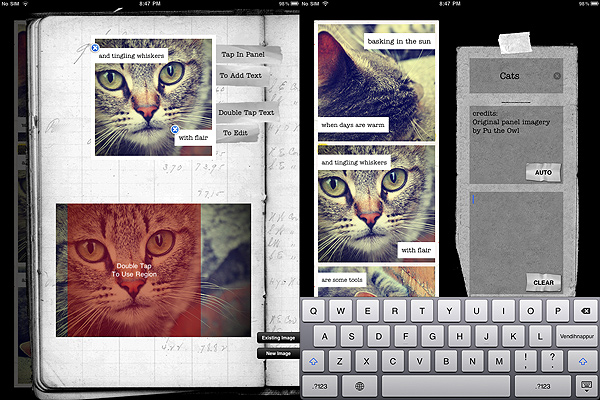
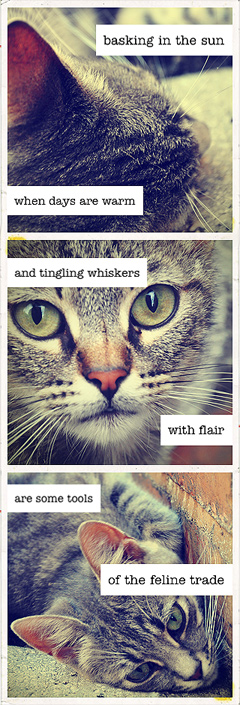
At first, you have three panels which you have to fill with pictures, either taken from your personal library or from services like Flickr, Tumblr, Google — depending on the service, you can browse by terms or interestingness factors, or you can specify the user from which you want to get the photos. Once you define your preferences, you are either redirected to your library or to a screen where images from one of the external services are being loaded. If you want to use the external services, be prepared to accept loading times that can be very unnerving. After the right image is chosen, you can select a square area from it that you want to appear on your visual poetry file. Only enlarging and shrinking of this area is allowed though, nothing else. After that, you can add your own text, which will be displayed in a magnet poetry style. You are given two different sizes for your text: by choosing smaller size, when you try to move it close to right border, it always shows an annoying  little gap between text and border, so if you want them to merge properly you cannot achieve the right effect — this doesn’t happen with large text size.

You basically have to do the same for all three panels, and then you can also input info as your visual poetry’s title and additional comments. You can then share by email or post on tumblr.

Visual Poet App iPad/iPhone

As I said, the idea for this app is really nice, but a little more refinement is absolutely required to make it more usable and flexible, otherwise Visual Poet is destined to remain one of these curious apps that nobody truly wants to use after a couple of times.

Overall

Name: Visual Poet
Developer: Patrick McNally
Compatibility: iPhone, iPod Touch. iOS 3.2 or later.
Price: £1.79||$2.99||€2.39
Vote: 2/5

Visual Poet - Patrick Summerhays McNally