Slow Shutter Cam Review

Slow Shutter Cam by Cogitap for iPhone and iPod Touch allows achieving peculiar blur and light effects that imitate long exposure photography, simply using the camera of your iDevice. Creative people, I am sure, will come up with more than a few ways to take advantage of Slow Shutter Cam’s tools; average users will also find this app can come in handy in very specific circumstances.

Main Features

  • Full resolution available;
  • Selectable shutter speed;
  • Self-timer;
  • 3 shooting modes;
  • Exposure lock;
  • Exposure adjustment;
  • Sensitivity levels adjustment;
  • Freeze control;
  • Fullscreen shutter button;
  • Autosave on/off.

Appotography Opinion

Slow Shutter Cam has three different shooting modes: Automatic, Manual and Light Trail. Each mode serves different purposes.

Automatic equals shutter priority mode in DSLR cameras, but it doesn’t actually control the camera’s shutter. When going Automatic, all you have to do is choosing the duration of each shooting session (that’s what the shutter speed is in Slow Shutter Camera). You have also a bulb mode, to manually terminate the shooting session. Automatic comes in handy especially to create nice blur effects, to suggest motion for example.
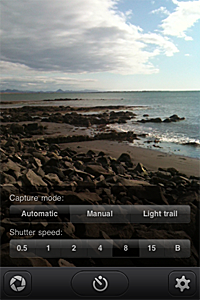
Slow Shutter Cam iPhoneManual mode helps you taking photos under difficult lighting conditions (low light, especially). The exposure can be compensated after the photo is taken and before saving the photo.

Light Trail, as the name says, allows creating the eye-catching trails of light effect. You set shutter speed and sensitivity value (how rapidly the camera sensor captures light) and the app does the rest. Sensitivity adjustment is only available in Light Trail mode. You can enable a live preview for better results.

Using Freeze Control after your images are processed by the software, you can determine which frames in your shooting session have to be emphasized. For even more control, you can lock exposure from the app’s settings, so that the app takes photos with the same exposure values for the whole shooting session.
Slow Shutter Cam iPhone
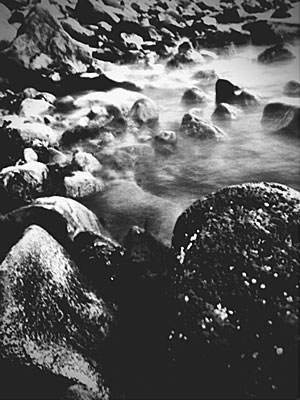
Blurry water effect (desaturated in Monochromia).

Rather than taking actual long exposures, what Slow Shutter Cam achieves is putting together more individual shots via software. The effects thus obtained are quite believable, but of course there are many limitations, especially concerning focus control. Moreover, Slow Shutter Cam lacks any stabilizing feature, which in some instances makes its use without a tripod or other stable support very challenging, if not impossible. Even in presence of a stable surface, shaking aftereffects are hard to avoid. To reduce camera shake, you can enable the Self-timer feature, which anyway only gets rid of shake due to pressure on the shutter button.

PS: Slow Shutter Cam is 50% off its full price for a limited period. You can get it now for $0.99 instead of the regular price of $1.99.

Overall

Name: Slow Shutter Cam
Developer: Cogitap Software
Compatibility: iPhone, iPod Touch (4th), iPad 2. iOS 4.0 or later.
Price: £1.19||$1.99||€1.59
Vote: 3/5

Slow Shutter Cam - Cogitap Software

Bracket Mode: A Fast Companion For Better HDR Results

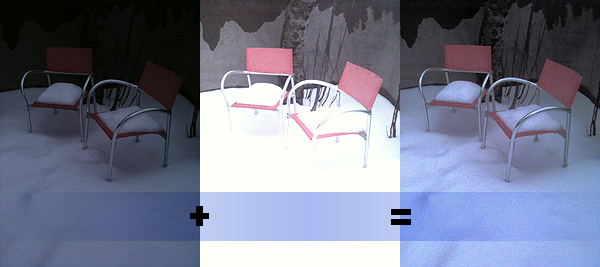
Bracketing is a technique that allows the photographer to take a series of photos of the same subject often with slightly different parameters. For example, it is possible to take several shots of the same scene with adjusted exposure to make up for bad lighting conditions. In post-processing, this allows to obtain a well-exposed single image by merging more exposures together. Today, the bracketing technique is mainly used in HDR photography, where you need a minimum of two exposures in order to generate the final HDR composite.

HDR on the iPhone is particularly popular because it’s easy and fun, but many HDR apps are very slow at taking bracketed photos. When there is no tripod available, this is particularly inconvenient and deeply affects the final outcome. Not everybody’s hands are as steady as it would be required to take separate exposures that perfectly overlap, so coming up with a good HDR image sometimes is particularly hard. How many occasions have you wasted already just because of this reason?

Bracket Mode by Cogitap Software is a tool specifically designed for the purpose of easily taking bracketed exposures to be effectively used to generate HDR composites within third party HDR apps.

Main Features

  • Full resolution available;
  • Automatic or Manual mode;
  • Auto-saving;
  • Self-timer.

Appotography Opinion

As the name suggests, Bracket Mode helps you to obtain bracketed photos in the most simple and straightforward possible way. The app itself is very basic and to the point.

Bracket Mode by Cogitap for iPhone

You can choose among two modes: Automatic and Manual. The difference between the two simply consists in the fact Manual lets you indicate dark and light areas by tapping on screen, while in Automatic you have to do nothing besides tapping on the shutter button while the software gathers all the necessary information on its own. After that, with Auto-saving feature enabled your bracketed images will be stored right away in your camera roll. Disabling Auto-saving, you have a preview of both images before saving: if the result is satisfactory you can save, otherwise you can start over. Bracket Mode IS NOT ABLE to make HDR composites; it only allows to take bracketed shots.


Bracket Mode by Cogitap for iPhone
Under-exposed + Over-exposed = HDR

The main problem with this app is that, differently from what you are able to do with bracketing on a full-fledged camera, you cannot choose to adjust exposure settings or take more than two shots to make up for possible imperfections. Even in Manual mode, you can only define dark or light areas at the moment of shooting: this definitely doesn’t really give you full control over the final HDR image. Unless lighting conditions aren’t particularly good, with just two exposures in many cases you’ll have to struggle against halation issues. It must be said though that in any case HDR apps won’t let you merge together more than two exposures — but with a greater number of exposures and thus more available choices perhaps you’d still have a little more control.

Why picking Bracket Mode AND another app to merge the photos instead of directly picking an HDR app without the hassle of paying for, downloading and using two apps? As I said from the very beginning, because Bracket Mode is faster. This may look like a secondary aspect, but it can make a great difference in some instances.

In the case you have arms of steel or a tripod of some sorts, you probably won’t need to resort to using a tool like Bracket Mode for your iPhone HDR; in other cases, it all depends on what your priorities are. But if you use HDR extensively on your iPhone, Bracket Mode will make everything much easier.

Overall

Name: Bracket Mode
Developer: Cogitap Software
Compatibility: iPhone 3GS & 4, iPod Touch 4th, iPad 2. iOS 4.2 or later.
Price: £1.19||$1.99||€1.59
Vote: 4/5

Bracket Mode - Cogitap Software