iPhone Photography Ttutorials #2 – Painterly Aged Photo Effect

Antique monochrome photos have an incredible charm. Most of them not only have a strangely surreal and almost ghostly feel, but also a beautiful painterly quality: for a long time, the influence of painting over photography was very strong and photographers often tried to imitate stylistic principles followed by painters.

With just a few easy steps, I intend on demonstrating how to achieve the evocative feel of aged photos on your iPhone. This is just one of the many processes you can follow.

Apps needed: iCamera HDR, Iris Photo Suite, Plastic Bullet. Optional: Bracket Mode.

1. Take two bracketed exposures of a landscape of your choice. Daylight photos featuring skies with significant detail (huge, fluffy clouds, etc.) will work better. You can either take your exposures directly within iCamera HDR or use Bracket Mode, whatever makes you feel more comfortable. If you already have photos you want to use, jump to step 2. If you have the HDR composite, go to step 3;
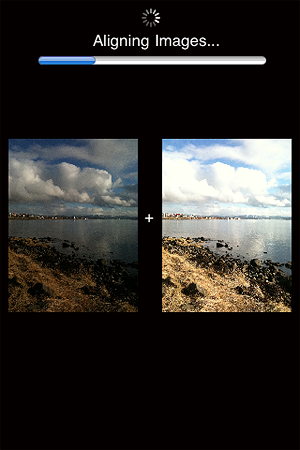
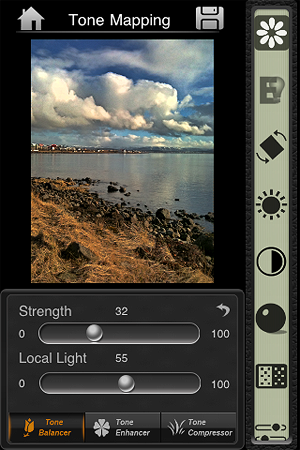
2. Merge the exposures in iCamera HDR, choosing Tone Balancer. Adjust the parameters to obtain rich, neatly contrasted details, without exaggerating with overblown brightness, and then save;
3. Open your saved HDR picture in Iris Photo Suite. Tap on the layers icon  -> One Touch -> Grunge. For this example, I picked Noise, but you can go for one of the other effects, if it suits your photo better. Leave the value to around 100 or little less, so the effect enhances the contrast of your image. Apply and save;
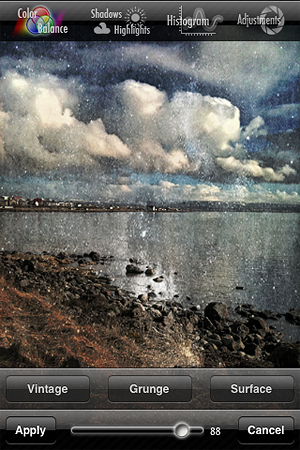
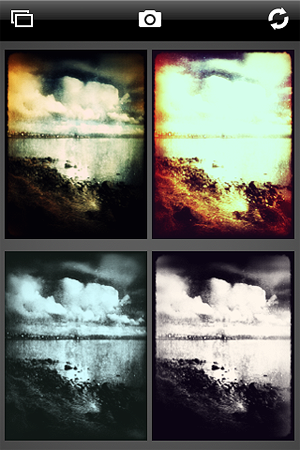
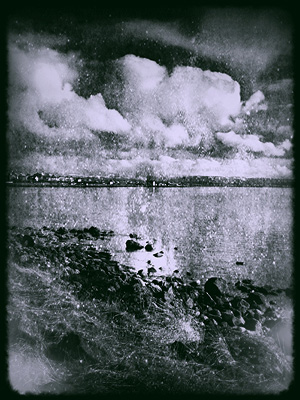
4. Load the image you just saved on Plastic Bullet. Our aim is to have our final image look like an old, aged picture; Plastic Bullet’s monochromes are particularly convincing for our purpose. Generate random styles by pressing on the refresh button until you obtain something that has the right balance of blur and brightness: we want the picture to look old and deteriorated but we want at the same time to preserve as much detail as it is possible. I decided to go for a dark silver tone with a thick border. When you find a style you like, save to your camera roll and you’re done!
And here is our final result:
Bracket Mode: A Fast Companion For Better HDR Results

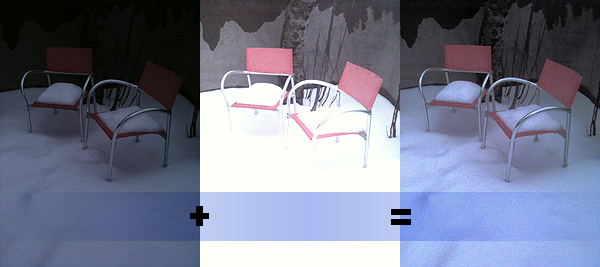
Bracketing is a technique that allows the photographer to take a series of photos of the same subject often with slightly different parameters. For example, it is possible to take several shots of the same scene with adjusted exposure to make up for bad lighting conditions. In post-processing, this allows to obtain a well-exposed single image by merging more exposures together. Today, the bracketing technique is mainly used in HDR photography, where you need a minimum of two exposures in order to generate the final HDR composite.

HDR on the iPhone is particularly popular because it’s easy and fun, but many HDR apps are very slow at taking bracketed photos. When there is no tripod available, this is particularly inconvenient and deeply affects the final outcome. Not everybody’s hands are as steady as it would be required to take separate exposures that perfectly overlap, so coming up with a good HDR image sometimes is particularly hard. How many occasions have you wasted already just because of this reason?

Bracket Mode by Cogitap Software is a tool specifically designed for the purpose of easily taking bracketed exposures to be effectively used to generate HDR composites within third party HDR apps.

Main Features

  • Full resolution available;
  • Automatic or Manual mode;
  • Auto-saving;
  • Self-timer.

Appotography Opinion

As the name suggests, Bracket Mode helps you to obtain bracketed photos in the most simple and straightforward possible way. The app itself is very basic and to the point.

Bracket Mode by Cogitap for iPhone

You can choose among two modes: Automatic and Manual. The difference between the two simply consists in the fact Manual lets you indicate dark and light areas by tapping on screen, while in Automatic you have to do nothing besides tapping on the shutter button while the software gathers all the necessary information on its own. After that, with Auto-saving feature enabled your bracketed images will be stored right away in your camera roll. Disabling Auto-saving, you have a preview of both images before saving: if the result is satisfactory you can save, otherwise you can start over. Bracket Mode IS NOT ABLE to make HDR composites; it only allows to take bracketed shots.


Bracket Mode by Cogitap for iPhone
Under-exposed + Over-exposed = HDR

The main problem with this app is that, differently from what you are able to do with bracketing on a full-fledged camera, you cannot choose to adjust exposure settings or take more than two shots to make up for possible imperfections. Even in Manual mode, you can only define dark or light areas at the moment of shooting: this definitely doesn’t really give you full control over the final HDR image. Unless lighting conditions aren’t particularly good, with just two exposures in many cases you’ll have to struggle against halation issues. It must be said though that in any case HDR apps won’t let you merge together more than two exposures — but with a greater number of exposures and thus more available choices perhaps you’d still have a little more control.

Why picking Bracket Mode AND another app to merge the photos instead of directly picking an HDR app without the hassle of paying for, downloading and using two apps? As I said from the very beginning, because Bracket Mode is faster. This may look like a secondary aspect, but it can make a great difference in some instances.

In the case you have arms of steel or a tripod of some sorts, you probably won’t need to resort to using a tool like Bracket Mode for your iPhone HDR; in other cases, it all depends on what your priorities are. But if you use HDR extensively on your iPhone, Bracket Mode will make everything much easier.

Overall

Name: Bracket Mode
Developer: Cogitap Software
Compatibility: iPhone 3GS & 4, iPod Touch 4th, iPad 2. iOS 4.2 or later.
Price: £1.19||$1.99||€1.59
Vote: 4/5

Bracket Mode - Cogitap Software