
If you had previously requested an invite through their web page, you already know that the folks at OpenPhoto launched the Instagram image importer. Thanks to this new feature, you do not have to worry anymore about not being able to preserve your Instagram photos. The OpenPhoto importer uses your service of choice (Dropbox or Amazon S3) to store your precious images. You can thus fully enjoy them as you prefer, also outside Instagram. Note that OpenPhoto has also similar features for photos that users shared on other networks, such as Flickr, Facebook and Picasa.
Tag: Dropbox

How To Download Full Resolution Photos to Your iPhone/iPad With Dropbox
I am all for taking photos with the iPhone and iPad native cameras, so you will rarely see me using pictures taken with a DSLR to illustrate what iPhone and iPad apps can do. This is because I think using non-native photos to show what the iPhone can really do is totally pointless and deceiving. I am not a so-called pixel-peeper either, but if there is something that really bothers me is a low quality image. If the photos I can take with an app are not much to look at in terms of quality, I do not care if it features the most unique concept or one billion filters. Evident aliasing issues, jagged borders, banding, interpolated pixels: all of them usually drive me crazy and I try to avoid these deficiencies at all costs. You can understand very well then that transferring full resolution images from the computer to the iPhone and iPad can be a serious problem for people like me.

Continue reading “How To Download Full Resolution Photos to Your iPhone/iPad With Dropbox”
Top Free Apps For Your Photography Needs Pt.1
Free iPhone and iPad apps are sometimes overlooked. Yes, overlooked. If it’s free, it’s not as good as if you have to pay for it. This is a general assumption for more than a few users. Well, to get it straight: this isn’t always true. Some free apps can get the job done as effectively, if not better, than paid apps.
In a series of specials, we want to bring our favorite free apps to our readers’ attention.
Instagram has become, thanks to its dedicated users, one of the most popular phenomena connected to iPhone photography. Instagram is a little of everything: a camera featuring a bunch of effects to spice up your photos, a tool allowing easy sharing on multiple networks, a lively community where it’s possible to meet thousands of iPhone photographers from all around the world.
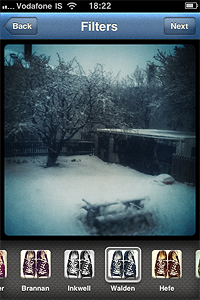 Pros: Easy photo sharing on most social networks. Some of the finest retro-looking filters available in the App Store.
Cons: Small output resolution. You need to be registered to Instagram community to use the app.
Actioncam is packed with many formats and filters. Shoot from 3 up to 9 pictures in a given time interval, or enjoy the creative freedom offered by manual mode.
 Pros: Use Actioncam as a full-fledged multishot camera and as a classic photobooth.
Cons: None.
Genius Scan is a pocket scanner able to export documents both in JPG and PDF format, but this app’s possibilities go well beyond document scanning: for instance, it’s possible to use Genius Scan to straighten and adjust perspective in photos taken from wrong angles.
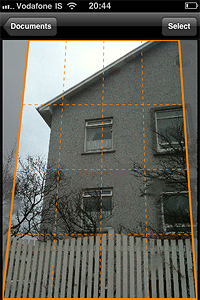
Pros: Very effective page detection and perspective correction.
Cons: Less features than Genius Scan+, the paid version of the app. If you need more flexibility in sharing your documents, you’ll need the full version. However, the basic features of the free release are fully functional.
Photosynth allows both creation of interactive panoramas and of panoramic still images to be used as any other photo.
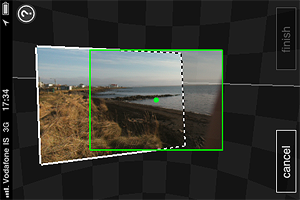 Pros: The capturing process is intuitive and immediate. The Auto Capture feature helps you to get yout panorama together with less effort.
Cons: Creating a panorama on Photosynth is easy, but creating a good one may be tricky, especially at first. Be sure to read the in-app guide to get the most out of Photosynth.
Dropbox is a service that greatly simplifies files management, allowing users to back up and share files from anywhere. Also, with Dropbox you can access files stored in your computer in any moment.
 Pros: Easy way to back up your photos and videos on-the-go.
Cons: Need to set up a Dropbox account before you can use it. Need access to an Internet connection to save files to Dropbox.
This was part one of our brief overview. Do you have any favorite free app? Feel free to comment and let us know!