Top Free Apps For Your Photography Needs Pt.1

Free iPhone and iPad apps are sometimes overlooked. Yes, overlooked. If it’s free, it’s not as good as if you have to pay for it. This is a general assumption for more than a few users. Well, to get it straight: this isn’t always true. Some free apps can get the job done as effectively, if not better, than paid apps.

In a series of specials, we want to bring our favorite free apps to our readers’ attention.

Instagram

Instagram has become, thanks to its dedicated users, one of the most popular phenomena connected to iPhone photography. Instagram is a little of everything: a camera featuring a bunch of effects to spice up your photos, a tool allowing easy sharing on multiple networks, a lively community where it’s possible to meet thousands of iPhone photographers from all around the world.
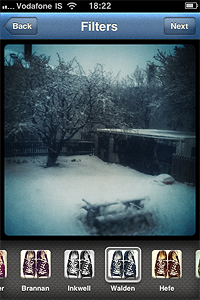
Instagram Top Free Photography App For iPhone Pros: Easy photo sharing on most social networks. Some of the finest retro-looking filters available in the App Store.
Cons: Small output resolution. You need to be registered to Instagram community to use the app.

Actioncam

Actioncam is packed with many formats and filters. Shoot from 3 up to 9 pictures in a given time interval, or enjoy the creative freedom offered by manual mode.

Instagram Top Free Photography App For iPhone Pros: Use Actioncam as a full-fledged multishot camera and as a classic photobooth.
Cons: None.

Genius Scan

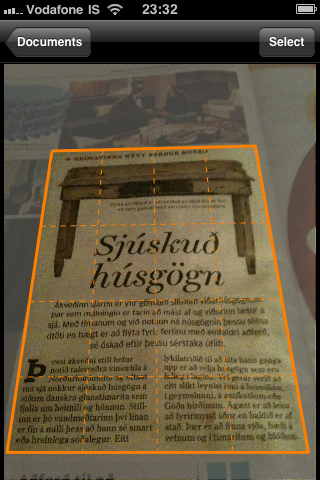
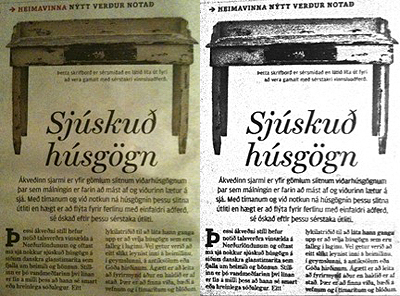
Genius Scan is a pocket scanner able to export documents both in JPG and PDF format, but this app’s possibilities go well beyond document scanning: for instance, it’s possible to use Genius Scan to straighten and adjust perspective in photos taken from wrong angles.
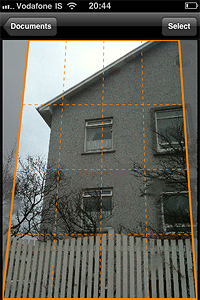
Genius Scan Top Free Photography App For iPhone

Pros: Very effective page detection and perspective correction.
Cons: Less features than Genius Scan+, the paid version of the app. If you need more flexibility in sharing your documents, you’ll need the full version. However, the basic features of the free release are fully functional.

Photosynth

Photosynth allows both creation of interactive panoramas and of panoramic still images to be used as any other photo.
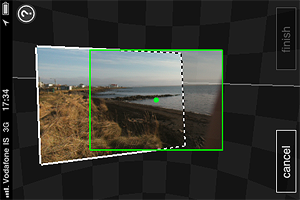
Photosynth Top Free Photography App For iPhone Pros: The capturing process is intuitive and immediate. The Auto Capture feature helps you to get yout panorama together with less effort.
Cons: Creating a panorama on Photosynth is easy, but creating a good one may be tricky, especially at first. Be sure to read the in-app guide to get the most out of Photosynth.

Dropbox

Dropbox is a service that greatly simplifies files management, allowing users to back up and share files from anywhere. Also, with Dropbox you can access files stored in your computer in any moment.

Dropbox Top Free Photography App For iPhone Pros: Easy way to back up your photos and videos on-the-go.
Cons: Need to set up a Dropbox account before you can use it. Need access to an Internet connection to save files to Dropbox.

This was part one of our brief overview. Do you have any favorite free app? Feel free to comment and let us know!

Genius Scan+, AutoPainter And Other Updates

A few of the apps we have reviewed were updated since our last entries.

Genius Scan+ introduced with the recent updates very interesting features. Improvements to document quality were also made:

  • Higher PDF quality;
  • Choose file size when exporting;
  • Export scans to Twitter;
  • Upload PDFs to Evernote;
  • Interface in Spanish and Italian (in addition to English, French and German);
  • Faster start-up;
  • Choose default PDF page size and orientation;
  • Choose default image enhancement;
  • Crash fixes;
  • Translation fixes.

The free edition of Genius Scan was also updated, so check it out.

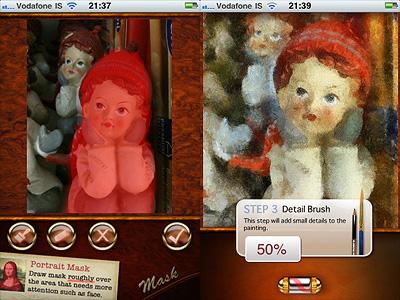
AutoPainter has also undergone some relevant changes.

  • Portrait Mask feature added: improved realism, especially on portraits;
  • Keep All Camera Images added: save your original images to your album;
  • Performance improvements.
The New Portrait Mask feature, applied with Benson effect.

Other noteworthy updates in the course of the last hours: Silent Film Director (2.1), TiltShift Generator (1.41).

Genius Scan Updated to 2.0.2

Here are fixes and improvements of version 2.0.2:

  • Fixed crash when document has an empty title;
  • Fixed the menu when adding a page to the current document;
  • Wifi sharing starts up very quickly even with a lot of documents;
  • Fixed image attachements in emails;
  • Fixed export of documents with special characters in title;
  • Removed error when uploading documents to Google Docs under certain conditions;
  • Fixed several small issues with Evernote: notebook choice is now respected, description text is added to the note, removes upload error which appeared under certain conditions;
  • Improved performance by migrating documents to a new format.
  • Warning: Genius Scan might take a while to migrate documents to the new format after this update. In return, better responsiveness of the UI will be allowed.

Genius Scan: a Pocket Scanner on the iPhone

Sometimes, looking for apps inside the right category in the App Store can get tricky. Have you thought, for example, about the possibility of finding a pocket scanner in the Business category? Maybe you have, maybe not; at any rate, I bet most people wouldn’t think about it if they were to look for it just browsing through categories.

Genius Scan is not strictly a photography app, but surely it’s not so obvious to label it as a business app either. Anyway, it involves the use of a camera and it’s definitely an app you might want to get also for its potential as a photographic tool. In addition to that, it could really come in handy at some point — it’s totally free too! So let’s take a closer look at it.

Main Features

  • Page frame detection;
  • Perspective correction;
  • Color or black and white post-processing;
  • Store scans as JPG in the camera roll;
  • Create documents with multiple scans;
  • Rename documents;
  • Send documents via email as PDF.

Appotography Opinion

Let’s assume you need to take a quick copy or note of something (a document, a sign, a book page, an excerpt of an article from a magazine, a notice on bulletin board, etc.) but you have no time or means to make a copy or to write down the information you need to remember. How many times has this happened to you? Even if it hasn’t happened yet, you can be sure it’s bound to happen sooner or later. A portable copier would be useful at times like this, wouldn’t it? If you have an iPhone, the possibility to use the iPhone camera to achieve something of the sort surely crossed your mind. But most of the times — if you tried it, you perfectly know what I mean — the photo turns out all crooked and unusable.

Genius Scan provides you exactly with this: a pocket scanner you can always bring with you. You just have to take a shot of the documents you want to keep for further reference, you crop the image and have its perspective adjusted, you choose if you want it processed as a color or black and white image, and you save it. You can save your snapshot as a JPG image file or create a document  with single or multiple scans and send it as a PDF file. You can also access the camera roll and use pictures taken with other apps or with the default iPhone camera.

Genius Scan iPhone

Genius Scan iPhone

Genius Scan iPhone

iPhone photographers may also need Genius Scan for improving their photos: quite a few  people use this app in more creative ways, for example to effectively straighten or adjust the perspective of pictures that are taken from wrong angles — to make photos of buildings look as if they were taken from a frontal position when they were not, for example.

With Genius Scan your privacy is 100% protected, as the app doesn’t send your data to third parties, and everything is being processed on your phone. The app is free, and even if it weren’t, it would definitely be worth having on your Apple device!

Overall

Name: Genius Scan
Developer: Grizzly Software
Compatibility: iPhone, iPod Touch. iOS 4.0 or later.
Price: free!
Vote: 4/5

Genius Scan - The Grizzly Labs