
Marvin Lee’s Lomora for iPhone is one app whose charm we could never deny. Finding an acceptable Lomo app for iPhone, one not only capable of delivering the visual appeal of the real thing but also of being reasonably hassle-free, has never been quite so simple, and even though we loved the old Lomora for its amazing effects, we also felt not so inclined to use it regularly for a number of reasons. The app had already been revamped a few times, introducing among other things focus and exposure controls, but some of its design flaws and its proneness to crash at random were still among its issues.
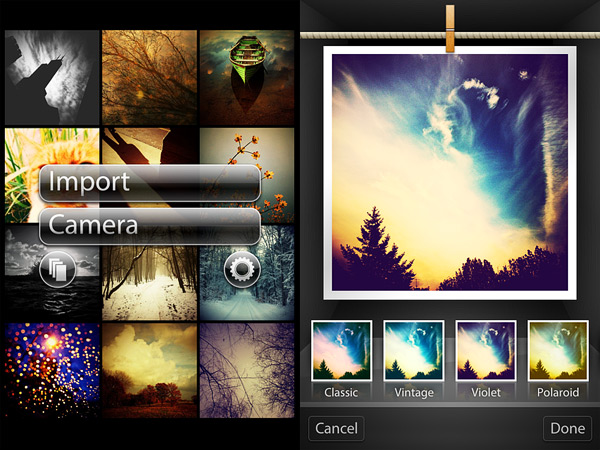
The newly released Lomora 2.3 provides the user with a totally different experience; at the same time, the app’s finest points — that is, the quality and beauty of its effects — are unchanged. Continue reading “The New Lomora”
Tag: Marvin Lee
Lomora 2 Updated Review
 It’s been some time since I first got Lomora 2 and just a little less since I published my review on this Lomo camera for iPhone. Although I wanted to like the app more at the time of the first review — mainly because of its fabulous effects — I couldn’t really get past a few usability issues. I haven’t been using Lomora 2 much in the course of the months, to be honest, but lately I have been rediscovering it. There have been significant improvements to this application and I feel Lomora deserves another chance.
Lomora 2 has matured a lot. A few changes were enough to bring the app to another level. The severest usability issues were fixed with the last updates, from 2.2 to 2.2.3 (the current version), thus in general the app feels less clunky than before. Although some aspects that are not exactly easy to figure out are untouched and still require a little effort on the user’s part to get them right, Lomora’s workflow is now smoother, also thanks to a more intuitive placement of items in the interface.
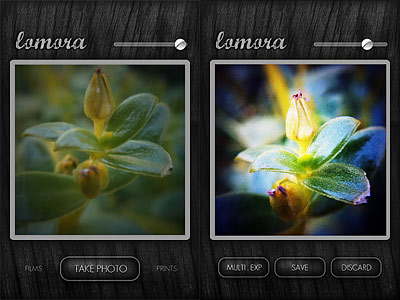 Additional features were introduced since version 2.2. Among the newly added elements are the focus, exposure and flash controls. With a tap you can set your focus point, with two you can determine the exposure, while with three you can set a flash point. Combining these three elements together depending on lighting and other conditions, you can produce remarkable results. Moreover, Lomora 2 now remembers your vignette choices so that upon restarting the app after you exit, all your previous vignette adjustments are maintained.
Last but not least, the problem with the light pixels appearing at the left border of each and every saved image, which forced to crop photos using an external app, is no more: photos taken in Lomora 2 are now as good as they can be.
Lomora 2 feels more enjoyable now than in the past, mainly because of all the technical enhancements mentioned above and because of all the minor fixes to bugs that may have caused occasional annoyance. For this reason I am happily revising my previous score. Not to forget that the original quality of the filters is intact and, even to this day, photos taken in Lomora 2 still look unique and refreshing and this alone is enough to justify the purchase.
Overall
Name: Lomora 2
Developer: Marvin Lee
Compatibility: iPhone, iPod Touch. iOS 4.0 or later.
Price: £1.99||$2.99||€2.39
Vote: 4/5

TiltShift Generator, Lomora 2, Panoramatic 360 Bug Fixes
 Just a very brief update to notify that three of the apps we reviewed were updated in the last hours: TiltShift Generator by Art & Mobile, Lomora 2 by Marvin Lee and Panoramatic 360 by floaty. None of these updates is a major one.
TiltShift Generator v. 1.36: fixed bug for Facebook sign-in .
Lomora 2 v. 2.2.1: fixed bug causing the app to crash on iPod Touch 4th generation.
Panoramatic 360 v. 4.3.1: fixed bugs and various improvements.
If you have experienced some problem with one of these apps, it’s recommended to update them now. Remember you can always contact the developer for further assistance and to report further issues.
Lomora 2 Review
The denomination lomography derives from LOMO, also known as Leningrad Optical & Mechanical Union, an originally French-Russian optical instruments manufacturer active in Russia since 1914. The story of this manufacturer is long, but I can keep my account brief by saying LOMO introduced to the market their renown LC-A (which stands for Lomo Kompakt Automat) consumer cameras only in relatively recent times, in 1984 to be more precise. The LC-A, a 35mm film camera, was able to deliver uniquely charming pictures, characterized by a dreamy feel due to their vibrant colors, blur, vignetting and other unfathomable accidents. Thanks to its idiosyncrasies, the LC-A was graced by unexpected popularity and it soon became a favorite of many photographers looking for a more casual and fresh approach to photography. After a series of fortunate coincidences, the fame of the little unassuming camera produced by LOMO rapidly grew outside the Soviet Union, especially thanks to the enthusiasm of a group of devotees from Austria, future founders of Lomographische AG, the sole worldwide distributor of the LC-A. The Russian manufacturer discontinued the production of the original camera and all its components in 2007, but the production continues to this day in China.
The LC-A promoted an approach which proved particularly suitable for lo-fi and inexpensive photography. Lomography has become over the years almost a genre of its own: many photographers found the limitations of the medium particularly stimulating to discover new ways of shooting. Significant evidence of the huge success of this style is the great number of apps that tried to bring the feel and the experience of authentic lomography to iPhone photography.
Lomora 2 for the iPhone is, as the name suggests, one of them.
Main Features
- Full resolution available;
- Square format;
- 18 film simulation effects;
- Adjustable vignette;
- Add colored flash or filter.
Appotography Opinion
I will say it from the start: I’m torn as I write this review. Torn because, in spite of all its qualities, Lomora 2 has some issues that can’t be overlooked, especially in comparison with other apps and also given its slightly higher than average price.
Since the point of Lomora 2 is to imitate the feel of analogue, you cannot load previously taken photos. Some people are usually annoyed by this solution. To them I say: this app is definitely not for you.
You have eighteen effects to choose from, all recreating the looks of authentic films — among them you can read names like Provia, Sensia, Ektachrome. In addition to these effects, you can apply vignetting, colored flashes and filters. When you shoot, you have a preview of what your photo looks like; if you are satisfied with it, you can save or export to the camera roll while if you aren’t, you can add to it another exposure by shooting again or you can simply delete it.
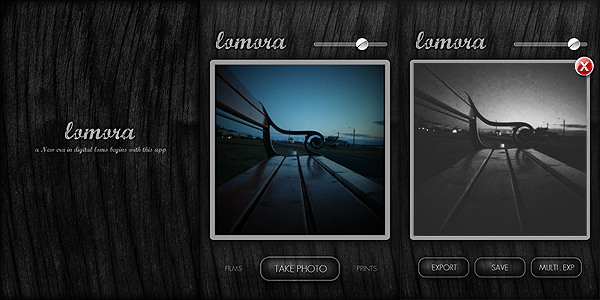
Everything would seem very linear from my words. To be honest however, using Lomora 2 I felt somehow not very comfortable, at least in the course of the first hours. The user interface seems intuitive enough, but just finding out how things are exactly done isn’t that simple. Tapping on the Lomora logo, for example, opens the settings menu, but it took me some time to discover this trick. In a user-friendly app, it should be clear to anybody from the very beginning where you have to look to change the settings. To close the settings menu you have to tap again, this time outside the menu’s window. This works also for the film menu: you select the film and you have to tap outside the menu in order to close it, otherwise it won’t disappear. Another example that comes to mind: to trigger the multiple exposure, after you take the first shot, you have to tap on the “Multi. Exp” button, go back to the camera mode manually and take another shot. At this point the second shot is superimposed to the first and you can save your double exposed image. But there is no way to know how the multiple exposure works unless you find it by yourself by a process of trial and error. Yet another example concerns the vignette slider, which adds more vignetting as you move the knob towards lower values and it adds less towards higher values. Maybe it’s just me, but this is the kind of confusing thing that can put me off while using an app. These are all very insignificant details perhaps, but they can make you waste a lot of time at the beginning. In Lomora 2 there is no in-app guide or help, so using it properly may take a little more time than you would expect.
What makes up for the awkward interface is the quality of the effects, which on average are very believable. Although most are fully enjoyable only if lighting conditions are ideal — daylight, no harsh shadows, no overcast weather, etc. — some among them are really good, especially the black and white film that, in my opinion, truly stands out as different from any other black and white simulation we have seen up to this moment in photo apps.

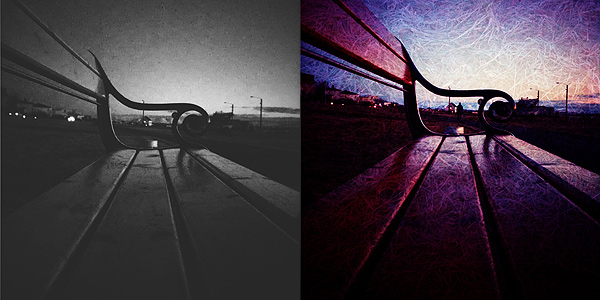
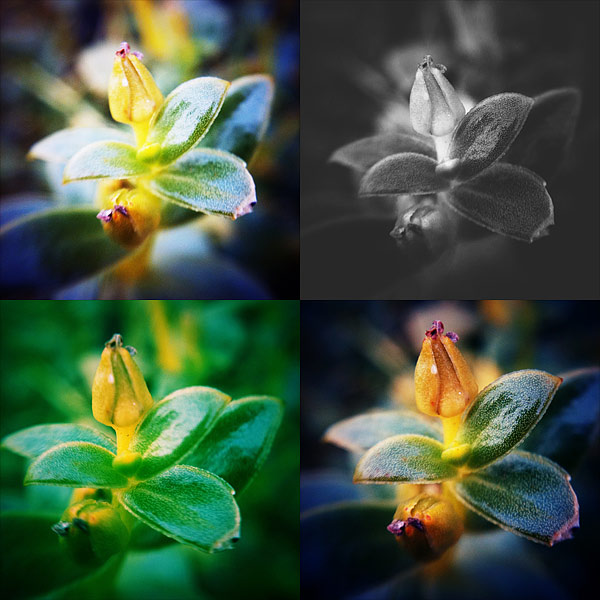
Above you can see results with random filters, respectively Red/Cyan, Yellow/Orange Black/White and Sensia double exposed.
One processing problem I encountered is the fact 1 pixel of a lighter color is added on the left border of each and every image. It doesn’t matter which effects you pick or the chosen resolution: the pixel is most of the times very noticeable, especially in photos with intense vignetting. And of course, removing it can be a pain because you have to do it with another app, since Lomora 2 doesn’t allow cropping.
Lomora 2 needs some improvements to really be on par with other lomography simulation apps. In spite of the swell filters, the app is truly a bit too convoluted and frustrating to use. We hope in future updates.
EDIT: the issue with light pixels appearing in the left border was fixed in version 2.2. Updated review for Lomora 2 can be found here.
Overall
Name: Lomora 2
Developer: Marvin Lee
Compatibility: iPhone, iPod Touch. iOS 4.1 or later.
Price: £1.79||$2.99||€2.39
Vote: 3/5