
Three noteworthy apps are currently available at a special price from the App Store: VintageScene, Lumière and Panoramatic 360. All three apps are now $0.99/€0.79/£0.69.

Continue reading “Price Drops for VintageScene, Lumière & Panoramatic 360”
Three noteworthy apps are currently available at a special price from the App Store: VintageScene, Lumière and Panoramatic 360. All three apps are now $0.99/€0.79/£0.69.
Three noteworthy apps are currently available at a special price from the App Store: VintageScene, Lumière and Panoramatic 360. All three apps are now $0.99/€0.79/£0.69.
Continue reading “Price Drops for VintageScene, Lumière & Panoramatic 360”
Percolator and Panoramatic 360 are on sale in the App Store. Both apps are currently available at the special price of $0.99/€0.79/£0.69. The offer is valid for a limited time only.
 Percolator is a fun tool to create fantastic graphics on the iPhone, quickly. By playing with just a few settings, you can conjure stylish retro photo manipulations and outstandingly colorful abstractions. If you want to know more about what the app can do and how it works, please read our full review here.
Panoramatic 360 has announced that a major update is coming soon. It was revealed that in the upcoming version of this 360 photo creator will be added a new feature to shoot panoramas in real time. Up to this day and after having tried several other panoramic photo apps, Panoramatic 360 remains my favorite option to capture images at 360 degrees with ease on the iPhone.

PictureShow by Graf got a substantial update and it’s now version 3.1. What’s new in the latest release?

TiltShift by Michael Krause is now version 2.3. The new features concern the resolution of saved images.
You can now have the possibility to save a half size or full size photo whatever the resolution or filter type is. The maximum output resolution was increased to 16 megapixels on the iPhone 4 and to 18 megapixels on the iPad 2.
Finally, Banana Camera’s ShakeItPhoto‘s latest update to version 2.0 adds the new Polaroid frame to the classic instant one previously included in the app.

Other minor updates in the last hours are for the following apps we have reviewed in the past: Lo-mob (v. 1.4.58), Panoramatic 360 (v. 4.4.1), Instagram (v. 1.6.1).
 Just a very brief update to notify that three of the apps we reviewed were updated in the last hours: TiltShift Generator by Art & Mobile, Lomora 2 by Marvin Lee and Panoramatic 360 by floaty. None of these updates is a major one.
TiltShift Generator v. 1.36: fixed bug for Facebook sign-in .
Lomora 2 v. 2.2.1: fixed bug causing the app to crash on iPod Touch 4th generation.
Panoramatic 360 v. 4.3.1: fixed bugs and various improvements.
If you have experienced some problem with one of these apps, it’s recommended to update them now. Remember you can always contact the developer for further assistance and to report further issues.
Panoramic photography is a technique producing images with elongated field of view. It is also commonly referred to as wide format photography. Panoramic images are usually composites of several images stitched together. These days, the stitching process is often carried out with the aid of a photo editing software.
Panoramatic 360° brings to Apple devices a tool conveniently designed to allow accurate stitching of individual images to be assembled as panoramic views.
Main Features
Appotography Opinion
Panoramatic makes the task of creating panoramic photos as easy and immediate as it can get.
You can can choose among Panorama and Poster modes. The first mode allows the user to take pictures either in landscape or in portrait orientation in order to create the final wide format image. Poster mode works in a similar manner, but images can be imported also from your albums and they don’t necessarily have to be horizontally taken.
All you have to do to create your wide format views in Panoramatic is taking a series of photos following the help of the app’s visual guide. As an additional reference, you are also shown the inclination of the camera and the total number of pictures taken. The more you get used to keep an eye on these indicators, the more accurate the stitching of your photos will be. After you take the pictures, you have a preview of what your panoramic image will look like. You can improve it by deleting a few shots, by adding some others, or you can just proceed to the final rendering.
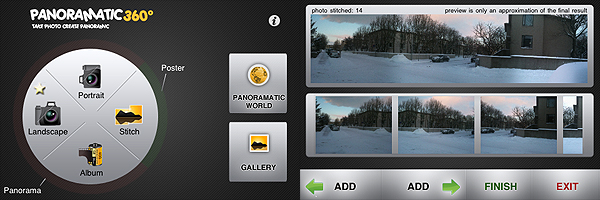
You can take photos manually or use the Auto function that will help you to know when to shoot. To be honest, the Auto function is the one thing I really didn’t feel very comfortable with while using the app. If you rotate too much or too fast or even in other unfathomable circumstances, the calculations of the compass won’t be accurate enough and you won’t be able to shoot when in the right position. It may seem a paradox, but from my experience I would say you need more training to make Auto function work properly than you need to make the app do a good job when this feature is disabled. Anyway, to get the most out of Panoramatic, I suggest getting used to shooting with Auto turned off.
When you have enough photos to work with — a minimum of two is required, but how many photos to take is up to you, depending on how you want your final image to look like — you can make a few adjustments to contrast, exposure, colors and vignetting; then the app will create the composite image for you to save in your camera roll, to share, or to explore as a 360° panorama. All the rendered panoramic images are stored in the app’s gallery, where you will be able to access them at any moment.
Panoramatic 360° is not difficult to use but, differently from the greatest majority of other apps, getting used to it does require some time. All the elements in it can at first seem overwhelming and I recommend reading the tutorial before starting taking photos. Although the app works very well and in general results are quite accurate, some of Panoramatic’s features are not perfect, so you have be in the best possible conditions to expect extremely good results. For example, the picture below was taken with Panoramatic 360° with auto vignetting correction enabled. As you can see, some flaws due to vignetting are still visible on the upper part of the final image. Color correction was also enabled, but lighting conditions sometimes are hard to overcome and it’s probably not completely the app’s fault.

Obtaining a panoramic photo and obtaining a good panoramic photo are different things entirely and it goes without saying that Panoramatic 360° can only help you in the first task. Taking the photos to be stitched together and making them actually look good together is up to you.
Overall
Name: Panoramatic 360°
Developer: floaty
Compatibility: iPhone, iPod Touch, iPad. iOS 3.1 or later.
Price: £1.19||$1.99||€1.59
Vote: 4/5
