Camera+ — not to be confused with Camera Plus — is back after a long and troubled absence from the Apple Store. We are happy to finally see it back and to be able to write our opinion on it.
For those who don’t know what I am talking about, Camera+ is an old acquaintance of the Apple Store: despite its popularity, at some point it had to be retired for violation of Apple’s developer agreement — the app introduced with an update the possibility to use iPhone’s volume button as a shutter button. The app got many positive opinions both from the media and from users, so it was quite a shock for some to see it was gone.
Camera+ is now available again for the iPhone, iPad and iPod Touch owners, without the volume button trick (not the developers’ fault), but with some interesting improvements.
Main Features
- Full resolution available;
- Stabilizer, burst and self-timer shot modes;
- Crop and rotate;
- Grid on/off;
- Digital zoom;
- Twenty-seven available filters (+ nine available with in-app purchase);
- Different scene modes for easy photo enhancement (digital flash, etc.);
- Eighteen photographic borders;
- Exif and location data available;
- Share via email, Twitter, Flickr and Facebook.
Appotography Opinion
Camera+ is one of those multi-purpose cameras that will be very helpful especially when choosing to use a single tool to accomplish what several different apps are able to offer separately. Camera+ includes tools like self-timer and stabilizer for making your shooting easier and more immediate, together with editing features like crop, rotate and several different post-processing adjustable filters and presets. If this weren’t enough, you also have the possibility to access your pictures’ data, which is something whose importance many apps stupidly don’t regard as a priority.
The interface is quite simple, although maybe not the simplest available. Anyhow, people with a little familiarity with their Apple devices won’t encounter difficulties getting used to it.
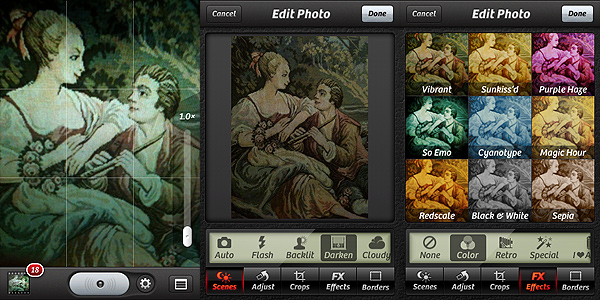
Your pictures, both taken with the built-in camera or uploaded from the camera roll, will be stored in the Camera+ Lightbox. From this dedicated space, you’ll be able with ease to modify your photos without having to start over all the times. The Lightbox works a lot like the Gallery feature within other apps: pictures taken or uploaded will remain there until you either remove them or save them once and for all.
To edit and enhance your photos, you crop and flip and rotate, and you can also access a variety of scenes — presets like the digital flash and other simulations of lighting conditions — or you can add a photographic filter and a border. Most filters are available right away with the app, but a few more can be added with in-app purchase. Having also a few more borders for a wider choice of styles to fit more appropriately the filters wouldn’t hurt.
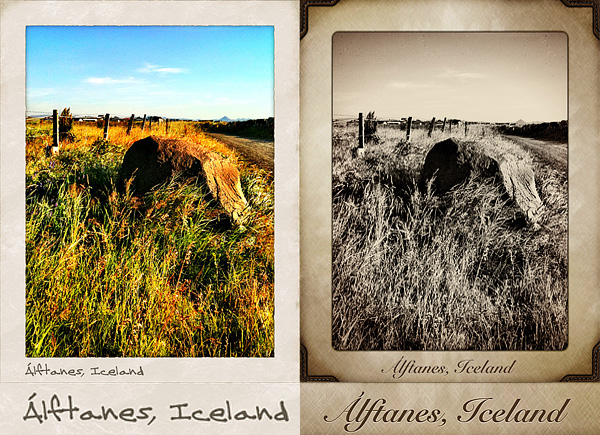
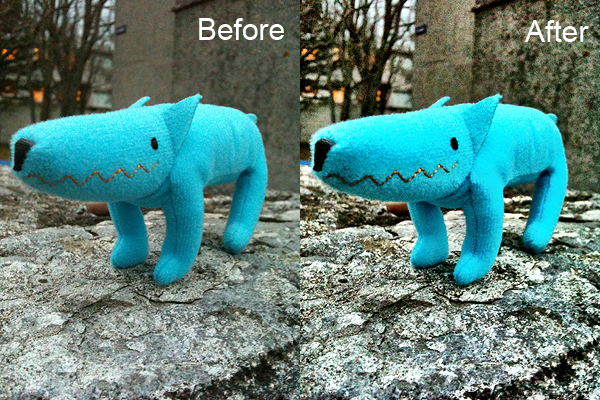
These are a few examples of filters applied with Camera+, with or without borders:


As you can see for yourself, the results obtained with Camera+ are really nifty; the filters are high quality and they can truly make a difference in complementing your photos. This app is definitely a purchase I would recommend to anybody in need of a comprehensive photography tool on the iPhone, iPad or iPod Touch.
To sum it up in just a few words: welcome back Camera+!
Overall
Name: Camera+
Developer: tap tap tap
Compatibility: iPhone, iPod Touch, iPad. iOS 3.1 or later.
Price: £0.59||$0.99||€0.79
Vote: 5/5


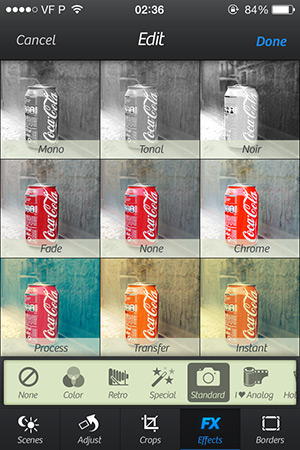 Continue reading “Camera+ 4.2 Presents The Standard Effects Pack”
 Camera+ 2.3 introduces a new feature: captions. Captions are a simple and fun way to add text to your photos.
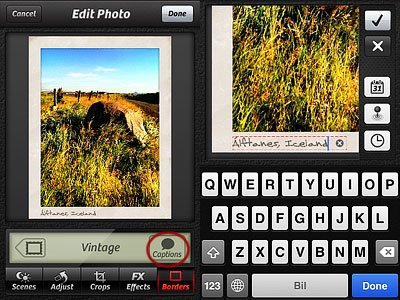 As you can see from the images below, each border style comes with matching styled captions, varying in fonts and colors. Alignment, font, size and color of captions are not editable.