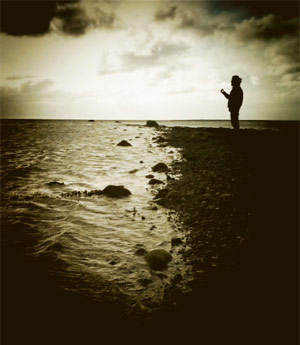
The Mobile Photo Awards are addressed to all mobile photographers out there. To take part in the contest, an entry fee of $20 for three images and $30 for five images is required; every image submitted is allowed for inclusion to up to three categories.
Mobile photography has acquired an enormous following over the last few years and it is now considered by many an alternative and valid form of visual art, on par with traditional photography. Thanks to the diffusion of mobile devices, even amateurs with no previous experience and with no background in photography are given an easy and accessible form of expression.
The Mobile Photo Awards are addressed to all mobile photographers out there. To take part in the contest, an entry fee of $20 for three images and $30 for five images is required; every image submitted is allowed for inclusion to up to three categories. Categories span a broad spectrum of photography genres, from Architecture to Digital Art & Collage. Specially sponsored app categories offer even more possibilities and hints to get creative. A Jury composed by renown names in the world of mobile photography will be judging all the images submitted. Note that any photo taken/processed with a mobile device is eligible for entry, regardless of the specific medium and software used.
Palette0 Game Art Photo Converter for iPhone is a very simple photographic tool to convert photos to old-school pixelated styles. LinkedPIXEL assembled a unique collection of digital effects reminiscent of retro gaming systems and old computer display standards.
Don’t be fooled by its long name: Palette0 Game Art Photo Converter for iPhone is a very simple photographic tool to convert photos to old-school pixelated styles. LinkedPIXEL assembled a unique collection of digital effects reminiscent of retro gaming systems and old computer display standards for the joy of all the nostalgic gamers — and photographers — out there.
Main Features
Up to 1024×768 pixels resolution;
28 effects;
4 palettes;
Adjust contrast;
In-app guide;
Send to email or share on Twitter, Facebook, Flickr and Tumblr.
PicFx for iPhone is currently free for download in the App Store. ActiveDevelopment’s app was previously $1.99/€1.59/£1.49. The offer is valid for a limited time only, so check it out. PicFx features several photographic styles that can be applied to photos, from black and white and sepia to other vintage and colored filters.
PicFx for iPhone is currently free for download in the App Store. ActiveDevelopment’s app was previously $1.99/€1.59/£1.49. The offer is valid for a limited time only, so check it out.
PicFx features several photographic styles that can be applied to photos, from black and white and sepia to other vintage and colored filters. Other than photo styles, PicFx includes a fair collection of items for easy and quick image enhancement, like textures overlays and frames. For obtaining different combinations, images can be filtered over as many times as you wish.
PicFx is a nice power-up for your photography, especially now that it comes for free.
FX Photo Studio by MacPhun was updated to version 4.1. The latest release not only revamps previously included items, but it also adds a couple of useful new features. Developers listened to the requests made by their users and in the new version they revised the app’s brush tool in masking.
FX Photo Studio by MacPhun was updated to version 4.1. The latest release not only revamps previously included items, but it also adds a couple of useful new features.
Developers listened to the requests made by their users and in the new version they revised the app’s brush tool in masking. The brush can now be resized and both its hardness and opacity can be adjusted as well. Customization is possible thanks to three separate sliders, each commanding one of the aforementioned parameters. The newly added flexibility allows to achieve better control when working in masking mode, especially with finer details. Previously, FX Photo Studio only offered four different fixed brush types, which by the way are still available in the brush menu, although they are now used as brush presets and can be edited.
Another addition in FX Photo Studio 4.1 is the Color Splash feature. Color Splash comes with two painting modes, color and grayscale. The brush tool used to apply color or grayscale selectively on images in Color Splash is the same used for masking and thus fully adjustable. For better results, it’s possible to enable panning and zooming.
Finally, FX Photo Studio now preserves EXIF data of your photo, so that all the useful information contained in pictures is retained after saving.
More than one user requested, after the publication of our recent review of Dramatic Black & White, a comparison between JixiPix’s app and Red Giant’s Noir Photo. Dramatic Black & White and Noir Photo are essentially similar apps: both try to convey beautiful monochrome effects that are suggestive and extremely pleasing to the eye.
More than one user requested, after the publication of our recent review of Dramatic Black & White, a comparison between JixiPix’s app and Red Giant’s Noir Photo. Dramatic Black & White and Noir Photo are essentially similar apps: both try to convey beautiful monochrome effects that are suggestive and extremely pleasing to the eye.
Note: we are only taking into account the iPhone version of Dramatic Black & White and Noir Photo.
UI
Both apps are well-designed and well-rounded products. Both feature similar ellipse tools for relighting by vignette placement on images. Personally, I am more inclined to like the sleek and focused interface of Noir Photo, with the numbered dial controls instead of the sliders. Even so, Dramatic Black & White’s interface works well and it’s very easy to get the hang of.
Processing Speed
Noir Photo does much better than Dramatic Black & White with processing times. With its simple and to-the-point three-dials system, Noir Photo is capable of delivering great effects in seconds. Rendering and saving also work amazingly smoothly. Red Giant’s expertise clearly gives them a huge advantage in this case. It’s nothing new, as JixiPix’s apps are renown for their sluggish processing times. Like other JixiPix’s apps, Dramatic Black & White is much slower than average apps when it comes to saving processed photos, in spite of all the recent enhancements.
Longevity
None among these two apps will make you regret your purchase and both allow the saving of custom presets for use at a later date. It must be said though that Dramatic Black & White, with its more thorough effects editor, does better than Noir Photo, as it allows more freedom in selecting different effects and has a wider selection of adjustments which counts, among other things, Infrared and HDR-like ready-to-use presets. Most importantly, JixiPix’s monochrome app comes with an RGB channel filter editor, which is a fundamental element for proper control over effective black and white conversion.
Quality
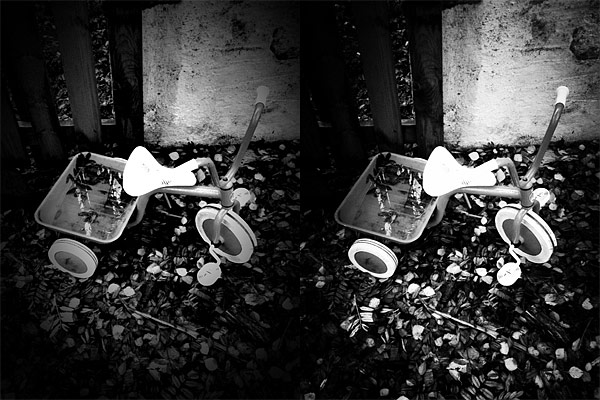
Again, Dramatic Black & White, especially thanks to a few additional tools like the RGB channel editor, has something more to offer. Still, both apps are capable of delivering fantastic black and white and monochrome effects. Thanks to the accessible controls, relighting photos with the help of the ellipse tool can be easily done in both apps. The two apps offer full resolution saving. After observation, I can say that in terms of mere quality, these two apps are equivalent.
Similar effects obtained with presets from Dramatic Black & White (left) and Noir Photo (right).
Sharing
Noir Photo’s sharing options are basically non-existent. Dramatic Black & White is not the most sharing-friendly app out there, but it comes with at least the send to email and share to Facebook features, plus it supports AirPrint.
Price
With a price tag of $1.99, Dramatic Black & White is a little cheaper in the App Store and, overall, it comes with more features than its opponent. Which in very simple words means that you will get more for less money. Of course, money’s value depends a lot on your priorities. If you are looking for an app to do its work fast and you do not care for the extra features, then the $2.99 for Noir Photo are definitely well spent.
Conclusion
While Dramatic Black & White offers more in terms of variety and customization, Noir Photo is definitely the winner when it comes to quick processing. Anyhow, Noir Photo and Dramatic Black & White are top apps in their category, delivering great quality photographic monochrome effects for a reasonable price. Both apps offer their users long-lived effects — meaning you won’t get tired of the beautiful monochrome of these apps, even after applying the same effects many times — that are enough to justify the purchase.
With Dramatic Black & White, JixiPix Software wanted to give their users something beyond the usual — and sometimes flat — iPhone black and white. The app can in fact produce beautiful and rich monochrome effects with a lot of space for customization.
With Dramatic Black & White, JixiPix Software wanted to give their users something beyond the usual — and sometimes flat — iPhone black and white. The app can in fact produce beautiful and rich monochrome effects with a lot of space for customization.
Main Features
Full resolution available;
35+ presets;
RGB filters;
Adjust tone, contrast and vignette;
Sharpen/soften;
Grain strength;
Randomize effects;
In-app guide;
AirPrint support;
Send photos via email or share on Facebook.
Appotography Opinion
Dramatic Black & White gives you a wide choice of ready-to-use effects for applying monochromatic processing to photos both imported from the Camera Roll or taken in-app. The UI and the workflow are basically identical to those of other JixiPix apps, such as VintageScene and Grungetastic. The main difference of course resides in the actual effects, which are in this case aimed at converting your photos to black and white or other monochrome.
Presets are divided into three categories: Black and White, Infrared Photo and Dramatic Black and White. Each category counts several presets, neatly arranged and fully editable. Black and White includes more classic black and white effects, Infrared Photo, as the name clearly states, infrared filters, and Dramatic Black and White highly contrasted effects of suggestive visual impact. Once you find a preset that suits your photo, you can save, share, print or proceed to further processing. JixiPix’s app offers tone adjustment — for the creation of sepia and other monochrome effects –, sharpness, contrast and brightness sliders. The app also comes with a handy spotlight editing tool. Moving and resizing the ellipse over the image, you can shrink, enlarge and find the right placement for your vignette, thus achieving more or less dramatic lighting. The RGB filter editor will help you in fine-tuning the black and white, blocking off specific color channels, in order to perfectly complement the original image. Dramatic Black & White will let you save your custom presets, so that you can use them more than once and you can also use the app’s randomizing button to generate unexpected effects.
Dramatic Black & White comes with a more than adequate collection of presets which can be fully customized for even more variety. The quality of the effects is excellent and the possibility to save custom presets, as in other apps by JixiPix, means greater flexibility than that offered by most iPhone apps devoted to monochrome. The only black and white app that I can think of that truly allows the same level of customization is Monochromia — which is, in fact, one of my personal favorites for black and white on iPhone. The only thing that could definitely be improved is the rendering times, which are, in spite of updates, still on the slow side.
Different presets applied in Dramatic Black & White.
JixiPix proves once again what they are capable of. Dramatic Black & White is a great tool for iPhone photographers with a special interest in monochrome photography, as it easily provides great functionality in a solid and well-rounded package.
Dramatic Black & White for iPhone is currently on sale for $0.99/€0.79/£0.69 in the App Store.
Overall
Name: Dramatic Black & White
Developer: JixiPix Software
Compatibility: iPhone, iPod Touch, iPad. iOS 4.2 or later.
Price: £1.49||$1.99||€1.59
Vote: 5/5
Paparazzi, infamous for their ability in carrying out their work employing questionable methods, are often masters of quickness. It doesn’t take a paparazzo though to know that in some instances rapid fire — also referred to as burst mode or continuous shooting mode — can be your best friend.
Paparazzi, infamous for their ability in carrying out their work employing questionable methods, are often masters of quickness. It doesn’t take a paparazzo though to know that in some instances rapid fire — also referred to as burst mode or continuous shooting mode — can be your best friend. This doesn’t only include situations where subjects are moving quickly in front of the camera, but also situations where light is far from optimal.
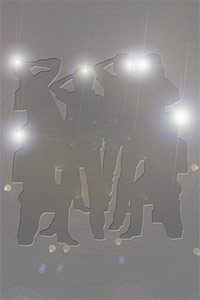
Paparazzi Photo is a simple app which makes use of continuous fire mode to rapidly take series of photos.
Main Features
Full resolution available;
Combine photos on/off;
Flash on/off (only on supported devices).
Appotography Opinion
Getting the hang of Paparazzi Photo is very simple. Once you open it, the app will immediately start to take shots and save them automatically to your device’s Camera Roll. You have to do nothing to make the app work, you do not even have to press a shutter button; all you have to do is aim the camera at the subject that interests you and then let the app do the rest. To stop shooting, you simply close the app.
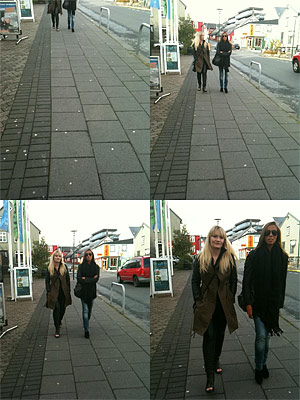
In your device’s settings, you can set the final resolution for saved photos, enable flash and activate the combine photos feature. Turning this last option on, the app will save shots at a medium resolution in a 2×2 format; turning it off, the app will save every single image separately at the resolution of your choice. Be aware that choosing the highest resolution available could slow down the shutter, especially on older devices.
Paparazzi Photo makes use of the basic continuous shooting mode that many cameras include among their features. The 2×2 format however looks like something straight out of an action sampler camera. Overall, this is a no-frills and very easy to use app. Still, effectively handling the burst mode is not as easy it may seem and for this reason getting used to this app to achieve satisfactory results may require some time and lots of guessing and checking. The fact the app starts shooting as soon as you open it doesn’t give you much time to think and frame properly; also, that you cannot stop taking photos unless you exit the app can be a bother sometimes. My impression is that a shutter button of some kind would definitely give users better control, without necessarily taking away anything from the app’s effectiveness. Perhaps a shutter control could be included as an additional feature that users could enable or disable when they need it.
Paparazzi Photo perhaps feels a bit too limited as a standalone app, especially as it doesn’t allow extra functions as bracketing. Even so, as a supporting tool in instances where rapid fire is your absolute priority, this app can come in handy.
The developer of Paparazzi Photo kindly provided us with a code for reviewing purposes.
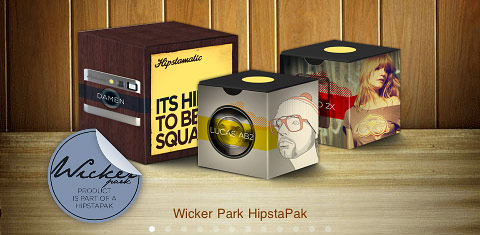
Hipstamatic 225 was released earlier this week. The latest version of the app comes with the MultiSlide Flash charger, a feature which allows to select between hardware and software flash (only working with iPhone 4) and with a brand new hipstapak. The Wicker Park hipstapak owes its name to the renown namesake park located in Chicago’s West Town area. The pak includes three items: a lens, a flash and a camera case. The Damen camera case blends together metallic finish with wood paneling for giving your Hipstamatic a distinctive urban look. The Jolly Rainbo 2x Flash is, in Hipstamatic’s team words, a “jovial strobe” suited for the darkest and less photo-taking friendly lighting situations. Lucas AB2 is a lens delivering beautiful golden tones, ideal for bringing out the warm colors of the upcoming fall season.
The Wicker Park hipstapak is available as in-app purchase with the updated Hipstamatic 225 for $0.99/€0.79/£0.69.
I’ve been knowing Nik Software mainly because of their Silver Efex, an excellent Photoshop plugin for achieving professional black and white effects and conversion. Snapseed is Nik’s contribution to the world of mobile photography.
Main Features
Full resolution available;
Auto correction;
Selective adjustment;
Straighten and rotate;
Crop;
Brightness, contrast, saturation and white balance adjustment;
Grain adjustment;
20+ creative effects;
Blur;
Revert to original;
Undo;
8 borders;
In-app guide;
AirPrint support;
Send photos via email or share on Facebook and Flickr.
Appotography Opinion
Snapseed works great both on iPhone — and iPod Touch — and iPad and it allows editing of photos taken in-app or loaded from the device. The app’s interface is minimal and uncluttered and it relies mainly on menus that can be brought on by onscreen tapping and holding; you can then scroll vertically to select the desired settings. To increase and decrease the setting values, swiping or pinching with fingers over the image is all you need to do and it’s also all you require to master the app. At the bottom of the work area, you will find additional controls to choose specific commands, undo, apply effects and compare with the original image.
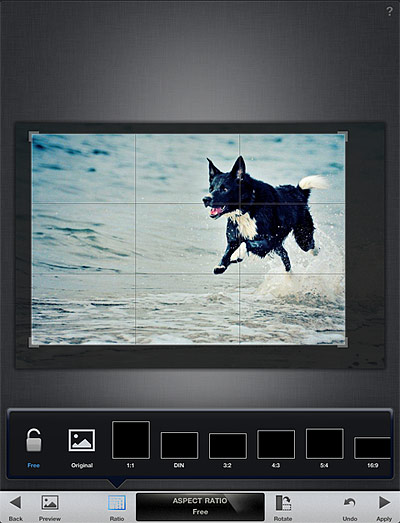
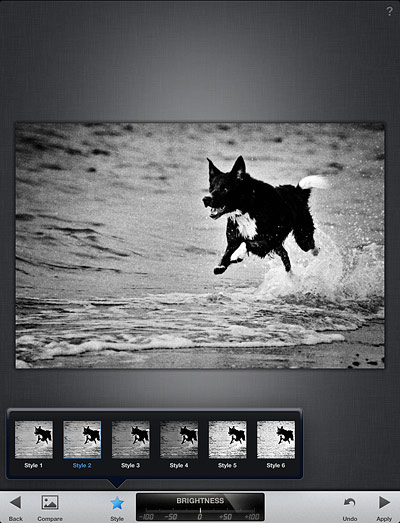
Automatic is the quickest way to apply basic enhancement to your photo. This mode allows to apply color and contrast correction in seconds, without having to go through more intensive processing. On the other hand, Selective Adjust serves the purpose of applying correction over specific areas of the chosen photo. Selective Adjust is a sort of simplified masking feature, allowing to make adjustments only where you really need it. Tune Effect, Straighten and Crop are designed for more thorough editing, as they come with a set of more comprehensive tools for fine-tuning photos. Tune Effect includes brightness, contrast, ambiance and white balance controls; straighten and crop will help in improving framing by fixing crooked images and by removing unnecessary elements. Snapseed comes also with a focus editor and four sets of different filters and effects, divided into four themed categories: Black and White, Vintage Films, Grunge and Drama. For final touches, a small collection of photographic borders is also included. All filters are top quality and highly customizable. After editing, it’s possible not only to save the image, but also to print it and share it via email or on Facebook and Flickr. You can always revert to the starting shot and a button in the work area allows you to compare the processed result with the original.
Nik’s Snapseed provides the user with quick and to-the-point instruments for easy enhancement. One of the most notable features of the app is the swiping motion, which allows for quick and accurate visualization of edits. If you imagined from previous experiences that image editing must necessarily be a painful process, then you should try Snapseed to change your mind. Snapseed doesn’t come cheap, but if you are looking for all-around quality editing, you definitely won’t regret getting it.
Overall
Name: Photo Effect Studio
Developer: Everimaging Ltd
Compatibility: iPhone, iPod Touch, iPad. iOS 4.0 or later.
Price: £2.99||$4.99||€3.99
Vote: 5/5
Bleach Bypass 1.2.6 was released today in the App Store. The latest version of the app introduces a new effect to the FX collection of Fotosyn’s skip bleach camera for iPhone. The new effect is called Rustic and is characterized by a soft sepia tone.
Rustic stylistically merges with the app’s previous effects. With the addition of Rustic, Fotosyn’s skip bleach camera currently counts nine effects in all, divided into two separate categories, Standard Effects and Tint Effects. The quality of Rustic fits in the latter group, offering a complement to tints already included in the app’s collection. Bleach Bypass 1.2.6 also presents a vignetting revision.
The new effect, Rustic.
Bleach Bypass recently got a significant update, allowing users to have a better control over the app’s workflow and to manually adjust their effects of choice to better suit photos during processing.

 The Mobile Photo Awards are addressed to all mobile photographers out there. To take part in the contest, an entry fee of $20 for three images and $30 for five images is required; every image submitted is allowed for inclusion to up to three categories. Categories span a broad spectrum of photography genres, from Architecture to Digital Art & Collage. Specially sponsored app categories offer even more possibilities and hints to get creative. A Jury composed by renown names in the world of mobile photography will be judging all the images submitted. Note that any photo taken/processed with a mobile device is eligible for entry, regardless of the specific medium and software used.
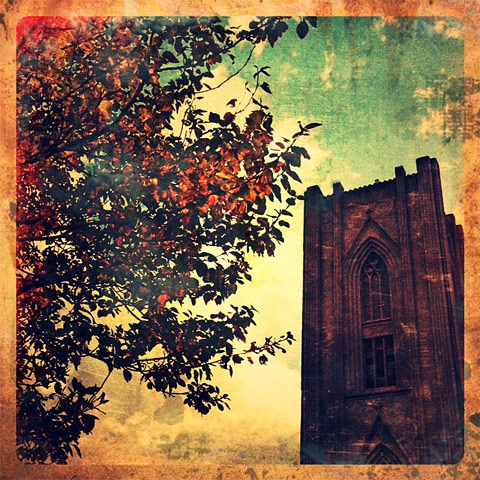 PicFx features several photographic styles that can be applied to photos, from black and white and sepia to other vintage and colored filters. Other than photo styles, PicFx includes a fair collection of items for easy and quick image enhancement, like textures overlays and frames. For obtaining different combinations, images can be filtered over as many times as you wish.

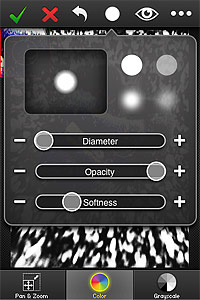 Another addition in FX Photo Studio 4.1 is the Color Splash feature. Color Splash comes with two painting modes, color and grayscale. The brush tool used to apply color or grayscale selectively on images in Color Splash is the same used for masking and thus fully adjustable. For better results, it’s possible to enable panning and zooming.
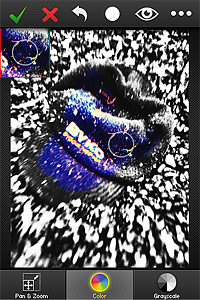 Finally, FX Photo Studio now preserves EXIF data of your photo, so that all the useful information contained in pictures is retained after saving.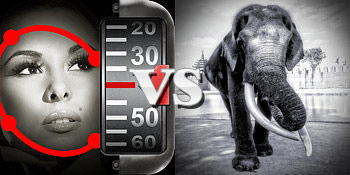


 JixiPix’s app offers tone adjustment — for the creation of sepia and other monochrome effects –, sharpness, contrast and brightness sliders. The app also comes with a handy spotlight editing tool. Moving and resizing the ellipse over the image, you can shrink, enlarge and find the right placement for your vignette, thus achieving more or less dramatic lighting. The RGB filter editor will help you in fine-tuning the black and white, blocking off specific color channels, in order to perfectly complement the original image. Dramatic Black & White will let you save your custom presets, so that you can use them more than once and you can also use the app’s randomizing button to generate unexpected effects.
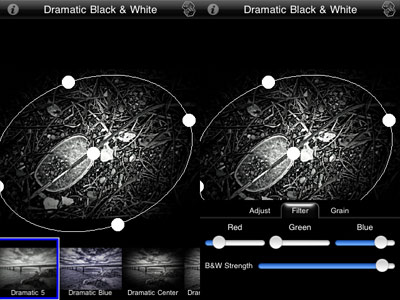 Dramatic Black & White comes with a more than adequate collection of presets which can be fully customized for even more variety. The quality of the effects is excellent and the possibility to save custom presets, as in other apps by JixiPix, means greater flexibility than that offered by most iPhone apps devoted to monochrome. The only black and white app that I can think of that truly allows the same level of customization is Monochromia — which is, in fact, one of my personal favorites for black and white on iPhone. The only thing that could definitely be improved is the rendering times, which are, in spite of updates, still on the slow side.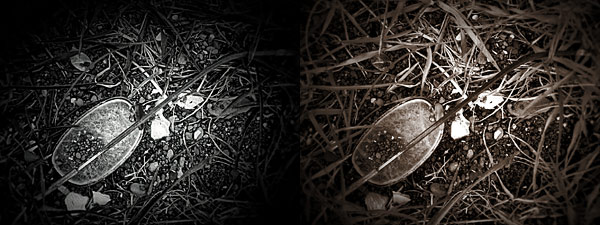
 The Wicker Park hipstapak owes its name to the renown namesake park located in
 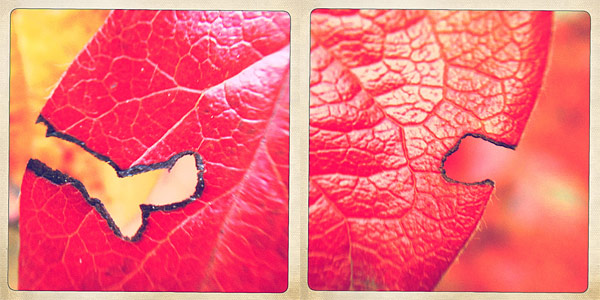 The Wicker Park hipstapak is available as in-app purchase with the updated Hipstamatic 225 for $0.99/€0.79/£0.69.
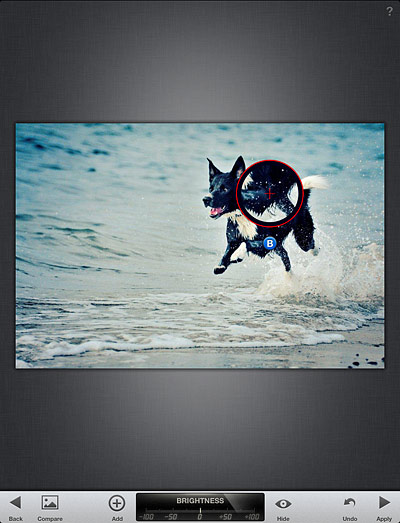 Tune Effect, Straighten and Crop are designed for more thorough editing, as they come with a set of more comprehensive tools for fine-tuning photos. Tune Effect includes brightness, contrast, ambiance and white balance controls; straighten and crop will help in improving framing by fixing crooked images and by removing unnecessary elements.
 Snapseed comes also with a focus editor and four sets of different filters and effects, divided into four themed categories: Black and White, Vintage Films, Grunge and Drama. For final touches, a small collection of photographic borders is also included. All filters are top quality and highly customizable.
 After editing, it’s possible not only to save the image, but also to print it and share it via email or on Facebook and Flickr. You can always revert to the starting shot and a button in the work area allows you to compare the processed result with the original.
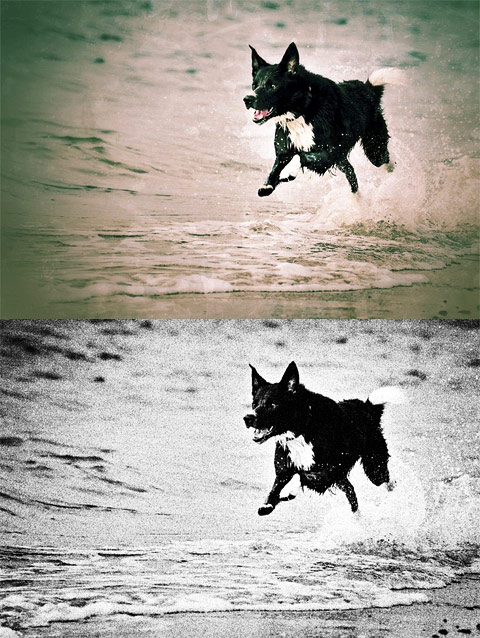 Nik’s Snapseed provides the user with quick and to-the-point instruments for easy enhancement. One of the most notable features of the app is the swiping motion, which allows for quick and accurate visualization of edits. If you imagined from previous experiences that image editing must necessarily be a painful process, then you should try Snapseed to change your mind. Snapseed doesn’t come cheap, but if you are looking for all-around quality editing, you definitely won’t regret getting it.