8mm Vintage Camera’s New Filters

8mm Vintage Camera8mm Vintage Camera was updated to version 1.8. The latest release comes with two new filters that are now part of the app’s collection. Now there are 10 retro looking filters in total to choose from for Nexvio’s vintage camera’s users.

Today it was a rainy day here in not-so-sunny Lisbon, so I had to the chance to test the new filters, Tuscan and Indigo, briefly while it was pouring. Sorry for lack of cats on the roofs — but as you can guess cats are not into rain very much.

8mm Vintage Camera 1.8 also introduces a brand new icon. Other than these changes, this release just fixes bug the app location indicator bug that has been bothering some users.

If you are into real time effects for video shooting on your mobile device, you should give the 8mm Vintage app a try. To this day its features and effects, old and new, are actually among the best for its genre in the App Store.

8mm Vintage Camera - Nexvio Inc.

Instagram’s Willow Tried & Tested

InstagramI am one of these Instagram users that was terribly shocked by changes made to the app’s original filters after the 2.0 makeover. Even though I could see the app was overall improved and I liked the new features, as a poster I was affected by the changes. The fact is for a while most of my Instagram photos were processed using the now forgotten filter Gotham. Yes, Gotham… While I really liked Gotham, I didn’t really appreciate the other in-app black and white effect, Inkwell, even if I used it as well — just not as often. Anyway, after said improvements, I almost completely stopped using Instagram to process photos to turn them into monochrome, because Inkwell was just a characterless joke.

Well, it turns out Instagram tried to make up for its embarrasing lack of monochrome by adding Willow. The app was updated a couple of days ago, so by now many of you probably know how to complement their photos using this new effect better than I do.

Instagram Willow Continue reading “Instagram’s Willow Tried & Tested”

Camera XE Quick Preview & Launch Offer

MEA Mobile‘s newest photo app, Camera XE is out. To celebrate the launch, the app is free for one week in the App Store.

Currently, Camera XE is also offering another promotion in collaboration with Walgreens: by entering the coupon code CAMERAXE13 when using the app to order prints, you get 25% off your purchase.

Camera XE Continue reading “Camera XE Quick Preview & Launch Offer”

Vintique Currently Free

GMY Studio’s Vintique is currently on sale. The app’s regular price is $0.99, but right now it is downloadable for free in the App Store.

Vintique Free

Vintique is an app for quick and easy photo enhancements that enjoyed great popularity among iPhone camera users for its rich collection of dreamy filters paired with fair customization capabilities. The latest update to version 1.6 was released earlier this week, making the app compatible with iPhone 5’s 4 inch screen and adding 2448×2448 textures and vignettes.

Note that the current offer does not include the add-on pack for enabling large resolution filters and frames. The extra content is still available from the in-app store for $0.99.

Vintique - GMY Studio

How To Disable Genius And Make The App Store Fun Again

If you have updated your iPhone to iOS 6, you have probably noticed that, among other changes, the way you can now interact with the App Store is quite different from before. You have probably also had the chance (not) to appreciate the absolute, mind-boggling slowness of the App Store after said update. Not only connecting to the store as soon as you launch the app, but also checking your updates and searching for stuff takes so long you could go to Easter Island, make tea and come back and your screen would probably still be “loading”. The issue is caused by the Genius for apps feature that is activated by default after updating the iOS.

Genius for Apps
Do you feel that this Genius feature is actually more of a bother than something you will thoroughly enjoy using? What can I say? You have my sympathy. But now for the bright side: deactivating Genius to start browsing the App Store from within your iPhone again without enduring the longest loading times is actually very easy. Most of you must have figured out how to do it by now. However, some might be having a harder time to find the right settings, and for the users that are still struggling we have this quick guide.

So you want to deactivate Genius? All right: just follow these steps, this is how you do it. Continue reading “How To Disable Genius And Make The App Store Fun Again”

MPro Review

MPro is another camera app focused on delivering black and white images. In the past getting black and white photographs as you wanted them right off the bat with the iPhone was so much more complicated and sometimes even tedious, as you had to switch multiple times among apps just to make slight adjustments. Honestly, monochrome cameras for the iPhone have gotten so much better over time and choice is so much richer than it used to be.

MPro iPhone

Main Features

  • Full resolution available;
  • 7 filters;
  • 5 aspect ratios;
  • 2 grid types;
  • 2 shutter modes;
  • Focus and exposure controls;
  • Focus and exposure lock;
  • Adjust contrast;
  • Level meter;
  • File format selection (JPG and TIFF);
  • Self-timer.

Continue reading “MPro Review”

A Look At Hueless Presets

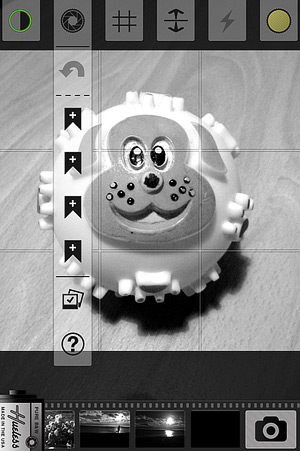
HuelessHueless 1.6 comes with a new feature: the preset management. Presets can be quite handy in more than a few instances and using them you don’t have to start your image processing from scratch all the times. Several popular apps rely on them heavily, but not as many let you create your own. Instead of giving you a bunch of instant effects, Hueless lets you save your own presets, both for interface and for image adjustments.

Hueless Presets iPhone Continue reading “A Look At Hueless Presets”