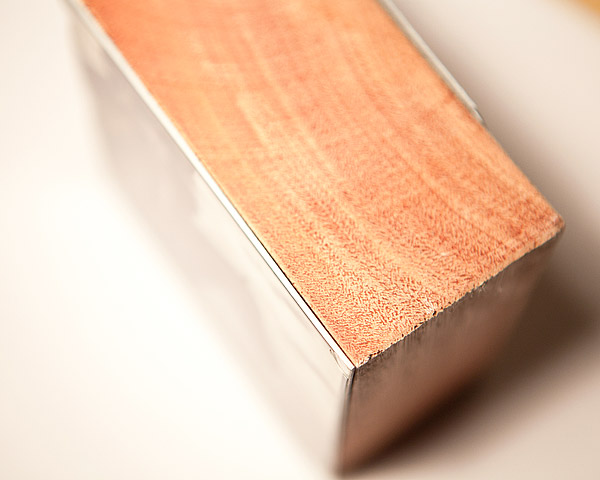
For a different gift idea, we suggest to take a look at ImageBlocks, a peculiar way to reinvent the photo frame that will give your images that extra dimension you are looking for.
The festive season is approaching faster than we think and we are already facing the yearly gift idea crisis. Looking for a nice present is not always the easiest task, is it?
For a different gift idea, we suggest to take a look at ImageBlocks, a peculiar way to reinvent the photo frame that will give your images that extra dimension you are looking for.
Three noteworthy apps are currently available at a special price from the App Store: VintageScene, Lumière and Panoramatic 360. All three apps are now $0.99/€0.79/£0.69.
Three noteworthy apps are currently available at a special price from the App Store: VintageScene, Lumière and Panoramatic 360. All three apps are now $0.99/€0.79/£0.69.
The Mobile Photo Awards are addressed to all mobile photographers out there. To take part in the contest, an entry fee of $20 for three images and $30 for five images is required; every image submitted is allowed for inclusion to up to three categories.
Mobile photography has acquired an enormous following over the last few years and it is now considered by many an alternative and valid form of visual art, on par with traditional photography. Thanks to the diffusion of mobile devices, even amateurs with no previous experience and with no background in photography are given an easy and accessible form of expression.
The Mobile Photo Awards are addressed to all mobile photographers out there. To take part in the contest, an entry fee of $20 for three images and $30 for five images is required; every image submitted is allowed for inclusion to up to three categories. Categories span a broad spectrum of photography genres, from Architecture to Digital Art & Collage. Specially sponsored app categories offer even more possibilities and hints to get creative. A Jury composed by renown names in the world of mobile photography will be judging all the images submitted. Note that any photo taken/processed with a mobile device is eligible for entry, regardless of the specific medium and software used.
Palette0 Game Art Photo Converter for iPhone is a very simple photographic tool to convert photos to old-school pixelated styles. LinkedPIXEL assembled a unique collection of digital effects reminiscent of retro gaming systems and old computer display standards.
Don’t be fooled by its long name: Palette0 Game Art Photo Converter for iPhone is a very simple photographic tool to convert photos to old-school pixelated styles. LinkedPIXEL assembled a unique collection of digital effects reminiscent of retro gaming systems and old computer display standards for the joy of all the nostalgic gamers — and photographers — out there.
Main Features
Up to 1024×768 pixels resolution;
28 effects;
4 palettes;
Adjust contrast;
In-app guide;
Send to email or share on Twitter, Facebook, Flickr and Tumblr.
The new iPhone 4S announced today by Apple will include an upgraded camera, as we had previously speculated. As a matter of fact, the camera was one of the main points during Apple’s keynote, showing the importance of photography on smartphones also from a marketing point of view.
The new iPhone 4S announced today by Apple will include an upgraded camera, as we had previously speculated. As a matter of fact, the camera was one of the main points during Apple’s keynote, showing the importance of photography on smartphones also from a marketing point of view.
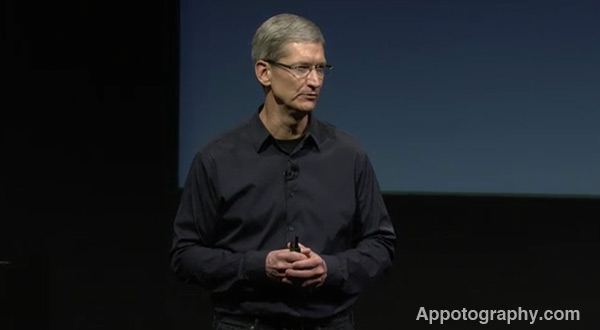
In one of the most awaited keynotes in the history of the iOS platform, Apple unveiled today their next iPhone, the iPhone 4S. The keynote was held in Apple’s Town Hall room, where the first iPod was launched 10 years ago. Tim Cook, CEO of Apple after Steve Jobs resigned this August, led the show passionately.
In one of the most awaited keynotes in the history of the iOS platform, Apple unveiled today their next iPhone, the iPhone 4S. The keynote was held in Apple’s Town Hall room, where the first iPod was launched 10 years ago. Tim Cook, CEO of Apple after Steve Jobs resigned this August, led the show passionately, and was joined on stage by other Apple representatives. Phil Schiller, Apple’s marketing director, had the task to announce the iPhone 4S.
Tim Cook leading the show
While a lot of fans that were eagerly waiting for an iPhone 5 announcement are already voicing their dissatisfaction though social networks and on technology blogs, the iPhone 4S includes the hardware enhancements that most were expecting. And the best news for iPhone photographers is that improvements to the camera made up a consistent part of the iPhone 4S announcement.
On the outside, the iPhone 4S looks exactly like its predecessor; anyhow, all the interior components had a consistent upgrade. The main features of the new iPhone include:
– New A5 processor: same chip currently used in the iPad 2. The new iPhone should be 7 times faster than the iPhone 4 at rendering graphics, according to Apple and representatives of Epic Games, on stage to show the demo of their new game, Infinity Blade 2.
– 8MP Camera with improved optics: 5 lenses instead of 4, improved light sensitivity, ability to shoot 1080p videos, faster sensor, which coupled with the new processor should make photography and video processing apps considerably faster. We will have a separate article today with more discussion on the camera improvements.
– Siri: voice based assistant, which will allow users to interact with their iPhone only using their voice. While this might seem a software only feature, it will be available only to iPhone 4S.
– New dual antenna system: the new antenna system will improve reception and allows Apple to manufacture a universal version of their iPhone able to connect to both CDMA- and GSM-based networks.
– iOS 5 and iCloud service: both available on October 12. iOS 5 will include a new camera app version and new software from Apple.
iPhone 4S: Price and Availability
The iPhone 4S will first launch in the U.S. and in 7 more countries (Canada, Australia, United Kingdom, France, Germany, and Japan) on October 14th. Apple will start accepting preorders on October 7th.
The price of the iPhone 4s in the U.S. will be $199 for the 16GB model, $299 for the 32GB model, and $399 for the 64GB model. We could not find a list of prices for all models outside the U.S., but so far we know that prices for the phone without subscription will be £499.00 for the base model in the U.K., and 629€ in Germany and France (and I suppose in most of Europe, even though the price is not showing up in other stores yet).
Phil Schiller introducing the iPhone 4S
On October 22nd, the iPhone 4S will become available in 22 more countries (Austria, Belgium, Czech Republic, Denmark, Estonia, Finland, Hungary, Ireland, Italy, Latvia, Liechtenstein, Lithuania, Luxembourg, Mexico, Netherlands, Norway, Singapore, Slovakia, Slovenia, Spain, Sweden, and Switzerland).
By the end of the year, the iPhone 4S will be available in over 70 countries.
iPhone 4 and iPhone 3GS Prices
Both models will be available and will support the new iOS 5 features (with the exception of the Siri system). In the U.S. the iPhone 4 8GB will cost $99 with a phone subscription; the iPhone 3GS will be free with an AT&T subscription.
Stay tuned for a couple more articles: one highlighting the new camera features, the other discussing iOS 5.
PicFx for iPhone is currently free for download in the App Store. ActiveDevelopment’s app was previously $1.99/€1.59/£1.49. The offer is valid for a limited time only, so check it out. PicFx features several photographic styles that can be applied to photos, from black and white and sepia to other vintage and colored filters.
PicFx for iPhone is currently free for download in the App Store. ActiveDevelopment’s app was previously $1.99/€1.59/£1.49. The offer is valid for a limited time only, so check it out.
PicFx features several photographic styles that can be applied to photos, from black and white and sepia to other vintage and colored filters. Other than photo styles, PicFx includes a fair collection of items for easy and quick image enhancement, like textures overlays and frames. For obtaining different combinations, images can be filtered over as many times as you wish.
PicFx is a nice power-up for your photography, especially now that it comes for free.
FX Photo Studio by MacPhun was updated to version 4.1. The latest release not only revamps previously included items, but it also adds a couple of useful new features. Developers listened to the requests made by their users and in the new version they revised the app’s brush tool in masking.
FX Photo Studio by MacPhun was updated to version 4.1. The latest release not only revamps previously included items, but it also adds a couple of useful new features.
Developers listened to the requests made by their users and in the new version they revised the app’s brush tool in masking. The brush can now be resized and both its hardness and opacity can be adjusted as well. Customization is possible thanks to three separate sliders, each commanding one of the aforementioned parameters. The newly added flexibility allows to achieve better control when working in masking mode, especially with finer details. Previously, FX Photo Studio only offered four different fixed brush types, which by the way are still available in the brush menu, although they are now used as brush presets and can be edited.
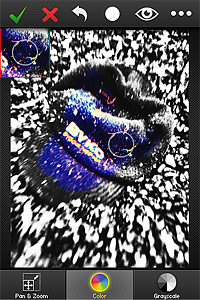
Another addition in FX Photo Studio 4.1 is the Color Splash feature. Color Splash comes with two painting modes, color and grayscale. The brush tool used to apply color or grayscale selectively on images in Color Splash is the same used for masking and thus fully adjustable. For better results, it’s possible to enable panning and zooming.
Finally, FX Photo Studio now preserves EXIF data of your photo, so that all the useful information contained in pictures is retained after saving.
More than one user requested, after the publication of our recent review of Dramatic Black & White, a comparison between JixiPix’s app and Red Giant’s Noir Photo. Dramatic Black & White and Noir Photo are essentially similar apps: both try to convey beautiful monochrome effects that are suggestive and extremely pleasing to the eye.
More than one user requested, after the publication of our recent review of Dramatic Black & White, a comparison between JixiPix’s app and Red Giant’s Noir Photo. Dramatic Black & White and Noir Photo are essentially similar apps: both try to convey beautiful monochrome effects that are suggestive and extremely pleasing to the eye.
Note: we are only taking into account the iPhone version of Dramatic Black & White and Noir Photo.
UI
Both apps are well-designed and well-rounded products. Both feature similar ellipse tools for relighting by vignette placement on images. Personally, I am more inclined to like the sleek and focused interface of Noir Photo, with the numbered dial controls instead of the sliders. Even so, Dramatic Black & White’s interface works well and it’s very easy to get the hang of.
Processing Speed
Noir Photo does much better than Dramatic Black & White with processing times. With its simple and to-the-point three-dials system, Noir Photo is capable of delivering great effects in seconds. Rendering and saving also work amazingly smoothly. Red Giant’s expertise clearly gives them a huge advantage in this case. It’s nothing new, as JixiPix’s apps are renown for their sluggish processing times. Like other JixiPix’s apps, Dramatic Black & White is much slower than average apps when it comes to saving processed photos, in spite of all the recent enhancements.
Longevity
None among these two apps will make you regret your purchase and both allow the saving of custom presets for use at a later date. It must be said though that Dramatic Black & White, with its more thorough effects editor, does better than Noir Photo, as it allows more freedom in selecting different effects and has a wider selection of adjustments which counts, among other things, Infrared and HDR-like ready-to-use presets. Most importantly, JixiPix’s monochrome app comes with an RGB channel filter editor, which is a fundamental element for proper control over effective black and white conversion.
Quality
Again, Dramatic Black & White, especially thanks to a few additional tools like the RGB channel editor, has something more to offer. Still, both apps are capable of delivering fantastic black and white and monochrome effects. Thanks to the accessible controls, relighting photos with the help of the ellipse tool can be easily done in both apps. The two apps offer full resolution saving. After observation, I can say that in terms of mere quality, these two apps are equivalent.
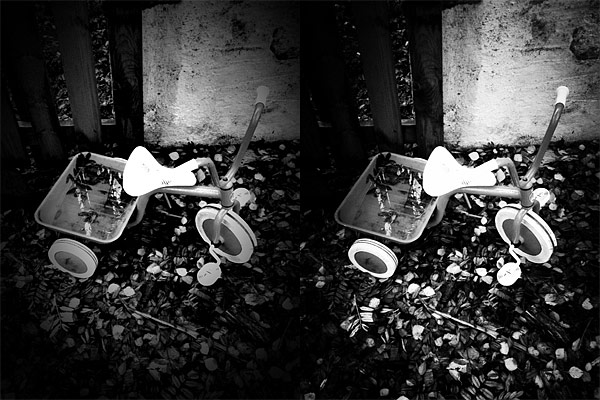
Similar effects obtained with presets from Dramatic Black & White (left) and Noir Photo (right).
Sharing
Noir Photo’s sharing options are basically non-existent. Dramatic Black & White is not the most sharing-friendly app out there, but it comes with at least the send to email and share to Facebook features, plus it supports AirPrint.
Price
With a price tag of $1.99, Dramatic Black & White is a little cheaper in the App Store and, overall, it comes with more features than its opponent. Which in very simple words means that you will get more for less money. Of course, money’s value depends a lot on your priorities. If you are looking for an app to do its work fast and you do not care for the extra features, then the $2.99 for Noir Photo are definitely well spent.
Conclusion
While Dramatic Black & White offers more in terms of variety and customization, Noir Photo is definitely the winner when it comes to quick processing. Anyhow, Noir Photo and Dramatic Black & White are top apps in their category, delivering great quality photographic monochrome effects for a reasonable price. Both apps offer their users long-lived effects — meaning you won’t get tired of the beautiful monochrome of these apps, even after applying the same effects many times — that are enough to justify the purchase.
With Dramatic Black & White, JixiPix Software wanted to give their users something beyond the usual — and sometimes flat — iPhone black and white. The app can in fact produce beautiful and rich monochrome effects with a lot of space for customization.
With Dramatic Black & White, JixiPix Software wanted to give their users something beyond the usual — and sometimes flat — iPhone black and white. The app can in fact produce beautiful and rich monochrome effects with a lot of space for customization.
Main Features
Full resolution available;
35+ presets;
RGB filters;
Adjust tone, contrast and vignette;
Sharpen/soften;
Grain strength;
Randomize effects;
In-app guide;
AirPrint support;
Send photos via email or share on Facebook.
Appotography Opinion
Dramatic Black & White gives you a wide choice of ready-to-use effects for applying monochromatic processing to photos both imported from the Camera Roll or taken in-app. The UI and the workflow are basically identical to those of other JixiPix apps, such as VintageScene and Grungetastic. The main difference of course resides in the actual effects, which are in this case aimed at converting your photos to black and white or other monochrome.
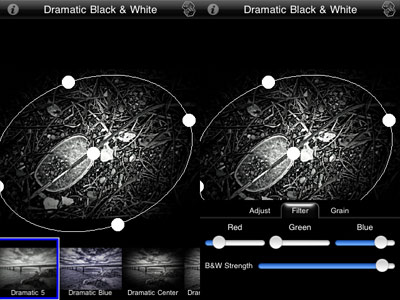
Presets are divided into three categories: Black and White, Infrared Photo and Dramatic Black and White. Each category counts several presets, neatly arranged and fully editable. Black and White includes more classic black and white effects, Infrared Photo, as the name clearly states, infrared filters, and Dramatic Black and White highly contrasted effects of suggestive visual impact. Once you find a preset that suits your photo, you can save, share, print or proceed to further processing. JixiPix’s app offers tone adjustment — for the creation of sepia and other monochrome effects –, sharpness, contrast and brightness sliders. The app also comes with a handy spotlight editing tool. Moving and resizing the ellipse over the image, you can shrink, enlarge and find the right placement for your vignette, thus achieving more or less dramatic lighting. The RGB filter editor will help you in fine-tuning the black and white, blocking off specific color channels, in order to perfectly complement the original image. Dramatic Black & White will let you save your custom presets, so that you can use them more than once and you can also use the app’s randomizing button to generate unexpected effects.
Dramatic Black & White comes with a more than adequate collection of presets which can be fully customized for even more variety. The quality of the effects is excellent and the possibility to save custom presets, as in other apps by JixiPix, means greater flexibility than that offered by most iPhone apps devoted to monochrome. The only black and white app that I can think of that truly allows the same level of customization is Monochromia — which is, in fact, one of my personal favorites for black and white on iPhone. The only thing that could definitely be improved is the rendering times, which are, in spite of updates, still on the slow side.
Different presets applied in Dramatic Black & White.
JixiPix proves once again what they are capable of. Dramatic Black & White is a great tool for iPhone photographers with a special interest in monochrome photography, as it easily provides great functionality in a solid and well-rounded package.
Dramatic Black & White for iPhone is currently on sale for $0.99/€0.79/£0.69 in the App Store.
Overall
Name: Dramatic Black & White
Developer: JixiPix Software
Compatibility: iPhone, iPod Touch, iPad. iOS 4.2 or later.
Price: £1.49||$1.99||€1.59
Vote: 5/5


 The Mobile Photo Awards are addressed to all mobile photographers out there. To take part in the contest, an entry fee of $20 for three images and $30 for five images is required; every image submitted is allowed for inclusion to up to three categories. Categories span a broad spectrum of photography genres, from Architecture to Digital Art & Collage. Specially sponsored app categories offer even more possibilities and hints to get creative. A Jury composed by renown names in the world of mobile photography will be judging all the images submitted. Note that any photo taken/processed with a mobile device is eligible for entry, regardless of the specific medium and software used.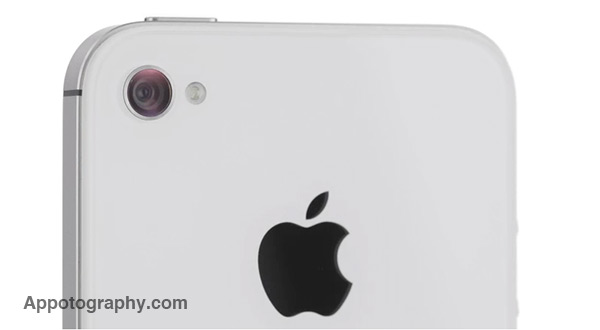


 PicFx features several photographic styles that can be applied to photos, from black and white and sepia to other vintage and colored filters. Other than photo styles, PicFx includes a fair collection of items for easy and quick image enhancement, like textures overlays and frames. For obtaining different combinations, images can be filtered over as many times as you wish.

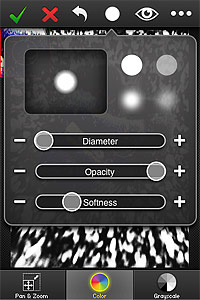 Another addition in FX Photo Studio 4.1 is the Color Splash feature. Color Splash comes with two painting modes, color and grayscale. The brush tool used to apply color or grayscale selectively on images in Color Splash is the same used for masking and thus fully adjustable. For better results, it’s possible to enable panning and zooming.
 Finally, FX Photo Studio now preserves EXIF data of your photo, so that all the useful information contained in pictures is retained after saving.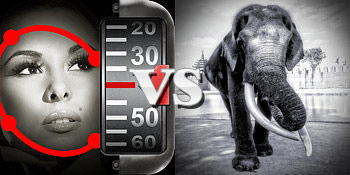


 JixiPix’s app offers tone adjustment — for the creation of sepia and other monochrome effects –, sharpness, contrast and brightness sliders. The app also comes with a handy spotlight editing tool. Moving and resizing the ellipse over the image, you can shrink, enlarge and find the right placement for your vignette, thus achieving more or less dramatic lighting. The RGB filter editor will help you in fine-tuning the black and white, blocking off specific color channels, in order to perfectly complement the original image. Dramatic Black & White will let you save your custom presets, so that you can use them more than once and you can also use the app’s randomizing button to generate unexpected effects.
 Dramatic Black & White comes with a more than adequate collection of presets which can be fully customized for even more variety. The quality of the effects is excellent and the possibility to save custom presets, as in other apps by JixiPix, means greater flexibility than that offered by most iPhone apps devoted to monochrome. The only black and white app that I can think of that truly allows the same level of customization is Monochromia — which is, in fact, one of my personal favorites for black and white on iPhone. The only thing that could definitely be improved is the rendering times, which are, in spite of updates, still on the slow side.