Instant110 Review

Instant110 is evidence enough that there are still nice surprises in store for fans of instant photography on iPhone. Although there are already many apps promising to deliver the same results, the latest photography app by Cameramatic’s developer is a polished product that, at the same time, offers very basic functionalities, a clear interface and great ease of use.

Main Features

  • Full resolution available;
  • 8 lens effects;
  • 5 borders;
  • 3 chemical effects;
  • Square format;
  • Send to other apps;
  • Access to EXIF data;
  • Random effect option;
  • Send to email or share on Twitter, Facebook, Flickr and Tumblr.

Continue reading “Instant110 Review”

Occupy Wall Street Seen Through a Camera Phone

A collection of poignant shots from the Occupy movement, taken with an iPhone or other smartphone cameras: front-line views on an event that is not getting the coverage it deserves in mainstream media.

Thanks to the technological advancements of the last 15 years, including the development of image sensors capable of taking photos in low-light conditions, camera phones have become more and more important as tools that can turn each of us into a reporter. With the right apps, a current generation smartphone like the iPhone becomes a portable media center — you can take, process, and publish your photos on the spot in a few minutes. These devices become source of first-hand testimony on events that are either ignored or misrepresented by mainstream media sources. The wave of protests against the political and financial elites that is spreading throughout the globe are a prime example of this.

The Occupy Wall Street movement “officially” started on Semptember 17th, 2011 in Zuccotti Park, a publicly accessible park in Lower Manhattan, New York City. The protestors, coming from the most heterogeneous walks of life, grouped around a slogan, “We are the 99%”, which refers to the difference in wealth in the U.S. between the wealthiest 1% and the rest of the population. And wealth, in capitalistic societies, translates directly into political power — thus, those that should reform the society are the same that are benefiting from the unequal distribution of wealth. The wealthy own the media, the flow of information, and they shape the destiny of a nation using their money.

Continue reading “Occupy Wall Street Seen Through a Camera Phone”

Hipstamatic Releases Limited Edition Nashville Hipstapak

Hipstamatic 226 was released just a few hours ago. The main changes in the new version of the app are the upgrade for final resolution on iPhone 4s (with High Quality brought to 2448×2448 and Medium Quality to 1936×1936) and more accurate EXIF data saving.

Hipstamatic 226 was released just a few hours ago. The main changes in the new version of the app are the upgrade for final resolution on iPhone 4s (with High Quality brought to 2448×2448 and Medium Quality to 1936×1936) and more accurate EXIF data saving.

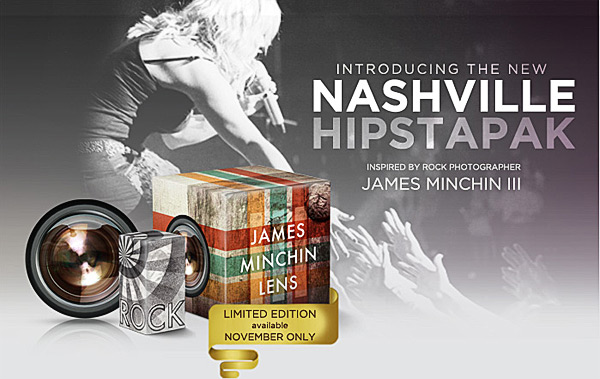
Now Hipstamatic offers a new extra, releasing the Limited Edition Nashville Hipstapak, inspired by the work of famed rock photographer James Minchin III.

Hipstamatic Limited Edition Nashville Hipstapak
Continue reading “Hipstamatic Releases Limited Edition Nashville Hipstapak”

International iPhoneography Show Calling for Entries

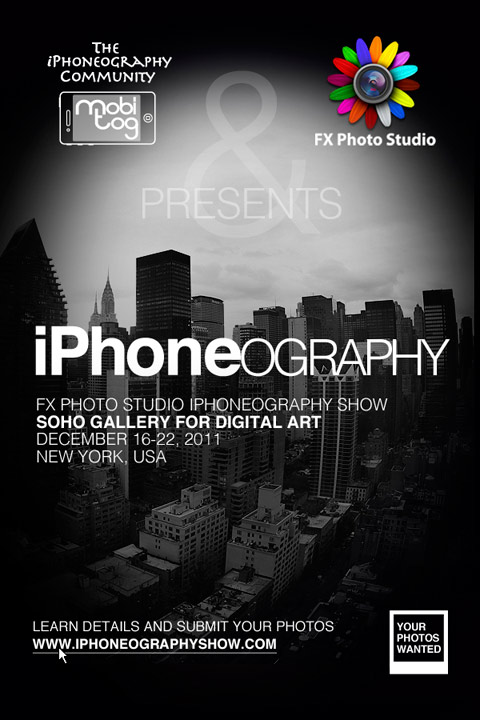
MobiTog and FX Photo Studio have joined forces to the International iPhoneography Show, a special event for all iPhone and iPad photographers, professionals and amateurs alike, that will take place in New York on December 16-22, 2011.

International iPhoneograhy Show
Continue reading “International iPhoneography Show Calling for Entries”

Capta: New Smartphone Photography & Videography Companion

Smartphone designers are always working to release devices that are more and more sophisticated, but they do not always have the actual needs of their users in mind. What if you need a tripod for your iPhone and how many of them have you purchased already that have become unusable after switching to the latest model, just because of design flaws or inconsistencies?

Capta
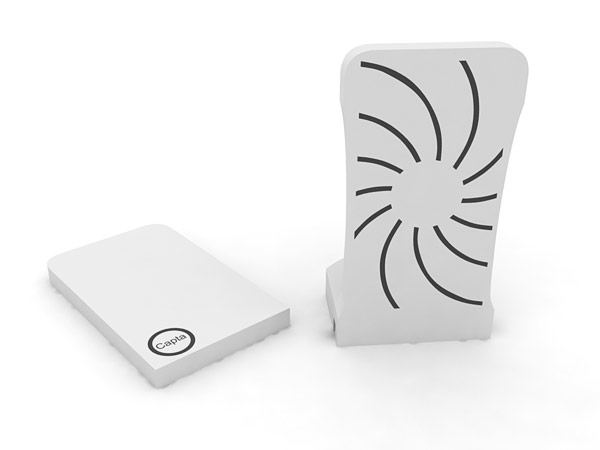
Capta's base + cover (photo courtesy of Unique Design).

To make the life of users — iPhone, Android, Blackberry, you name it — much easier, the folks at Unique Design (Bojan Smiljanic and Adewale Adelusi-Adeluyi) created Capta, a hybrid two-piece accessory for smartphones that is intended as an implement working across multiple platforms.
Continue reading “Capta: New Smartphone Photography & Videography Companion”

iPhone & iPad Layer Blending Modes Explained

Making use of layer blending can take your iPhone and iPad photography and your post-processing on a higher level, as it enormously widens creative possibilities. However, working with blending modes can be confusing at first and differences between one mode and the next can appear not completely evident.

As a matter of fact, no photo app comes with a truly informative guide to help the newbie in the task of getting started with layer blending. The best idea is to experiment how each mode affects your images, but it can be tough to get the hang of it. For this reason, I am writing a brief overview of the most used blending modes in iPhone photo apps. Most of them you can also find in photo editing programs as Photoshop, some others have slightly different names — but what you can achieve with them is exactly the same. Hopefully, this little guide will help you have a better understanding of what each of the commonest layer blending modes used in today’s photo applications can do.

First, let me explain a few crucial terms used in the layer blending modes descriptions: a Base Layer is the original image you start with; a Blend Layer is the layer placed above the base that needs to be blended with it. To make things easier to understand, I will be grouping modes according to the result they allow to achieve, rather than according to their strictly technical definitions.

iPhone layer blending sample images
These are two random iPhone sample images I am going to use in the guide.

Continue reading “iPhone & iPad Layer Blending Modes Explained”

Price Drop for Palette0 Premium Video Game Art Photo Converter

Palette0 is a photo app that conveys the feel of retro games by letting iPhone users convert any picture into a colorful pixelated image, reminiscent of old school gaming systems.

The Premium edition of Palette0 Video Game Art Photo Converter for iPhone is now available in the app Store at a special price for a limited time. Palette0 Premium is currently $0.99/€0.79/£0.69, which is 50% off its regular price tag. LinkedPIXEL’s app was previously $1.99/€1.59/£1.49.

Palette0 Premium Game Art Photo Converter

Continue reading “Price Drop for Palette0 Premium Video Game Art Photo Converter”