Laminar Back to App Store

It’s not without some excitement that we aknowledge the recent return of Laminar after a long absence from the App Store. As many will remember, Laminar was withdrawn from the Store in late September for serious problems with iOS 7. At the time, no official statement or detailed explanation had been divulged by the developer, making some assume the app was gone for good.

Laminar Back to App Store

Being the image editor by Pranav Kapoor one of the most complete on iOS, its prolonged absence was experienced as a huge loss by those iPhone users who made it the go-to app for throughout photo retouch on the device. Continue reading “Laminar Back to App Store”

What Happened to Laminar?

If you are a regular user of Laminar (both iPhone and Pro versions) you have probably been unable to use the app recently. Maybe you have noticed the app was withdrawn from the App Store as well. It’s now almost two weeks that the Laminar apps are not available for sale anymore.

Laminar
So what happened exactly? To save you from the trouble of contacting the developer on your own (trust me, support was pretty sluggish), I will share the reply I got. Continue reading “What Happened to Laminar?”

When Apps Take Over: The Genesis of Moons

Some days you are applying yourself to a specific project and everything you come up with looks invariably wrong. It’s not that your image will look bad per se, but the feeling is things are just not what you are after, and you cannot understand when and how you took a wrong turn. It’s like with trying to fix a spoiled recipe (cookery is another serious business and an art in its own right): if the dough is not rising and you cannot figure out why, it’s time to take a break and focus on something else. Gardening or knitting perhaps—good luck with these two.

M00n
M00N

Some time ago I started a series of pictures with thematic and visual affinity. At some point I got stuck and couldn’t go on Continue reading “When Apps Take Over: The Genesis of Moons”

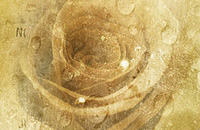
iPhone Photography Tutorials #5 – Creating Vintage Roses

This is a new installment in our iPhoto Tips series for beginners and intermediate photography apps users. The aim is to help iPhone shooters to enhance mobile pictures and create original artwork with them. The techniques shown are very easy to reproduce and can be adapted to a variety of styles with just a little creativity.

In this tutorial we’ll be using multiple layers’ blending to create a new image from a simple — and boring! — iPhone shot.

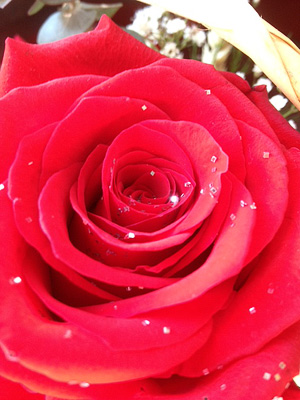
I am starting with this rose picture, taken with the iPhone 4s default Camera app:

Vintage rose iPhone tutorial pt. 1
The original photo

Continue reading “iPhone Photography Tutorials #5 – Creating Vintage Roses”