Creating photo albums on the iPhone is actually rather simple and straightforward. However, it seems that for some users the album creation process is not very obvious. This is a very quick tip and most of you probably know about it, but hopefully readers who have been asking through email and in older posts will find it useful.
- Go to “Photos”. Once you’re within the app, enable the “Albums” view — if you haven’t done so already. By default, you just have the “Camera Roll” and the “Photo Stream” albums. Tap on the “Edit” button at the topmost right corner of your screen.
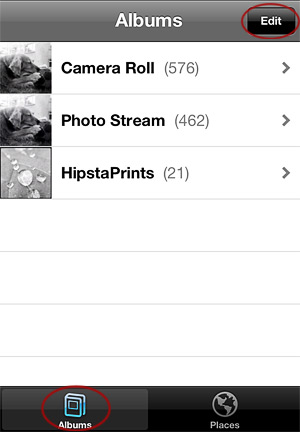
01. The Albums view.
Note: since some photo apps automatically create their own albums as soon as you start taking photos with them, you might see others beside the default ones.