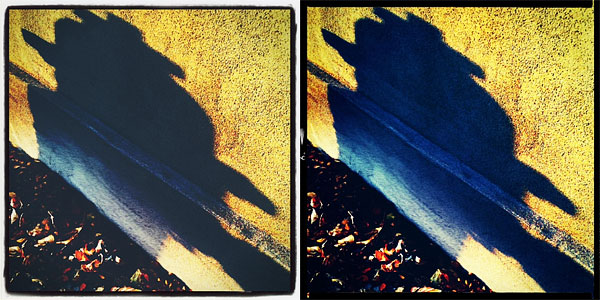
HalfCamera 1.3 is now available in the App Store. The latest release of iPhone’s split-frame camera by B1VISUALEFFECTS adds three new filters to HalfCamera’s collection, which now counts 15 effects in all. The newly added filters are Hottest, Bright and Vintage. Hottest is a vivid filter with strong yellow/orange toning; Bright mainly raises overall brightness of images; Vintage has a faded and opaque look, subtler than that of 70’s and Old Film, which were already included in version 1.0. Three additional frames also come with version 1.3. To suggest different moods, try the new filters in combination with any of the other effects: in HalfCamera you can filter photos over and over.
Mixing new and old filters in HalfCamera.
You will find our full review of HalfCamera and a brief overview on split frame format here.
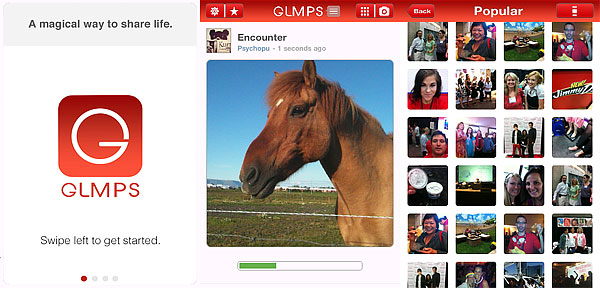
GLMPS is a photo sharing application for iPhone that doesn’t strictly take photos or videos, but it records “glimpses”, which are a combination of the two. According to its creators, a glmps (the app’s form for glimpse) is a sort of “visual status” that can be shared among users to tell others something about themselves.
Main Features
480×480 pixels resolution (saved photos);
In-app guide;
Share on Facebook, Twitter, Foursquare and Tumblr.
Appotography Opinion
To use GLMPS, an account is needed. It’s possible to create the personal profile in GLMPS by connecting to Twitter or Facebook. To take a glmps, the user simply aims the device and taps on the shutter button. Together with the snapshot, a short video clip is also automatically recorded (the photo taken is actually the last frame of the clip). The user can add a title and turn on or off geolocation before posting each glmps in the app’s community. A glmps can be sent to other social networks such as Facebook and Twitter or it can be embedded as a video in any webpage. The original photo is normally saved to the Camera Roll (video clips, on the other hand, are not).
Each glmps can be played over by tapping on it again and again. From within the app, GLMPS users can follow others, explore popular entries, comment and choose their favorites, not differently than in other photo sharing communities.
Although this is perhaps not too much of a relevant issue given GLMPS’s actual purpose, it must be said that the final resolution of saved photos is ridiculous: 480×480 pixels, definitely too small. Even if they are conveniently saved to the Cameral Roll, quite simply photos taken with the app don’t lend themselves to be used in many ways.
I admit I might be proved wrong, but I feel the scope of this app is a bit narrow: users don’t have any control over their final results; moreover, sharing something that is neither a photo nor a video has serious limitations — not to mention it could get stale after novelty wears off. However, the idea behind GLMPS is undoubtedly interesting and, since the app itself is free, it is worth a try.
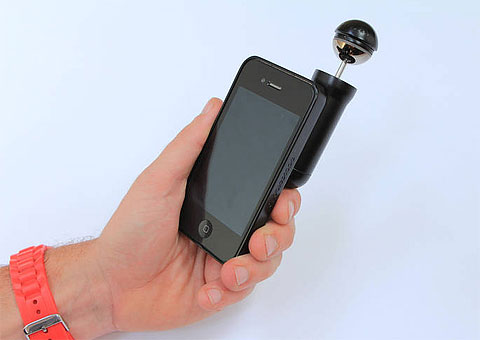
BubbleScope — not to be confused with Bubble Scope — is a new optical accessory allowing capture of 360° stills and videos with your camera phone. The project, started on CrowdFunder by Tom Lawton and currently ongoing, arrives after funding on Kickstarter for other 360° add-ons for iPhone camera was successful. I am referring in particular to Kogeto’s Dot and EyeSee360’s GoPano micro. Differently from BubbleScope, these devices only record video.
BubbleScope is a capsule-like attachment that slides into a special rigid case. With a twist, the user will be able to bring up the optical bubble, which will remain safely locked when not in use. Case and optical device will be sold separately: while the optical bubble will be the same, different case models will be manufactured to fit most smartphones. The case for iPhone 4, in two colors (black and white) is the first scheduled for release.
BubbleScope will be usable both in lanscape and portrait orientation. With a click, it will be possible to take either photos or videos. The camera add-on will work in conjunction with BubblePix, an app able to instantly display the panoramic scenes in real time. This will allow accurate preview before capturing. BubblePix will feature an online community for sharing 360° bubbles created with BubbleScope.
The funding target of £3,000 was successfully reached, but there is still more than enough time, if you are interested, to go take a look at the project’s page on CrowdFunder and give your contribution. All funds raised will help to get the production started. It’s possible to invest from £20 to £70 in this project. Depending on the amount invested, funders will be either offered a discount on the purchase of BubbleScope when it will become available or they will be sent a BubbleScope as soon as production is completed — they will be given the opportunity to become beta testers as well.
TtV stands for through the viewfinder, a photography technique which simply consists in taking photos through a surrogate viewfinder. The top and the bottom camera are connected through a contraption made of materials like cardboard, plumbing tubes, and so on. Standard choice for the top camera, the one that actually takes the photo, is a digital camera; the bottom camera is commonly a twin-lens reflex (TLR). The effects achieved vary a lot depending on the TLR used. Mostly, photographers employ this technique for its peculiar results: dust, scratches, vignetting and unexpected distortion create distinctive old-fashioned looking photos.
TtV Studio Pro by Taplayer definitely does better than ints predecessor, TtV Camera. Despite the valuable idea behind it, TtV Camera had serious flaws which prevented users to fully enjoy it. First of all the small resolution, justified by the real-time processing, but also a not well-refined enough interface and lack of features. In TtV Studio Pro, developers decided to drop the real-time processing in favor of higher resolution; they also opted to give users more to work with, for an overall better-rounded tool.
Main Features
Full resolution available;
30+ viewfinders;
Square format;
Adjust brightness, contrast;
Adjust viewfinder opacity;
Sepia, blue and black and white toning on/off;
Send via email or share on Twitter and Facebook.
Appotography Opinion
In TtV Studio Pro, both taking photos with the built-in camera or loading images from the Camera Roll is possible. Note that in the case of imported photos accurate framing is not possible, as the app automatically centers images and doesn’t allow further adjustments to framing. This is not a big deal, but it can be a bother in specific instances. The easiest workaround to incorrect framing when precision is necessary is cropping photos in another app before importing them. More than 30 viewfinder effects are available by scrolling horizontally the menu at the bottom of the work area screen. For fine-tuning each effect to photos, users have at their disposal brightness, contrast and effect opacity adjustment sliders. It’s also possible to add sepia, blue and black and white toning. Photos are saved both to Camera Roll and to the app’s library, from which you can share and edit them again. Until photos are stored in the library, it’s possible to make changes to any previously chosen setting.
The viewfinder collection in TtV Studio Pro is rich and it features some of the most popular classic TLR cameras (Kodak Duaflex, Argus 75, Rolleiflex, Anscoflex, Super Ricohflex, Kodak Brownie, and more). All effects are very well done, they blend nicely with images and they give a believable analog look to photos. However, I encountered a problem with viewfinder #2, the Brownie Dark. When I try to apply it, the photo turns into a blank square. The issue doesn’t affect only the preview: the photo is not even saved correctly. This only happens with imported photos, not when using photos taken in-app.
Anscoflex Brown (left) and Brownie 5 Grids (right).
TtV Studio Pro is a nice addition to the app collection of any iPhone photographer, serious or casual, as it offers a way to easily recreate the beautiful look of old-time photos.
TtV Studio Pro is currently on sale and available in the App Store at the special price of $0.99/€0.79/£0.69.
Overall
Name: TtV Studio Pro
Developer: Taplayer
Compatibility: iPhone (3GS, 4), iPod Touch (3rd, 4th), iPad. iOS 4.0 or later.
Price: £1.19||$1.99||€1.59
Vote: 4/5
There isn’t such thing as the foolproof formula to perfect creation: don’t let anybody tell you any different. Visual arts, photography included, aren’t really about getting the best equipment; what matters in visual arts is whether the creation is capable to speak to the viewer, either by conveying a strong message or simply by tickling senses and imagination. iPhone photography is not an exception.
Of course, many professionals will affirm that it’s impossible to productively use an iPhone to take valuable photographs; to support their reasoning, these professionals will go through long and tedious lists of specs and technicalities. The creatives though will always think differently, as they know every tool has more than what specifications suggest. By exploring and experimenting, creative artists accept disadvantages and flaws in the medium and turn them into unique features. iObsessed is the brainchild of Dan Marcolina, designer and photographer with a passion for iPhone image processing. The iPad Companion counts sixteen chapters. In every chapter, Marcolina analyzes techniques and recipes he has devised to produce peculiar effects to process photos on the iPhone. Commentary and links offer in-depth overview on how the given results can be accomplished; original shots are presented for comparison and all processed photos come with their app formula. By rotating the iPad from horizontal to vertical position, it’s possible to access the app compendium, which contains information on the apps used in each chapter. Extensive video materials (around 90 minutes in all) complete the book, guiding the reader to understanding the workflow from original shot to processed image. An appendix includes several extras, like links to iPhone camera add-ons, photo gallery, and a brief note on the author. The iPad companion is actually an extension to the iPhone Obsessed book by the same author, published by Peachpit Press, which contains more examples and information on how to use the iPhone creatively. Dan Marcolina’s interactive book doesn’t claim to be the ultimate “how-to” manual to iPhone photography. iObsessed rather presents tips and ideas that uncover the hidden potential of images and go beyond limits inherent to the medium. As such, it can be a great source of inspiration and a reference guide to rewardingly learn to combine possibilities offered by different applications and also, occasionally, by external resources.
iObsessed is available from the App Store for $4.99/€3.99/£2.99.
One of the most important changes introduced in version 2.0 of iSupr8 is the possibility to purchase more films to process video clips. Together with the original Tru 8, iSupr8 now features a selection of effects ranging from black and white to a variety of color film stocks. All films are customizable: users can choose default settings or they can create and save their own custom presets by altering basic parameters for each effect.
After the update to 2.0.2, iSupr8 now offers 7 film types (+ Tru 8 and Levi’s® Film Workshop, available for free with the app’s download):
VibraChrome 100D: slightly faded color film with warm, radiant tones.
SuprChrome 40: desaturated colors with a slight magenta cast.
PenneMaker B&W Reversal Film: bold high contrast black and white in the style of the 60’s.
Prime-X B&W Reversal Film: black and white with a faded look and a subtle sepia tint.
ThermaChrome: vibrant colors with an emphasis on blue shadows and warm midtones.
AltroVerdi 100: ultra-vivid colors and strong green hues, especially noticeable in darker areas.
WestmanRosa 64T: bright red shadows contrasting with cool midtones.
Here is a preview of all the extra films that are available as in-app purchases in iSupr8.
Thermachrome, AltroVerdi and WestmanRosa were added with the last update (2.0.2), while the other films were already in version 2.0. Effects are not bundled together: each of the available items can be purchased individually for $0.99/€0.79/£0.69.
iSupr8 is still free in the App Store, thanks to the sponsorship of Levi’s Film Workshop.
FX Photo Studio for iPhone will be on sale throughout the weekend. MacPhun’s photo editing app is currently available at the special price of $0.99/€0.79/£0.69 (-50%) in the App Store.
FX Photo Studio was recently updated. You will find our full review of version 4.0 here. The current version of iPhone’s app comes with 194 ready-to-use filters (vintage, monochrome, sketch, distortion effects and more), masking feature and several photographic tools for fine-tuning your images.
The anticipated Mac 1.1 update of FX Photo Studio, with upgraded editing tools, integration with Aperture and iPhoto and new effects, is also coming next week.
The new release of PhotoToolbox improves performance of image processing on iPhone 4. This is not the only change in version 2.8.0: other than the new app icon, the most important addition is the introduction of a layer blend feature.
Blending can be enabled by scrolling the first menu wheel in Filter mode. There are 6 presets for quick blending; however, by tapping on the Blend button, you can access the blend editor and import any image in JPG and PNG format from your own device. This lets you use custom textures and allows to merge more photos together.
There are 16 classic blending modes available in all: Normal, Multiply, Screen, Darken, Lighten, Overlay, Soft Light, Hard Light, Color Burn, Color Dodge, Difference, Exclusion, Hue, Saturation, Color, Luminosity. For each mode, it’s possible to set overall intensity.
Imported textures or images can be resized according to different aspect ratios and they can also be rotated independently from the base photo you want to apply them to. Using the Front/Back switch, the order of the layers can be inverted.
Custom blends you create can be saved among the app’s presets.
Cameramatic 1.4.0 is now available in the App Store. The latest version introduces new filters and frames to its already rich collection.
The new filters, Instant and Deep, are both added to the Standard collection of Cameramatic. Their overall looks are not significantly different, but while Instant is bright and vivid, Deep has a slightly faded character. Several new frames (9 new items in total: White 07, White 08, Ivory 02, Sloppy, Film 01, Film 02, Film 03, Film 04, Hassy 02) are also part of this update. They are added to Film and Standard frame collections.
Here is a preview of the filters in combination with two of the new borders.
Deep + Sloppy border (left), Instant + Film 04 (right)
Pholeido is not only a photo editing app with several tools and effects to retouch and spice up your pictures, but also a photo community where you can share your images with other members.
Main Features
Full resolution available;
Grid on/off;
Self-timer;
Flash on/off (only on supported devices);
15 borders;
11 photographic effects;
9 fun effects;
Crop, resize and rotate;
Adjust saturation, color, brightness, contrast;
Adjust focus, blur, sharpness;
Red eye remover;
24 bubble styles;
27 cliparts;
100+ available fonts;
Undo;
Send via email or share Pholeido, Facebook, Twitter, Tumblr and Flickr.
Appotography Opinion
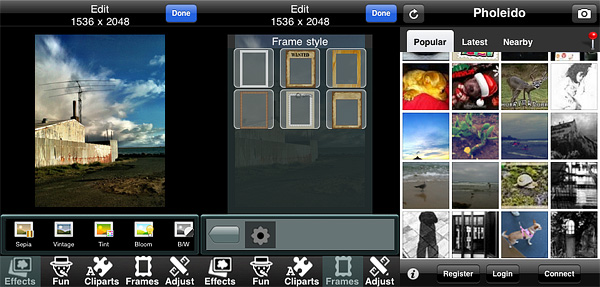
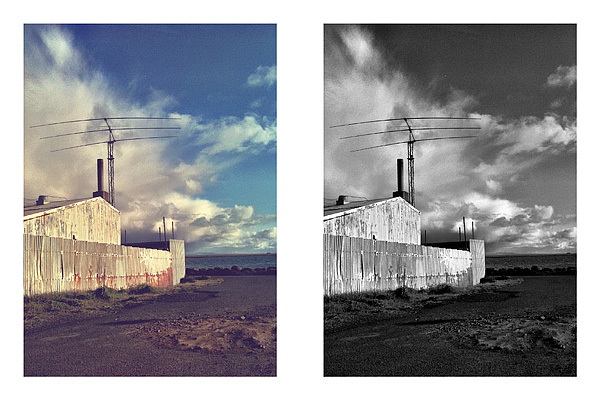
Pholeido lets you import photos from your Camera Roll and in addition offers a built-in camera equipped with self-timer (5,10,15 seconds delay) and rule of thirds grid. Photos, either taken in-app or imported, can be edited before sharing them.
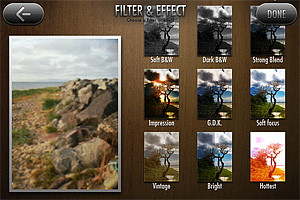
A series of tools are available to retouch images. Various presets, like basic sepia and black and white, oil painting and sketch filters, blend modes (eight in all), tint, solarize and negative, allow a quick edit, while more control can be achieved by adjusting brightness, contrast, saturation and color settings together with blur and sharpening. Most of these tools feature adjustment sliders. The collection of Pholeido photographic tools counts also a red eye remover. Other effects which can applied are different types of distortion (mirror, fisheye, warp, swirl, among others) and cliparts to be used as stickers. Adding text and speech bubbles is also possible. For a final touch, you can add a frame and change its color to match your picture (matching won’t be easy though, as there are only a few colors to choose from, anyway).
Once you are done with editing, you develop the photo, which at this point can be sent using email or shared on several social networks, including Pholeido’s community.
The app’s community works more or less like any other community: you upload your photos and decide whether you prefer to share them with everybody or with your approved contacts only. You can set permissions for each contact separately. For example, you can decide to share photos with some of your contacts only. Other than sharing, you can browse photos uploaded by your contacts in your feed or search for popular and nearby entries. Users can comment and like photos from other community members. It is not required to have a community account in order to use the photo app.
The plain white border is the only one I actually like.
One the most annoying elements in Pholeido is the wavy effect that is applied to photos during processing times. Was it supposed to offer distraction to the user? Was it the first thing developers could come up with? Is it totally random? I am confused. There are other confusing things in Pholeido, like blend modes, that are mysteriously hidden behind an effect called “Bloom”, or the fact you can apply as many effects as you like, but you only have a single undo. In general, a few of the effects are nice, like the black and white and the vintage ones, but most of them are nothing more than average. Frames and cliparts are sort of generic as well and they include a variety of cliched items, from wanted poster to Santa Claus hat. Processing times are unusually long. It feels like this app offers very limited possibilities and it was developed without a coherent idea. Pholeido tries to please everybody without really being successful at pleasing anybody.

 HalfCamera 1.3 is now available in the App Store. The latest release of iPhone’s split-frame camera by B1VISUALEFFECTS adds three new filters to HalfCamera’s collection, which now counts 15 effects in all. The newly added filters are Hottest, Bright and Vintage. Hottest is a vivid filter with strong yellow/orange toning; Bright mainly raises overall brightness of images; Vintage has a faded and opaque look, subtler than that of 70’s and Old Film, which were already included in version 1.0. Three additional frames also come with version 1.3.
 To suggest different moods, try the new filters in combination with any of the other effects: in HalfCamera you can filter photos over and over.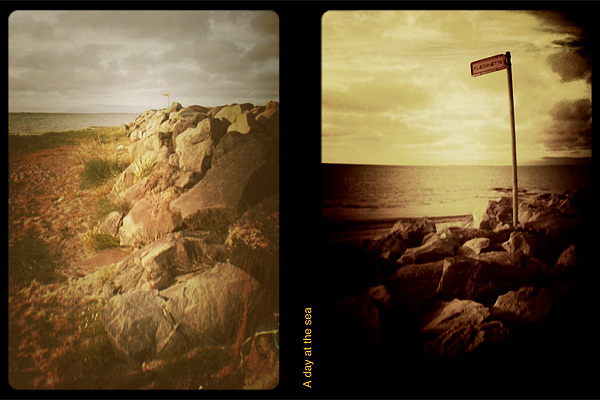

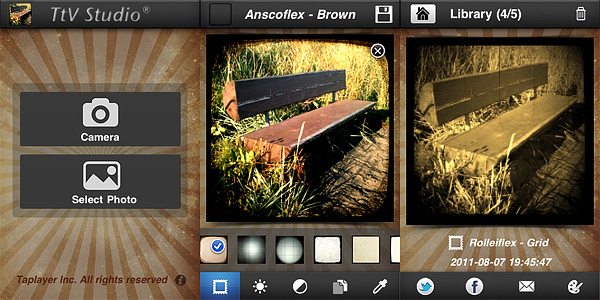 More than 30 viewfinder effects are available by scrolling horizontally the menu at the bottom of the work area screen. For fine-tuning each effect to photos, users have at their disposal brightness, contrast and effect opacity adjustment sliders. It’s also possible to add sepia, blue and black and white toning. Photos are saved both to Camera Roll and to the app’s library, from which you can share and edit them again. Until photos are stored in the library, it’s possible to make changes to any previously chosen setting.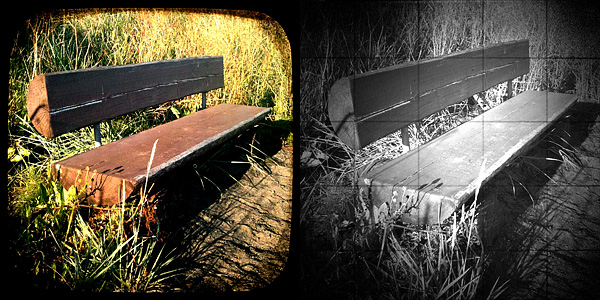
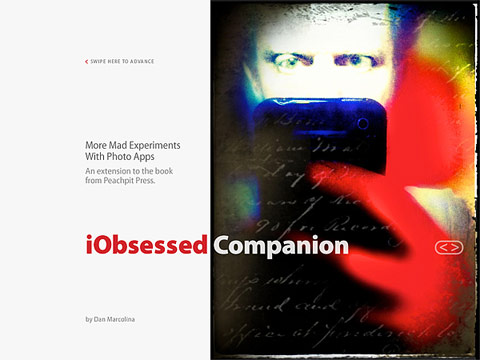 iObsessed is the brainchild of Dan Marcolina, designer and photographer with a passion for iPhone image processing. The iPad Companion counts sixteen chapters. In every chapter, Marcolina analyzes techniques and recipes he has devised to produce peculiar effects to process photos on the iPhone. Commentary and links offer in-depth overview on how the given results can be accomplished; original shots are presented for comparison and all processed photos come with their app formula. By rotating the iPad from horizontal to vertical position, it’s possible to access the app compendium, which contains information on the apps used in each chapter. Extensive video materials (around 90 minutes in all) complete the book, guiding the reader to understanding the workflow from original shot to processed image. An appendix includes several extras, like links to iPhone camera add-ons, photo gallery, and a brief note on the author.
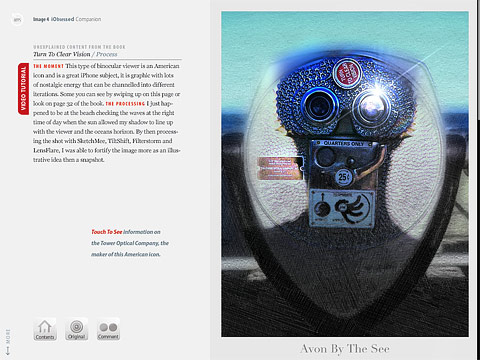 The iPad companion is actually an extension to the iPhone Obsessed book by the same author, published by Peachpit Press, which contains more examples and information on how to use the iPhone creatively. Dan Marcolina’s interactive book doesn’t claim to be the ultimate “how-to” manual to iPhone photography. iObsessed rather presents tips and ideas that uncover the hidden potential of images and go beyond limits inherent to the medium. As such, it can be a great source of inspiration and a reference guide to rewardingly learn to combine possibilities offered by different applications and also, occasionally, by external resources.
 iSupr8
 FX Photo Studio
 The anticipated Mac 1.1 update of FX Photo Studio, with upgraded editing tools, integration with Aperture and iPhoto and new effects, is also coming next week.
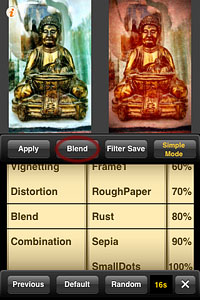 There are 16 classic blending modes available in all: Normal, Multiply, Screen, Darken, Lighten, Overlay, Soft Light, Hard Light, Color Burn, Color Dodge, Difference, Exclusion, Hue, Saturation, Color, Luminosity. For each mode, it’s possible to set overall intensity.
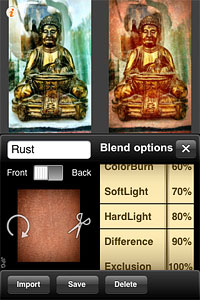 Imported textures or images can be resized according to different aspect ratios and they can also be rotated independently from the base photo you want to apply them to. Using the Front/Back switch, the order of the layers can be inverted.
 Cameramatic