Simply B&W 1.1 is out. The latest release of MR. B. Ware’s monochrome converter for iPhone comes with enhanced interface and new useful features.
It’s now possible to apply two different vignetting styles, black and white. Vignette intensity is easily adjustable with a slider. Another new feature is grain simulation, to imitate effects obtained with different types of film. Version 1.1 also adds EXIF data preservation for devices running iOS 4.1 or later.
Other noteworthy updates include:
PicTools 1.1: new effects, overlays and borders with names for easier reference, added border opacity control, save up to 5 RGB curves settings;
Hipstamatic 221: added the requested delete from Family Album feature;
Appysnap 1.1: added leaderboard and Snap tab, improved upload stability;
Many alternatives to common photo sharing are emerging. iPhone users are more and more challenged to make use of their photos in new creative ways and to take advantage of photo sharing also as a way to tell others something meaningful. Tracks can be used simply to share photos, but also to tell a story, compose a visual essay, or simply put together a thematic collection with photos you take with your iPhone.
Main Features
Create and delete tracks;
Comments.
Appotography Opinion
The idea behind Tracks is nice, but I was not completely convinced by its actualization: in the present state, Tracks looks more like a service still in need of testing than like a full-fledged sharing platform. The interface is minimally designed and very slick, but features are also very limited. All in the name of simplicity, but exaggerated simplicity is not always desirable.
Users create a profile and then they can either load photos from their device or use the built-in camera feature. By loading photos, users create albums (or tracks, if you wish) they can share with people they personally choose, like friends and family. Whole tracks can be deleted as well as individual photos in them. From Tracks website you can have an overview of all the tracks you have created. The main quality of Tracks, as I said, is also the app’s main flaw: extreme simplicity. The fact it’s not possible to rearrange the photos in any logical order or edit the location defies in part the purpose of the app. Moreover, once they are logged in, users are given no further indications. How does Tracks work in detail? What about Terms of Service and Privacy Policy? And so on and so forth. In the absence of a guide, tips or help of any kind, you have to find answers to all your questions on your own (if you’re the fussy type, you can contact the support service: they are very polite and more than willing to help their users). Anyway, most of the times, if you cannot figure it out, it means you cannot do it.
Right now, Tracks is a hassle-free app that makes it possible to privately share photos — which is something, it must be said, several other services allow as well and with more options. But Tracks has the potential to become something more refined and useful: we will be looking forward to future updates.
Overall
Name: Tracks™
Developer: Tracks Media Inc.
Compatibility: iPhone, iPod Touch, iPad. iOS 4.0 or later.
Price: free!
Vote: 3/5
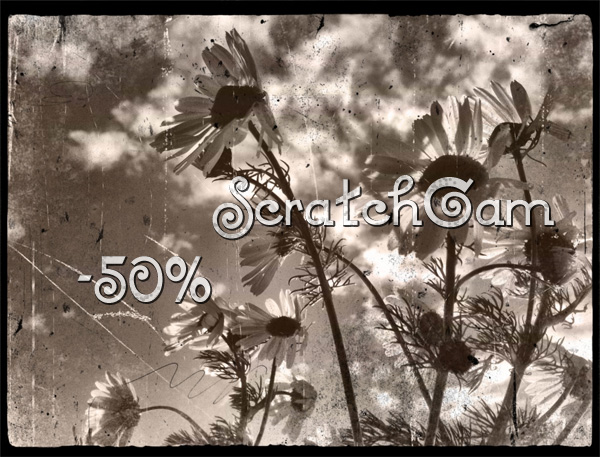
ScratchCam is currently on sale with a discount of 50% off the original App Store price.
ScratchCam is easy to use: you can generate random effects to turn your photos into old and worn out images with one single tap. You can save your favorite effects to apply them over and over to all your photos.
Right now, ScratchCam is available at the special price of $0.99/€0.79/£0.69 for a limited time. If you haven’t tried this app, this could be the right occasion.
Some news that caught my attention earlier this month concern an open source project that could definitely bring some fresh air and, hopefully, new exciting possibilities both to casual and dedicated photographers. OpenPhoto — this is the name of the project — will be an open source equivalent of many photo sharing services we are already acquainted with, like the various Flickr, Smugmug, Picasa, Photobucket and so on.
Do we need another photo sharing service?
The answer to this question depends, of course, on what kind of photo sharing we are talking about. The principle inspiring OpenPhoto is, at its core, very simple: you shouldn’t be forced to commit yourself to a company when all you want to do is simply enjoying the sharing of your own photos. The difference between OpenPhoto and other services is that you will be given the freedom to use your photos as you like and the photos will remain yours and yours alone. No more dealing with cryptic terms of service that, ultimately, go to the advantage of the service provider; no more situations in which somebody has a final say on what you can do and what you cannot do with your own creations.
OpenPhoto will provide a sharing service that will rely on users’ cloud storage accounts like those on Dropbox, Rackspace and Amazon S3, to host not only photos, but also tags and comments.
In the words of Jaisen Mathai, former software engineer for Yahoo! and project founder, OpenPhoto is the “digital equivalent of shoe-boxes filled with photos”, only safer and more convenient: take your photos with you always, use them as you wish, post them on other services like Twitter and Facebook. The project’s funding on Kickstarter was successful and updates are expected in the forthcoming months.
As for the question that probably interests many of you: will a mobile (iPhone, Android) version be available? The project founder clearly stated that it’s in his intention to bring OpenPhoto to mobile platforms. However, both iPhone and Android applications are not the top priority for the present moment. This means it’s very likely OpenPhoto will eventually arrive to your mobile device, but it’s not possible at the moment to predict when or how this will happen.
If you are interested in learning more about this project and if you want to keep yourself updated on further developments, please visit the official OpenPhoto page or follow OpenPhoto on Twitter.
Taking photos with an Apple iPhone is not only about saving memories from oblivion or about creating. The iPhone camera can be used also for pure amusement and to discover new ways of taking photos.
Appysnap combines the features of a photo sharing app with those of a treasure hunting game and nicely bundles them for the iPhone format.
Main Features
Full resolution available;
In-app guide;
Share on Facebook and Twitter.
Appotography Opinion
As a refreshing way to explore themes and ideas, Appysnap can be used by everybody, expert photographers and beginners or casuals alike. In fact, using Appysnap requires no previous knowledge of how the iPhone camera and other photography apps work. Following the instructions and taking snapshots is all that is necessary to play.
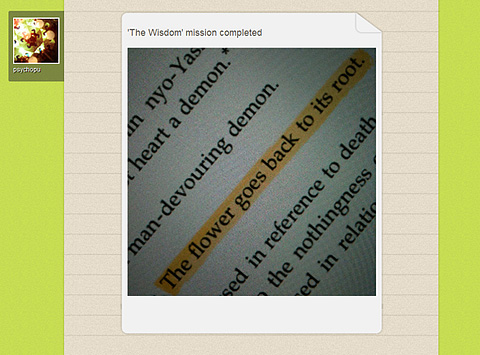
To use the app, you need to create an Appysnap profile (note that the profile is unique and it cannot be shared on more devices), which you can connect to Twitter and Facebook accounts to post evidence of your achievements. From the missions panel, you can read briefs and choose missions you feel like completing. Mission themes vary a lot and come in many forms. They can be about taking snapshots of specific objects, people, situations. For obvious fair play reasons, importing photos from the Camera Roll is not allowed. For missions you successfully complete, you are awarded points that will determine your personal Appysnap rank. Points are not always automatically updated: for some missions, all entries have to be reviewed before assigning points. Other missions will award points only to the quickest players. Secret or local missions can be available as well from time to time. In general, this kind of missions doesn’t assign points, but caps (exclusive badges which you can collect to unlock special content) or prizes.
There might be times when you have completed all the missions before new ones are generated, so you will have to check back often or enable push notifications to allow Appysnap tell you when new missions become available. Mission downtimes can vary and occasions in which you will not be able to complete any mission for various reasons (you don’t own some required item or you don’t live in areas where matching situations can occur) will be frequent.
Appysnap is a nice diversion from the usual way of conceiving iPhone’s photographic capabilities and, even though there is definitely space for improvements, using this app can suggest fresh ideas and different approaches to photo taking.
Overall
Name: Appysnap
Developer: Never Odd Or Even LLP
Compatibility: iPhone, iPod Touch, iPad. iOS 3.1.3 or later.
Price: free!
Vote: 4/5
Photojojo just released their new telephoto cell phone lens, out now and available from their shop. The new lens is the third release in a series of cell phone camera add-ons, which also include a macro/wide angle and a fisheye lens.
With a 2x zoom capability, the telephoto is the aid you are looking for if you want to make subjects look closer in your photos. Like the macro/wide angle and the fisheye, the telephoto lens is compatible with most cell phone cameras. Yes, also with your older iPhone model. To attach it to the camera, the lens features a detachable magnetic ring. Front and back covers come with the lens to prevent scratching.
The complete lens kit.
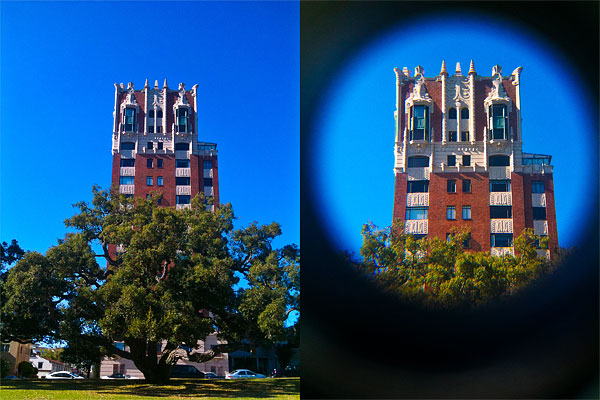
Note that in Photojojo FAQ it is stated that lenses will fit most cell phone bodies, but iPhone 3GS and 4 users will experience some issue due to the design of their devices (the curved body in 3GS and the flash in 4 getting in the way). Note also that the lens produces intense vignetting around the borders of photos taken with it. The vignetting may be a problem for some users, although for others it may be a point in favor, as it gives photos a peculiar style.
Photo with (right) and without (left) telephoto lens.
The new telephoto ships for $20, but it’s possible to get the complete three-lens kit at the special price of $49.
Click! is now version 3.1.1. The new release of Room1337’s single-handed photo app mainly improves without changing the way Click! works and without introducing new features as well.
Especially noteworthy the fix concerning the app’s preview feature. The issue prevented users from previewing images taken with Click! from within the app (note that, as we explained in our previous review, this didn’t affect saved or sent images). I could verify that the preview feature now works perfectly fine.
Fixed preview bug in 3.1.1
Version 3.1.1 improvements include fixes both to interval timer on older devices and to continuous photo memory, enhancements concerning devices running iOS 3.x, and optimization for Flickr photo sharing.
Even photos that at first glance might look defective can be given a new life with proper editing. Editing often simply means adequate cropping. Gyro Cropper by FANG is a specialized iPhone/iPad/iPod Touch utility to perform easy cropping on images.
Main Features
Full resolution available;
3 cropping tools;
Rotate;
Adjust aspect ratio;
In-app guide;
Send to Squaready or Instagram.
Appotography Opinion
Gyro Cropper offers a simple and effective way to crop photos. The app comes with a set of tools, allowing users to crop and adjust images with the minimum effort.
Rotate by Device Posture calculates cropping thanks to the device’s position. By rotating the device, the user gives the app all the necessary indications without having to touch the screen. This tool is especially convenient in instances in which covering the screen with fingers may cause inaccurate results. Although at first it might take some time getting used to, Rotate by Device Posture is not hard to use. In this mode, the app relies on methods that entirely depend on the device’s capabilities to figure out cropping: on iPhone 4, iPod Touch 4th and iPad 2, Gyro Cropper uses the gyroscope, on iPhone 3GS and iPad both the accelerometer and the compass, while on iPhone 3G and iPod Touch 2nd and 3rd it uses the accelerometer only. Thus, user experience may vary according to the device you are using. Rotate by Device Posture is in any case the most interesting element in Gyro Cropper.
Rotate by Finger Tapping is more of a classic tool, relying on finger rotation to determine cropping. A number of apps come with similar tools to perform cropping.
Rotate by Drawing a Line is basically a straightening tool and thus it is useful to fix crooked images, especially landscapes. By drawing a line on the photo, the user tells the app how cropping should be performed. A few apps offer this kind of cropping instrument.
Additionally, aspect ratio and rotate by 90 degrees are included to broaden the available possibilities. Both are common in apps that support cropping.
The eruption at Eyjafjallajökull doesn't look very hideous at this resolution.
Gyro Cropper is great for photos in need of quick cropping and for fixing crooked images. FANG’s app is better than most cropping features that come with the majority of do-it-all editors. The app is easy enough to use and its workflow is very smooth. Although flip and rotate by degrees could come in handy in some instances, this app is pretty much a flexible aid for most cropping needs. While people using older devices may encounter issues with less accurate results now and then, iPhone 4/iPod Touch 4th/iPad users will enjoy Gyro Cropper at its full potential.
Gyro Cropper is currently on sale and available in the App Store at the special launch price of $0.99/€0.79/£0.69.
Overall
Name: Gyro Cropper
Developer: FANG Inc.
Compatibility: iPhone, iPod Touch, iPad. iOS 4.0 or later.
Price: £1.19||$1.99||€1.59
Vote: 4/5
PhoneGrafer is on sale! The multi-purpose camera by emotionale is currently 50% off its original App Store price tag.
PhoneGrafer is an old acquaintance of many photographers who priced iPhone as a quick and easy means of expression. Thanks to a balanced selection of photographic tools and to a neat user interface, the app preserved well its original freshness and it’s still a fine alternative to those in need of a smart and comprehensive enough multi-purpose camera.
You can now get PhoneGrafer at the special price od $0.99/€0.79/£0.69. The offer is valid for a limited time only.
I have been hoping for this update. Monophix 3.1 is out and with it comes the long-awaited color filter feature.
Monophix is one of the most valuable tools in the App Store for easy conversion from color to black and white. In our previous review, although we recognized the worth and the potential of the app, we also explained how the final score reflected the absence of a color filtering feature. Color filtering is an essential aspect in color to monochrome conversion. To avoid mediocre results, every photographer has to take into account color filtering. In traditional photography different results are obtained by blocking certain colors by using various photographic filters. In digital photography, the same can be easily achieved in photo editing.
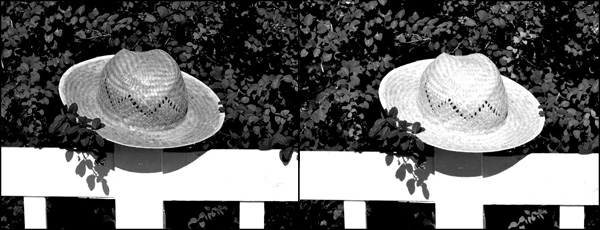
Different filters can change the look of your black and white photo.
In Monophix 3.1 you have now filters for red, green, blue, cyan, yellow and magenta. The average weight black and white is also still available. This allows better control over final results, depending on the photo and on the effect you want to achieve.
In Monophix 3.1 major improvements to the vignette feature were also made. Vignette is now more manageable, thanks to the intensity slider which was added in this version. For users who experienced this issue in previous releases, the developer informs that the vignette preview glitch was also fixed: with a slider it’s now possible to correct vignette preview distortion.
Thanks to these and other minor enhancements, we feel like reviewing the previous score of Monophix, which now gets 5 out of 5.
Note: version 3.1 contains a glitch affecting the app’s opening screen. Since we have verified the issue does not concern the app’s functioning, our final score is not influenced by it. Anyhow, the developer lets Monophix users know that with the upcoming update to 3.1.1 the problem will be solved.

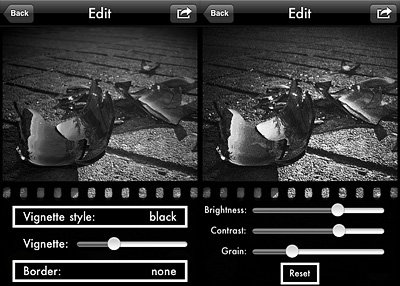 Version 1.1 also adds EXIF data preservation for devices running iOS 4.1 or later.
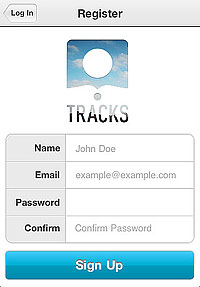 The main quality of Tracks, as I said, is also the app’s main flaw: extreme simplicity. The fact it’s not possible to rearrange the photos in any logical order or edit the location defies in part the purpose of the app. Moreover, once they are logged in, users are given no further indications. How does Tracks work in detail? What about Terms of Service and Privacy Policy? And so on and so forth. In the absence of a guide, tips or help of any kind, you have to find answers to all your questions on your own (if you’re the fussy type, you can contact the support service: they are very polite and more than willing to help their users). Anyway, most of the times, if you cannot figure it out, it means you cannot do it.
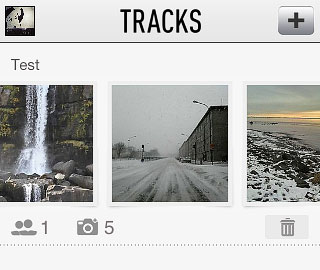 Right now, Tracks is a hassle-free app that makes it possible to privately share photos — which is something, it must be said, several other services allow as well and with more options. But Tracks has the potential to become something more refined and useful: we will be looking forward to future updates.

 Right now, ScratchCam is available at the special price of $0.99/€0.79/£0.69 for a limited time. If you haven’t tried this app, this could be the right occasion.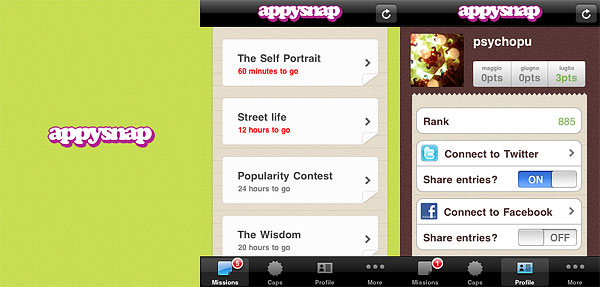
 Secret or local missions can be available as well from time to time. In general, this kind of missions doesn’t assign points, but caps (exclusive badges which you can collect to unlock special content) or prizes.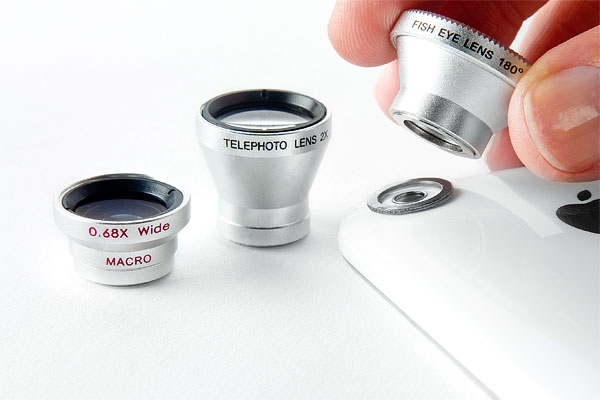
 Click!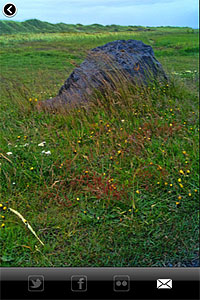
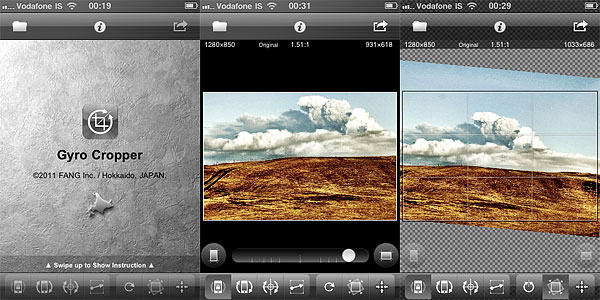 Rotate by Device Posture calculates cropping thanks to the device’s position. By rotating the device, the user gives the app all the necessary indications without having to touch the screen. This tool is especially convenient in instances in which covering the screen with fingers may cause inaccurate results. Although at first it might take some time getting used to, Rotate by Device Posture is not hard to use. In this mode, the app relies on methods that entirely depend on the device’s capabilities to figure out cropping: on iPhone 4, iPod Touch 4th and iPad 2, Gyro Cropper uses the gyroscope, on iPhone 3GS and iPad both the accelerometer and the compass, while on iPhone 3G and iPod Touch 2nd and 3rd it uses the accelerometer only. Thus, user experience may vary according to the device you are using. Rotate by Device Posture is in any case the most interesting element in Gyro Cropper.
 PhoneGrafer
 You can now get PhoneGrafer at the special price od $0.99/€0.79/£0.69. The offer is valid for a limited time only.