Red Giant’s Noir Photo gets a price cut for the weekend. The artistic monochrome converter for iPhone, iPod Touch and iPad is now 66% off the regular price.
Noir Photo is designed to achieve beautiful and evocative black and white, sepia and other monochrome effects with no effort. By setting contrast, exposure and vignetting with the help of easy-to-operate controls, Noir will bring dramatic suggestions to your images. The app is universal and thus compatible with all iDevices. Our full review of Noir Photo is available here.
You can currently find Noir at the special price of $0.99/€0.79/£0.69 in the App Store.
Photo Effect Studio for iPhone by Everimaging is a photo editing app which offers users an assortment of editing tools to achieve quick and easy post-processing. A Mac and an iPad version of the app are also available for purchase.
Main Features
Full resolution available;
30+ effects;
Detail, temperature and tint;
Brightness, contrast and saturation;
11 borders;
Flip and rotate;
Split toning and sepia effects;
Autosave on/off;
Send photos via email or share on Facebook and Flickr.
Appotography Opinion
Photo Effect Studio comes with a selection of editing tools for simple fine-tuning of photos both taken in-app or imported from iPhone’s Camera Roll. The Edit Photo section offers brightness, contrast and saturation sliders, plus sliders for detail enhancement, temperature and tint. Every adjustment to these parameters is carried out by moving sliders. Other than these operations, Photo Effect Studio provides its users with simple flip and rotate tools. Images thus edited can be processed further by adding to them several photographic filters. All effects available are arranged into four categories: Classic, Lomo, Neon and Monochrome. The grouping of effects to fit them in the various categories seems however a little arbitrary and I still cannot fathom why some of those effects appear twice and why in the Monochrome section there are color filters as well. Countless filter combinations can be applied to photos. As a final touch, before saving, sending with email or sharing on Facebook and Flickr, it’s possible to apply a borders. Borders are mostly black and white items in a variety of styles. Photo Effect Studio is an OK app with a few nice effects, but it definitely looks too much like something we have already seen many times. And with many I really mean many. Some of the filters bear an uncanny resemblance — same names too — to those of other best-selling apps, like Instagram and Camera+.
Lomo (left) and Inkwell (right) filters.
Is this app acceptable in terms of quality? Yes, although I wouldn’t go as far as considering it truly good. Many elements can be improved and refined, like removing the repeated filters, making the Monochrome category an actual monochrome category instead of including in it all kinds of randomness, making borders more usable and less “cheap”, spicing things up, and so on. Overall, this app is far from unmissable and it leaves the impression of a product put together without many ideas to support it.
Photo Effect Studio for iPhone is currently free in the App Store.
Overall
Name: Photo Effect Studio
Developer: Everimaging Ltd
Compatibility: iPhone, iPod Touch, iPad. iOS 4.0 or later.
Price: £1.49||$1.99||€1.59
Vote: 3/5
The update to 1.2 of BoothClub brings to Glowing Butterfly’s iPhone photo booth some extra features, like new effects, border colors and self-timer.
The new effects are Lovely Pink and Seraphic White, both added to the Fantasy booth. Without any logical reason, to unlock these effects in the Fantasy booth, which comes for free with the initial download, you have to buy the Memory booth, which is available only as in-app purchase for $0.99. Seraphic white is basically a heavy white vignette, while Lovely Pink applies a hot pink tint on photos.
The new borders are simply plain color frames that are in substance all variations of the same style. Originally, BoothClub only included three borders, while now there are ten colors in all available to choose from (black, white, gray, purple, red, blue, navy, yellow, brown and green).
Finally, the self-timer feature. In version 1.2 it is possible to enable a time interval between shots, to make it easier to take photos more accurately in BoothClub. The timer, with options ranging from 1 to 5 seconds, can be set from the in-app settings.
Following its recent update, Grungetastic is now free in the App Store. JixiPix’s app had already gotten a price cut in occasion of the update to version 2.o.
The update to 2.0, which took place last week, revamped Grungetastic’s UI and added tons of new items, although mainly in the form of in-app purchase. A new update, to version 2.01, took place earlier today to allow users to have more freedom when applying effects and to help them to achieve subtler results. Grungetastic now counts seven themed preset packs and a rich choice of textures, borders and other elements to turn even the cleanest photo into a grungy feast.
You will find more details on the update to 2.0 of Grungetastic here. If you want to know how the app works and what it can do, please read our full review.
Are you one of those people trying to avoid lens flare at all costs in your photos and blaming unexpected light scattering caused by your lens all the times? Or are you instead one of those people welcoming all the fancy rings, glares and starburst-like effects and deliberately using them to add that special something to your images? If you are part of the second group, then you will like LensFlare.
LensFlare is a no-frills photographic tool for enhancement of photos and other graphic elements. BrainFeverMedia’s iPhone app makes it incredibly easy to drastically change images by adding and manipulating light effects.
Main Features
Up to 3072×3072 pixels resolution (iPhone 4);
45 effects;
Adjust flare brightness;
Lens dust on/off;
In-app guide.
Appotography Opinion
Even if the way LensFlare works is simple and to the point, the app comes with a clear and detailed manual to guide you through your post-processing. Once a photo — either taken in-app or imported from Camera Roll — is loaded into the work area, you can pick one of the several light effects among those in LensFlare collection.
By tapping and dragging, you place the flare in the right position; by pinching with two fingers, you shrink or enlarge the flare; with two fingers, it is also possible to rotate the flare to the right angle. You can save your image right away to your device or, if you prefer, using the “Render image” option, you can add to it as many flares as you like. In order to use flares generated in LensFlare in external photo editors, you can choose the “Save flare only” option and thus export the flare on a plain black background. The lens dust feature to achieve a more realistic and natural look can be enabled and disabled from the same flares panel.
The choice of flare types is very rich and it includes cinematic, natural light and SRL flares, plus several other effects. All effects coming with LensFlare are high quality and their brightness can be adjusted with a slider.
Adding a believable sun to your photo is easy in LensFlare.
LensFlare allows immediate and easy modification of photos through the addition of striking photographic effects. Used as a tool for finishing touches, this app will undoubtedly bring value to your iPhone camera bag.
The HD version of LensFlare for iPad is also available in the App Store.
RomaticPhoto is on sale. Both the iPhone/iPod Touch and the HD version for iPad are currently available at a special price in the App Store. RomanticPhoto counts 60+ ready-to-use preset styles to enrich photos with timeless and unreal atmospheres. Presets come in several themed categories and cover a variety of effects, from dreamy blur to selective saturation. Colors and overlays are adjustable for even more effects.
RomanticPhoto for iPhone and iPod Touch is currently $0.99/€0.79/£0.69 while the HD version for iPad is $1.99/€1.59/£1.49. The offer is valid for a limited time only.
Top Camera is a do-it-all camera app that can both take photos and record videos and allows sharing and, to a degree, editing. In occasion of its recent launch, Top Camera is currently on sale for 0.99/€0.79/£0.69 in the App Store.
I have tested this photo application thoroughly and, although I recognize there are good ideas in it, I found it has too many issues to be a truly useful replacement for iPhone’s native camera app.
Main Features
Full resolution available;
Video recording;
Self-timer;
Stabilizer;
Grid on/off;
Virtual horizon on/off;
5x digital zoom;
Focus and exposure setting;
White balance lock;
4 capturing modes;
Crop and rotate;
36 effects;
18 borders;
Adjust contrast, brightness, saturation;
In-app guide;
Send photos via email and share on Facebook, Twitter, Flickr and Dropbox.
Appotography Opinion
To help the user in the task of taking photos and videos, Top Camera comes with individually adjustable focus and exposure, virtual horizon and four capturing modes: Normal, HDR, Burst and Slow Shutter. The Normal mode just takes photos normally; in HDR mode, both auto and manual, the app takes three shots and merges them to create a high dynamic range image; Slow Shutter also merges more shots together to simulate long exposure effects; the Burst mode takes several shots in sequence while pressing the shutter button just once. To improve the performance of each of these modes in difficult conditions, the user can enable a self-timer and a stabilizing feature.
All videos and photos taken in-app are automatically stored in the app’s Main Folder. From here they can be viewed, saved, shared, edited (with the exception of videos) and moved to other folders. Users can create and title new folders, importing and moving photos and videos freely among them. The folders feature is one of the best elements in Top Camera, as it permits to keep photos and videos neatly arranged.
The Photo Editor offers crop, rotate, adjust brightness, contrast, saturation and improve definition tools. It also includes effects and borders. Effects — 36 in all — range from sepia to lomo-like filters. Borders come in two different styles, basic and vignette. Most adjustments and effects can be applied simply using sliders to regulate their intensity. Reverting to the original image is always possible.
Top Camera comes with many features and options and, in this regard, it would represent and interesting choice in the App Store’s photography section. However, Top Camera’s workflow feels somewhat clunky, the output quality of images is poor and some of the features of this camera lack refinement and thus are not comparable with equivalent features of other apps. Just to make some examples: the HDR feature, since it lacks any tweaking possibility after the shots are taken, is not always fully usable and it tends to produce severe halo artifacts; the edit mode counts several adjustments, effects and borders, but most are quite mediocre and not varied enough — if anything, it looks like they’re just there to give users additional content. Another problem I have encountered using Top Camera is the app sometimes disables the auto-lock feature of the iPhone, which obviously causes it to drain more battery than necessary. Finally, the in-app guide is not very comprehensive and helpful.
Color Boost (left) and Lomo (right) effects on HDR. Noticeable quality issues at full resolution (bottom).
On average, Top Camera will perhaps satisfy a few of those users looking for a general replacement for the native camera app with some extras that other multi-purpose camera lack. However, for its many issues and especially given the overall quality of images produced with Top Camera, I don’t feel like recommending it.
Overall
Name: Top Camera
Developer: Lucky Clan
Compatibility: iPhone, iPod Touch 4th, iPad 2. iOS 3.1 or later.
Price: £1.99||$2.99||€2.39
Vote: 2/5
Photo Academy is on sale: currently the photography reference guide for iPhone by Aspyre Solutions is only $0.99/€0.79/£0.69.
Photo Academy is a comprehensive photography compendium for beginners that offers valuable information and tips on techniques and equipment to help photographers to know better and make the most of their camera. The app explores practical shooting situations with many examples and reference images. Photo Academy also allows to keep track of learning progress with a photo diary feature.
Photo Academy’s regular price is $3.99/€2.99/£2.49: if you have not tried the app yet, you may take advantage of this offer until it lasts.
Our feature on Aspyre’s for iPhone is available here.
We have a number of free promo codes for Bleach Bypass which we want to share with our readers. Please, read the following to apply. Bleach Bypass by fotosyn recreates skip bleach processing on the iPhone. The recently revamped Bleach Bypass features 8 different effects plus borders and vignetting for easy and dramatic enhancement of images. Bleach Bypass 1.2.5 was released in the App Store earlier this week and this latest version comes with PhotoAppLink integration, to seamlessly edit photos between photo apps. If you have not tried the app yet, this could be the perfect occasion to get acquainted with it.
We will be choosing at random among people posting a comment in this entry in the course of the next 48 hours. Codes will be mailed to winners after commenting is closed, so please add your comment using a valid email address.
Many thanks to Jim Moore, developer of Bleach Bypass, who kindly provided us with the promo codes!
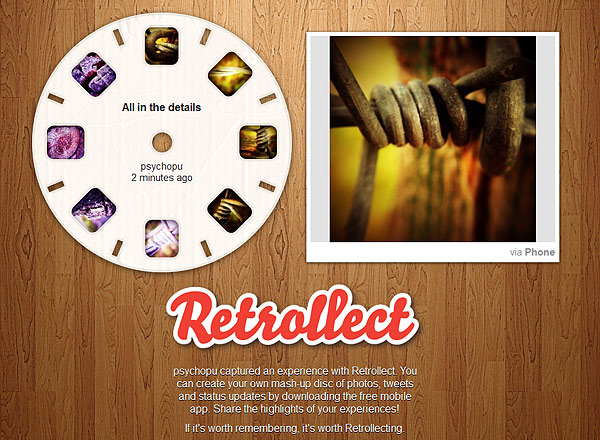
Retrollect was updated in the past hours. Version 2.0 brings several improvements to the stylish Master-View-inspired sharing app by Border Stylo for iPhone and Android.
Here is what’s new in detail:
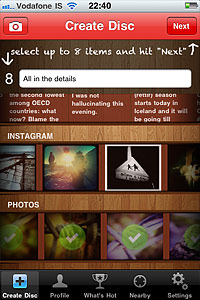
Simplified disc creation: title your disc and select all items at your disposal from either your Camera Roll or your social media accounts from a single menu. This not only makes the creation process much simpler, but it also permits a more accurate and immediate visualization of the various sources for all your items. The simplified workflow is the biggest improvement in version 2.0 of Retrollect.
Easier sharing: share your created discs directly via email or to Facebook and Twitter.
What’s Hot: browse the “What’s Hot” feed to discover popular discs created by other users.
Overall better performance: enjoy general enhancements to Retrollect performance for a more satisfying sharing experience.
Retrollect for iPhone and Android is free in the respective stores, so check it out.



 Images thus edited can be processed further by adding to them several photographic filters. All effects available are arranged into four categories: Classic, Lomo, Neon and Monochrome. The grouping of effects to fit them in the various categories seems however a little arbitrary and I still cannot fathom why some of those effects appear twice and why in the Monochrome section there are color filters as well. Countless filter combinations can be applied to photos. As a final touch, before saving, sending with email or sharing on Facebook and Flickr, it’s possible to apply a borders. Borders are mostly black and white items in a variety of styles.
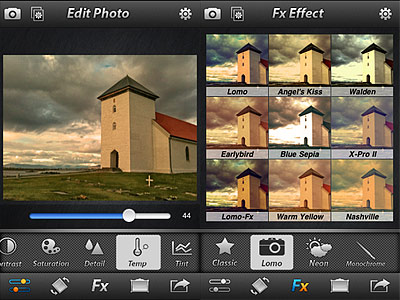 Photo Effect Studio is an OK app with a few nice effects, but it definitely looks too much like something we have already seen many times. And with many I really mean many. Some of the filters bear an uncanny resemblance — same names too — to those of other best-selling apps, like Instagram and Camera+.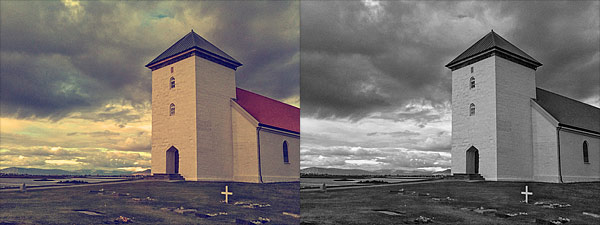

 By tapping and dragging, you place the flare in the right position; by pinching with two fingers, you shrink or enlarge the flare; with two fingers, it is also possible to rotate the flare to the right angle. You can save your image right away to your device or, if you prefer, using the “Render image” option, you can add to it as many flares as you like. In order to use flares generated in LensFlare in external photo editors, you can choose the “Save flare only” option and thus export the flare on a plain black background. The lens dust feature to achieve a more realistic and natural look can be enabled and disabled from the same flares panel.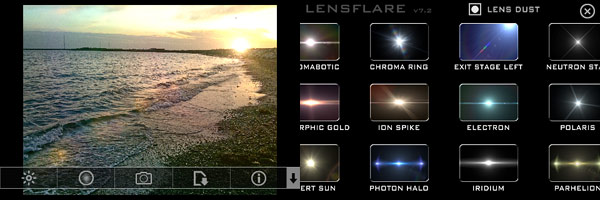

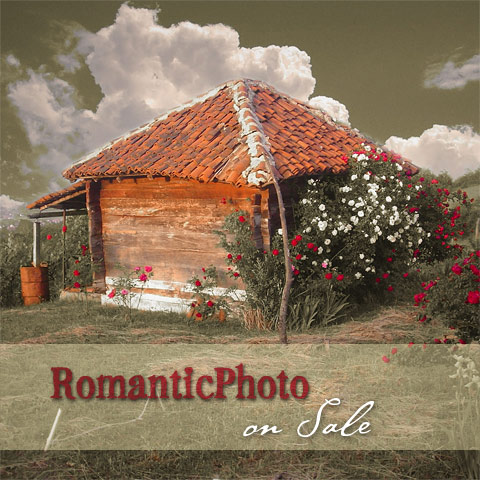 RomanticPhoto counts 60+ ready-to-use preset styles to enrich photos with timeless and unreal atmospheres. Presets come in several themed categories and cover a variety of effects, from dreamy blur to selective saturation. Colors and overlays are adjustable for even more effects.
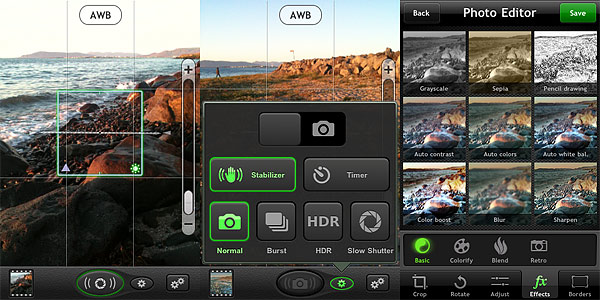 The Photo Editor offers crop, rotate, adjust brightness, contrast, saturation and improve definition tools. It also includes effects and borders. Effects — 36 in all — range from sepia to lomo-like filters. Borders come in two different styles, basic and vignette. Most adjustments and effects can be applied simply using sliders to regulate their intensity. Reverting to the original image is always possible.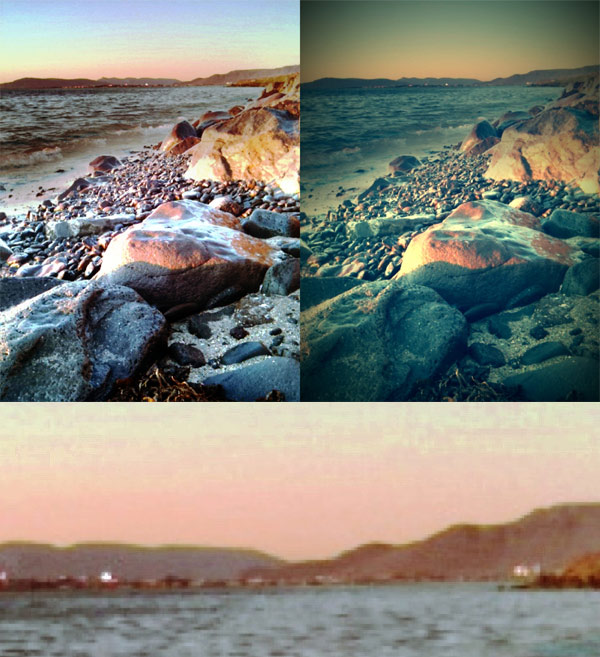

 Bleach Bypass by fotosyn recreates skip bleach processing on the iPhone. The recently revamped Bleach Bypass features 8 different effects plus borders and vignetting for easy and dramatic enhancement of images. Bleach Bypass 1.2.5 was released in the App Store earlier this week and this latest version comes with PhotoAppLink integration, to seamlessly edit photos between photo apps. If you have not tried the app yet, this could be the perfect occasion to get acquainted with it.
 The simplified workflow is the biggest improvement in version 2.0 of Retrollect.